USA
USA UAE
UAESmall Business
Designed for startups and growing businesses

See More





Brand: Zoho Corporation
Have you used Zoho TeamInbox before?
Share your insights for better experience
View plans
 Save upto 18%, Get GST Invoice on your business purchase T&C Buy Now & Pay Later, Check offer on payment page.
 Brand: Zoho Corporation
Founded Year: 1996
Zoho Corporation is an Indian multinational company that specialises in software development, cloud computing, and web-based business tools. It is best known for Zoho Office suite and its enterprise IT management division, ManageEngine
 Shared Inbox Thread Assignment Internal Comments Email Delegation Rules & Automations Conversation Tagging Snooze & Follow-Up Activity Tracking Shared Drafts Analytics & Reporting Multiple Channel Support Thread Collision Detection Access Controls Custom Views Integrations with Zoho Apps

Watch the demo video to explore key features, real workflows, and how the software fits your business needs.
 Windows
  iOS
iOS  Android MacOS
  Desktop
  Mobile
  Tablet
  iPad
iPad  Cloud-Based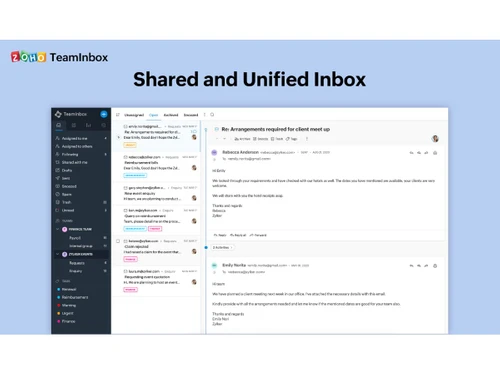
Small Business
Designed for startups and growing businesses
Medium Business
Built for business growth and flexibility
Enterprises
Designed for complex and large-scale business needs
4.3
Out of 5

Overall Rating
Based on
5 Verified Ratings
Rating Breakdown
80% Recommend this Product
Add ReviewTechjockey Trusted Reviews from Verified Users
No reviews are currently available for Zoho TeamInbox. Discover similar Email Software reviews

Zoho Mail
Whats great - From an insider's perspective, I can confidently say that this ERP system truly streamlines business processes. The user-frie... read more

MailsDaddy OST to PST Converter
Whats great - Easily and safely converts OST to PST files. read more

Mithi SkyConnect
Whats great - I was not certain of our actual needs due to limited experience with shipping. I was provided recommendations for some produc... read more

Zoho TeamInbox
₹ 360.00 excl. GST
Desktop
Mobile
Web based
On Premises
Windows
Mac OS
Zoho Mail
₹ 708
Desktop
Mobile
Web based
On Premises
Windows
Mac OS

Zoho Zeptomail
Price On Request
Desktop
Mobile
Web based
On Premises
Windows
Mac OS

GMass
₹ 1200
Desktop
Mobile
Web based
On Premises
Windows
Mac OS

Mailinator
Price On Request
Desktop
Mobile
Web based
On Premises
Windows
Mac OS

Beefree
Price On Request
Desktop
Mobile
Web based
On Premises
Windows
Mac OS

MailDex
Price On Request
Desktop
Mobile
Web based
On Premises
Windows
Mac OS

Woodpecker
Price On Request
Desktop
Mobile
Web based
On Premises
Windows
Mac OS

Mailtrack
Price On Request
Desktop
Mobile
Web based
On Premises
Windows
Mac OS

ImprovMX
Price On Request
Desktop
Mobile
Web based
On Premises
Windows
Mac OS

Sidemail
Price On Request
Desktop
Mobile
Web based
On Premises
Windows
Mac OS
(0) Product(s) selected
Starting Price:
$30
Starting Price:
$139 /License
Starting Price:
$35 /Month
Starting Price:
$10 /Month

Starting Price:
€4 /Month

Starting Price:
$15 /Month

Starting Price:
$30 /Month

Available
Price on Request
Starting Price:
$30 /Month

Starting Price:
₹200 /Month

Starting Price:
$12 /User/Month
Zoho TeamInbox is an email application that enables teams to have a shared mail and dialogue on the same platform with one inbox.
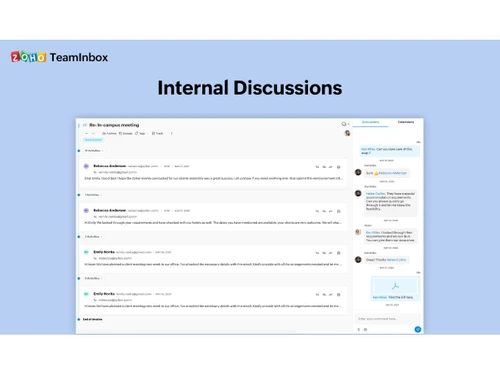
You are able to add your email accounts, build a joint inbox, delegate messages, and organize discussions with your team members to be effective.
Zoho TeamInbox is also part of Zoho One, which means that its users can use it as part of the full business software suite.
Zoho TeamInbox is free to use, but has a time limit after which the user can select a paid plan.
Zoho TeamInbox pricing is available at INR 360 per month at Techjockey.
The support, sales, and marketing teams utilize Zoho TeamInbox as they receive emails from customers and require improved teamwork and communication.
Yes, the same inbox is available to several team members, and hence it becomes easy to handle emails collectively and respond more quickly as a team.
Yes, Zoho TeamInbox is very easy to use, and can help any team speed up in mastering its usage, handling mail, and working together without requiring technical expertise.
20,000+ Software Listed
Best Price Guranteed
Free Expert Consultation
2M+ Happy Customers
Terms and Condtions

Users with registered businesses can purchase goods from merchants on the platform to satisfy their business needs. Users are not permitted to utilize any products acquired through the platform for resale, advertising, business, or further distribution.
For each purchase made, users will receive a Tax Invoice (or 'GST invoice') that includes specific details such as:
the GSTIN of the user associated with their registered business, and
the specified Entity Name for their business.
It should be noted that not all products are eligible for GST Invoice. Only the products displayed by participating sellers with the 'GST-based Invoice Available' callout on the product description page would qualify.
Certain goods and services are not eligible to get a GST Invoice, including items with VAS, i.e., Value Added Services (e.g., Total Mobile Protection/Assured Buyback) and those involving an exchange offer at the time of purchase.
Users must ensure the accuracy of the GSTIN, and business entity name provided for the GST Invoice. Requests for corrections into GST Invoice would not be accommodated by Techjockey.com or any Seller, and any issues arising from user-provided information are the sole responsibility of users.
Techjockey.com is not liable for the GST Invoice or any associated input tax credit. To efficiently claim an input tax credit, users should select the registered place of business address as per the GST authority's data and follow the provisions of the GST Act and rules.
To claim an input tax credit, the delivery and billing addresses must match. Furthermore, input tax credits will not be granted if the delivery address and GSTIN on the invoice are from different states. In case of incorrect GST details provided during the order placement, the order will be canceled automatically.