linkedin
SysTools SQL Backup Recovery logo
play SysTools SQL Backup Recovery Tool
systools sql backup corrupt sql

SysTools SQL Backup Recovery

Brand: Systools

  • 4.3

  • 3 Ratings

  • Helps recover and repair corrupted SQL Server backup (.bak) files.
  • Supports multiple SQL Server versions, including the latest editions.
  • Recovers tables, views, procedures, and deleted records.
  • Offers export options to SQL Server, scripts, and CSV formats.
See More

Have you used SysTools SQL Backup Recovery before?

Share your insights for better experience

Add a Review
Starting Price
₹13,552 excl.GST
₹ 15,991 incl. GST

View plans

offer Save upto 18%, Get GST Invoice on your business purchase T&C
offer Buy Now & Pay Later, Check offer on payment page.
Buy Now
100% Genuine
Products
Best Price
Guaranteed
Safe & Secure
Payment
  • Description

  • Pricing

  • Features

  • Specification

  • Review

  • Compare

  • Alternatives

  • FAQ

Starting at ₹13,552
Buy Now

SysTools SQL Backup RecoverySoftware Overview

What is SysTools SQL Backup Recovery?

SysTools SQL Backup Recovery is an expert database management software that offers correction of corrupted SQL Server backup (.bak) files and recovers entire database content.

It enables people to restore tables, views, stored procedures, triggers, indexes, and other database objects of damaged backups without loss of data. The tool is compatible with several versions of SQL Server and allows direct export into a live SQL Server database or other data formats such as SQL scripts and CSV.

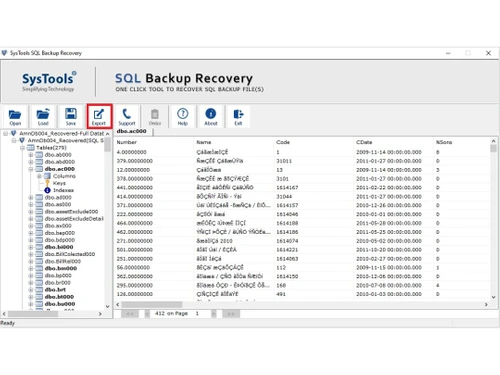
Its high-quality scanning and preview capabilities provide the user with an opportunity to examine the data recovered and then export it with high accuracy and reliability in the recovery process.

What are the Benefits of Choosing SysTools SQL Backup Recovery?

  • Complete Backup Recovery: Restores whole SQL database objects, such as tables, views, triggers, functions, and indexes, without loss of vital data.
  • Support for Multiple SQL Versions: Supports SQL Server 2000-2025, and therefore, is a flexible product in a variety of database platforms.
  • Recover Deleted Data:this allows us to recover deleted objects, tables, and records, and even the database objects directly out of the backup files, which helps a great deal in restoring the information that has been lost.
  • Advanced Preview Feature: Before the export of data, it shows the recovered data, and the deleted data is highlighted so that the data can be easily identified and confirmed.
  • Compressed & Differential Backup Support: Recovers compressed and differential .bak files, making it more compatible with various types of backups.
  • No File Size Limitation: Lots of support for big backups (up to TB), and it implies that it may be applied to enterprise databases.
  • Multiple Export Options:Enables the export of recovered data to run SQL Server, SQL scripts, or CSV, according to the requirements of the user.
  • Auto-Detect SQL Version: Automatically identifies the version of the backup file, which is easy to recover, thus saving on manual labor.

SysTools SQL Backup Recovery Pricing

SysTools SQL Backup Recovery offers a free demo version with limited export functionality. The full version is available starting at INR 13,552 at Techjockey. You can contact the team for exact pricing and licensing details.

Read more

Systools Company Details

Founded Year:  2007

SysTools

Director/Founders Anuraag Singh 
Company Size 1-100

SysTools SQL Backup Recovery Pricing & Plans

Full Version License- Personal
Key Features
  • Add SQL BAK File
  • Select SQL Version (2000, 2005, 2008 2012 & 2014)
  • Preview All Recovered Objects from BAK File
  • Windows 11, 10 & All Other Previous Windows Versio
  • Export with Schema or Schema & Data
  • Export to SQL Server Database
  • Export as SQL Server Compatible SQL Scripts

Calculated Price

13552 Exclusive of all taxes
    • Licenses

      Licenses
      Licenses

Key Features

  • Add SQL BAK File

  • Select SQL Version (2000, 2005, 2008 2012 & 2014)

  • Preview All Recovered Objects from BAK File

  • Windows 11, 10 & All Other Previous Windows Versio

  • Export with Schema or Schema & Data

  • Export to SQL Server Database

  • Export as SQL Server Compatible SQL Scripts

SysTools SQL Backup Recovery Features

  • icon_check Data Recovery
    Recovers corrupted or inaccessible SQL Server backup data and restores tables, records, and database items safely.
  • icon_check Restore Multiple BAK Files
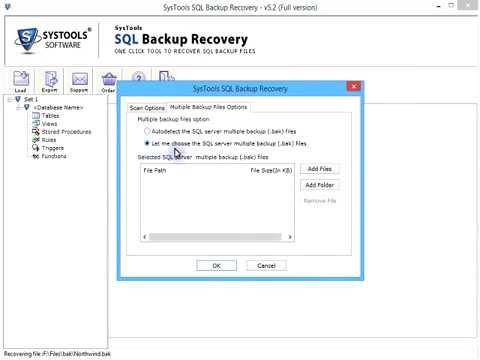
    Allows users to restore multiple SQL Server BAK files at once, saving time while recovering several databases in a single process.
  • icon_check Database Objects
    Recovers and restores SQL database objects including tables, views, triggers, indexes, stored procedures, and functions.
  • icon_check recover MDF & LDF file Data
    Extracts and restores data from MDF and LDF files, enabling recovery of SQL Server databases even when backup files are
  • icon_check Export with Schema & Data
    Exports recovered SQL database with complete schema structure and table data to maintain database integrity and relationships.
  • icon_check Restore SQL Backup (BAK) Database
    Restores SQL Server databases directly from BAK backup files without needing a live SQL Server environment.
  • icon_check SQL Server Database
    Supports recovery and restoration of SQL Server databases while preserving database structure and internal relationships.
  • icon_check Foreign and Primary Key Support
    Maintains foreign and primary key relationships during database restoration to ensure accurate table connections and integrity.
SysTools SQL Backup Recovery Demo Video play icon

Get SysTools SQL Backup Recovery Demo

Watch the demo video to explore key features, real workflows, and how the software fits your business needs.

Understand
Key Features
Personal
Demo Insights
Interactive
Demo Support

SysTools SQL Backup Recovery Specification

Supported Platforms
Windows Windows
Devices
Desktop Desktop
Deployment
Web-Based Web-Based
Suitable For
All Industries
Business Specific
All Businesses
Business Size
Small Business Startups Medium Business Enterprises
Customer Support
Phone Live Chat Communities
Language
English
Training Resources
Documentation Videos

Explore the Best Alternative Solutions Similar to Your Business Size and Needs

SysTools SQL Backup Recovery Review

4.3

Out of 5

img

Overall Rating

Based on
3 Verified Ratings

Rating Breakdown

  • Features 4.5
  • Value for Money 4.5
  • Ease of Use 4
  • Customer Support 4.5

100% Recommend this Product

Add Review

Techjockey Trusted Reviews from Verified Users

No reviews are currently available for SysTools SQL Backup Recovery. Discover similar Database Management Software reviews

  • EDB Postgres

    4.8

    Whats great - Excellent experience, staff prepared and available a problem solved during the installation and activation of the software. I... read more

  • Simego Data Synchronisation Studio

    4.5

    Whats great - Easily exports to flat files, connects library with drag and drop system, provides user active directory. read more

  • MySQL enterprise Edition

    4.5

    Whats great - easy to use read more

Compare SysTools SQL Backup Recovery With other Database Management Software

Products
Ratings
Pricing
Device Supported
Deployment
Supported Platforms
  • img

    SysTools SQL Backup Recovery

  • 4.3

  • ₹ 13552.00 excl. GST

  • Desktop

    Mobile

  • Web based

    On Premises

  • Windows

    Mac OS

  • img

    ClickHouse

  • 4.2

  • Price On Request

  • Desktop

    Mobile

  • Web based

    On Premises

  • Windows

    Mac OS

  • img

    Supabase

  • 4.5

  • Price On Request

  • Desktop

    Mobile

  • Web based

    On Premises

  • Windows

    Mac OS

  • img

    EDB Postgres

  • 4.8

  • Price On Request

  • Desktop

    Mobile

  • Web based

    On Premises

  • Windows

    Mac OS

  • img

    Lio

  • 4.8

  • Price On Request

  • Desktop

    Mobile

  • Web based

    On Premises

  • Windows

    Mac OS

  • img

    MongoDB Compass

  • 4.0

  • Price On Request

  • Desktop

    Mobile

  • Web based

    On Premises

  • Windows

    Mac OS

  • img

    Beekeeper Studio

  • 4.4

  • Price On Request

  • Desktop

    Mobile

  • Web based

    On Premises

  • Windows

    Mac OS

  • img

    Akkio

  • 4.5

  • Price On Request

  • Desktop

    Mobile

  • Web based

    On Premises

  • Windows

    Mac OS

  • img

    ArangoDB

  • 4.4

  • Price On Request

  • Desktop

    Mobile

  • Web based

    On Premises

  • Windows

    Mac OS

  • img

    CUBRID

  • 4.1

  • Price On Request

  • Desktop

    Mobile

  • Web based

    On Premises

  • Windows

    Mac OS

(2) Product(s) selected

SysTools SQL Backup Recovery Alternatives

See All SysTools SQL Backup Recovery Alternatives

Starting Price:

$28 /Month

Starting Price:

$25 /Monthly

Starting Price:

$49 /user/month

Available

Price on Request

Available

Price on Request

Available

Price on Request

Available

Price on Request

Available

Price on Request

Articles for SysTools SQL Backup Recovery

See All Related Articles

How much does SysTools SQL Backup Recovery cost?

The full version costs around INR 13,552, while a free trial offers limited export capabilities.

What is SysTools SQL Backup Recovery used for?

It is used to repair corrupted SQL Server backup files and to recover database objects such as tables, views, and stored procedures.

How does SysTools SQL Backup Recovery work?

It scans damaged .bak files, recovers database components, allows preview of data, and enables export to SQL Server or other formats.

Who should use SysTools SQL Backup Recovery?

It is ideal for database administrators, IT professionals, and organizations managing SQL Server databases.

Can it recover deleted SQL database records?

Yes, it can recover deleted tables, records, and other database objects from backup files.

Does it support large backup files?

Yes, there is no file size limitation, and it can handle very large database backups.

Can I export recovered data to a live SQL Server?

Yes, the tool allows direct export to a live SQL Server database or as SQL scripts and CSV files.

Does it support compressed backup files?

Yes, it supports recovery of compressed and differential SQL backup files.

20,000+ Software Listed

Best Price Guranteed

Free Expert Consultation

2M+ Happy Customers

Terms and Condtions

close

Users with registered businesses can purchase goods from merchants on the platform to satisfy their business needs. Users are not permitted to utilize any products acquired through the platform for resale, advertising, business, or further distribution.

For each purchase made, users will receive a Tax Invoice (or 'GST invoice') that includes specific details such as:

  • the GSTIN of the user associated with their registered business, and

  • the specified Entity Name for their business.

It should be noted that not all products are eligible for GST Invoice. Only the products displayed by participating sellers with the 'GST-based Invoice Available' callout on the product description page would qualify.

Certain goods and services are not eligible to get a GST Invoice, including items with VAS, i.e., Value Added Services (e.g., Total Mobile Protection/Assured Buyback) and those involving an exchange offer at the time of purchase.

Users must ensure the accuracy of the GSTIN, and business entity name provided for the GST Invoice. Requests for corrections into GST Invoice would not be accommodated by Techjockey.com or any Seller, and any issues arising from user-provided information are the sole responsibility of users.

Techjockey.com is not liable for the GST Invoice or any associated input tax credit. To efficiently claim an input tax credit, users should select the registered place of business address as per the GST authority's data and follow the provisions of the GST Act and rules.

To claim an input tax credit, the delivery and billing addresses must match. Furthermore, input tax credits will not be granted if the delivery address and GSTIN on the invoice are from different states. In case of incorrect GST details provided during the order placement, the order will be canceled automatically.