USA
USA UAE
UAESmall Business
Designed for startups and growing businesses


See More


Brand: Systools
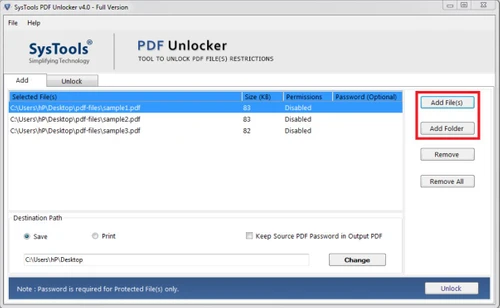
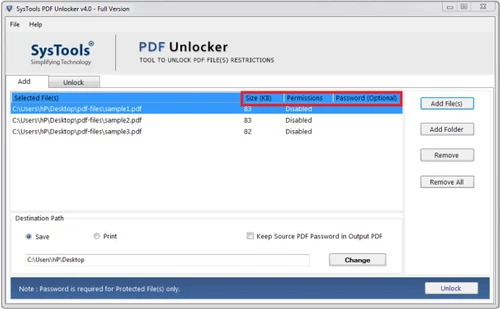
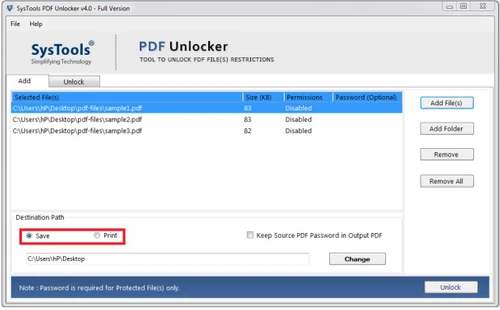
SysTools PDF Unlocker is a powerful tool that allows users to unlock, edit, and manage secured PDF files. It removes password restrictions and enables seamless file editing, copying, and printing. The software ensures data security while providing features like file preview, report generation, and s...
See MoreHave you used Systools Pdf Unlocker before?
Share your insights for better experience
Brand: Systools
Founded Year: 2007
SysTools
Looking for The Right Pricing?
Share your requirements and get a plan built around your business.
Price Available on Request
Get personalised Systools Pdf Unlocker pricing that fits your needs. Our team will connect with you.
 Data Security Report Generation PDF Editor Unlock Protected File Preview Experience File Transfer

Watch the demo video to explore key features, real workflows, and how the software fits your business needs.
 Windows
  MacOS
MacOS  Desktop
  Mobile
  Cloud-Based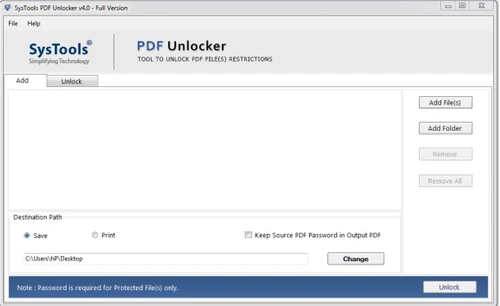
Small Business
Designed for startups and growing businesses
Medium Business
Built for business growth and flexibility
Enterprises
Designed for complex and large-scale business needs
4.3
Out of 5

Overall Rating
Based on
4 Verified Reviews
Rating Breakdown
94% Recommend this Product
Add ReviewCustomers generally express high satisfaction with Systools PDF Unlocker, praising its effectiveness in removing password protection from PDF files without data loss. Users appreciate its user-friendly interface and efficient performance, often highlighting its ability to handle batch processing and maintain folder hierarchy. However, some feedback indicates a desire for a more modern interface design. Overall, the tool is recommended for those needing a reliable solution for unlocking PDFs, with minimal complaints noted.

Dec 12, 2022
Techjockey Verified
“Best PDF Unlocked Tool to Remove My PDF Protections”
Pros
best part is, I have some PDF files full of important documents, which are password protected but after a long time I wanted to see those documents but I forgot the PDF password. So in this situation, I used many tools but to no avail, so after a lot of research, I found the Systools PDF Unlocker tool and used it. By using this tool my pdf got unlocked too without loss of data. The best thing about this tool is that without wasting time bs I solved my problem by following some steps, so I those users who want to unlock PDF, I recommend them to use this tool.
Cons
Didn't found much but I would like that SysTools team will more work on the Interface of the tool. It looks a little bit old for me during the process. I would love to see some dynamic effects in my processing option. Overall it is a perfect utility with a professional and simple GUI.
Reason to switch
Faster, accurate, effective, simple to use, and stand-alone software without requiring any additional downloading of other tools.
Dec 9, 2022
Techjockey Verified
“To unlock PDF password”
Pros
After suffering a lot I got the fastest tool to unlock my all PDF data which is completely error-free. Remove the PDF password restrictions for (Windows & Mac) & unlock protected Adode PDF in batch. Some main & interactive features are: It supports the Unlocking of PDF files from Owner Level Password security. It maintains Folder Hierarchy. Moreover, it removes PDF restrictions: Page Extraction, Editing, Copying, and Printing.
Cons
Try this SysTools PDF Unlocker Software to get the results for your issues. Grab this utility for an easy & simple solution to fulfill all your requirements.
Reason to switch
I have been using this tool for past 1 year. I am just use to it of this tool, even I used this tool for only unlocking few of my PDF files. The accuracy and performance of this tool is commandable for me. I really thank the SysTools developing team for developing such a useful tool for us.
Dec 9, 2022
Techjockey Verified
“User Friendly PDF Unlocker”
Pros
SysTools PDF Unlocker Tool is probably the best software to unlock password-protected PDF Files. After using multiple tools I found this software completely safe and secure. Definitely, I’ll recommend this PDF Unlocker to everyone.
Cons
As such I didn't find any cons in this PDF Unlocker Tool.
Reason to switch
It helped me in unlocking multiple Pdf files at once.

Systools Pdf Unlocker
Price On Request
Desktop
Mobile
Web based
On Premises
Windows
Mac OS

Foxit PDF Editor
₹ 12000
Desktop
Mobile
Web based
On Premises
Windows
Mac OS

Gravity PDF
Price On Request
Desktop
Mobile
Web based
On Premises
Windows
Mac OS

Zoho PDF Editor
Price On Request
Desktop
Mobile
Web based
On Premises
Windows
Mac OS

PDF Expert
₹ 7200
Desktop
Mobile
Web based
On Premises
Windows
Mac OS

Adobe Acrobat Pro DC for teams
₹ 23864
Desktop
Mobile
Web based
On Premises
Windows
Mac OS
JOPDF
Price On Request
Desktop
Mobile
Web based
On Premises
Windows
Mac OS

Hybiscus
Price On Request
Desktop
Mobile
Web based
On Premises
Windows
Mac OS

Soda PDF
₹ 1111
Desktop
Mobile
Web based
On Premises
Windows
Mac OS

BentoPDF
Price On Request
Desktop
Mobile
Web based
On Premises
Windows
Mac OS

Systweak PDF Editor
₹ 2499
Desktop
Mobile
Web based
On Premises
Windows
Mac OS
(0) Product(s) selected
Yes, it can remove owner-level restrictions, allowing editing, copying, and printing, but it cannot remove user-level passwords without authorization.
Yes, the software supports various PDF versions, including older and the latest formats.
Absolutely! The software ensures secure unlocking without altering or corrupting the original file.
Yes, the batch processing feature allows you to unlock multiple PDFs simultaneously.
No, SysTools PDF Unlocker works independently and does not require Adobe Acrobat.
Yes, the software ensures that the document’s layout, content, and formatting remain intact.
The software primarily supports Windows, but it is recommended to check compatibility for Mac systems.
No, you can unlock as many PDF files as needed, depending on the license purchased.
No, the software only removes restrictions but does not add new security features.
The pricing is available on request and varies based on features, deployment type, and number of users. Contact Techjockey for detailed pricing.
20,000+ Software Listed
Best Price Guranteed
Free Expert Consultation
2M+ Happy Customers
Terms and Condtions

Users with registered businesses can purchase goods from merchants on the platform to satisfy their business needs. Users are not permitted to utilize any products acquired through the platform for resale, advertising, business, or further distribution.
For each purchase made, users will receive a Tax Invoice (or 'GST invoice') that includes specific details such as:
the GSTIN of the user associated with their registered business, and
the specified Entity Name for their business.
It should be noted that not all products are eligible for GST Invoice. Only the products displayed by participating sellers with the 'GST-based Invoice Available' callout on the product description page would qualify.
Certain goods and services are not eligible to get a GST Invoice, including items with VAS, i.e., Value Added Services (e.g., Total Mobile Protection/Assured Buyback) and those involving an exchange offer at the time of purchase.
Users must ensure the accuracy of the GSTIN, and business entity name provided for the GST Invoice. Requests for corrections into GST Invoice would not be accommodated by Techjockey.com or any Seller, and any issues arising from user-provided information are the sole responsibility of users.
Techjockey.com is not liable for the GST Invoice or any associated input tax credit. To efficiently claim an input tax credit, users should select the registered place of business address as per the GST authority's data and follow the provisions of the GST Act and rules.
To claim an input tax credit, the delivery and billing addresses must match. Furthermore, input tax credits will not be granted if the delivery address and GSTIN on the invoice are from different states. In case of incorrect GST details provided during the order placement, the order will be canceled automatically.