linkedin
Taskade logo
play Taskade Full Walkthrough & Tutorial Guide for 2022
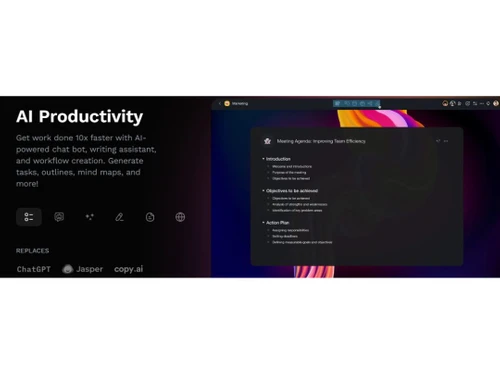
Taskade AI productivity
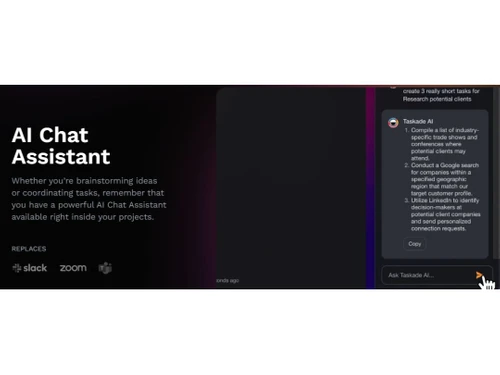
Taskade AI Chat Assistant

Taskade

Brand: Taskade

  • 4.4

  • 6 Ratings & 3 Reviews

Taskade is a robust software solution that is designed to be your AI-powered productivity companion.

See More

Have you used Taskade before?

Share your insights for better experience

Add a Review
Starting Price
$8

View plans

100% Genuine
Products
Best Price
Guaranteed
Safe & Secure
Payment
  • Description

  • Pricing

  • Features

  • Specification

  • Review

  • Compare

  • Alternatives

  • FAQ

Starting at $8

Taskade Software Overview

What is Taskade?

Five intelligent tools are seamlessly integrated into one unified workspace. This makes Taskade your second brain, helping you keep your work and ideas in sync.

Experience a 10x productivity boost with AI-powered chatbots, AI writing assistants, and workflow creation. Generate tasks, outlines, mind maps, and more, effortlessly transforming your ideas into actionable plans. Enjoy a smart and structured outlining experience that mirrors the natural organization of your brain. Create unlimited connections and levels of hierarchy, collaborating in real-time with your team to capture and develop ideas.

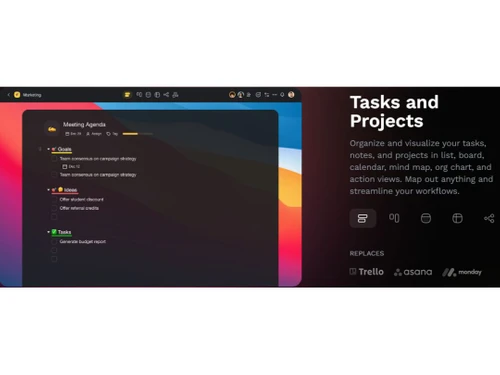
Transform your thoughts into actionable items and track progress across views. Taskade's mind maps are like the art of origami, allowing you to shape and adapt your ideas effortlessly. With Taskade, you can share projects effortlessly, invite stakeholders for real-time chat and video calls, and collaborate with guests, clients, and teams in one place. It's the next generation of team collaboration.

Taskade seamlessly integrates with your favorite tools, allowing you to upload from Google Drive, Dropbox, and more. Plus, you can customize your home screen with Taskade's mobile widgets for on-the-go productivity. Stay connected and productive across all your devices with real-time sync. Access Taskade on iOS, Android, Mac, PC, and more, ensuring you have all your tasks, projects, and workflows at your fingertips.

Why Choose Taskade?

Taskade offers a comprehensive solution to boost productivity and streamline collaboration for individuals and teams. Say goodbye to scattered to-do lists, cluttered inboxes, and disorganized work, and embrace Taskade to unlock AI-powered productivity and become more organized, productive, and connected.

Benefits of Taskade

  • Harness the power of AI to supercharge your team's productivity and get work done faster.
  • Keep all your work in sync and organized in one centralized workspace, eliminating the need for scattered tools and platforms.
  • Collaborate seamlessly with your team members in real time, making communication and coordination efficient and effective.
  • Easily manage and access your documents within the platform, ensuring important information is readily available.
  • Stay on top of regulatory requirements and track compliance progress effortlessly, ensuring adherence to necessary standards.
  • Prioritize tasks, set due dates, and create structured workflows to optimize productivity and meet deadlines.

Pricing of Taskade

Taskade is priced at INR 325.00 on TechJockey.

The overall pricing model is based on different factors such as personalization, extra features required, total users, and deployment type. Please feel free to request a call from our product experts if you want to learn more about our subscription plans or premium package deals.

Read more

Taskade Company Details

Founded Year:  2017

Taskade is a real-time organization and collaboration tool for distributed teams.

Director/Founders Dionis Loire, John Xie, Stan Chang
Company Size 1-100 Employees

Taskade Pricing & Plans

Taskade for Teams
Starting at $16
    • Users

      Users
      Users
    • Monthly

      Monthly
      Monthly

Key Features

  • Everything in Pro

  • Unlimited Workspaces

  • Unlimited AI Automation

  • Advanced Team Permissions

Taskade Pro
Starting at $8
    • Users

      Users
      Users
    • Monthly

      Monthly
      Monthly

Key Features

  • Taskade AI Agents

  • Unlimited AI Usage

  • Up to 10 Workspaces

  • Unlimited File Uploads

Taskade Features

  • icon_check Task Management
    Streamline and organize your tasks effectively to stay on top of your work.
  • icon_check Productivity Tools
    Unlock your full productivity potential with various powerful tools at your fingertips.
  • icon_check Collaboration Tools
    Foster seamless teamwork and collaboration with features designed to enhance communication and cooperation.
  • icon_check Document Management
    Efficiently manage and organize your documents for easy access and retrieval.
  • icon_check Compliance Tracking
    Ensure adherence to regulatory requirements and track compliance progress effortlessly.
  • icon_check Prioritization
    Prioritize your tasks and focus on what matters most to achieve your goals efficiently.
  • icon_check Activity Dashboard
    Gain valuable insights into your work progress and activities immediately.
  • icon_check Drag & Drop
    Easily rearrange and organize tasks and content with simple drag-and-drop functionality.
  • icon_check Content Import/ Export
    Seamlessly import and export your content to and from different formats and platforms.
  • icon_check Notes Management
    Capture and organize your notes effectively to keep track of important information.
Taskade Demo Video play icon

Get Taskade Demo

Watch the demo video to explore key features, real workflows, and how the software fits your business needs.

Understand
Key Features
Personal
Demo Insights
Interactive
Demo Support

Taskade Specifications

Supported Platforms
Windows Windows iOS iOS Android Android MacOS MacOS Linux Linux
Devices
Desktop Desktop Mobile Mobile Tablet Tablet iPad iPad
Deployment
Cloud-Based Cloud-Based
Suitable For
All Industries
Business Specific
All Businesses
Business Size
Small Business Startups Medium Business Enterprises
Customer Support
Email Communities Forums
Language
English
Training Resources
Webinars Documentation Videos
AI Features
AI Integrated

Explore the Best Alternative Solutions Similar to Your Business Size and Needs

Taskade Reviews

4.4

Out of 5

img

Overall Rating

Based on
3 Verified Reviews

Rating Breakdown

  • Features 4.1
  • Value for Money 4.2
  • Ease of Use 4.5
  • Customer Support 4.6

95% Recommend this Product

Add Review

Taskade Video Reviews

youtubeVideoId

4.5

“Taskade Review : AI Project Management Software”

Review by: Tool Finder

youtubeVideoId

4.4

“Taskade Light Project Management Review”

Review by: More Productive

youtubeVideoId

4.3

“3 Reasons You Should Use Taskade Taskade Review 2023”

Review by: Demetri Panici

Compare Taskade With other Productivity Software

Products
Ratings
Pricing
Device Supported
Deployment
Supported Platforms
  • img

    Taskade

  • 4.4

  • Price On Request

  • Desktop

    Mobile

  • Web based

    On Premises

  • Windows

    Mac OS

  • img

    Google Workspace

  • 4.3

  • ₹ 325

  • Desktop

    Mobile

  • Web based

    On Premises

  • Windows

    Mac OS

  • img

    Cold Turkey

  • 4.3

  • Price On Request

  • Desktop

    Mobile

  • Web based

    On Premises

  • Windows

    Mac OS

  • img

    Office 365 E3

  • 5

  • ₹ 1740

  • Desktop

    Mobile

  • Web based

    On Premises

  • Windows

    Mac OS

  • img

    InboxPro

  • 4.5

  • Price On Request

  • Desktop

    Mobile

  • Web based

    On Premises

  • Windows

    Mac OS

  • img

    Snippets AI

  • 4.4

  • Price On Request

  • Desktop

    Mobile

  • Web based

    On Premises

  • Windows

    Mac OS

  • img

    Office 365 E5

  • 4

  • ₹ 3240

  • Desktop

    Mobile

  • Web based

    On Premises

  • Windows

    Mac OS

  • img

    Raycast

  • 4.1

  • Price On Request

  • Desktop

    Mobile

  • Web based

    On Premises

  • Windows

    Mac OS

  • img

    Microsoft 365 F3

  • 4.4

  • ₹ 996

  • Desktop

    Mobile

  • Web based

    On Premises

  • Windows

    Mac OS

  • img

    Microsoft 365 F1

  • 4.2

  • ₹ 300

  • Desktop

    Mobile

  • Web based

    On Premises

  • Windows

    Mac OS

  • img

    SmartPanels

  • 4.4

  • Price On Request

  • Desktop

    Mobile

  • Web based

    On Premises

  • Windows

    Mac OS

(0) Product(s) selected

Taskade Alternatives

See All Taskade Alternatives

Starting Price:

₹2,499 /One-Time

Starting Price:

$24

Starting Price:

$6 /User/Month

Starting Price:

$10 /Month

Starting Price:

$4 /Monthly

Starting Price:

$7 /Month

Starting Price:

$60

Rize

4.1

Starting Price:

$17 /Month

Articles for Taskade

See All Related Articles

Which operating system does Taskade support?

Taskade is compatible with Windows and MacOS operating systems.

Is there any Taskade app?

Taskade is available for Android and iOS devices.

What is the deployment type of Taskade?

Taskade supports web-based deployment.

How much does Taskade cost?

Taskade is priced at INR 325.00 on TechJockey.

Who are the potential users of Taskade?

Taskade is typically used by employees of all organizations to organize their ideas and day-to-day work.

Is there any free trial or demo for Taskade?

Taskade demo is available for free with techjockey.com.

Is Taskade free?

Taskade offers a free trial. Please request a call back for subscription-related details and to avail of offers on premium packages.

How can you download Taskade?

Installation is not required, as it is web-based. Just open the Setup Wizard to get started.

How does Taskade work?

Taskade helps efficiently manage and organize your documents for easy access and retrieval. It streamlines and organizes your tasks effectively to stay on top of your work. Capture and organize your notes effectively to keep track of important information.

20,000+ Software Listed

Best Price Guranteed

Free Expert Consultation

2M+ Happy Customers

Terms and Condtions

close

Users with registered businesses can purchase goods from merchants on the platform to satisfy their business needs. Users are not permitted to utilize any products acquired through the platform for resale, advertising, business, or further distribution.

For each purchase made, users will receive a Tax Invoice (or 'GST invoice') that includes specific details such as:

  • the GSTIN of the user associated with their registered business, and

  • the specified Entity Name for their business.

It should be noted that not all products are eligible for GST Invoice. Only the products displayed by participating sellers with the 'GST-based Invoice Available' callout on the product description page would qualify.

Certain goods and services are not eligible to get a GST Invoice, including items with VAS, i.e., Value Added Services (e.g., Total Mobile Protection/Assured Buyback) and those involving an exchange offer at the time of purchase.

Users must ensure the accuracy of the GSTIN, and business entity name provided for the GST Invoice. Requests for corrections into GST Invoice would not be accommodated by Techjockey.com or any Seller, and any issues arising from user-provided information are the sole responsibility of users.

Techjockey.com is not liable for the GST Invoice or any associated input tax credit. To efficiently claim an input tax credit, users should select the registered place of business address as per the GST authority's data and follow the provisions of the GST Act and rules.

To claim an input tax credit, the delivery and billing addresses must match. Furthermore, input tax credits will not be granted if the delivery address and GSTIN on the invoice are from different states. In case of incorrect GST details provided during the order placement, the order will be canceled automatically.