USA
USA UAE
UAESmall Business
Designed for startups and growing businesses


See More


Brand: Task Pro
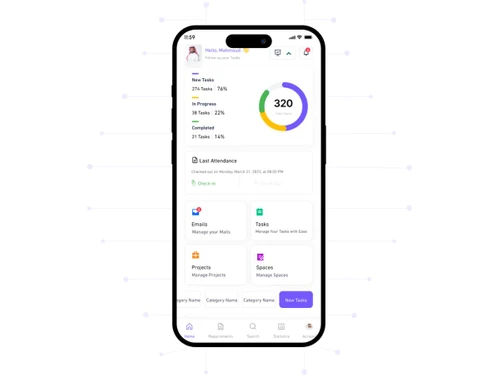
Taskpro is a task management software that replaces the old diary management ways. They have a cloud based task management software, where, every employee of a particular organization has a list of tasks for the day listed as soon as they log-in. Those tasks can be prioritized by their level of ur...
See MoreHave you used Task Pro before?
Share your insights for better experience
Looking for The Right Pricing?
Share your requirements and get a plan built around your business.
Price Available on Request
Get personalised Task Pro pricing that fits your needs. Our team will connect with you.
 Task Management Admin Control Work Management Report Generation Alerts & Notifications
  Windows
  Android
  Desktop
  Cloud-Based
  Perpetual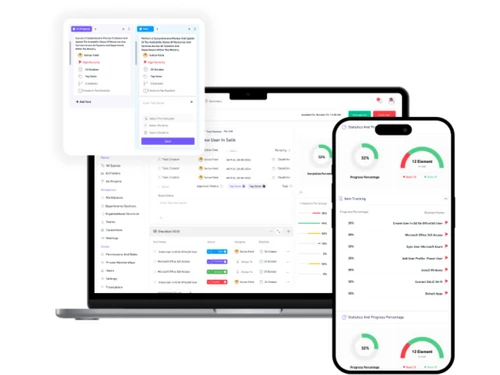
Small Business
Designed for startups and growing businesses
Medium Business
Built for business growth and flexibility
Enterprises
Designed for complex and large-scale business needs
4.2
Out of 5

Overall Rating
Based on
3 Verified Reviews
Rating Breakdown
93% Recommend this Product
Add ReviewCustomers generally appreciate Task Pro for its efficient service and support, highlighting the quick response times and personalized assistance they receive. Users find the platform valuable for streamlining their software selection process, particularly in specialized sectors like higher education. However, feedback is limited, and while many express satisfaction with their experiences, there are no significant drawbacks noted in the reviews. Overall, Task Pro is recommended for those seeking effective software solutions with attentive support.

Mar 8, 2019
Techjockey Verified
“Extraordinary ”
Pros
Extraordinary work environment in the event that you have an open timetable, great pay and progression relies upon you. In case you're searching for good occasional work, I would reccomend it.
Cons
NO CONS
Aug 30, 2018
Techjockey Verified
“One-Stop Shop for Software Solutions”
Pros
Fast, Attentive, and Thorough Help in Sorting Software Options!
Cons
N/A
Aug 23, 2018
Techjockey Verified
“They were great and response was quick.”
Pros
Using Techjockey saved me a lot of time. I worked with Brittany Walther. She called me back after what seemed like only a few minutes. From asking a few key questions, she sent me a list of 5 vendors that were appropriate for the size of my organization and were familiar with higher education. Within a day or two I had calls scheduled with all the vendors. It really cut down on the work I had to do. We are still evaluating products but I would not have progress this fast without the help of Techjockey.
Cons
N/A
Task Pro
Price On Request
Desktop
Mobile
Web based
On Premises
Windows
Mac OS

TickTick
Price On Request
Desktop
Mobile
Web based
On Premises
Windows
Mac OS

Task Tracker
₹ 225
Desktop
Mobile
Web based
On Premises
Windows
Mac OS

TaskOPad
Price On Request
Desktop
Mobile
Web based
On Premises
Windows
Mac OS

Microsoft Planner
₹ 996
Desktop
Mobile
Web based
On Premises
Windows
Mac OS
Zoho ToDo
Price On Request
Desktop
Mobile
Web based
On Premises
Windows
Mac OS

Aarvi Task Management System
Price On Request
Desktop
Mobile
Web based
On Premises
Windows
Mac OS
Taskmaan
₹ 2000
Desktop
Mobile
Web based
On Premises
Windows
Mac OS

Akiflow
Price On Request
Desktop
Mobile
Web based
On Premises
Windows
Mac OS

Sunsama
Price On Request
Desktop
Mobile
Web based
On Premises
Windows
Mac OS

Todoist
₹ 330
Desktop
Mobile
Web based
On Premises
Windows
Mac OS
(0) Product(s) selected
Starting Price:
$4 /Month
Starting Price:
₹996 /Month ₹1,200
Available
Price on Request
Starting Price:
$34 /month
Starting Price:
$20 /month

Starting Price:
$7 /month

Available
Price on Request

Starting Price:
$50 $100

Starting Price:
$4 /Month

Starting Price:
$30 /Month
Taskpro User Activity Monitoring Software is compatible with Windows and Android operating systems.
Taskpro User Activity Monitoring Software supports Web-Based.
Taskpro User Activity Monitoring Software is typically used in All Industries.
Taskpro User Activity Monitoring Software demo is available for free with Techjockey.com
Taskpro User Activity Monitoring Software offers a free trial. However, the premium plan with advanced features available at Techjockey .
For Taskpro User Activity Monitoring Software installation, insert the given CD/USB flash storage in your system and open the Setup Wizard to get started.
Taskpro User Activity Monitoring Software helps with Alerts & Notifications,Task Management,Admin Control and Work Management. It's a complete solution for Report Generation.
20,000+ Software Listed
Best Price Guranteed
Free Expert Consultation
2M+ Happy Customers
Terms and Condtions

Users with registered businesses can purchase goods from merchants on the platform to satisfy their business needs. Users are not permitted to utilize any products acquired through the platform for resale, advertising, business, or further distribution.
For each purchase made, users will receive a Tax Invoice (or 'GST invoice') that includes specific details such as:
the GSTIN of the user associated with their registered business, and
the specified Entity Name for their business.
It should be noted that not all products are eligible for GST Invoice. Only the products displayed by participating sellers with the 'GST-based Invoice Available' callout on the product description page would qualify.
Certain goods and services are not eligible to get a GST Invoice, including items with VAS, i.e., Value Added Services (e.g., Total Mobile Protection/Assured Buyback) and those involving an exchange offer at the time of purchase.
Users must ensure the accuracy of the GSTIN, and business entity name provided for the GST Invoice. Requests for corrections into GST Invoice would not be accommodated by Techjockey.com or any Seller, and any issues arising from user-provided information are the sole responsibility of users.
Techjockey.com is not liable for the GST Invoice or any associated input tax credit. To efficiently claim an input tax credit, users should select the registered place of business address as per the GST authority's data and follow the provisions of the GST Act and rules.
To claim an input tax credit, the delivery and billing addresses must match. Furthermore, input tax credits will not be granted if the delivery address and GSTIN on the invoice are from different states. In case of incorrect GST details provided during the order placement, the order will be canceled automatically.