linkedin
Thunderbird logo
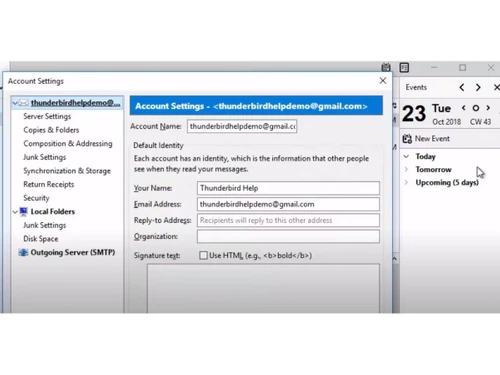
play How to create and add signatures in Thunderbird
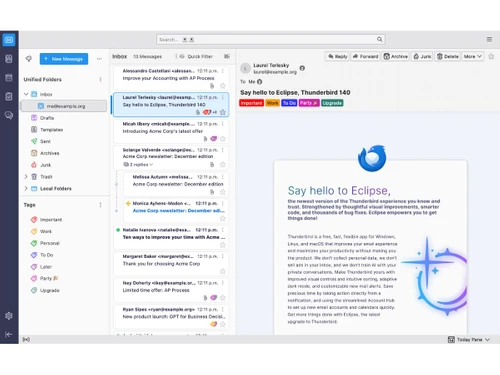
Thunderbird-inbox
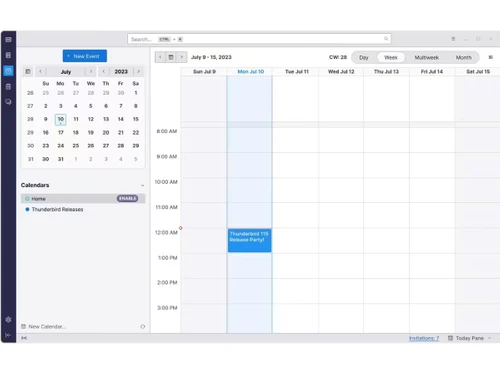
Thunderbird-calendar booking

Thunderbird

Brand: Mozilla

  • No Ratings & Reviews

Experience ultimate email freedom with thunderbird, your powerful, open-source app for secure, customizable email, calendar, and contacts across all devices.

See More

Have you used Thunderbird before?

Share your insights for better experience

Add a Review

Free Forever

Get started immediately at no cost. Upgrade anytime if your business demand more.

100% Genuine
Products
Best Price
Guaranteed
Safe & Secure
Payment
  • Description

  • Pricing

  • Features

  • Specification

  • Review

  • Compare

  • Alternatives

  • FAQ

Thunderbird Software Overview

What is Thunderbird?

Thunderbird is a comprehensive, open-source software application designed to manage your digital communications efficiently. It functions as a powerful, all-in-one solution for email, calendar, and contacts, available for desktop operating systems including Windows, macOS, and Linux. Developed with a strong emphasis on user privacy and control, Thunderbird provides a clean, fast, and organized interface to handle multiple accounts without clutter. Recently, its capabilities have been extended to mobile with the introduction of Thunderbird Mobile for Android, allowing users to access their communications securely on the go. As part of the Mozilla family, Thunderbird is built on a foundation of transparency and a commitment to a better, more private internet.

Why Choose Thunderbird?

  • Freedom from Chaos: Thunderbird simplifies email management by consolidating all your accounts into a single, unified inbox or managing them separately as you prefer. Its powerful filtering, search, and tagging features allow you to organize messages according to your workflow, saving time and reducing inbox clutter.
  • Freedom from Manipulation: Unlike many free services that monetize user data, Thunderbird is funded by user donations. This model ensures its agenda is aligned with user interests. The software does not collect personal data, sell advertisements, or use your private conversations to train AI models. Its open-source nature guarantees transparency and a steadfast commitment to your privacy and security.
  • Freedom to Customize: The application is designed to be adaptable. While the default interface is clean and elegant, it is highly customizable to match your specific workflow and visual preferences. As one user noted, you'd be ""hard pressed to find a client more extensible than Thunderbird,"" thanks to its support for add-ons and various configuration options.
  • True Cross-Platform Support: Whether you work on a Windows PC, a Mac, or a Linux machine, Thunderbird provides a consistent and reliable experience across all platforms. This makes it an ideal choice for individuals and teams who operate in diverse computing environments.

Advanced Features of Thunderbird

  • Unified Inbox: This feature is a cornerstone of Thunderbird's design, allowing you to view and manage emails from all your configured accounts in a single, consolidated folder. This streamlines the process of checking messages and helps you stay on top of important communications without switching between accounts.
  • Advanced Tagging System: Organize your emails with customizable tags. As praised by users, this feature allows you to ""tag something important and find it quickly."" You can assign colors and labels to messages, making it easy to categorize and prioritize your inbox visually.
  • Robust Privacy and Security: Built with security as a priority, Thunderbird includes features like phishing protection, remote content blocking, and Do Not Track options to safeguard your information from malicious actors and invasive tracking.
  • Extensibility with Add-ons: Tailor Thunderbird to your exact needs by leveraging a vast library of add-ons. These extensions can add new functionality, integrate with other services, or change the application's appearance, making it a truly personalized tool.
  • Integrated Calendar and Tasks: Manage your schedule directly within the application. The integrated calendar supports multiple calendars, task lists, and event invitations, turning your email client into a central hub for organization.

Key Capabilities of Thunderbird

  1. Email Management: At its core, Thunderbird is a sophisticated email client that supports both POP and IMAP protocols. It offers a tabbed interface, smart folders, and a powerful search function to help you navigate your messages with ease.
  2. Calendar (Lightning): The integrated Lightning calendar allows you to organize your schedule, create events, manage to-do lists, and subscribe to public calendars. It seamlessly integrates with your email for managing event invitations.
  3. Contact Management (Address Book): Maintain a detailed address book with support for photos, birthdays, and custom fields. The address book integrates with the email composer for quick recipient selection and can be synchronized with various online services.
  4. Thunderbird Mobile: The dedicated Android app brings the core principles of Thunderbird privacy, security, and user control to your mobile device. It ensures your most important messages are accessible anywhere through a secure, open-source application.

How to Use Thunderbird?

  1. Download and Install: Visit the official Thunderbird website to download the appropriate installer for your operating system (Windows, macOS, or Linux). The installation process is simple and guided.
  2. Account Setup Wizard: Upon launching the application for the first time, a wizard will guide you through adding your email accounts. You typically only need to provide your name, email address, and password, and Thunderbird will automatically find the correct server settings.
  3. Explore the Interface: Familiarize yourself with the main window, which includes the folder pane, message list, and message preview pane. You can customize this layout through the View menu.
  4. Organize Your Email: Start using features like tags, filters, and smart folders to organize your messages. Right-click on a message to tag it, or go to the Tools menu to set up message filters that automatically sort incoming mail.
  5. Customize and Extend: Explore the Add-ons Manager to find extensions that add new features or change the look and feel of the application to better suit your needs.

Thunderbird Price

Thunderbird software is completely free to download and use.

Read more

Mozilla Company Details

Founded Year:  1998

Mozilla provides internet solutions and offers firefox, thunderbird, and raindrop.

Director/Founders Blake Ross, Dave Hyatt
Company Size 1000+ Employees

Thunderbird Pricing & Plans

This Product is Available Free Forever.

Start instantly with no fees, no subscriptions, and no commitments.

  • Full access to basic version available
  • No credit card or sign-up required

Free Forever Plan

Get started immediately at no cost. Upgrade anytime if your business demand more.

Free Forever

Thunderbird Features

  • icon_check Unified Inbox
    View and manage emails from multiple accounts in a single inbox to simplify communication workflows.
  • icon_check Multiple Accounts
    Connect and manage Gmail, Outlook, Yahoo, and custom email accounts from one platform.
  • icon_check Advanced Email Search
    Quickly locate messages, attachments, contacts, and conversations using powerful search filters.
  • icon_check Filters and Rules
    Automatically organize incoming emails into folders based on sender, subject, or keywords.
  • icon_check Calendar Management
    Schedule meetings, create events, and manage appointments with the integrated calendar tool.
  • icon_check Contact Management
    Store, organize, and access contact information with a built-in address book system.
  • icon_check Encryption
    Protect sensitive communications with built-in email encryption and digital signatures.
  • icon_check Message Tagging
    Categorize and prioritize emails using customizable tags for better inbox organization.
  • icon_check Tabbed Email Interface
    Open multiple emails in tabs to improve multitasking and navigation efficiency.
  • icon_check Attachment Management
    Easily send, receive, preview, and manage email attachments directly from the application.
  • icon_check Anti Spam Filtering
    Reduce unwanted emails with intelligent junk mail detection and filtering capabilities.
  • icon_check Offline Access
    Access previously downloaded emails and information even without an internet connection.
  • icon_check Customizable Interface
    Personalize layouts, themes, and toolbars to match individual productivity preferences.
  • icon_check Cross-Platform Compatibility
    Use the application seamlessly across Windows, macOS, Linux, and Android devices.
Thunderbird Demo Video play icon

Get Thunderbird Demo

Watch the demo video to explore key features, real workflows, and how the software fits your business needs.

Understand
Key Features
Personal
Demo Insights
Interactive
Demo Support

Thunderbird Specifications

Supported Platforms
Windows Windows MacOS MacOS Linux Linux
Devices
Desktop Desktop
Deployment
Cloud-Based Cloud-Based Perpetual Perpetual
Suitable For
All Industries
Business Specific
All Businesses
Business Size
Individual Small Business Startups Medium Business Enterprises SMBs SMEs MSMBs MSMEs Freelancers
Customer Support
Email Communities Forums
Language
English
Integration
API Integration
Training Resources
Webinars Documentation Videos

Explore the Best Alternative Solutions Similar to Your Business Size and Needs

Small Business

Designed for startups and growing businesses

EmailJS

4.4

GMass

4.5

ImprovMX

4.4

See More

Thunderbird Review

Techjockey Trusted Reviews from Verified Users

No reviews are currently available for Thunderbird. Discover similar Email Software reviews

  • Zoho Mail

    4.4

    Whats great - From an insider's perspective, I can confidently say that this ERP system truly streamlines business processes. The user-frie... read more

  • MailsDaddy OST to PST Converter

    5.0

    Whats great - It is easy to use and makes the conversion process simple. The software works smoothly, maintains mailbox data properly, and ... read more

  • Mithi SkyConnect

    5.0

    Whats great - I was not certain of our actual needs due to limited experience with shipping. I was provided recommendations for some produc... read more

Compare Thunderbird With other Email Software

Products
Ratings
Pricing
Device Supported
Deployment
Supported Platforms
  • img

    Thunderbird

  • FREE

  • Desktop

    Mobile

  • Web based

    On Premises

  • Windows

    Mac OS

  • img

    Zoho Mail

  • 4.3

  • ₹ 708

  • Desktop

    Mobile

  • Web based

    On Premises

  • Windows

    Mac OS

  • img

    GMass

  • 4.5

  • ₹ 1200

  • Desktop

    Mobile

  • Web based

    On Premises

  • Windows

    Mac OS

  • img

    Mailinator

  • 4.2

  • Price On Request

  • Desktop

    Mobile

  • Web based

    On Premises

  • Windows

    Mac OS

  • img

    Beefree

  • 4.5

  • Price On Request

  • Desktop

    Mobile

  • Web based

    On Premises

  • Windows

    Mac OS

  • img

    MailDex

  • 4.2

  • Price On Request

  • Desktop

    Mobile

  • Web based

    On Premises

  • Windows

    Mac OS

  • img

    Woodpecker

  • 4.2

  • Price On Request

  • Desktop

    Mobile

  • Web based

    On Premises

  • Windows

    Mac OS

  • img

    Mailtrack

  • 4.3

  • Price On Request

  • Desktop

    Mobile

  • Web based

    On Premises

  • Windows

    Mac OS

  • img

    Zoho TeamInbox

  • 4.3

  • ₹ 360

  • Desktop

    Mobile

  • Web based

    On Premises

  • Windows

    Mac OS

  • img

    Zoho Zeptomail

  • 4.2

  • Price On Request

  • Desktop

    Mobile

  • Web based

    On Premises

  • Windows

    Mac OS

  • img

    ImprovMX

  • 4.4

  • Price On Request

  • Desktop

    Mobile

  • Web based

    On Premises

  • Windows

    Mac OS

(0) Product(s) selected

Thunderbird Alternatives

See All Thunderbird Alternatives

Starting Price:

$30

Starting Price:

$139 /License

Starting Price:

$35 /Month

Starting Price:

$10 /Month

Tuta

4.3

Starting Price:

€4 /Month

Starting Price:

$15 /Month

Starting Price:

$30 /Month

OwIU

4.4

Available

Price on Request

Starting Price:

$30 /Month

Starting Price:

₹200 /Month

HEY

4.0

Starting Price:

$12 /User/Month

Articles for Thunderbird

See All Related Articles

Is Thunderbird still good?

Yes, Thunderbird remains a powerful and highly customizable email, calendar, and contacts application, praised for its unified inbox, tagging features, and extensibility across Windows, Linux, and macOS. It offers robust organization and privacy-focused features, making it a strong choice for managing multiple accounts.

Is Thunderbird free to use?

Thunderbird software is completely free to download and use.

Is Thunderbird safe to use?

Yes, Thunderbird is considered safe to use as an open-source application from the Mozilla family, prioritizing user privacy and security by not collecting personal data, selling ads, or training AI with private conversations.

Is Thunderbird better than Outlook?

Thunderbird offers a powerful, open-source, and highly customizable email experience with a strong focus on user privacy and security, featuring a unified inbox, tagging, and extensibility, which allows users to maintain ownership of their emails.

Does Thunderbird have a future?

Yes, Thunderbird actively plans for its future, continuously improving the desktop application and expanding its ecosystem with the recent introduction of Thunderbird Mobile for Android, demonstrating ongoing development and commitment.

Who can use thunderbird?

Thunderbird can be used by anyone needing a powerful email, calendar, and contacts application, available across Windows, Linux, macOS, and now as a leading open-source email app for Android.

What are some key features of Thunderbird?

Key features of Thunderbird include a unified inbox for managing multiple accounts, robust filtering and organization tools, a powerful tagging system, and extensive customizability, all integrated with calendar and contacts management.

What platforms does Thunderbird support?

Thunderbird supports a wide range of platforms, including desktop versions for Windows, Linux, and macOS, and a mobile version available for Android devices.

Is Thunderbird open source?

Yes, Thunderbird is an open-source application, which contributes to its transparency, security, and strong focus on user privacy.

20,000+ Software Listed

Best Price Guranteed

Free Expert Consultation

2M+ Happy Customers

Terms and Condtions

close

Users with registered businesses can purchase goods from merchants on the platform to satisfy their business needs. Users are not permitted to utilize any products acquired through the platform for resale, advertising, business, or further distribution.

For each purchase made, users will receive a Tax Invoice (or 'GST invoice') that includes specific details such as:

  • the GSTIN of the user associated with their registered business, and

  • the specified Entity Name for their business.

It should be noted that not all products are eligible for GST Invoice. Only the products displayed by participating sellers with the 'GST-based Invoice Available' callout on the product description page would qualify.

Certain goods and services are not eligible to get a GST Invoice, including items with VAS, i.e., Value Added Services (e.g., Total Mobile Protection/Assured Buyback) and those involving an exchange offer at the time of purchase.

Users must ensure the accuracy of the GSTIN, and business entity name provided for the GST Invoice. Requests for corrections into GST Invoice would not be accommodated by Techjockey.com or any Seller, and any issues arising from user-provided information are the sole responsibility of users.

Techjockey.com is not liable for the GST Invoice or any associated input tax credit. To efficiently claim an input tax credit, users should select the registered place of business address as per the GST authority's data and follow the provisions of the GST Act and rules.

To claim an input tax credit, the delivery and billing addresses must match. Furthermore, input tax credits will not be granted if the delivery address and GSTIN on the invoice are from different states. In case of incorrect GST details provided during the order placement, the order will be canceled automatically.