linkedin
Touchbistro POS logo
play TouchBistro: We Get Restaurants
Touchbistro POS-sales point
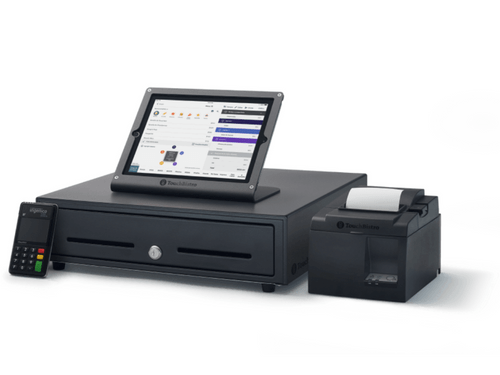
Touchbistro POS-pos hardware

Touchbistro POS

Brand: Touchbistro

  • 4.3

  • 4 Ratings

TouchBistro POS is an easy-to-use, all-in-one restaurant management and point-of-sale system that helps restaurants manage orders, sales, staff, and guest experiences from a single platform.

See More

Have you used Touchbistro POS before?

Share your insights for better experience

Add a Review
Starting Price
$69

View plans

100% Genuine
Products
Best Price
Guaranteed
Safe & Secure
Payment
  • Description

  • Pricing

  • Features

  • Specification

  • Review

  • Compare

  • Alternatives

  • FAQ

Starting at $69

Touchbistro POS Software Overview

What is Touchbistro POS?

TouchBistro is a cloud-based point-of-sale (POS) system designed specifically for restaurants, cafes, bars, and food trucks. This restaurant POS software helps streamline daily operations by combining front-of-house and back-of-house tools into one easy-to-use platform. With TouchBistro, staff can take orders tableside using iPads, manage floor plans, split bills, and process payments quickly.

The system also includes features like inventory tracking, staff scheduling, and kitchen display integration to improve kitchen efficiency. For customer engagement, it offers loyalty programs, online ordering, reservations, and gift card options. TouchBistro provides over 50 detailed reports to help restaurant owners make informed decisions and boost profitability. It operates offline as well, ensuring uninterrupted service even without internet access. This all-in-one solution is trusted by restaurants worldwide to enhance guest experiences and simplify management tasks.

Why Choose Touchbistro POS Software?

  • Restaurant-Focused Design: Built specifically for the foodservice industry, TouchBistro caters to full-service restaurants, quick-service eateries, bars, cafes, and food trucks.
  • Hybrid POS System: Operates both online and offline, ensuring uninterrupted service even during internet outages.
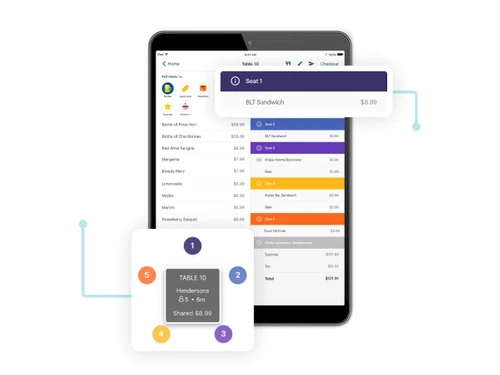
  • Tableside Ordering: Enhances service speed and accuracy by allowing staff to take orders directly at the table using iPads.
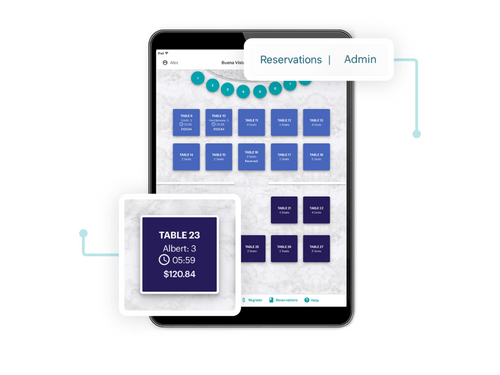
  • Customizable Floor Plans: Easily design and modify your restaurant layout to optimize seating and improve table turnover.
  • Integrated Payment Processing: Offers a seamless payment experience with support for various payment methods, including contactless options.
  • Inventory Management: Track stock levels, monitor ingredient usage, and reduce food waste with integrated inventory tools.
  • Customer Engagement Features: Implement loyalty programs, gift cards, and targeted promotions to encourage repeat business.
  • Online Ordering & Reservations: Expand your reach by offering online ordering and reservation capabilities directly integrated with your POS system.
  • Scalable Solutions: Suitable for single-location establishments and multi-unit operations, allowing you to add features as your business grows.
  • User-Friendly Interface: Intuitive design ensures quick staff training and efficient daily operations.
  • 24/7 Customer Support: Access round-the-clock support via phone, chat, or email to resolve any issues promptly.
  • Affordable Pricing Plans: Transparent pricing with the flexibility to choose only the features you need, helping manage costs effectively.

Benefits of Touchbistro POS Software

  • Recipe Costing & Ingredient Tracking: It allows you to log recipes and track ingredient costs and quantities, helping manage inventory efficiently and reduce food waste.
  • Offline Functionality: The system operates without an internet connection, ensuring uninterrupted service during outages.
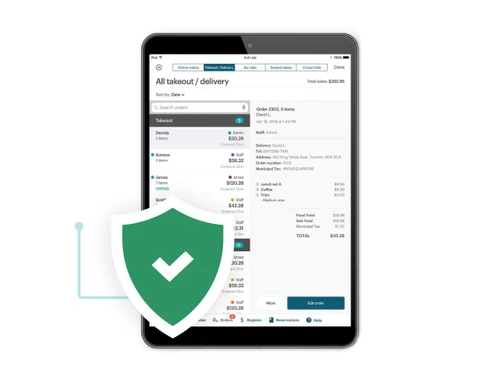
  • Integrated Order and Payment System: It offers a fully integrated system that streamlines order taking and payment processing, enhancing the dining experience.
  • Customizable Floor Plans: Easily design and adjust your restaurant layout within the POS to match your physical space, optimizing table management.
  • Self-Serve Kiosks and Digital Menu Boards: Optional add-ons like self-serve kiosks and digital menu boards can enhance customer engagement and streamline ordering.
  • Reporting & Analytics: Access over 50 detailed reports to gain insights into sales trends, staff performance, and operational efficiency.

Touchbistro POS Pricing

Touchbistro POS price details are available on request at techjockey.com.

The pricing model is based on different parameters, including extra features, deployment type, and the total number of users. For further queries related to the product, you can contact our product team and learn more about the pricing and offers.

Read more

Touchbistro Company Details

Founded Year:  2010

TouchBistro is an iPad-based restaurant point-of-sale system enabling owners to manage reservations and take orders instantly.

Director/Founders Alex Barrotti, Geordie Konrad
Company Size 101-500 Employees

Touchbistro POS Pricing & Plans

Touchbistro POS
Key Features
  • Floor Plan & Table Management
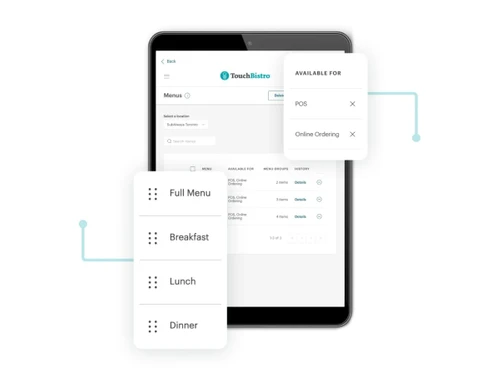
  • Menu Management
  • Reporting & Analytics
  • Tableside Ordering
  • Staff Management
Starting at $69
    • Monthly

      Monthly
      Monthly

Key Features

  • Floor Plan & Table Management

  • Menu Management

  • Reporting & Analytics

  • Tableside Ordering

  • Staff Management

Touchbistro POS Features

  • icon_check Menu Management
    Easily create, update, and organize your food and drink menu anytime.
  • icon_check Table Management
    Customize your floor plan and track table status to improve service flow.
  • icon_check Analytics & Reporting
    Get detailed reports on sales, staff, and performance to make smart decisions.
  • icon_check Inventory Management
    Track ingredients and stock levels to reduce waste and manage costs.
  • icon_check Staff Management
    Schedule shifts, track hours, and monitor staff performance from one place.
  • icon_check App Integrations
    Connect with apps like accounting, marketing, and delivery platforms for smoother operations.
  • icon_check Tableside Ordering
    Take orders directly at the table using an iPad to speed up service.
  • icon_check Kitchen Display
    Send orders instantly to kitchen screens to avoid delays and mistakes.
  • icon_check Self Service Kiosk
    Let customers place orders themselves at kiosks, reducing wait times and improving accuracy.
Touchbistro POS Demo Video play icon

Get Touchbistro POS Demo

Watch the demo video to explore key features, real workflows, and how the software fits your business needs.

Understand
Key Features
Personal
Demo Insights
Interactive
Demo Support

Touchbistro POS Specifications

Supported Platforms
Windows Windows
Devices
Desktop Desktop
Deployment
Cloud-Based Cloud-Based
Suitable For
Restaurant Cafe & Restaurants
Business Specific
Restaurants
Business Size
Small Business Medium Business SMBs
Customer Support
Phone Email Forums
Language
English
Training Resources
Videos

Explore the Best Alternative Solutions Similar to Your Business Size and Needs

Touchbistro POS Review

4.3

Out of 5

img

Overall Rating

Based on
4 Verified Ratings

Rating Breakdown

  • Features 4.2
  • Value for Money 4.1
  • Ease of Use 4.5
  • Customer Support 4.3

80% Recommend this Product

Add Review

Techjockey Trusted Reviews from Verified Users

No reviews are currently available for Touchbistro POS. Discover similar Restaurant POS Software reviews
  • Petpooja

    4.1

    Whats great - The software is easy to use and understand. Currently, it has all the features required to run a restaurant efficiently. read more

  • Mink Foodiee Restaurant POS

    4.8

    Whats great - Works with almost all devices, Very easy to setup and use with many services like crm, loyalty programs, inventory managemen... read more

  • TMBill POS

    4.2

    Whats great - No expertise and solution offered, only duping people. read more

Compare Touchbistro POS With other Restaurant POS Software

Products
Ratings
Pricing
Device Supported
Deployment
Supported Platforms
  • img

    Touchbistro POS

  • 4.3

  • Price On Request

  • Desktop

    Mobile

  • Web based

    On Premises

  • Windows

    Mac OS

  • img

    Petpooja

  • 4.2

  • ₹ 10000

  • Desktop

    Mobile

  • Web based

    On Premises

  • Windows

    Mac OS

  • img

    Feedo

  • 4.7

  • ₹ 899

  • Desktop

    Mobile

  • Web based

    On Premises

  • Windows

    Mac OS

  • img

    SpotOn

  • 4.3

  • Price On Request

  • Desktop

    Mobile

  • Web based

    On Premises

  • Windows

    Mac OS

  • img

    SpeedLine POS

  • 4.5

  • Price On Request

  • Desktop

    Mobile

  • Web based

    On Premises

  • Windows

    Mac OS

  • img

    Rezku POS

  • 4.4

  • Price On Request

  • Desktop

    Mobile

  • Web based

    On Premises

  • Windows

    Mac OS

  • img

    Track My Table

  • 4.2

  • ₹ 399

  • Desktop

    Mobile

  • Web based

    On Premises

  • Windows

    Mac OS

  • img

    RestoMPOS

  • 4.3

  • Price On Request

  • Desktop

    Mobile

  • Web based

    On Premises

  • Windows

    Mac OS

  • img

    Solo Billing

  • 4.1

  • ₹ 8000

  • Desktop

    Mobile

  • Web based

    On Premises

  • Windows

    Mac OS

  • img

    TMBill POS

  • 4.4

  • ₹ 5999

  • Desktop

    Mobile

  • Web based

    On Premises

  • Windows

    Mac OS

  • img

    FoodyQueen

  • 4.1

  • ₹ 4188

  • Desktop

    Mobile

  • Web based

    On Premises

  • Windows

    Mac OS

(0) Product(s) selected

Touchbistro POS Alternatives

See All Touchbistro POS Alternatives

Starting Price:

$55 /Month

Starting Price:

$49 /Month

Available

Price on Request

Lavu

4.1

Available

Price on Request

Starting Price:

$49 /Month

Available

Price on Request

How much does Touchbistro POS Software cost?

Touchbistro POS price starts at $69 at techjockey.com.

Does Touchbistro POS Software have a mobile app?

No, Touchbistro POS does not offer a mobile app.

Which operating systems are supported by Touchbistro POS Software?

Touchbistro POS is compatible with Windows.

Is there a free trial for Touchbistro POS Software?

No, TouchBistro does not offer a free trial of its POS software.

How does Touchbistro POS Software operate?

TouchBistro is an iPad-based POS system designed for restaurants, enabling staff to manage orders, payments, inventory, and more directly from the device.

Who uses Touchbistro POS Software?

TouchBistro is used by various foodservice businesses, including restaurants, cafes, bars, and food trucks, ranging from small to medium-sized establishments.

Is there a free demo available for Touchbistro POS Software?

Yes, TouchBistro offers a free demo to showcase its features and functionalities.

Is Touchbistro POS Software available at no cost?

No, Touchbistro POS is a paid software.

20,000+ Software Listed

Best Price Guranteed

Free Expert Consultation

2M+ Happy Customers

Terms and Condtions

close

Users with registered businesses can purchase goods from merchants on the platform to satisfy their business needs. Users are not permitted to utilize any products acquired through the platform for resale, advertising, business, or further distribution.

For each purchase made, users will receive a Tax Invoice (or 'GST invoice') that includes specific details such as:

  • the GSTIN of the user associated with their registered business, and

  • the specified Entity Name for their business.

It should be noted that not all products are eligible for GST Invoice. Only the products displayed by participating sellers with the 'GST-based Invoice Available' callout on the product description page would qualify.

Certain goods and services are not eligible to get a GST Invoice, including items with VAS, i.e., Value Added Services (e.g., Total Mobile Protection/Assured Buyback) and those involving an exchange offer at the time of purchase.

Users must ensure the accuracy of the GSTIN, and business entity name provided for the GST Invoice. Requests for corrections into GST Invoice would not be accommodated by Techjockey.com or any Seller, and any issues arising from user-provided information are the sole responsibility of users.

Techjockey.com is not liable for the GST Invoice or any associated input tax credit. To efficiently claim an input tax credit, users should select the registered place of business address as per the GST authority's data and follow the provisions of the GST Act and rules.

To claim an input tax credit, the delivery and billing addresses must match. Furthermore, input tax credits will not be granted if the delivery address and GSTIN on the invoice are from different states. In case of incorrect GST details provided during the order placement, the order will be canceled automatically.