linkedin

Get Free Advice

Get Quote

Tradovate logo
Gallery Tradovate | A Modern Futures Trading Platform
Tradovate-dashboard Tradovate-future trading Tradovate-integrations
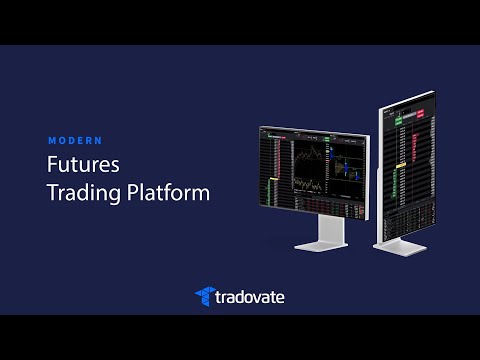
play Tradovate | A Modern Futures Trading Platform
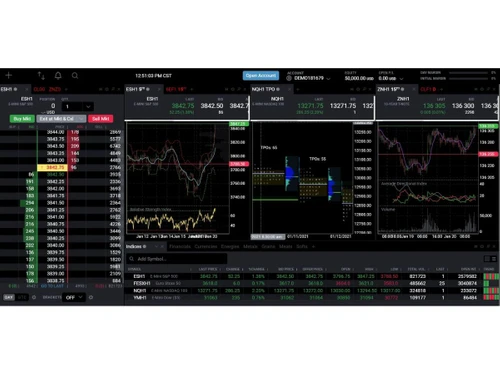
Tradovate-dashboard
Tradovate-future trading
Tradovate-integrations

Tradovate

Brand : NinjaTrader

Starting at

$ 99

Save Extra with 2 Offers

  • offer_icon Save upto 18%, Get GST Invoice on your business purchase |
  • offer_icon Buy Now & Pay Later, Check offer on payment page.

Tradovate allows users to trade, analyze markets, and manage trades from web, desktop, and mobile devices. ...Read more

  • AdviceGet Instant Expert
    Advice
  • PaymentSafe & Secure
    Payment
  • GuaranteedAssured Best Price
    Guaranteed

Tradovate Software Pricing, Features & Reviews

What is Tradovate?

Tradovate is a modern cloud-based futures trading platform designed for active traders. It allows users to trade futures and options on futures from desktop, web, and mobile devices.

The platform is known for its fast performance, advanced trading tools, and easy multi-device access.

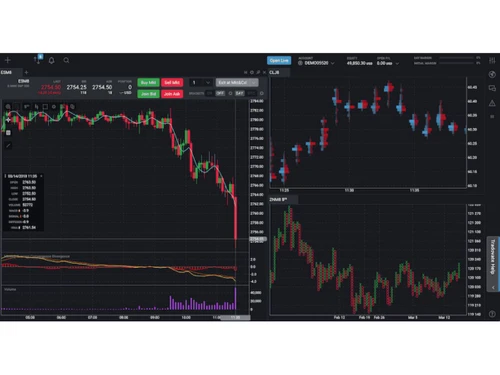
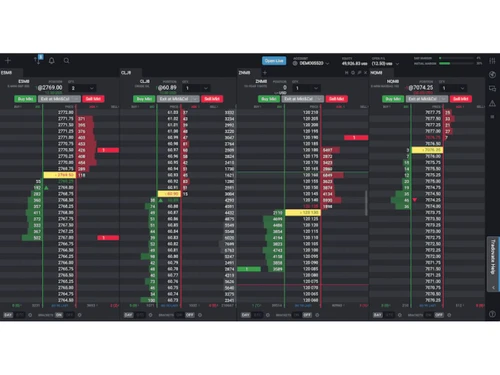
Tradovate offers features like charting tools, market replay, simulated trading, depth of market analysis, and automated order management. Traders can access the platform from anywhere without installing heavy software.

It supports trading across major futures markets including indexes, metals, energies, and commodities. Tradovate also integrates with third-party tools like TradingView for enhanced charting and analysis.

The platform provides commission plans, including subscription-based pricing and pay-as-you-trade options.

Why Choose Tradovate Software?

  • Easy Cloud Access: Tradovate works online, so you can trade from anywhere.
  • Use on Any Device: It works on mobile, desktop, and web browsers.
  • Fast Trading Speed: Orders are placed quickly with smooth performance.
  • Simple Interface: The platform is clean and easy to understand.
  • Advanced Charts: Users get helpful charts and market analysis tools.
  • Made for Futures Trading: Tradovate is specially designed for futures traders.
  • Practice with Replay: Traders can replay old market sessions for learning.
  • Demo Trading Account: Beginners can practice without risking real money.
  • Live Market Data: Users get real-time futures market updates.
  • Market Depth View: It shows buying and selling activity clearly.
  • Automatic Order Tools: Users can set stop-loss and profit targets easily.
  • Low-Cost Trading Plans: It offers affordable pricing options for traders.
  • Flexible Payment Options: Traders can choose plans based on their needs.
  • TradingView Support: It connects with TradingView for better charts.
  • Custom Trading Tools: Developers can build tools using APIs.

Benefits of Tradovate Software

  • No Software Download Needed: Users can trade directly from a browser.
  • Sync Across Devices: Account data updates automatically everywhere.
  • Custom Layouts: Traders can arrange screens the way they like.
  • Risk Management Tools: It helps users manage losses and trades safely.
  • Easy Account Opening: New users can create accounts quickly online.
  • Built-In Brokerage: Trading and brokerage services come together in one platform.
  • Professional Features: It supports advanced trading strategies.
  • Good for Beginners and Experts: Anyone can use the platform easily.
  • Supports Small and Large Trades: Users can trade different contract sizes.
  • Works with Other Apps: Users can connect external trading tools.
  • Anytime Access: Traders can manage accounts 24/7 from anywhere.

Tradovate Pricing

Tradovate price starts at USD 99, as listed on techjockey.com.

The pricing model is based on different parameters, including extra features, deployment type, and the total number of users. For further queries related to the product, you can contact our product team and learn more about the pricing and offers.

Tradovate Pricing & Plans

Monthly
  • Powerful charts
  • Third-party tools integration
  • Free simulated trading
  • Customize your trading platform
  • Customer support
    • Licenses
    • Monthly
Starting at $ 99
Lifetime
  • Powerful charts
  • Third-party tools integration
  • Free simulated trading
  • Customize your trading platform
  • Customer support
    • Licenses (One Time)
Starting at $ 1499

Get Tradovate Demo

We make it happen! Get your hands on the best solution based on your needs.

Interacted

Tradovate Features

Core Features

  • icon_check Portfolio Management View account balances, open positions, and performance metrics focused on futures trading portfolios.
  • icon_check Market Data Real-time and delayed futures market data from major exchanges like CME and CBOT.
  • icon_check Watchlist Create and manage watchlists for futures contracts across multiple markets.
  • icon_check Charting Tools Advanced charts with multiple timeframes, indicators, and drawing capabilities.
  • icon_check Order Control Full control over order types, quantities, routing, and execution behavior.
  • icon_check Order Execution High-speed, low-latency execution optimized for futures markets.

Order Execution

  • icon_check Limit Order Place limit orders to buy or sell contracts at a specified price or better.
  • icon_check Market Order Instantly execute trades at the best available market price.
  • icon_check Stop (Loss) Order Automatically exits positions when price reaches a predefined loss level.
  • icon_check Stop Limit Orders Combines stop triggers with limit prices for controlled execution.
  • icon_check Trailing Stop Order Dynamic stop orders adjust automatically as the market moves favorably.

Research and Analysis

  • icon_check Technical Analysis Includes indicators, overlays, drawing tools, and advanced charting for technical traders.
  • icon_check Backtesting and Optimization Strategy backtesting and market replay allow testing and refining trading ideas.
  • icon_check Smart drawing tools Chart drawing tools snap to price levels for precise technical analysis.
  • icon_check Fundamental Analysis Evaluate a security's value by analyzing financial data and economic factors.
  • icon_check Pattern Recognition Identify significant historical price patterns for future forecasting.
  • icon_check Scanning Tools Filter stocks based on specific criteria to spot trading opportunities.

Trading Options

  • icon_check Paper Trading Simulated trading environment lets users practice strategies with live market data.
  • icon_check Intraday Trading Built for active intraday futures traders with fast execution and low-latency tools.
  • icon_check Algorithm Trading Supports automated trading through APIs and custom algorithmic strategies.
  • icon_check Options Trading Trade options on futures contracts directly from the platform.
  • icon_check Futures Trading Core offering with full support for global futures markets.
  • icon_check Automatic Trading Automated strategies can place and manage trades via API connections.
  • icon_check Margin Trading (MTF) Futures trading inherently uses margin as defined by exchange requirements.
  • icon_check Forex Trading Trade currency pairs to profit from exchange rate fluctuations.
  • icon_check Crypto Trading Trade cryptocurrencies to benefit from market volatility.
  • icon_check Mutual Funds Invest in professionally managed portfolios for diversified exposure.
  • icon_check Stock SIP Allows for systematic investment in stocks over time to build a portfolio gradually.

Account Management

  • icon_check Multi-Factor Authentication (MFA) Adds an extra security layer using verification codes during login attempts.
  • icon_check Platform Migration Supports importing settings and transitioning from other trading platforms.
  • icon_check Customizable User Interface Layouts, panels, charts, and tools can be customized per trader preference.
  • icon_check Demat Account Creation Facilitate the opening of electronic securities accounts.

Integrations

  • icon_check API Integration REST and WebSocket APIs allow custom apps, automation, and integration with third-party trading tools.
  • icon_check Financial Tools Integration Integrates with TradingView and third-party analytics via APIs.

Reporting & Analytics

  • icon_check Dashboards Customizable dashboards display charts, DOM, orders, positions, and performance widgets.
  • icon_check P&L Report Displays real-time and historical profit and loss for trades and sessions.
  • icon_check Contract Note Provides trade confirmations and contract details for executed futures trades.
  • icon_check Automated Reports Generate regular reports on trading activity and performance automatically.
  • icon_check Report Customization Tailor reports to meet specific user requirements for relevance.
  • icon_check Financial Transaction Report (CashLedger) Track cash inflows and outflows in the trading account.

Alerts & Notification

  • icon_check Price Alert Alerts notify users when contracts hit specified price levels in real time.
  • icon_check Real Time Market Updates Live price updates and order book data with minimal latency.
  • icon_check Volume Alerts Alerts can be set based on volume activity in futures contracts.
  • icon_check News Alerts Updates on news events that could impact markets.

Tradovate Specifications

  • Supported Platforms :
  • Device:
  • Deployment :
  • Suitable For :
  • Business Specific:
  • Business Size:
  • Customer Support:
  • Language:
  • Windows iOS Android MacOS
  • DesktopMobileTabletiPad
  • Web-Based
  • Stock Market
  • Traders, Stock Market
  • Individual, Small Business, Startups, Medium Business, Enterprises
  • Email, Communities
  • English

Tradovate Reviews and Ratings

banner

Would you like to review this product?

Submit Reviews

NinjaTrader Company Details

Brand Name NinjaTrader
Information NinjaTrader is an industry-leading trading platform and futures broker, supporting over 1 million users around the globe with best-in-class tech.
Founded Year 2004
Director/Founders Raymond Deux
Company Size 101-500 Employees
Other Products NinjaTrader

Tradovate FAQ

A Tradovate price starts at USD 99, as listed on techjockey.com.
A Yes, the Tradovate mobile app is available on iOS and Android.
A Tradovate is compatible with Windows and MacOS operating systems.
A Yes, Tradovate offers a free trial.
A Tradovate works as a cloud-based futures trading platform where users can analyze markets, place trades, and manage accounts online.
A Futures traders, day traders, beginners, professional traders, and trading firms use Tradovate for online futures trading.
A Yes, Tradovate offers a free demo account for practice trading with simulated market data.
A Tradovate offers free access with some pricing plans.

Tradovate Alternatives

See All
Why Choose Techjockey?

Software icon representing 20,000+ Software Listed 20,000+ Software Listed

Price tag icon for best price guarantee Best Price Guaranteed

Expert consultation icon Free Expert Consultation

Happy customer icon representing 2 million+ customers 2M+ Happy Customers