linkedin
NinjaTrader logo
play How to find an entry signal | NinjaTrader Live
ninjatrader-dashboard
ninjatrader-buttons

NinjaTrader

Brand: NinjaTrader

  • 4.1

  • 12 Ratings & 12 Reviews

Powerful stock market software for futures trading, offering advanced charting, analytics, backtesting, and risk management tools.

See More

Have you used NinjaTrader before?

Share your insights for better experience

Add a Review
Starting Price
$99

View plans

100% Genuine
Products
Best Price
Guaranteed
Safe & Secure
Payment
  • Description

  • Pricing

  • Features

  • Specification

  • Review

  • Compare

  • Alternatives

  • Questions

Starting at $99

NinjaTrader Software Overview

What is NinjaTrader?

NinjaTrader is a stock market software used for futures trading, accommodating both novice and expert traders. Some of the most valuable crowning concepts of the NinjaTrader include charting tools and analytical tools, a backtesting engine, paper trading capabilities, as well as risk management tools.

This platform is highly focused on the futures, but market traders are enabled to trade stocks, foreign exchange, and other commodities as well.

Additionally, the utilities of the NinjaTrader have earned a lot of popularity due to the inclusion of such customizable features which give traders the ability to vary their trading styles according to the prevailing conditions.

Features of NinjaTrader

  • Free Simulated Trading: NinjaTrader offers traders the opportunity to trade in a real market while losing no real funds. It is one of the popular online trading solution systems that is not only favorable to real time trading but offers simulated practice for the traders.
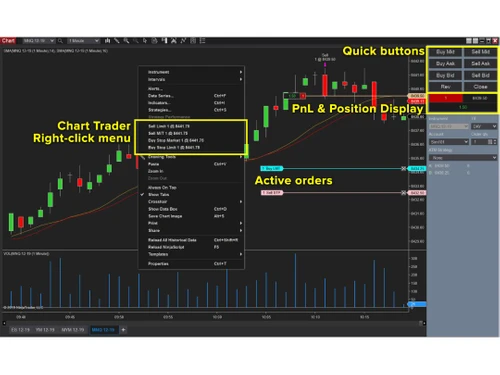
  • Advanced Charting: The system provides the trader with lots of charting options, such as adjustable workspaces, qualitative market analysis, graphic drawing instruments, and others.
  • Depth of Market Tools: It allows traders to examine their buy and sell orders at various price points in real time. It facilitates their comprehension of price fluctuations and market liquidity.
  • Advanced Trade Management: NinjaTrader allows traders to utilize advanced order types including stop orders, target orders, and self-tightening trailing stops. This helps in managing trading risk and optimizing trades.
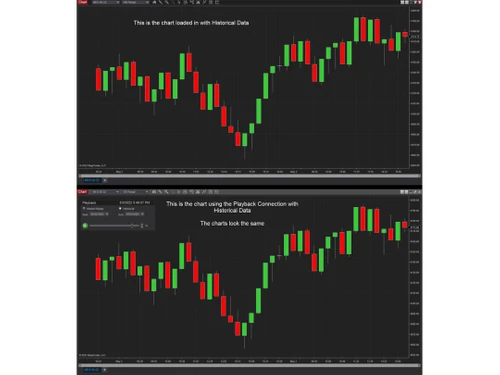
  • Market Replay: Market replays help in replaying historic market data tick-by-tick and test strategies under several market conditions. This allows traders to identify potential trading opportunities for higher profit.
  • Order Flow Analysis: The order flow analysis feature contained within NinjaTrader empowers traders to identify market impact buying and selling motions, probable evaluating trends, and exploitable opportunities for trade.
  • Technical Analysis: NinjaTrader is rich in a variety of Barton including technical indicators which are many. Some of these include many of the trade indicators include moving averages, momentum indicators, volatility indicators, volume indicators and so forth

Why choose NinjaTrader?

The various reasons for choosing NinjaTrader are the following:

  • NinjaSript for Customization: NinjaTrader provides the powerful scripting language NinjaScript for high customizability of indicators, strategies, and trading systems. It offers higher flexibility to integrate trading solutions to unique needs.
  • Advanced Strategy Builder: NinjaTrader offers an advanced strategy builder where traders can develop complex trading strategies without programming. It mainly provides builder screeners, condition builders, and action windows.
  • Backtesting and Optimization: Backtesting and optimization are core capabilities of NinjaTrader. It offers in-depth performance metrics and optimization tools.
  • Enhanced Order Execution and Management: The order execution feature of NinjaTrader provides advanced trade management (ATM) and One-Cancles-the-Other (OCO) orders. These features provide customizable risk management.
  • Community and Ecosystem: This platform provides a robust community and a marketplace for third-party add-ons. This helps in enhancing the trading capability with a wide range of resources.
  • Integrated Market Data and Brokerage Services: NinjaTrader’s integration capabilities help traders to streamline their trading experience. It integrates with its own brokerage services and other parties.

Benefits of NinjaTrader

  • This platform is well-suited for automated trading with its advanced language script – NinjaScript. It helps traders to develop, test, and deploy custom trading strategies.
  • NinjaTrader provides a user-friendly interface for traders with customizable properties. It helps them to access real-time market data and simplifies the trading journey.
  • This platform is free to use, and traders can get additional features with optional paid upgrades. It helps traders to start with minimal cost and increase when needed.
  • There are numerous educational resources such as video tutorials, webinars, and forums. These resources help traders to understand the platform properly and use it effectively.
  • Although, NinjaTrader focuses on futures, but it also supports other assets such as stocks, forex, and crypto.

Pricing of NinjaTrader

NinjaTrader’s pricing starts at $99 at techjockey.com. The pricing model may vary depending on different parameters, including the features you need, time periods, and other factors. For further queries related to the product, you can contact our product team and learn more about the pricing and offers.

Read more

NinjaTrader Company Details

Founded Year:  2004

NinjaTrader is an industry-leading trading platform and futures broker, supporting over 1 million users around the globe with best-in-class tech.

Director/Founders Raymond Deux
Company Size 101-500 Employees

NinjaTrader Pricing & Plans

Monthly
Starting at $99
    • Licenses

      Licenses
      Licenses
    • Monthly

      Monthly
      Monthly

Key Features

  • Commissions per side

  • $0.25 / Micro

  • $0.99 / Standard

Lifetime
Starting at $1499
    • Licenses (lifetime)

      Licenses (lifetime)
      Licenses (lifetime)

Key Features

  • Commissions per side

  • $0.09 / Micro

  • $0.59 / Standard

NinjaTrader Features

Core Features

  • icon_check Market Data
    Real-time stock prices and market trends for informed trading decisions.
  • icon_check Watchlist
    Customizable list of securities for easy monitoring of price movements.
  • icon_check Charting Tools
    Visual tools to analyze price movements and trends using various chart types.
  • icon_check Order Control
    Manage and modify trades efficiently to align with trading strategies.
  • icon_check Order Execution
    Complete trades by placing, modifying, and canceling orders.
  • icon_check Portfolio Management
    Track investments and assess performance effectively.

Order Execution

  • icon_check Limit Order
    Buy/sell at a specified price or better for control over trade execution.
  • icon_check Market Order
    Immediate buy/sell at current market price prioritizing speed.
  • icon_check Stop (Loss) Order
    Sell when the price hits a certain level to limit losses.
  • icon_check Stop Limit Orders
    Triggers a limit order once a specified stop price is reached.
  • icon_check Trailing Stop Order
    Adjusts the stop price with favorable market movement for profit protection.

Research and Analysis

  • icon_check Technical Analysis
    Use price movements and volume data to predict future price trends.
  • icon_check Fundamental Analysis
    Evaluate a security's value by analyzing financial data and economic factors.
  • icon_check Pattern Recognition
    Identify significant historical price patterns for future forecasting.
  • icon_check Scanning Tools
    Filter stocks based on specific criteria to spot trading opportunities.
  • icon_check Backtesting and Optimization
    Test strategies against historical data to assess effectiveness.
  • icon_check Smart drawing tools
    Annotate charts with trend lines and levels for better analysis.

Trading Options

  • icon_check Paper Trading
    Simulate trading without real money to test strategies.
  • icon_check Intraday Trading
    Buy/sell securities within the same trading day for short-term gains.
  • icon_check Algorithm Trading
    Automate trading strategies for faster execution without emotional bias.
  • icon_check Options Trading
    Buy/sell options contracts for strategic market exposure.
  • icon_check Futures Trading
    Trade contracts obligate the purchase/sale of an asset at a future date.
  • icon_check Forex Trading
    Trade currency pairs to profit from exchange rate fluctuations.
  • icon_check Crypto Trading
    Trade cryptocurrencies to benefit from market volatility.
  • icon_check Automatic Trading
    Execute trades automatically based on set criteria.
  • icon_check Margin Trading (MTF)
    Borrow funds to trade larger positions than account balance allows.
  • icon_check Mutual Funds
    Invest in professionally managed portfolios for diversified exposure.
  • icon_check Stock SIP
    Allows for systematic investment in stocks over time to build a portfolio gradually.

Account Management

  • icon_check Multi-Factor Authentication (MFA)
    Enhance security with multiple verification methods.
  • icon_check Platform Migration
    Assist in transferring accounts or data from one platform to another.
  • icon_check Customizable User Interface
    Personalize trading environments for ease of use.
  • icon_check Demat Account Creation
    Facilitate the opening of electronic securities accounts.

Integrations

  • icon_check API Integration
    Connect third-party apps to enhance platform functionality.
  • icon_check Financial Tools Integration
    Incorporate various financial analysis tools for improved insights.

Reporting & Analytics

  • icon_check Dashboards
    Visual summaries of key performance metrics for quick assessments.
  • icon_check Automated Reports
    Generate regular reports on trading activity and performance automatically.
  • icon_check Report Customization
    Tailor reports to meet specific user requirements for relevance.
  • icon_check P&L Report
    Summarize profits and losses over a specified period.
  • icon_check Contract Note
    Document detailing trade specifics, including prices and fees.
  • icon_check Financial Transaction Report (CashLedger)
    Track cash inflows and outflows in the trading account.

Alerts & Notification

  • icon_check Price Alert
    Notifications when securities hit specified price points.
  • icon_check Real Time Market Updates
    Instant notifications on significant market changes and events.
  • icon_check News Alerts
    Updates on news events that could impact markets.
  • icon_check Volume Alerts
    Alerts for unusual trading volumes in securities.
NinjaTrader Demo Video play icon

Get NinjaTrader Demo

Watch the demo video to explore key features, real workflows, and how the software fits your business needs.

Understand
Key Features
Personal
Demo Insights
Interactive
Demo Support

NinjaTrader Specifications

Supported Platforms
Ubuntu Ubuntu Windows Windows iOS iOS Android Android MacOS MacOS Linux Linux
Devices
Desktop Desktop Mobile Mobile
Deployment
Cloud-Based Cloud-Based Perpetual Perpetual
Suitable For
Stock Market
Business Specific
Traders Finance Services
Business Size
Small Business Startups Medium Business Enterprises Freelancers
Customer Support
Phone Email Communities Forums
Language
English français Deutsche Italiano Português русский Español
Training Resources
Videos

Explore the Best Alternative Solutions Similar to Your Business Size and Needs

NinjaTrader Reviews

4.1

Out of 5

img

Overall Rating

Based on
12 Verified Reviews

Rating Breakdown

  • Features 4.0
  • Value for Money 4.1
  • Ease of Use 4.2
  • Customer Support 4.2

88% Recommend this Product

Add Review

Pros

  • "The variety of educational resources they offer has been incredibly useful for me. I appreciate the ability to practice trading without the risk of losing money."

    Lalita Sep 18, 2024

  • "What I love most is the wealth of educational materials available. I can learn at my own pace, and the practice trading feature has allowed me to build my confidence without risk."

    Tushar VadhavanaSep 17, 2024

  • "What I appreciate most is the wealth of educational content available, helping me understand the platform better. I also like that I can practice trading without any risk."

    Deepak Jul 23, 2024

Cons

  • "However, I was surprised by the high withdrawal fees, and I really wish there was a mobile app available for convenience. "

    Lalita Sep 18, 2024

  • " I faced a high withdrawal fee, and I found it frustrating that there isn’t a mobile app for trading outside of using a specific broker. "

    Divyani SinghSep 18, 2024

  • "However, I was disappointed by the high withdrawal fees, and it’s a drawback that there’s no mobile app for trading. "

    Ashish AnandSep 17, 2024

NinjaTrader Video Reviews

youtubeVideoId

4.6

“NinjaTrader Review - Pros & Cons of NinjaTrader”

Review by: The Savvy Professor

youtubeVideoId

4.6

“NinjaTrader Review - Pros 0026 Cons of NinjaTrader (Is It Legit?)”

Review by: Jacob Amaral

Lalita

Accountant

Industry: SAAS User since: 1-2 years

4.5

Reviewed on: Sep 18, 2024

Techjockey Verified

“NinjaTrader: A Great Experience Overall”

Pros

The variety of educational resources they offer has been incredibly useful for me. I appreciate the ability to practice trading without the risk of losing money.

Cons

However, I was surprised by the high withdrawal fees, and I really wish there was a mobile app available for convenience.

Switched from Tradetron

Reason to switch

I wanted a platform that provided better tools for futures trading at a lower price.

Deepak Kumar

Head

Industry: SAAS User since: 1-2 years

4.1

Reviewed on: Jul 8, 2024

Techjockey Verified

“NinjaTrader: My Go-To for Futures Trading”

NinjaTrader has become my go-to platform for futures trading. The low trading fees are fantastic, and their charting tools are excellent. However, setting it up was somewhat challenging due to my limited experience with tech.

Pros

The educational materials available are truly helpful, allowing me to learn more about trading strategies and techniques. I also appreciate the option to practice trading without risking real money.

Cons

However, I did find the withdrawal fees to be quite high, and it’s frustrating that there’s no mobile app for trading on the go.

Switched from MetaTrader 4

Reason to switch

I needed a platform that offered better tools for futures trading at a lower cost.

Varun Jain

Accountant

Industry: Accounting User since: 1-2 years

4.1

Reviewed on: Jul 17, 2024

Techjockey Verified

“NinjaTrader: Why I Choose It”

Pros

I love that they offer various educational resources to help traders like me learn more about the platform. The practice trading feature has been particularly helpful in building my confidence.

Cons

However, I was taken aback by the high withdrawal fees, and I wish they provided a mobile app for trading.

Switched from StockRadars

Reason to switch

I wanted a more specialized platform for futures trading with lower fees.

See All NinjaTrader Reviews

Compare NinjaTrader With other Trading Platforms

Products
Ratings
Pricing
Device Supported
Deployment
Supported Platforms
  • img

    NinjaTrader

  • 4.1

  • Price On Request

  • Desktop

    Mobile

  • Web based

    On Premises

  • Windows

    Mac OS

  • img

    Pocketful

  • 4.9

  • Price On Request

  • Desktop

    Mobile

  • Web based

    On Premises

  • Windows

    Mac OS

  • img

    Tradovate

  • Price On Request

  • Desktop

    Mobile

  • Web based

    On Premises

  • Windows

    Mac OS

  • img

    Masterswift 2.0

  • 4.3

  • Price On Request

  • Desktop

    Mobile

  • Web based

    On Premises

  • Windows

    Mac OS

  • img

    AlgoTest

  • 4.6

  • Price On Request

  • Desktop

    Mobile

  • Web based

    On Premises

  • Windows

    Mac OS

  • img

    StockMock

  • 4.5

  • ₹ 349

  • Desktop

    Mobile

  • Web based

    On Premises

  • Windows

    Mac OS

  • img

    Bajaj Broking

  • 4.5

  • Price On Request

  • Desktop

    Mobile

  • Web based

    On Premises

  • Windows

    Mac OS

  • img

    Edelweiss TX3

  • 4.2

  • Price On Request

  • Desktop

    Mobile

  • Web based

    On Premises

  • Windows

    Mac OS

  • img

    Zerodha Kite

  • 4.2

  • Price On Request

  • Desktop

    Mobile

  • Web based

    On Premises

  • Windows

    Mac OS

  • img

    Bigul

  • 4.2

  • Price On Request

  • Desktop

    Mobile

  • Web based

    On Premises

  • Windows

    Mac OS

  • img

    Trading Terminal

  • 4.4

  • Price On Request

  • Desktop

    Mobile

  • Web based

    On Premises

  • Windows

    Mac OS

(2) Product(s) selected

NinjaTrader Alternatives

See All NinjaTrader Alternatives

Starting Price:

$99 /Month

Available

Price on Request

Available

Price on Request

Available

Price on Request

Available

Price on Request

Articles for NinjaTrader

See All Related Articles

NinjaTrader Questions

A:

Data, settings, and customisations can be imported and exported using NinjaTrader's tools. With the aid of these tools, you can move your settings and previous information to a new platform version.

Nitin Sep 20, 2024
A:

Make sure you frequently check out NinjaTrader's website, sign up for their newsletters, and follow them on social media.

Vanshika parwani Sep 20, 2024
A:

It regularly updates its platform to improve user experience, introduce new features, and boost performance.

SAMIR KUMAR NASKAR Sep 20, 2024
A:

NinjaTrader provides an extensive collection of chart styles, including candlestick charts, Renko, bar, line, Point & Figure, and Heikin-Ashi.

Mohammad Shakir Shaikh Sep 20, 2024
A:

Yes, NinjaTrader provides a simulated trading environment in which users can practise trading methods without real money. The key distinction is that paper trading does not involve actual money.

ROHIT kumar Sep 20, 2024
See All NinjaTrader Questions

20,000+ Software Listed

Best Price Guranteed

Free Expert Consultation

2M+ Happy Customers

Terms and Condtions

close

Users with registered businesses can purchase goods from merchants on the platform to satisfy their business needs. Users are not permitted to utilize any products acquired through the platform for resale, advertising, business, or further distribution.

For each purchase made, users will receive a Tax Invoice (or 'GST invoice') that includes specific details such as:

  • the GSTIN of the user associated with their registered business, and

  • the specified Entity Name for their business.

It should be noted that not all products are eligible for GST Invoice. Only the products displayed by participating sellers with the 'GST-based Invoice Available' callout on the product description page would qualify.

Certain goods and services are not eligible to get a GST Invoice, including items with VAS, i.e., Value Added Services (e.g., Total Mobile Protection/Assured Buyback) and those involving an exchange offer at the time of purchase.

Users must ensure the accuracy of the GSTIN, and business entity name provided for the GST Invoice. Requests for corrections into GST Invoice would not be accommodated by Techjockey.com or any Seller, and any issues arising from user-provided information are the sole responsibility of users.

Techjockey.com is not liable for the GST Invoice or any associated input tax credit. To efficiently claim an input tax credit, users should select the registered place of business address as per the GST authority's data and follow the provisions of the GST Act and rules.

To claim an input tax credit, the delivery and billing addresses must match. Furthermore, input tax credits will not be granted if the delivery address and GSTIN on the invoice are from different states. In case of incorrect GST details provided during the order placement, the order will be canceled automatically.