linkedin
Truffle POS logo
play Truffle Online Ordering System with Built in Point of Sale
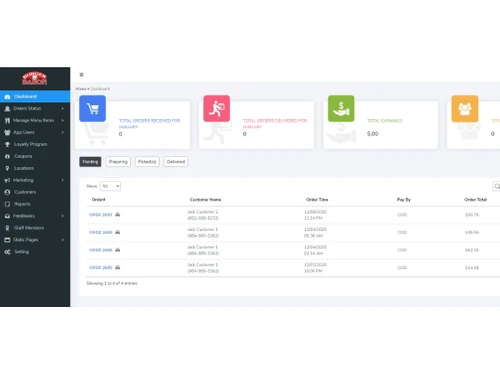
Truffle POS Dashboard
Truffle POS Orders

Truffle POS

Brand: Truffle System

  • 4.1

  • 4 Ratings

Truffle POS is a cloud-based point-of-sale (POS) system designed specifically for restaurants and food and beverage businesses.

See More

Have you used Truffle POS before?

Share your insights for better experience

Add a Review
Starting Price
$90

View plans

100% Genuine
Products
Best Price
Guaranteed
Safe & Secure
Payment
  • Description

  • Pricing

  • Features

  • Specification

  • Review

  • Compare

  • Alternatives

  • FAQ

Starting at $90

Truffle POS Software Overview

What is Truffle POS?

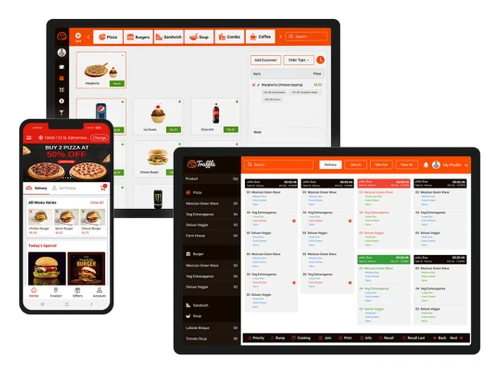
Truffle POS, a cloud-based point-of-sale (POS) system, has revolutionised the world of hospitality for restaurants and food and beverage establishments. Its intuitive interface empowers businesses of all scales to effortlessly set up and utilise the system, regardless of their prior POS experience.

Truffle POS's exceptional flexibility allows it to seamlessly adapt to the specific requirements of each business. This versatility has enabled restaurant owners and managers to streamline their operations, elevating customer service and maximising efficiency. As a testament to its versatility, Truffle POS has garnered widespread recognition for its efficacy in accommodating a diverse range of dining concepts, from casual eateries to fine-dining establishments. This adaptability extends to its pricing structure, ensuring that businesses of all sizes can reap the benefits of its advanced features at a price point that aligns with their operations.

Why Choose Truffle POS?

  • Automated Processes: Streamline operations and save time with automated tasks.
  • Customer Management: Track customer orders and preferences for personalised experiences.
  • Sales Promotion Tools: Enhance sales growth with integrated online promotion capabilities.
  • Detailed Reporting: Generate comprehensive reports for data analysis and actionable insights.
  • User-Friendly Interface: Designed for simplicity, even for beginners.
  • Competitive Pricing: Affordable solutions with premium features.
  • Cloud-Based Access: Remote management from any device with internet connectivity.
  • Mobile Optimization: Manage your business on the go with smartphone and tablet compatibility.
  • Customizable Templates: Utilise pre-built templates or create your own to match specific business needs.
  • Robust Notification System: Stay informed with timely alerts and updates to keep operations on track.

Benefits of Truffle POS Restaurant Management Software

Truffle POS can help you save time and money by automating your operations, such as:

  • Order taking: Truffle POS allows you to take orders quickly and easily, and automatically sends them to the kitchen. This can save you time and reduce errors.
  • Payment processing: Truffle POS accepts all major credit cards and debit cards, and can process payments quickly and securely. This can help you reduce lines and get your customers out the door faster.
  • Inventory management: Truffle POS can help you track your inventory levels, and automatically reorder items when they're running low. This can help you avoid running out of stock, and can save you time and money.
  • Track customer orders: It allows you to track the status of customer orders, so you can keep them updated on their food. This can help to improve customer satisfaction and build loyalty.
  • Store customer preferences: This software allows you to store customer preferences, such as their favourite dishes and seating preferences.
  • Personalise the dining experience: It allows you to create custom menus, offer discounts, and run loyalty programs. This can help you to create a unique and memorable dining experience for each customer.

Pricing Of Truffle POS Software

Truffle POS pricing starts at $ 90 and is available at techjockey.com. The pricing model is based on different parameters, including the amount of bandwidth you need, the number of servers you need, and the features you need. For further queries related to the product, you can contact our product team and learn more about the pricing and offers.

Read more

Truffle System Company Details

Founded Year:  2010

Truffle is a digital restaurant platform, food vendors add delivery and pickup options quickly and affordably without hiring more people.

Director/Founders N/A
Company Size 1-100 Employees

Truffle POS Pricing & Plans

Truffle Appetizer
Key Features
  • Digital Order Management
  • Stand Alone Order pickup (GOBOX Sold seperately)
  • Real-Time Order Reporting
Starting at $90
    • Monthly

      Monthly
      Monthly

Key Features

  • Digital Order Management

  • Stand Alone Order pickup (GOBOX Sold seperately)

  • Real-Time Order Reporting

Truffle POS Features

  • icon_check Order Management
    Take orders quickly and easily, and automatically send them to the kitchen.
  • icon_check Delivery Management
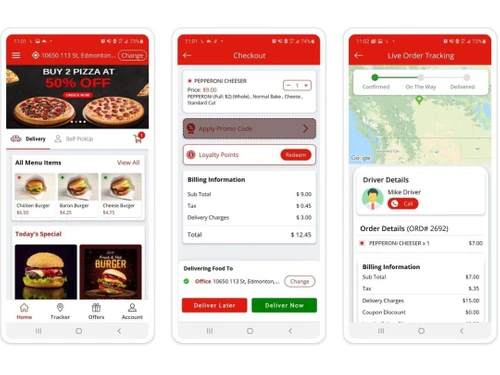
    Manage your delivery orders efficiently, and track the status of each delivery.
  • icon_check Online Orders
    Allow customers to order online, and manage your online orders through Truffle POS.
  • icon_check Table Management
    Manage your tables and reservations, and track the status of each table.
  • icon_check Inventory Management
    Track your inventory levels, and automatically reorder items when they're running low.
  • icon_check Cloud Kitchens
    Manage your cloud kitchen operations, and track the performance of each kitchen.
  • icon_check Dashboard
    Get a real-time overview of your restaurant's performance, and track key metrics.
  • icon_check Alerts & Notifications
    Get notified about important events, such as low inventory or new orders.
  • icon_check Integrations
    Integrate Truffle POS with your other business systems, such as accounting and CRM.
Truffle POS Demo Video play icon

Get Truffle POS Demo

Watch the demo video to explore key features, real workflows, and how the software fits your business needs.

Understand
Key Features
Personal
Demo Insights
Interactive
Demo Support

Truffle POS Specifications

Supported Platforms
Ubuntu Ubuntu Windows Windows MacOS MacOS Linux Linux
Devices
Desktop Desktop
Deployment
Cloud-Based Cloud-Based
Suitable For
Food & Beverage
Business Specific
Restaurants
Business Size
Small Business Medium Business Enterprises
Customer Support
Email Communities
Language
English
Training Resources
Videos

Explore the Best Alternative Solutions Similar to Your Business Size and Needs

Truffle POS Review

4.1

Out of 5

img

Overall Rating

Based on
4 Verified Ratings

Rating Breakdown

  • Features 4.1
  • Value for Money 4
  • Ease of Use 4.5
  • Customer Support 4.1

90% Recommend this Product

Add Review

Techjockey Trusted Reviews from Verified Users

No reviews are currently available for Truffle POS. Discover similar Restaurant POS Software reviews
  • Petpooja

    4.1

    Whats great - The software is easy to use and understand. Currently, it has all the features required to run a restaurant efficiently. read more

  • Mink Foodiee Restaurant POS

    4.8

    Whats great - Works with almost all devices, Very easy to setup and use with many services like crm, loyalty programs, inventory managemen... read more

  • TMBill POS

    4.2

    Whats great - No expertise and solution offered, only duping people. read more

Compare Truffle POS With other Restaurant POS Software

Products
Ratings
Pricing
Device Supported
Deployment
Supported Platforms
  • img

    Truffle POS

  • 4.1

  • Price On Request

  • Desktop

    Mobile

  • Web based

    On Premises

  • Windows

    Mac OS

  • img

    Petpooja

  • 4.2

  • ₹ 10000

  • Desktop

    Mobile

  • Web based

    On Premises

  • Windows

    Mac OS

  • img

    Feedo

  • 4.7

  • ₹ 899

  • Desktop

    Mobile

  • Web based

    On Premises

  • Windows

    Mac OS

  • img

    SpotOn

  • 4.3

  • Price On Request

  • Desktop

    Mobile

  • Web based

    On Premises

  • Windows

    Mac OS

  • img

    SpeedLine POS

  • 4.5

  • Price On Request

  • Desktop

    Mobile

  • Web based

    On Premises

  • Windows

    Mac OS

  • img

    Rezku POS

  • 4.4

  • Price On Request

  • Desktop

    Mobile

  • Web based

    On Premises

  • Windows

    Mac OS

  • img

    Track My Table

  • 4.2

  • ₹ 399

  • Desktop

    Mobile

  • Web based

    On Premises

  • Windows

    Mac OS

  • img

    RestoMPOS

  • 4.3

  • Price On Request

  • Desktop

    Mobile

  • Web based

    On Premises

  • Windows

    Mac OS

  • img

    Solo Billing

  • 4.1

  • ₹ 8000

  • Desktop

    Mobile

  • Web based

    On Premises

  • Windows

    Mac OS

  • img

    TMBill POS

  • 4.4

  • ₹ 5999

  • Desktop

    Mobile

  • Web based

    On Premises

  • Windows

    Mac OS

  • img

    FoodyQueen

  • 4.1

  • ₹ 4188

  • Desktop

    Mobile

  • Web based

    On Premises

  • Windows

    Mac OS

(0) Product(s) selected

Truffle POS Alternatives

See All Truffle POS Alternatives

Starting Price:

$55 /Month

Starting Price:

$49 /Month

Available

Price on Request

Lavu

4.1

Available

Price on Request

Starting Price:

$49 /Month

Available

Price on Request

Which operating system does Truffle POS Software Support?

Truffle POS supports most operating systems, including Windows, MacOS, Linux, and Ubuntu.

Is there any Truffle POS Software App?

Yes, Truffle POS has an app called Truffle KDS available for Android devices.

What is the deployment type of Truffle POS?

Truffle POS uses web-based deployment, meaning you can use it directly through your web browser without needing to install any software.

How much does Truffle POS Software Platform Cost?

The pricing for Truffle POS starts at $90 per month.

Who are the potential users of Truffle POS Software?

Truffle POS is designed for businesses in the food and beverage industry, including small to large restaurants and hospitality businesses.

Is there any free demo for Truffle POS Software?

Yes, you can schedule a free 30-minute demo to see how Truffle POS can help your business.

Is Truffle POS Free?

No, Truffle POS is not free. It has a starting price of $90 per month.

Does Truffle POS offer a free trial?

No, there is no mention of a free trial for Truffle POS.

How can you download Truffle POS Software?

You don't need to download Truffle POS. It is web-based, so you can use it through your internet browser. The Truffle KDS app can be downloaded from the Google Play Store for Android devices.

How does Truffle POS software Work?

Truffle POS helps restaurants manage orders, inventory, table reservations, and deliveries. It also supports customer loyalty programs, marketing processes, and provides various reports to help manage the business efficiently.

20,000+ Software Listed

Best Price Guranteed

Free Expert Consultation

2M+ Happy Customers

Terms and Condtions

close

Users with registered businesses can purchase goods from merchants on the platform to satisfy their business needs. Users are not permitted to utilize any products acquired through the platform for resale, advertising, business, or further distribution.

For each purchase made, users will receive a Tax Invoice (or 'GST invoice') that includes specific details such as:

  • the GSTIN of the user associated with their registered business, and

  • the specified Entity Name for their business.

It should be noted that not all products are eligible for GST Invoice. Only the products displayed by participating sellers with the 'GST-based Invoice Available' callout on the product description page would qualify.

Certain goods and services are not eligible to get a GST Invoice, including items with VAS, i.e., Value Added Services (e.g., Total Mobile Protection/Assured Buyback) and those involving an exchange offer at the time of purchase.

Users must ensure the accuracy of the GSTIN, and business entity name provided for the GST Invoice. Requests for corrections into GST Invoice would not be accommodated by Techjockey.com or any Seller, and any issues arising from user-provided information are the sole responsibility of users.

Techjockey.com is not liable for the GST Invoice or any associated input tax credit. To efficiently claim an input tax credit, users should select the registered place of business address as per the GST authority's data and follow the provisions of the GST Act and rules.

To claim an input tax credit, the delivery and billing addresses must match. Furthermore, input tax credits will not be granted if the delivery address and GSTIN on the invoice are from different states. In case of incorrect GST details provided during the order placement, the order will be canceled automatically.