linkedin
Vectorworks Vision software logo
play What is Vision?
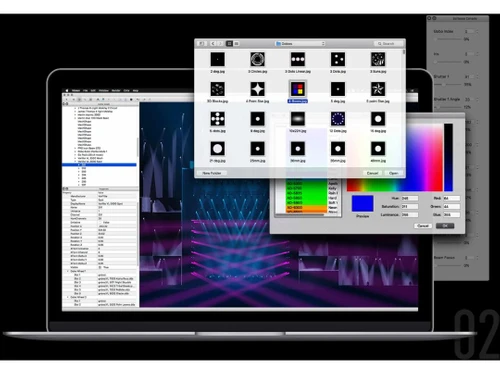
Vectorworks Vision software Edit
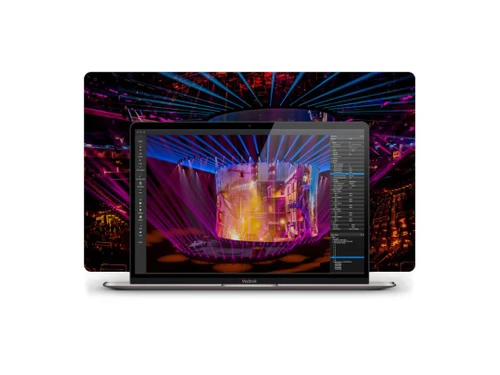
Vectorworks Vision software Effect

Vectorworks Vision software

Brand: Vectorworks

  • 4.0

  • 5 Ratings

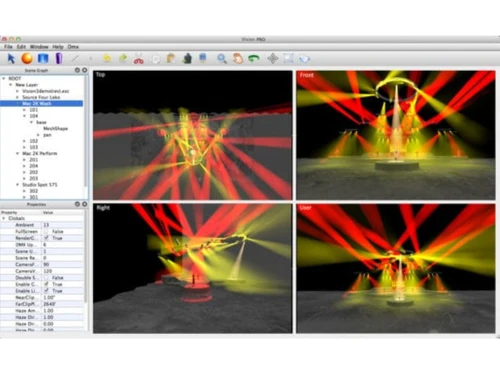
Vectorworks Vision is a 3D previsualization software that lets entertainment professionals simulate and program lighting, video, and effects before live events.

See More

Have you used Vectorworks Vision software before?

Share your insights for better experience

Add a Review

Price Available on Request

Questions about pricing or customization? We’re here to help, just a click away.

100% Genuine
Products
Best Price
Guaranteed
Safe & Secure
Payment
  • Description

  • Pricing

  • Features

  • Specification

  • Review

  • Compare

  • Alternatives

  • FAQ

Vectorworks Vision Software Overview

What is Vectorworks Vision software?

Vectorworks Vision is a 3D design software designed for entertainment professionals to simulate and program lighting, video, and special effects before live events.

It integrates seamlessly with Vectorworks Spotlight, allowing users to export lighting and model data directly into Vision for real-time simulation.

This enables designers to test and refine their setups without being on-site, saving time and resources. Vision supports various fixture types, including conventional and moving lights, and offers customizable controls for colors, gobos, and other parameters.

It also allows for the import of My Virtual Rig (MVR) files and supports protocols like DMX, Art-Net, and sACN for cueing and playback.

Whether you're presenting concepts to clients or preparing for a show, Vision provides a comprehensive platform to visualize and fine-tune your designs.

Why Choose Vectorworks Vision Software?

  • Seamless Integration with Spotlight: Works directly with Vectorworks Spotlight, making design-to-visualization smooth and efficient.
  • Real-Time Previsualization: Preview lighting and stage setups in real time before going on-site.
  • Accurate Show Simulation: Provides realistic rendering of lighting, stage, and event setups.
  • Wide Fixture Library: Includes thousands of lighting fixture profiles with accurate parameters.
  • Fixture Customization: Easily adjust colors, gobos, lenses, shutters, and other fixture attributes.
  • Multi-Platform Support: Available for both Windows and Mac operating systems.
  • DMX Compatibility: Supports industry-standard DMX control protocols for seamless connectivity.
  • High-Quality Graphics: Delivers photorealistic visualizations with detailed textures and lighting.
  • Realistic Light Rendering: Simulates how light interacts with objects, enhancing accuracy in previews.

Benefits of Vectorworks Vision Software

  • Flexible Workflow: Enables importing and syncing designs from other tools for easy collaboration.
  • Optimized for Performance: Handles large and complex projects without major performance issues.
  • Streamlined Cueing: Pre-program cues virtually to save rehearsal and venue preparation time.
  • Remote Collaboration: Supports file sharing and collaboration for distributed design teams.
  • Regular Updates: Frequent updates keep features aligned with evolving industry needs.
  • User-Friendly Interface: Intuitive controls make it easier for both beginners and professionals.
  • Reliable Support: Comes with technical support and resources from Vectorworks.
  • Professional Industry Standard: Trusted by entertainment designers, lighting professionals, and event planners worldwide.
  • Increases Creative Freedom: Allows designers to experiment, visualize, and refine ideas without on-site limitations.

Vectorworks Vision Pricing

Vectorworks Vision software price details are available on request at Techjockey.com. The pricing model is based on different parameters, including extra features, deployment type, and the total number of users. For further queries related to the product, you can contact our product team and learn more about the pricing and offers.

Read more

Vectorworks Vision software Pricing & Plans

Looking for The Right Pricing?

Share your requirements and get a plan built around your business.

  • Define your business needs
  • Get customised pricing
  • Choose features that fit your workflow

Price Available on Request

Get personalised Vectorworks Vision software pricing that fits your needs. Our team will connect with you.

Vectorworks Vision software Features

  • icon_check Real-Time 3D Visualization
    Provides immersive, real-time previews of lighting, video, and effects in a 3D environment.
  • icon_check Fixture Control & Simulation
    Allows detailed control and simulation of various lighting fixtures, including conventional and moving lights.
  • icon_check Integration with Lighting Control Systems
    Seamlessly integrates with lighting control systems for efficient programming and cueing.
  • icon_check 3D Modeling
    Supports 3D modeling to accurately represent the event space and design elements.
  • icon_check Virtual Camera Controls
    Enables virtual camera movements to simulate audience perspectives and camera shots.
  • icon_check Advanced Rendering
    Offers high-quality rendering capabilities for realistic visualization of lighting effects.
  • icon_check Fixture Library
    Includes an extensive library of fixture profiles for accurate representation and control.
  • icon_check Cloud Services & Mobile Access
    Cloud-based file storage, rendering, sharing, plus mobile app support — enabling remote work, reviews or on-site checks.
  • icon_check Landmark Edition
    Tools for terrain modeling, grading, planting plans, hardscape, site context and GIS integration for landscape & urban design.
Vectorworks Vision software Demo Video play icon

Get Vectorworks Vision software Demo

Watch the demo video to explore key features, real workflows, and how the software fits your business needs.

Understand
Key Features
Personal
Demo Insights
Interactive
Demo Support

Vectorworks Vision software Specifications

Supported Platforms
Windows Windows MacOS MacOS
Devices
Desktop Desktop
Deployment
Perpetual Perpetual
Suitable For
All Industries
Business Specific
All Businesses
Business Size
Small Business Medium Business Enterprises SMEs MSMBs
Customer Support
Phone Email Live Chat Communities Forums
Language
English Español
Integration
API Integration
AI Features
AI Integrated

Explore the Best Alternative Solutions Similar to Your Business Size and Needs

Vectorworks Vision software Review

4.0

Out of 5

img

Overall Rating

Based on
5 Verified Ratings

Rating Breakdown

  • Features 4.1
  • Value for Money 4.1
  • Ease of Use 4
  • Customer Support 3.9

90% Recommend this Product

Add Review

Techjockey Trusted Reviews from Verified Users

No reviews are currently available for Vectorworks Vision software. Discover similar 3D Design Software reviews

  • Power NURBS Pro

    4.8

    Whats great - PowerNurbs is an incredible NURBS apparatus, natural and amazing. 3Ds max joined with PowerNurbs winds up a standout amongst ... read more

  • Autodesk Autocad Plant 3D Toolset

    4.6

    Whats great - Produce and offer isometrics, orthographics, and materials reports. read more

  • Power Translator Pro

    4.4

    Whats great - Exquisite on the grounds that its planners imagined the sorts of reports and situations that individuals need to decipher. read more

Compare Vectorworks Vision software With other 3D Design Software

Products
Ratings
Pricing
Device Supported
Deployment
Supported Platforms
  • img

    Vectorworks Vision software

  • 4.0

  • Price On Request

  • Desktop

    Mobile

  • Web based

    On Premises

  • Windows

    Mac OS

  • img

    CLO 3D Fashion

  • 4.7

  • Price On Request

  • Desktop

    Mobile

  • Web based

    On Premises

  • Windows

    Mac OS

  • img

    Coohom

  • 4.4

  • ₹ 750

  • Desktop

    Mobile

  • Web based

    On Premises

  • Windows

    Mac OS

  • img

    Pacdora

  • 4.2

  • Price On Request

  • Desktop

    Mobile

  • Web based

    On Premises

  • Windows

    Mac OS

  • img

    Bambu Studio

  • 4.3

  • Price On Request

  • Desktop

    Mobile

  • Web based

    On Premises

  • Windows

    Mac OS

  • img

    Autodesk 3DS Max

  • 4.3

  • Price On Request

  • Desktop

    Mobile

  • Web based

    On Premises

  • Windows

    Mac OS

  • img

    Spline

  • 4.1

  • Price On Request

  • Desktop

    Mobile

  • Web based

    On Premises

  • Windows

    Mac OS

  • img

    MeshLab

  • 4.2

  • Price On Request

  • Desktop

    Mobile

  • Web based

    On Premises

  • Windows

    Mac OS

  • img

    Rodin AI

  • 4.4

  • Price On Request

  • Desktop

    Mobile

  • Web based

    On Premises

  • Windows

    Mac OS

  • img

    Sweet Home 3D

  • 4.1

  • Price On Request

  • Desktop

    Mobile

  • Web based

    On Premises

  • Windows

    Mac OS

(2) Product(s) selected

Vectorworks Vision software Alternatives

See All Vectorworks Vision software Alternatives

Starting Price:

$18 /Month

Starting Price:

$15 /Seat/Month

Available

Price on Request

Starting Price:

$15 /Month

Available

Price on Request

Starting Price:

$2,645 /Quantity

in3D

4.3

Available

Price on Request

Starting Price:

$299 /Month

How much does Vectorworks Vision cost?

The pricing details for Vectorworks Vision software can be obtained on request from Techjockey.com.

Is there a mobile app available for Vectorworks Vision Software?

No, Vectorworks Vision is desktop-based and does not have a mobile app.

Which operating systems are compatible with Vectorworks Vision Software?

Vectorworks Vision is compatible with both Windows and macOS.

Does Vectorworks Vision software offer a free trial?

Yes, you can request a free trial of Vectorworks, which includes Vision, by signing in or creating a Vectorworks account.

How does Vectorworks Vision Software function?

Vision allows you to previsualize and program lighting, video, and effects in a simulated environment, enabling you to test and refine your designs before live events.

Who uses Vectorworks Vision Software?

Lighting designers, event producers, and entertainment professionals use Vision to simulate and program their shows, ensuring accurate and efficient setups.

Is a free demo available for Vectorworks Vision Software?

Yes, you can access a free demo of Vectorworks Vision by signing up through the official website.

Is Vectorworks Vision software available for free?

No, Vectorworks Vision is a paid software with trial and demo options.

20,000+ Software Listed

Best Price Guranteed

Free Expert Consultation

2M+ Happy Customers

Terms and Condtions

close

Users with registered businesses can purchase goods from merchants on the platform to satisfy their business needs. Users are not permitted to utilize any products acquired through the platform for resale, advertising, business, or further distribution.

For each purchase made, users will receive a Tax Invoice (or 'GST invoice') that includes specific details such as:

  • the GSTIN of the user associated with their registered business, and

  • the specified Entity Name for their business.

It should be noted that not all products are eligible for GST Invoice. Only the products displayed by participating sellers with the 'GST-based Invoice Available' callout on the product description page would qualify.

Certain goods and services are not eligible to get a GST Invoice, including items with VAS, i.e., Value Added Services (e.g., Total Mobile Protection/Assured Buyback) and those involving an exchange offer at the time of purchase.

Users must ensure the accuracy of the GSTIN, and business entity name provided for the GST Invoice. Requests for corrections into GST Invoice would not be accommodated by Techjockey.com or any Seller, and any issues arising from user-provided information are the sole responsibility of users.

Techjockey.com is not liable for the GST Invoice or any associated input tax credit. To efficiently claim an input tax credit, users should select the registered place of business address as per the GST authority's data and follow the provisions of the GST Act and rules.

To claim an input tax credit, the delivery and billing addresses must match. Furthermore, input tax credits will not be granted if the delivery address and GSTIN on the invoice are from different states. In case of incorrect GST details provided during the order placement, the order will be canceled automatically.