 USA
USA UAE
UAESmall Business
Designed for startups and growing businesses

See More





Brand: ScanMyEssay
Viper Plagiarism Checker is a powerful and user-friendly plagiarism detection tool designed for students, teachers, and professionals.
See MoreHave you used Viper Plagiarism Checker before?
Share your insights for better experience
Brand: ScanMyEssay
Founded Year: 2007
ScanMyEssay.com is the home of Viper plagiarism checker, one of the World's leading plagiarism checkers and the most popular free software of its kind.
Core Detection Features
 Multi Language Support Source Matching Paraphrase Detection Plagiarism Detection API Access AI Detection
 Document Management
Multi Format Support File Upload Management Bulk Document Checking Document Retention and History Performance and Security
Data Security Multi Device Compatibility Scan Speed Automated Alerts and Monitoring Branding & Marketing
Custom Branding White Label Solution Client Based Reporting PDF Reports Productivity and Enhancements
Citation Generation Grammar Checker Collaboration Integrations and Extensions
Browser Extension Google Docs Integration API Integration Microsoft Office Integration Administrative Features
Domain Filtering Content Filtering Global Content Access User Access Management Report and Analysis
Data Export Plagiarism Reports Customizable Exclusion Originality Score Side-by-Side Comparison Paraphrasing Score Writing Statistics 

Watch the demo video to explore key features, real workflows, and how the software fits your business needs.
 Ubuntu
  Windows
  MacOS
MacOS  Linux
Linux  Desktop
  Cloud-Based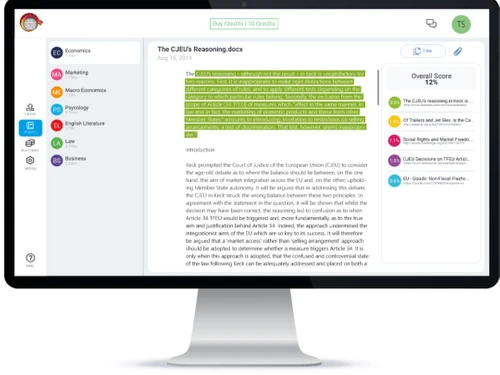
Small Business
Designed for startups and growing businesses
Medium Business
Built for business growth and flexibility
Enterprises
Designed for complex and large-scale business needs
4.2
Out of 5

Overall Rating
Based on
10 Verified Reviews
Rating Breakdown
87% Recommend this Product
Add ReviewViper Plagiarism Checker generally receives positive feedback for its user-friendly interface and effectiveness in identifying potential plagiarism, making it a valuable tool for various roles, including content writers and educators. Users appreciate the quick scanning capabilities and the ability to handle multiple file types. However, some common concerns include the need for more frequent updates to its database, occasional sensitivity in flagging common phrases, and limitations in comprehensiveness compared to more expensive alternatives. Additionally, the free trial is seen as limited, and integration with platforms like Google Docs and Word is lacking.
Pros
"It helps me identify where I might need to add citations to avoid accidental plagiarism."
"It is a great option if I am working on assignments or research papers where originality matters."
"There is no installation required since it is web based. I do not need to worry about downloading anything or using up space on my computer."
Cons
"No real-time updates. I wish it updated regularly with new sources or databases to keep up with online content."
"I found that it can be sensitive at times since it can flag phrases and common sentences that are not necessarily plagiarized."
" Occasionally the plagiarism report comes in a bit hard to read or does not highlight things the way I would like. "

Jan 24, 2025
Techjockey Verified
“Great for Citation Help but Needs Regular Updates”
Viper Plagiarism Checker has been useful in pointing out places where I might need to include citations. I wish it could update frequently with fresh sources to stay up to speed with the most recent online content.
Pros
It helps me identify where I might need to add citations to avoid accidental plagiarism.
Cons
No real-time updates. I wish it updated regularly with new sources or databases to keep up with online content.
Reason to switch
Viper provide better value and helped me spot areas where I needed citations more easily.
Dec 28, 2024
Techjockey Verified
“Best for Research”
When I am working on assignments or research papers where originality is crucial, I have found Viper Plagiarism Checker to be helpful. It can be a little annoying because it can occasionally be overly sensitive and flag frequent words or sentences.
Pros
It is a great option if I am working on assignments or research papers where originality matters.
Cons
I found that it can be sensitive at times since it can flag phrases and common sentences that are not necessarily plagiarized.
Reason to switch
DrillBit did the job, but Vipers focus on academic integrity and detailed reports made it better.
Nov 15, 2024
Techjockey Verified
“Web-Based and Convenient, But Report Could Be Clearer”
I like that Viper Plagiarism Checker is web-based since it eliminates the need for me to download anything or use up computer space. However, I have found that the plagiarism reports do not always highlight things the way I would like them to.
Pros
There is no installation required since it is web based. I do not need to worry about downloading anything or using up space on my computer.
Cons
Occasionally the plagiarism report comes in a bit hard to read or does not highlight things the way I would like.
Reason to switch
While Plagiarism Checker X had decent reports, I found Viper’s reports to be more straightforward.

Viper Plagiarism Checker
Price On Request
Desktop
Mobile
Web based
On Premises
Windows
Mac OS

DrillBit Plagiarism Checker
₹ 4500
Desktop
Mobile
Web based
On Premises
Windows
Mac OS

Plagiarism Detector Pro
₹ 3729
Desktop
Mobile
Web based
On Premises
Windows
Mac OS

Plagiarism Checker X
₹ 3700
Desktop
Mobile
Web based
On Premises
Windows
Mac OS

CopyLeaks
Price On Request
Desktop
Mobile
Web based
On Premises
Windows
Mac OS

Urkund
Price On Request
Desktop
Mobile
Web based
On Premises
Windows
Mac OS

iThenticate Plagiarism
Price On Request
Desktop
Mobile
Web based
On Premises
Windows
Mac OS

PlagAware
Price On Request
Desktop
Mobile
Web based
On Premises
Windows
Mac OS

DupliChecker
Price On Request
Desktop
Mobile
Web based
On Premises
Windows
Mac OS

Unicheck
Price On Request
Desktop
Mobile
Web based
On Premises
Windows
Mac OS

Plag AI
Price On Request
Desktop
Mobile
Web based
On Premises
Windows
Mac OS
(0) Product(s) selected
Starting Price:
€13 /License
Starting Price:
$10 /Month
Available
Price on Request

Available
Price on Request

Starting Price:
€30 /License

Starting Price:
$20 /Month

Available
Price on Request

Starting Price:
$10 /Month

Available
Price on Request

Available
Price on Request

Starting Price:
$15 /Month $30

Viper online plagiarism checker enables users to check for self-plagiarism by comparing your uploaded file with the files already stored in your database.
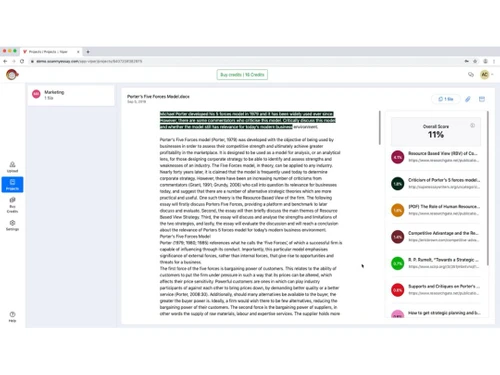
Viper Plagiarism Checker showcases all matching texts in the highlighted form along with URL of the matching source, enabling users to view the source of duplication and verify results in real-time.
Yes, you can request an online demo of Viper Plagiarism Checker. Product experts will get back to you as per your mentioned time and date.
Yes, you can upload multiple documents at once and scan them for plagiarism, at the same time.
Yes, Viper Plagiarism Checker has a dedicated mobile app that is available on iOS platform.
Viper Plagiarism Checker is compatible with Windows and MacOS devices. Viper Plagiarism Checker features a dedicated mobile app that is available on the iOS platform.
Yes, Viper is safe to use. The platform does not store or share your documents with third parties.
Viper offers a free version with basic plagiarism checking features.
Viper offers high accuracy in detecting plagiarized content, especially from publicly available web sources and academic publications.
Viper is a reliable plagiarism detection tool, particularly favoured by students and educators.
Viper is not suitable for checking plagiarism in books and offline sources because it is mainly designed to compare documents with online content and certain online databases. Its limited database restricts its effectiveness in checking offline sources.
0 0
Viper struggles to identify plagiarism from subscription-based platforms like academic journals or premium content providers due to its reliance on publicly available content. Turnitin or Unicheck are more effective for detecting content from subscription-based or paywalled sources due to their partnerships with publishers.
0 0
No, Viper is primarily designed to check online sources and has a limited database, which means it cannot effectively check plagiarism for books and offline sources. It focuses mainly on comparing documents to content available on the internet, student papers, and certain online databases.
0 0
Viper differ from all the other plagiarism checkers as:
0 0
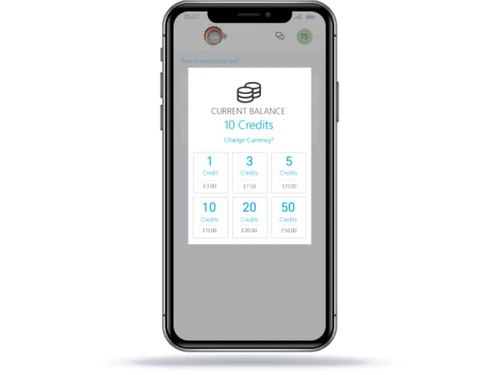
The number of credits that the user possesses, and the length of each document determines how many documents they can check with Viper. For example,
0 0
20,000+ Software Listed
Best Price Guranteed
Free Expert Consultation
2M+ Happy Customers
Terms and Condtions

Users with registered businesses can purchase goods from merchants on the platform to satisfy their business needs. Users are not permitted to utilize any products acquired through the platform for resale, advertising, business, or further distribution.
For each purchase made, users will receive a Tax Invoice (or 'GST invoice') that includes specific details such as:
the GSTIN of the user associated with their registered business, and
the specified Entity Name for their business.
It should be noted that not all products are eligible for GST Invoice. Only the products displayed by participating sellers with the 'GST-based Invoice Available' callout on the product description page would qualify.
Certain goods and services are not eligible to get a GST Invoice, including items with VAS, i.e., Value Added Services (e.g., Total Mobile Protection/Assured Buyback) and those involving an exchange offer at the time of purchase.
Users must ensure the accuracy of the GSTIN, and business entity name provided for the GST Invoice. Requests for corrections into GST Invoice would not be accommodated by Techjockey.com or any Seller, and any issues arising from user-provided information are the sole responsibility of users.
Techjockey.com is not liable for the GST Invoice or any associated input tax credit. To efficiently claim an input tax credit, users should select the registered place of business address as per the GST authority's data and follow the provisions of the GST Act and rules.
To claim an input tax credit, the delivery and billing addresses must match. Furthermore, input tax credits will not be granted if the delivery address and GSTIN on the invoice are from different states. In case of incorrect GST details provided during the order placement, the order will be canceled automatically.

