linkedin
Webinarjam logo
play WebinarJam Demo A Z Walkthrough
Webinarjam Live Chat
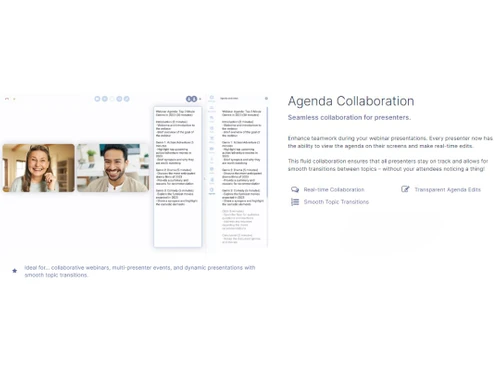
Webinarjam Collaboration

Webinarjam

Brand: Genesis Digital

  • 4.6

  • 4 Ratings & 4 Reviews

WebinarJam is a cloud-based webinar and video conferencing software that allows users to host online meetings and webinars in front of 5000 attendees at a time. It also allows up to 6 hosts to present their ideas simultaneously. The webinar software enables its users to either go for a solo presentation or a roundtable conference with multiple hosts during live casting, event streaming or webinar...

See More

Have you used Webinarjam before?

Share your insights for better experience

Add a Review
Starting Price
$49

View plans

100% Genuine
Products
Best Price
Guaranteed
Safe & Secure
Payment
  • Description

  • Pricing

  • Features

  • Specification

  • Review

  • Compare

  • Alternatives

  • FAQ

Starting at $49

Webinarjam Software Overview

What is WebinarJam?

WebinarJam is a cloud-based webinar and video conferencing software that allows users to host online meetings and webinars in front of 5000 attendees at a time. It also allows up to 6 hosts to present their ideas simultaneously. The webinar software enables its users to either go for a solo presentation or a roundtable conference with multiple hosts during live casting, event streaming or webinar broadcasting. All presentations are broadcasted in HD-quality, ensuring crystal clear view to the attendees. 

Hosts can enhance the quality of their presentation by including handwritten notes on top of the slides, by drawing a mind map or an annotation on the graphs. They can even pre-record videos and integrate them within their live webinars. By using the control center feature of the software, users can ensure that everything is under control and the live webinar is heading towards success.

How can hosts plan and execute high-quality webinars with WebinarJam?

WebinarJam allows hosts to present their point of view in front of a huge audience at a time. They can send invitation forms to their potential attendees either via email or SMS. The software has also solved the problem of lengthy paperwork with its One-Click Registration technology. WebinarJam seamlessly connects with all types of autoresponders or CRM software. The makers of WebinarJam have designed smart API connections so that users can configure different rules based on their registrant’s behavior. It also provides real-time reports to the hosts, enabling them to analyze their performance.

Pricing of WebinarJam

WebinarJam pricing starts from $49 at techjockey.com. It comes with multiple pricing plans and caters to a diverse customer base. For subscription-related details and offers on premium packages, please request a call back from our product experts.

Latest Version of WebinarJam

The latest version of webinarJam is Version 4.0, and it comes with the following features -

  1. Live Connection Reports: WebinarJam provides real-time reports to the hosts while they are in the middle of a live webinar, enabling them to review the level of connectivity with the attendees.
  2. Instant Webinars: Users can start live webinars and online meetings at the drop of a hat.
  3. Better Video Quality: The latest version of the software streams high-quality live videos, ensuring ultimate viewers’ pleasure.
  4. All Device Support: It is compatible with all devices including smartphones, enabling attendees to catch up on live events from anywhere at any time.

Compatible Platforms of WebinarJam

The software is compatible with all Windows and macOS systems. It is also compatible with Android and iOS supported mobile devices.

What are the benefits of using WebinarJam?

The benefits of using WebinarJam are:

  1. Cloud-Based Technology: Users can reach out to 5000 audiences at once by using the cloud-based broadcasting technology of the software.
  2. HD Quality Presentation: The software ensures that all the presentations are broadcasted in HD quality.
  3. Stream from Anywhere: Both the host and the attendee can join and host live events from anywhere via any device.
  4. Panic Button: Users can press the panic button in case they detect any abnormality. The whole system will boot up instantly and the whole live session will be shifted into a new room within 10 to 15 seconds.
  5. Control Center: The software offers a separate control center to its users, which can be operated by a colleague or a co-host during the live event.
  6. Password Protected Rooms: Users can secure their webinar rooms against unauthorized attendees by adding passwords to them.
  7. Analytics and Reports: WebinarJam provides detailed reports based on the performance of the webinar, attendee numbers, duration of their attendance, etc.
Read more

Genesis Digital Company Details

Founded Year:  2013

Genesis Digital empowers entrepreneurs and small business owners to achieve financial freedom with affordable and easy-to-use marketing and sales automation software, and a world-class customer experience.

Director/Founders Andy Jenkins
Company Size 101-500 Employees

Webinarjam Pricing & Plans

Starter(100 Attendees)
Key Features
  • Unlimited webinars
  • Includes 1 host
  • 1 hour max duration
  • Flexible Scheduling
  • Fully-customizable pages
  • Email & SMS System
Starting at $49
    • Monthly

      Monthly
      Monthly

Key Features

  • Unlimited webinars

  • Includes 1 host

  • 1 hour max duration

  • Flexible Scheduling

  • Fully-customizable pages

  • Email & SMS System

Webinarjam Features

  • icon_check Live Chat
    By using WebinarJam, hosts can enhance the level of engagement of their attendees by including live chat, highlighted comments,
  • icon_check Automated Recordings
    The software has a ‘Replica Replay’ option, which mimics complete recordings second-by-second, ensuring that nothing is
  • icon_check Flexible Scheduling
    Users can pre-schedule their meetings and webinars with WebinarJam. The software also offers reserved rooms where the users can
  • icon_check Attendee Spotlight
    As a host, users can invite any of their attendees to speak out their part. The attendees can speak and share their screen like
  • icon_check Page Builder
    The software features a huge library of templates and offers a fully customizable interface to its users. This enables them to
  • icon_check Email & SMS Integration
    WebinarJam allows users to send reminders to their potential attendees and registrants via email or SMS.
  • icon_check Polls & Surveys
    The hosts can include various types of polls and questions within a live webinar. This will help them understand the needs of
  • icon_check Active Offers
    By using WebinarJam, users can pop a pre-configured offer in front of their audience during a live webinar. They can also add an
  • icon_check Video Injections
    WebinarJam enables users to play pre-recorded videos in their live meetings and run the whole session in autopilot.
  • icon_check Drawing Board
    The drawing board feature of the software enables users to enhance their presentations by including some personal touches in
  • icon_check Video Webinar
    With the advanced tools and features offered by WebinarJam, users can host several video webinars with ease.  
Webinarjam Demo Video play icon

Get Webinarjam Demo

Watch the demo video to explore key features, real workflows, and how the software fits your business needs.

Understand
Key Features
Personal
Demo Insights
Interactive
Demo Support

Webinarjam Specifications

Supported Platforms
Windows Windows
Devices
Desktop Desktop
Deployment
Cloud-Based Cloud-Based
Suitable For
All Industries
Business Specific
All Businesses
Language
English
Compliance Regulation
COPPA

Webinarjam Reviews

4.6

Out of 5

img

Overall Rating

Based on
4 Verified Reviews

Rating Breakdown

  • Features 4.6
  • Value for Money 4.6
  • Ease of Use 4.7
  • Customer Support 4.7

95% Recommend this Product

Add Review

Webinarjam Video Review

youtubeVideoId

4.3

“WebinarJam Review: 7 Things You Need To Know Before Buying”

Review by: Dan Thorne

Akshay

Chief Executive Officer

Industry: E-commerce

4.6

Reviewed on: Sep 6, 2022

Techjockey Verified

“WebinarJam software is useful for audio and video conferencing.”

Pros

The reason I use WebinarJam for my video and audio conferencing is that it helps me chat live with my attendees. Moreover, I can engage better with my audience through Q&A sessions in real-time. I really like using this software and will surely recommend others to use it.

Cons

N/A

Switched from Webinarninja

Reason to switch

I have used WebinarNinja to create webinars. However, I found it difficult to navigate options. Then, I used WebinarJam as it is very easy to use.

Kiran

Co-founder

Industry: Hospitality User since: 1-2 years

5

Reviewed on: Sep 5, 2022

Techjockey Verified

“Webinarjam software is most convenient for creating business presentations.”

Pros

I love using WebinarJam as it is very easy to use. The best thing is that it offers videos explaining everything related to software. However, I was still confused but their customer service representative explained everything so well.

Cons

The application is great for hosting seminars. However, it has a limit on the numbers of guests that join the webinars. Therefore, it becomes difficult for people to join webinar once the limit exceed.

Switched from Zoho Meeting

Reason to switch

I used Zoho Meeting for video and audio conferencing. But afterwards, I started using WebinarJam as it automatically records sessions.

Jagdish

Chief Executive Officer

Industry: E-commerce User since: 6-12 months

4.8

Reviewed on: Sep 6, 2022

Techjockey Verified

“WebinarJam software is most convenient for presentators.”

Pros

WebinarJam is very easy to use and a great application to create high quality video webinars. I was able to create my two webinars in just a half hour. I will surely use it to create my future webinars.

Cons

I have been using WebinarJam for the past few years. This application works great to create amazing seminars. However, sometimes, the application does not load properly and wastes a lot of time.

Switched from LiveStorm

Reason to switch

I have been using Livestorm previously but then I switched to WebinarJam as it supports all devices.

See All Webinarjam Reviews

Compare Webinarjam With other Webinar Software

Products
Ratings
Pricing
Device Supported
Deployment
Supported Platforms
  • img

    Webinarjam

  • 4.6

  • Price On Request

  • Desktop

    Mobile

  • Web based

    On Premises

  • Windows

    Mac OS

  • img

    GoToWebinar

  • 4.3

  • Price On Request

  • Desktop

    Mobile

  • Web based

    On Premises

  • Windows

    Mac OS

  • img

    Zoho Webinar

  • 4.1

  • ₹ 450

  • Desktop

    Mobile

  • Web based

    On Premises

  • Windows

    Mac OS

  • img

    ClickMeeting

  • 4.1

  • Price On Request

  • Desktop

    Mobile

  • Web based

    On Premises

  • Windows

    Mac OS

  • img

    EasyWebinar

  • 4.3

  • Price On Request

  • Desktop

    Mobile

  • Web based

    On Premises

  • Windows

    Mac OS

  • img

    Larksuite

  • 4.1

  • Price On Request

  • Desktop

    Mobile

  • Web based

    On Premises

  • Windows

    Mac OS

  • img

    BigMarker

  • 4.2

  • Price On Request

  • Desktop

    Mobile

  • Web based

    On Premises

  • Windows

    Mac OS

  • img

    Daxta

  • 4.1

  • Price On Request

  • Desktop

    Mobile

  • Web based

    On Premises

  • Windows

    Mac OS

(0) Product(s) selected

Webinarjam Alternatives

See All Webinarjam Alternatives

Available

Price on Request

Available

Price on Request

Available

Price on Request

Articles for Webinarjam

See All Related Articles

Does WebinarJam integrate with CRM Software?

WebinarJam seamlessly integrates with most of the CRM software within the industry.

Is WebinarJam compatible with all types of payment gateways?

As a host, if you want to arrange a paid live session, you can go ahead with WebinarJam as it supports multiple payment gateways.

Can I get a live demo of WebinarJam?

Yes, you can get an online demo of WebinarJam software with techjockey. You can send us a demo request along with your preferred time and date, and our technical team will get in touch with you.

What are the system requirements for installing WebinarJam?

RAM: 8GB of RAM is recommended Processor: The user needs to have a 2.2 Intel Core i5 processor for a seamless performance. HD WebCam

Does WebinarJam have a mobile app?

Users can download and use the WebinarJam mobile app as it is compatible with both Android and iOS devices.

20,000+ Software Listed

Best Price Guranteed

Free Expert Consultation

2M+ Happy Customers

Terms and Condtions

close

Users with registered businesses can purchase goods from merchants on the platform to satisfy their business needs. Users are not permitted to utilize any products acquired through the platform for resale, advertising, business, or further distribution.

For each purchase made, users will receive a Tax Invoice (or 'GST invoice') that includes specific details such as:

  • the GSTIN of the user associated with their registered business, and

  • the specified Entity Name for their business.

It should be noted that not all products are eligible for GST Invoice. Only the products displayed by participating sellers with the 'GST-based Invoice Available' callout on the product description page would qualify.

Certain goods and services are not eligible to get a GST Invoice, including items with VAS, i.e., Value Added Services (e.g., Total Mobile Protection/Assured Buyback) and those involving an exchange offer at the time of purchase.

Users must ensure the accuracy of the GSTIN, and business entity name provided for the GST Invoice. Requests for corrections into GST Invoice would not be accommodated by Techjockey.com or any Seller, and any issues arising from user-provided information are the sole responsibility of users.

Techjockey.com is not liable for the GST Invoice or any associated input tax credit. To efficiently claim an input tax credit, users should select the registered place of business address as per the GST authority's data and follow the provisions of the GST Act and rules.

To claim an input tax credit, the delivery and billing addresses must match. Furthermore, input tax credits will not be granted if the delivery address and GSTIN on the invoice are from different states. In case of incorrect GST details provided during the order placement, the order will be canceled automatically.