linkedin
Zoho Webinar logo
play Get to know Zoho Webinar
Zoho Webinar-dashboard
Zoho Webinar-conversations

Zoho Webinar

Brand: Zoho Corporation

  • 4.1

  • 3 Ratings

Zoho Webinar is a cloud-based webinar software for secure, interactive online webinars and events with customizable branding.

See More

Have you used Zoho Webinar before?

Share your insights for better experience

Add a Review
Starting Price
₹450 excl.GST
₹ 450 incl. GST

View plans

offer Save upto 18%, Get GST Invoice on your business purchase T&C
offer Buy Now & Pay Later, Check offer on payment page.
Buy Now
100% Genuine
Products
Best Price
Guaranteed
Safe & Secure
Payment
  • Description

  • Pricing

  • Features

  • Specification

  • Review

  • Compare

  • Alternatives

  • FAQ

Starting at ₹450
Buy Now

Zoho Webinar Software Overview

What is Zoho Webinar?

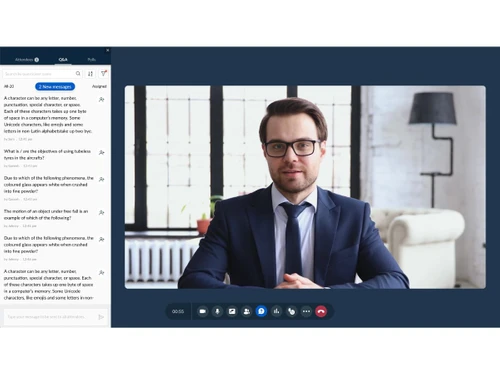
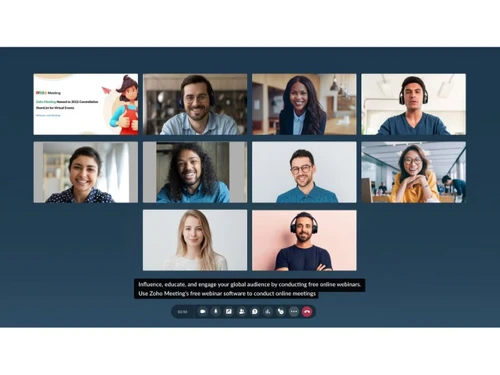
Zoho Webinar is a cloud-based webinar software. It is designed for hosting professional online webinar sessions. It operates through an interactive organizer dashboard, allowing presenters to manage speakers, attendees, and shared content with ease.

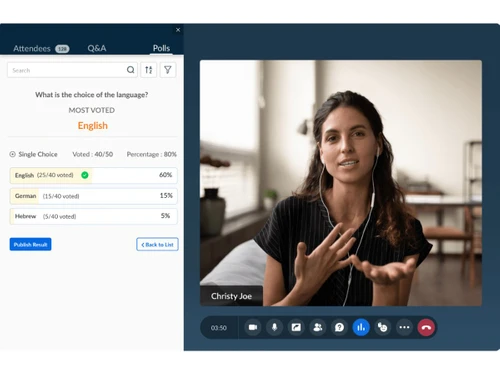
Zoho Webinar provides customizable branding for event pages and emails, interactive polls, Q&A sessions, and emoji reactions to boost audience involvement. It provides secure streaming with end-to-end encryption for webinar sessions. It sends timely notifications to boost attendance and reduce drop-offs.

The platform integrates with CRM and Campaigns, lead generation and marketing automation. It comes with flexible pricing slabs that accommodate varying audience sizes.

Why Choose Zoho Webinar?

  • Secure Webinars: Helps to host secure online webinar sessions with encryption, for safe communication, reliable streaming, and trustworthy experiences.
  • Registrations: Manage attendee sign-ups efficiently with customizable forms, automated confirmations, and branded pages, managing event participation and audience engagement.
  • Webcasting: Broadcast live presentations globally, share content, and deliver professional experiences to the audiences without technical interruptions.
  • Analytics: Gain actionable insights through detailed reports, track attendee behavior, measure engagement, and optimize future events using performance-driven data.
  • Screen Sharing: Present slides, demonstrate software, or showcase documents in real time, supporting communication and interactive collaboration during sessions

Benefits of Zoho Webinar

  • Ease of use: A simple interface helps the organizers to schedule, manage, and deliver webinar sessions without technical complexity.
  • Better attendee understanding: Interactive tools help to increase clarity, giving participants a grasp of concepts effectively during live or recorded sessions.
  • Secure: Encrypted streaming protects sensitive information, guaranteeing safe communication and trustworthy experiences for all participants.
  • Better engagement: Polls, Q&A, and reactions help in active involvement, keeping audiences attentive and connected throughout events.
  • Numerous options: Flexible plans, integrations, and mobile access help to provide smooth execution of webinars easily and efficiently.

Pricing of Zoho Webinar

Zoho Webinar Price starts at INR450 at techjockey.com. Zoho Webinar comes with multiple pricing plans and caters to a diverse customer base. For subscription-related details and offers on premium packages, please request a call back from our product experts.

Read more

Zoho Corporation Company Details

Founded Year:  1996

Zoho Corporation is an Indian multinational company that specialises in software development, cloud computing, and web-based business tools. It is best known for Zoho Office suite and its enterprise IT management division, ManageEngine

Director/Founders Sridhar Vembu / Tony Thomas
Company Size 1000+ Employees

Zoho Webinar Pricing & Plans

Standard

Calculated Price

450 Exclusive of all taxes
    • Users

      Users
      Users
    • Monthly

      Monthly
      Monthly

Key Features

  • 25 Attendees

  • Cloud recording storage of 10 GB/organizer

  • Multiple co-organizers

  • Webinars for up to 24 hours

  • Webinar recording

  • Embed registration form

Professional

Calculated Price

950 Exclusive of all taxes
    • Users

      Users
      Users
    • Monthly

      Monthly
      Monthly

Key Features

  • 25 Attendees

  • Source tracking

  • Registration moderation

  • Registration form customization

  • Share material

  • File management

Enterprise

Calculated Price

4740 Exclusive of all taxes
    • Users

      Users
      Users
    • Monthly

      Monthly
      Monthly

Key Features

  • 500 Attendees

  • On-demand webinar

  • Custom domain

  • Email customization

  • Domain restriction for registration

  • Onboarding and Implementation

Zoho Webinar Features

  • icon_check HD Video Broadcasting
    Stream webinars in high-definition with minimal latency for clear visuals and seamless communication.
  • icon_check Screen Sharing
    Share your screen, slides, or applications in real-time to deliver engaging presentations or product demos.
  • icon_check Custom Branding
    Personalize your webinars with custom logos, themes, and branded registration pages to match your identity.
  • icon_check Interactive Polls
    Engage attendees with live polls and surveys during webinars to gather instant feedback and insights.
  • icon_check Q&A management
    Host structured question-and-answer sessions allowing attendees to interact and clarify key discussion points.
  • icon_check Raise Hand Option
    Enable participants to raise virtual hands for queries or participation, ensuring interactive engagement.
  • icon_check Registration Management
    Create and customize registration forms to capture attendee data and manage event sign-ups efficiently.
  • icon_check Automated Email Notifications
    Send automated confirmation, reminder, and follow-up emails to keep attendees informed and engaged.
  • icon_check Record Webinars
    Record entire sessions automatically for future playback, sharing, or repurposing into training content.
  • icon_check Analytics & Reporting
    Track attendee engagement, participation, and performance through detailed webinar analytics and reports.
  • icon_check Lead Generation
    Capture qualified leads from registration and engagement data and sync them directly with Zoho CRM.
  • icon_check Browser-Based Access
    Allow attendees to join webinars directly from their browsers—no downloads or installations required.
  • icon_check Multi-Host Support
    Add multiple presenters or co-hosts to collaborate and manage sessions effectively during live events.
  • icon_check Audience Engagement Tools
    Use chat, reactions, and polls to increase attendee participation and improve event interactivity.
  • icon_check Secure Streaming
    Ensure data protection with TLS and DTLS-SRTP encryption for secure and compliant webinar experiences.
Zoho Webinar Demo Video play icon

Get Zoho Webinar Demo

Watch the demo video to explore key features, real workflows, and how the software fits your business needs.

Understand
Key Features
Personal
Demo Insights
Interactive
Demo Support

Zoho Webinar Specifications

Supported Platforms
Windows Windows iOS iOS Android Android MacOS MacOS
Devices
Desktop Desktop Mobile Mobile Tablet Tablet iPad iPad
Deployment
Cloud-Based Cloud-Based
Suitable For
All Industries
Business Specific
All Businesses
Business Size
Small Business Medium Business Enterprises
Customer Support
Phone Email Communities
Language
English
Training Resources
Videos
Compliance Regulation
SOC 2

Zoho Webinar Review

4.1

Out of 5

img

Overall Rating

Based on
3 Verified Ratings

Rating Breakdown

  • Features 4
  • Value for Money 4.6
  • Ease of Use 3.8
  • Customer Support 4

80% Recommend this Product

Add Review

Techjockey Trusted Reviews from Verified Users

No reviews are currently available for Zoho Webinar. Discover similar Webinar Software reviews

  • Webinarjam

    4.8

    Whats great - The reason I use WebinarJam for my video and audio conferencing is that it helps me chat live with my attendees. Moreover, I ... read more

  • GoToWebinar

    4.4

    Whats great - Easy, Simple and Reliable solution. Great platform with best functionality read more

  • GudSho

    4.3

    Whats great - I can create branded channels for each subject, allowing me to organize my content and cater to different learning styles. read more

Compare Zoho Webinar With other Webinar Software

Products
Ratings
Pricing
Device Supported
Deployment
Supported Platforms
  • img

    Zoho Webinar

  • 4.1

  • ₹ 450.00 excl. GST

  • Desktop

    Mobile

  • Web based

    On Premises

  • Windows

    Mac OS

  • img

    Webinarjam

  • 4.6

  • Price On Request

  • Desktop

    Mobile

  • Web based

    On Premises

  • Windows

    Mac OS

  • img

    GoToWebinar

  • 4.3

  • Price On Request

  • Desktop

    Mobile

  • Web based

    On Premises

  • Windows

    Mac OS

  • img

    ClickMeeting

  • 4.1

  • Price On Request

  • Desktop

    Mobile

  • Web based

    On Premises

  • Windows

    Mac OS

  • img

    Larksuite

  • 4.1

  • Price On Request

  • Desktop

    Mobile

  • Web based

    On Premises

  • Windows

    Mac OS

  • img

    EasyWebinar

  • 4.3

  • Price On Request

  • Desktop

    Mobile

  • Web based

    On Premises

  • Windows

    Mac OS

  • img

    BigMarker

  • 4.2

  • Price On Request

  • Desktop

    Mobile

  • Web based

    On Premises

  • Windows

    Mac OS

  • img

    Daxta

  • 4.1

  • Price On Request

  • Desktop

    Mobile

  • Web based

    On Premises

  • Windows

    Mac OS

(0) Product(s) selected

Zoho Webinar Alternatives

See All Zoho Webinar Alternatives

Starting Price:

$49 /Month

Available

Price on Request

Available

Price on Request

Available

Price on Request

Articles for Zoho Webinar

See All Related Articles

How much does Zoho Webinar cost?

Zoho Webinar pricing starts at INR 450 at techjockey.com.

Who uses Zoho Webinar?

Zoho Webinar is used by businesses, educators, and organizations for marketing, training, product demos, and interactive online events.

How does Zoho Webinar work?

Zoho Webinar works through a cloud-based platform, enabling organizers to schedule, broadcast, record webinars, and engage audiences with interactive tools.

Which operating systems are compatible with Zoho Webinar Software?

Zoho Webinar runs smoothly on OS like Windows, macOS, Android, and iOS.

Is a free demo available for the Zoho Webinar software?

Yes, a free demo is available for Zoho Webinar software.

Does Zoho Webinar support screen sharing?

Yes, Zoho Webinar supports real-time screen sharing, helping presenters to showcase slides, applications, or documents during sessions.

Can Zoho Webinar record sessions?

Yes, Zoho Webinar allows recording of live events, which can be shared later as on-demand webinars.

Does Zoho Webinar provide analytics?

Yes, Zoho Webinar provides detailed analytics, including attendee engagement, poll results, and performance metrics for event optimization.

Is Zoho Webinar secure?

Zoho Webinar ensures secure streaming with encryption, protecting sensitive information and maintaining safe communication for organizers and participants.

20,000+ Software Listed

Best Price Guranteed

Free Expert Consultation

2M+ Happy Customers

Terms and Condtions

close

Users with registered businesses can purchase goods from merchants on the platform to satisfy their business needs. Users are not permitted to utilize any products acquired through the platform for resale, advertising, business, or further distribution.

For each purchase made, users will receive a Tax Invoice (or 'GST invoice') that includes specific details such as:

  • the GSTIN of the user associated with their registered business, and

  • the specified Entity Name for their business.

It should be noted that not all products are eligible for GST Invoice. Only the products displayed by participating sellers with the 'GST-based Invoice Available' callout on the product description page would qualify.

Certain goods and services are not eligible to get a GST Invoice, including items with VAS, i.e., Value Added Services (e.g., Total Mobile Protection/Assured Buyback) and those involving an exchange offer at the time of purchase.

Users must ensure the accuracy of the GSTIN, and business entity name provided for the GST Invoice. Requests for corrections into GST Invoice would not be accommodated by Techjockey.com or any Seller, and any issues arising from user-provided information are the sole responsibility of users.

Techjockey.com is not liable for the GST Invoice or any associated input tax credit. To efficiently claim an input tax credit, users should select the registered place of business address as per the GST authority's data and follow the provisions of the GST Act and rules.

To claim an input tax credit, the delivery and billing addresses must match. Furthermore, input tax credits will not be granted if the delivery address and GSTIN on the invoice are from different states. In case of incorrect GST details provided during the order placement, the order will be canceled automatically.