linkedin
Zoho Publish logo
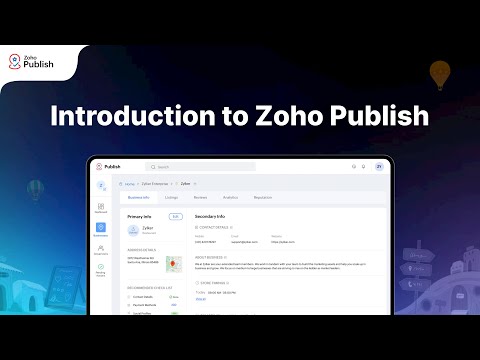
play A quick introduction to Zoho Publish
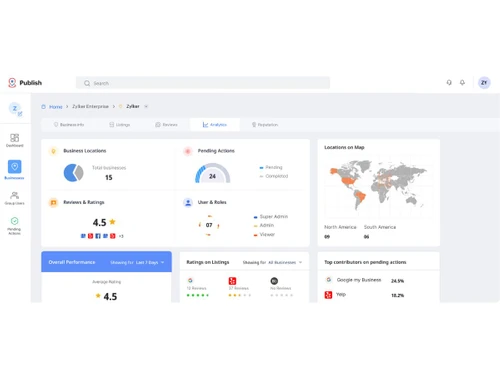
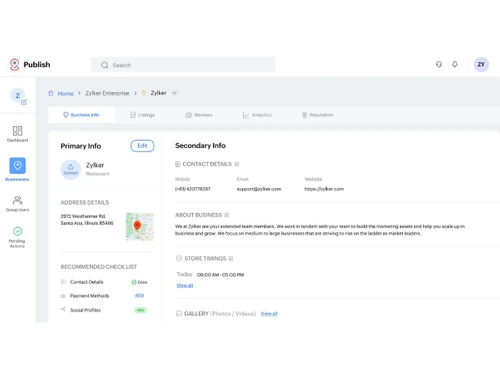
Zoho Publish-dashboard
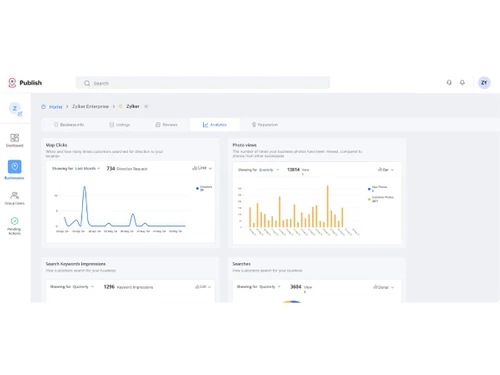
Zoho Publish-impressions

Zoho Publish

Brand: Zoho Corporation

  • 4.2

  • 5 Ratings

  • A business management software that helps manage listings and online reputation.
  • Keeps business information updated across multiple online platforms easily.
  • Helps manage and respond to customer reviews from one place.
  • Improves visibility and builds trust with accurate business information.
See More

Have you used Zoho Publish before?

Share your insights for better experience

Add a Review
Starting Price
₹600 excl.GST
₹ 600 incl. GST

View plans

offer Save upto 18%, Get GST Invoice on your business purchase T&C
offer Buy Now & Pay Later, Check offer on payment page.
Buy Now
100% Genuine
Products
Best Price
Guaranteed
Safe & Secure
Payment
  • Description

  • Pricing

  • Features

  • Specification

  • Review

  • Compare

  • Alternatives

  • FAQ

Starting at ₹600
Buy Now

Zoho Publish Software Overview

What is Zoho Publish?

Zoho Publish is a business management software that assists businesses in managing their web presence on various platforms. It enables the companies to maintain the business information to be current and uniform on the different listing platforms where customers are searching for services.

This platform is appropriate for businesses that desire to have a good online reputation and relate well with their customers. It keeps them informed of what is being said by the customers and acts promptly.

Zoho Publish is widely applied by organizations and companies to enhance visibility, create trust, and effectively manage their image. It ensures that the useful business information is correct, and thus the customers can easily access and communicate with the business over the internet.

Why Choose Zoho Publish?

  • Manage business listings easily: It assists businesses to ensure their details are updated at all times on various platforms, so that a customer will never be misled by any information online.
  • Handle customer reviews in one place: Customers are able to read and reply to various reviews across various locations, which may assist in enhancing customer trust and reputation.
  • Improve online visibility: Maintaining business information will make it easier for customers to locate your business with ease, and this will increase visibility and opportunities to attract more customers online.
  • Save time with automation: It saves time on manual labor as it maintains updates efficiently and reviews responses to make businesses prioritize their activities.
  • Get useful business insights: It offers clear data on customer behavior and feedback, which companies can use to improve their performance and overall web presence.

Zoho Publish Pricing

Zoho Publish pricing starts at INR 600 per month on Techjockey. Several parameters, including additional functionality, deployment type, and total number of users, determine pricing. For more details about the product, please contact our product team to discuss pricing and promotions.

Read more

Zoho Corporation Company Details

Founded Year:  1996

Zoho Corporation is an Indian multinational company that specialises in software development, cloud computing, and web-based business tools. It is best known for Zoho Office suite and its enterprise IT management division, ManageEngine

Director/Founders Sridhar Vembu / Tony Thomas
Company Size 1000+ Employees

Zoho Publish Pricing & Plans

Professional
Key Features
  • Create Business
  • Automate Review Response
  • Auto-assign Users to Reviews
  • AI Response
  • Create Reports
  • Schedule Reports
  • Zoho CRM Integration
  • Zoho Desk Integration

Calculated Price

600 Exclusive of all taxes
    • Location

      Location
      Location
    • Monthly

      Monthly
      Monthly

Key Features

  • Create Business

  • Automate Review Response

  • Auto-assign Users to Reviews

  • AI Response

  • Create Reports

  • Schedule Reports

  • Zoho CRM Integration

  • Zoho Desk Integration

Zoho Publish Features

  • icon_check Business Listings Management
    Update and sync business details across multiple directories and platforms from one centralized dashboard.
  • icon_check Multi-Location
    Manage listings, reviews, and visibility for multiple business locations efficiently within a single interface.
  • icon_check Review Monitoring
    Track and view customer reviews from all connected listing platforms in real time to stay informed.
  • icon_check AI-Assisted Review Response
    Use AI-generated templates and smart suggestions to craft quick, accurate, and brand-aligned review replies.
  • icon_check Dashboards
    Get a unified view of listings, reviews, and analytics metrics for all locations in one intuitive dashboard.
  • icon_check Listing Accuracy Control
    Ensure consistent business data like name, address, and phone number across every connected directory.
  • icon_check Sentiment Analysis
    Automatically analyze review tone and sentiment to understand customer satisfaction trends over time.
  • icon_check Performance Analytics
    Access visual reports on reviews, ratings, listing visibility, and engagement metrics for better insights.
  • icon_check Directory Integration
    Connect and publish listings to popular directories such as Google, Bing, Yelp, and SuperPages easily.
  • icon_check Bulk Listing Updates
    Edit and publish location details in bulk across multiple directories to save time and avoid manual errors.
  • icon_check Role-Based Access Control (RBAC)
    Assign roles and permissions to users or teams for managing reviews and listings securely.
  • icon_check Review Filtering & Sorting
    Filter reviews by rating, platform, or sentiment to prioritize responses and focus on key feedback.
  • icon_check Competitor Insights
    Monitor competitors’ online reputation and listing performance to identify improvement opportunities.
  • icon_check Report Scheduling
    Automate generation and delivery of performance reports to stakeholders on a recurring schedule.
  • icon_check API & Integration Support
    Integrate with Zoho CRM, Zoho Social, or third-party marketing tools to enhance automation and data flow.
Zoho Publish Demo Video play icon

Get Zoho Publish Demo

Watch the demo video to explore key features, real workflows, and how the software fits your business needs.

Understand
Key Features
Personal
Demo Insights
Interactive
Demo Support

Zoho Publish Specifications

Supported Platforms
Ubuntu Ubuntu Windows Windows MacOS MacOS Linux Linux
Devices
Desktop Desktop
Deployment
Cloud-Based Cloud-Based
Suitable For
All Industries
Business Specific
All Businesses
Business Size
Small Business Medium Business Enterprises
Customer Support
Phone Email Communities
Language
English
Integration
API Integration
Training Resources
Videos
AI Features
AI Integrated

Explore the Best Alternative Solutions Similar to Your Business Size and Needs

Medium Business

Built for business growth and flexibility

eLite BAM

4.4

Karya

3.9

PROCRM

4.2

See More

Enterprises

Designed for complex and large-scale business needs

See More

Zoho Publish Review

4.2

Out of 5

img

Overall Rating

Based on
5 Verified Ratings

Rating Breakdown

  • Features 4.2
  • Value for Money 4.5
  • Ease of Use 4
  • Customer Support 4.4

80% Recommend this Product

Add Review

Be the First to Review

This product has no reviews yet. Be the first to leave your feedback.

Add Review

Compare Zoho Publish With other Business Management Software

Products
Ratings
Pricing
Device Supported
Deployment
Supported Platforms
  • img

    Zoho Publish

  • 4.2

  • ₹ 600.00 excl. GST

  • Desktop

    Mobile

  • Web based

    On Premises

  • Windows

    Mac OS

  • img

    Zoho One

  • ₹ 2500

  • Desktop

    Mobile

  • Web based

    On Premises

  • Windows

    Mac OS

  • img

    PROCRM

  • 4.2

  • Price On Request

  • Desktop

    Mobile

  • Web based

    On Premises

  • Windows

    Mac OS

  • img

    AntMyERP

  • 4.1

  • ₹ 1200

  • Desktop

    Mobile

  • Web based

    On Premises

  • Windows

    Mac OS

  • img

    Dubsado

  • 4.3

  • Price On Request

  • Desktop

    Mobile

  • Web based

    On Premises

  • Windows

    Mac OS

  • img

    JAGGAER

  • 4.4

  • Price On Request

  • Desktop

    Mobile

  • Web based

    On Premises

  • Windows

    Mac OS

  • img

    Bookkizee

  • 4.1

  • Price On Request

  • Desktop

    Mobile

  • Web based

    On Premises

  • Windows

    Mac OS

  • img

    Raiser

  • 4.3

  • ₹ 499

  • Desktop

    Mobile

  • Web based

    On Premises

  • Windows

    Mac OS

  • img

    Striven

  • 4.4

  • Price On Request

  • Desktop

    Mobile

  • Web based

    On Premises

  • Windows

    Mac OS

  • img

    Bloom

  • 4.0

  • Price On Request

  • Desktop

    Mobile

  • Web based

    On Premises

  • Windows

    Mac OS

(0) Product(s) selected

Zoho Publish Alternatives

See All Zoho Publish Alternatives

Starting Price:

$20

Available

Price on Request

Starting Price:

$35 /Month

Starting Price:

$9 /Month

Starting Price:

$30 /Month

Available

Price on Request
Articles for Zoho Publish

See All Related Articles

How much does Zoho Publish cost?

Zoho Publish pricing starts at INR 600 per user per month on Techjockey.

Is Zoho Publish a part of Zoho One?

Zoho Publish is part of Zoho One, so it can be accessed as part of the entire business software system.

What is Zoho Publish used for?

Zoho Publish is applied to handle business listing, monitor customer reviews, and have an excellent presence on the web on various platforms.

How does Zoho Publish work?

It gathers business data and reviews on various platforms, enabling businesses to take care of listing and responding to customers in a single location.

Who uses Zoho Publish?

Zoho Publish is a tool that is used by companies, marketers, and agencies interested in enhancing their presence online and containing feedback messages effectively.

Can Zoho Publish improve online reputation?

Yes, it is used to have businesses reply to reviews swiftly and have the right information available to enhance trust and overall internet credibility in the long run.

Is Zoho Publish easy to use?

Yes, the interface of the Zoho Publish is not complex and allows users to manage the listing and reviews without any special technical skills.

Can Zoho Publish manage multiple locations?

Yes, it enables businesses to handle listings and reviews of various locations and, therefore, is appropriate for growing and multi-location businesses.

20,000+ Software Listed

Best Price Guranteed

Free Expert Consultation

2M+ Happy Customers

Terms and Condtions

close

Users with registered businesses can purchase goods from merchants on the platform to satisfy their business needs. Users are not permitted to utilize any products acquired through the platform for resale, advertising, business, or further distribution.

For each purchase made, users will receive a Tax Invoice (or 'GST invoice') that includes specific details such as:

  • the GSTIN of the user associated with their registered business, and

  • the specified Entity Name for their business.

It should be noted that not all products are eligible for GST Invoice. Only the products displayed by participating sellers with the 'GST-based Invoice Available' callout on the product description page would qualify.

Certain goods and services are not eligible to get a GST Invoice, including items with VAS, i.e., Value Added Services (e.g., Total Mobile Protection/Assured Buyback) and those involving an exchange offer at the time of purchase.

Users must ensure the accuracy of the GSTIN, and business entity name provided for the GST Invoice. Requests for corrections into GST Invoice would not be accommodated by Techjockey.com or any Seller, and any issues arising from user-provided information are the sole responsibility of users.

Techjockey.com is not liable for the GST Invoice or any associated input tax credit. To efficiently claim an input tax credit, users should select the registered place of business address as per the GST authority's data and follow the provisions of the GST Act and rules.

To claim an input tax credit, the delivery and billing addresses must match. Furthermore, input tax credits will not be granted if the delivery address and GSTIN on the invoice are from different states. In case of incorrect GST details provided during the order placement, the order will be canceled automatically.