 USA
USA UAE
UAESmall Business
Designed for startups and growing businesses


See More





Brand: Abtrac
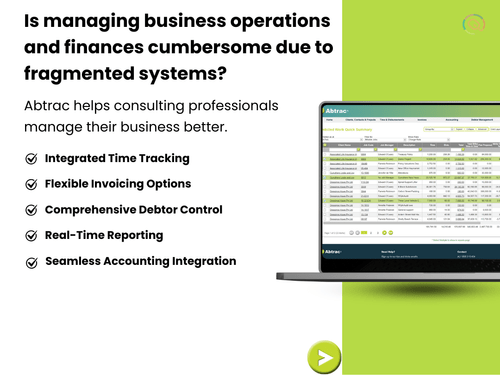
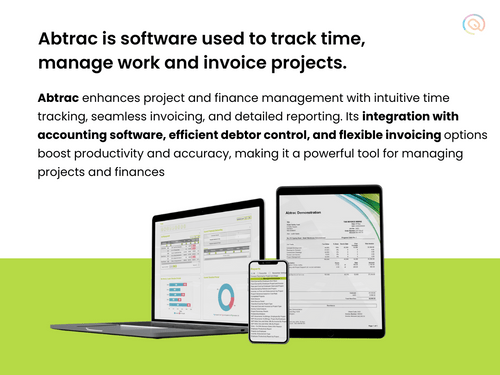
Abtrac simplifies project management by combining time tracking, invoicing, reporting, and project management in a single platform.
See MoreHave you used Abtrac before?
Share your insights for better experience
Brand: Abtrac
Founded Year: 1990
Abtrac is the leading all-in-one job management software with online timesheets in Australia and New Zealand.
Core Functionalities
 Issue Management Workflow Management Resource Management Task Management Risk Management Backlog Management Pipeline Management Sprint Management Workforce Management Incident Management
 Task & Workflow Management
Workflow Automation Recurring Tasks Task Prioritization Sub-Task Creation Notifications/Reminders Task Creation & Assignment Task Dependencies Automated Task Assignment Task Views
Gantt Chart Task List Calendar View Timeline View Kanban Boards Spreadsheet View Mind Map Progress & Performance Tracking
Time Tracking Team Capacity Tracking Milestone Tracking Resource & Budget Management
Budget Planning Automated Resource Allocation Dynamic Budgeting Risk Scoring System Workload Distribution Auto Scaling Collaboration & Communication
File Sharing & Document Collaboration Real-Time Collaboration Integrated Chat & Messaging Version Control Access Control & Security
User Access Management Activity Logs Data Backup and Disaster Recovery Compliance Tracking Multi-Factor Authentication (MFA) Customization
Templates Custom Fields Task Customization Custom Layouts Custom Views Integrations
API Integration Communication and Collaboration Tools File Storage and Sharing Time Tracking Tools CRM Integration Issue Tracking Tools Automation Tools AI-Based Integrations ERP Integration Third Party Integrations Reporting & Analytics
Dashboards Automated Reports Project Progress Reports Resource Reports Risk Reports Timesheet Reports Real-Time Reporting Report Customization Benchmarking Workload Reports Sprint Reports Burndown & Burnup Charts Bottleneck Reports Predictive Analytics 

Watch the demo video to explore key features, real workflows, and how the software fits your business needs.
 Windows
  MacOS
MacOS  Linux
Linux  Desktop
  Cloud-Based
Small Business
Designed for startups and growing businesses
Medium Business
Built for business growth and flexibility
Enterprises
Designed for complex and large-scale business needs
4.1
Out of 5

Overall Rating
Based on
10 Verified Reviews
Rating Breakdown
81% Recommend this Product
Add ReviewUsers generally appreciate Abtrac for its effectiveness in organizing projects, tracking time, and managing budgets. The software simplifies collaboration, enhances reporting capabilities, and is user-friendly, making it suitable for teams of various sizes. However, some users have noted limitations, such as frequent auto-saving causing delays during data entry and a need for more customization options. Additionally, performance can suffer with larger files or slow internet connections, which can disrupt workflow. Overall, Abtrac is viewed as a reliable tool with room for improvement.
Pros
"Abtrac is very convenient to be able to generate detailed reports, also allows us to adjust charges as needed."
Cons
"The only issue we face is when the internet connection is slow, it does cause a delay in data entry. "
"One minor issue we’ve noticed is that the system tends to save more often than necessary, which can slow things down during data entry. "
"Sometimes the system auto-saves frequently, which can cause a delay in data entry. "

Aug 5, 2024
Techjockey Verified
“Abtrac: Great for Design Collaboration but Needs More Features”
I’ve been using Abtrac to manage design projects with my team, and it’s been helpful for keeping everyone organized.
Pros
Abtrac is excellent when it comes to design collaboration. Sharing and managing design files with my team became so much easier after we started using it. I also like that it allows version control, so I don’t have to worry about losing any design updates. The integration with Sketch is smooth, and it helps everyone stay on the same page, which is super important in a fast-paced environment.
Cons
While it’s great for collaboration, the software could benefit from more customization options. I’ve found the lack of support for other design tools besides Sketch a bit frustrating. Also, the platform can be a bit slow at times, especially when working with larger design files, which disrupts our workflow.
Reason to switch
We switched to Abtrac because we needed a more organized way to manage design versions and collaborate in real time, and it offered the perfect solution for that.
Jul 11, 2024
Techjockey Verified
“Abtrac Keeps Our Projects Well-Organized”
Abtrac has been an excellent tool for keeping our projects organized. It tracks time, manages budgets, and helps us generate accurate invoices.
Pros
Abtrac helps us stay on top of all aspects of our projects, from tracking hours to managing expenses and generating invoices. The system is easy for new hires to pick up and use right away.
Cons
Sometimes the system auto-saves frequently, which can cause a delay in data entry.
Reason to switch
I was looking for change.
Aug 5, 2024
Techjockey Verified
“Abtrac is a time-saving software for Project Tracking”
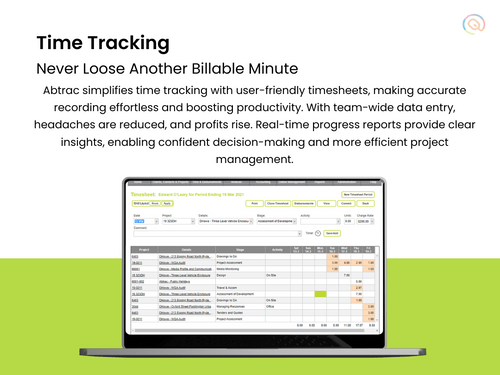
We’ve been using Abtrac for a number of years, and it has helped us stay organized when managing projects. The invoicing system pulls data directly from timesheets, and the reports provide valuable insights into project progress and costs.
Pros
Abtrac’s reporting feature makes it easy to monitor expenses and hours worked on projects. It automatically adds expenses to invoices, saving us time. We also like how simple it is to manage client information and track employee hours with the platform.
Cons
One minor issue we’ve noticed is that the system tends to save more often than necessary, which can slow things down during data entry.
Reason to switch
We needed software that would allow us to track projects more.

Abtrac
Price On Request
Desktop
Mobile
Web based
On Premises
Windows
Mac OS

Jira
Price On Request
Desktop
Mobile
Web based
On Premises
Windows
Mac OS
TrackPM
Price On Request
Desktop
Mobile
Web based
On Premises
Windows
Mac OS

Swatle
Price On Request
Desktop
Mobile
Web based
On Premises
Windows
Mac OS

Birdview PMS
Price On Request
Desktop
Mobile
Web based
On Premises
Windows
Mac OS

Forecast
Price On Request
Desktop
Mobile
Web based
On Premises
Windows
Mac OS

Favro
Price On Request
Desktop
Mobile
Web based
On Premises
Windows
Mac OS

Zoho Projects
₹ 3360
Desktop
Mobile
Web based
On Premises
Windows
Mac OS

Clickup
Price On Request
Desktop
Mobile
Web based
On Premises
Windows
Mac OS

SmartSuite
Price On Request
Desktop
Mobile
Web based
On Premises
Windows
Mac OS

Dart
Price On Request
Desktop
Mobile
Web based
On Premises
Windows
Mac OS
(0) Product(s) selected
Starting Price:
$9 /User/Month
Available
Price on Request
Starting Price:
$12 /Month
Starting Price:
$10 /User/Month
Starting Price:
$10 /User/Month

Starting Price:
$19 /Month

Starting Price:
$13 /Month

Starting Price:
$179 /Month

Starting Price:
$35 /Month

Starting Price:
$10 /User/Month

Starting Price:
$2 /Monthly






No, Abtrac doesn't offer a free version.
Abtrac offers various pricing plans, so the exact cost depends on your specific needs. The starting cost of Abtrac is USD 66 per month.
No, Abtrac currently doesn't have a mobile app.
Abtrac takes data security seriously and uses high-security practices to protect data and information.
Abtrac is mainly used for consulting professionals like architects, engineers, etc.
Visit the Abtrac website to sign up for their free trial for a limited time duration before switching to a paid plan.
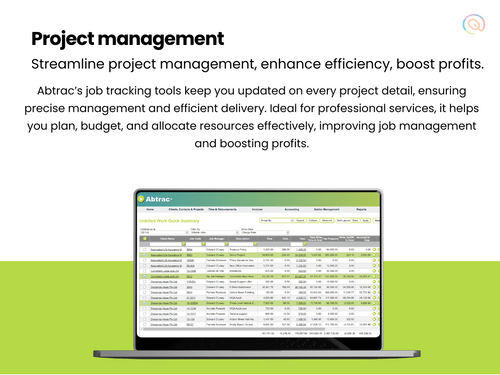
Abtrac is an all-in-one project management software used by professional services firms to manage proposals, jobs, scheduling, time tracking, invoicing, and reporting in a single connected system.
Abtrac price starts at USD 47 at techjockey.com.
Abtrac offers an optional accounts link add-on that allows it to sync invoices, expenses, and payroll data with your accounting and payroll software.
Abtrac manages your jobs and resources, tracks time and project budgets, prepares and sends invoices, links to your accounts, and provides comprehensive reporting on project progress.
Abtrac is ideal for architects, engineers, surveyors, project managers, planners, and other professional service firms that need project management, time tracking, and billing software.
No, Abtrac does not require a fixed-term contract as you pay on a month-to-month basis and can adjust your plan at any time.
Abtrac provides support from real people via phone and email, offering one-on-one training and assistance from a local support team with real-world experience.
Yes, you can enhance your core Abtrac subscription with optional add-on modules for accounting software integration, debtor management, and project mapping.
Yes, every Abtrac subscription includes a mobile timesheet app that allows you to track time and expenses from anywhere.
20,000+ Software Listed
Best Price Guranteed
Free Expert Consultation
2M+ Happy Customers
Terms and Condtions

Users with registered businesses can purchase goods from merchants on the platform to satisfy their business needs. Users are not permitted to utilize any products acquired through the platform for resale, advertising, business, or further distribution.
For each purchase made, users will receive a Tax Invoice (or 'GST invoice') that includes specific details such as:
the GSTIN of the user associated with their registered business, and
the specified Entity Name for their business.
It should be noted that not all products are eligible for GST Invoice. Only the products displayed by participating sellers with the 'GST-based Invoice Available' callout on the product description page would qualify.
Certain goods and services are not eligible to get a GST Invoice, including items with VAS, i.e., Value Added Services (e.g., Total Mobile Protection/Assured Buyback) and those involving an exchange offer at the time of purchase.
Users must ensure the accuracy of the GSTIN, and business entity name provided for the GST Invoice. Requests for corrections into GST Invoice would not be accommodated by Techjockey.com or any Seller, and any issues arising from user-provided information are the sole responsibility of users.
Techjockey.com is not liable for the GST Invoice or any associated input tax credit. To efficiently claim an input tax credit, users should select the registered place of business address as per the GST authority's data and follow the provisions of the GST Act and rules.
To claim an input tax credit, the delivery and billing addresses must match. Furthermore, input tax credits will not be granted if the delivery address and GSTIN on the invoice are from different states. In case of incorrect GST details provided during the order placement, the order will be canceled automatically.



