 USA
USA UAE
UAESmall Business
Designed for startups and growing businesses


See More





Brand: Ambient Design
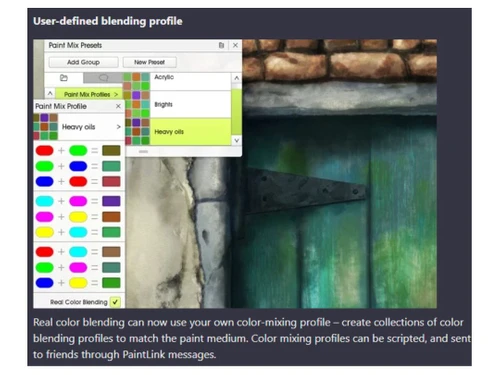
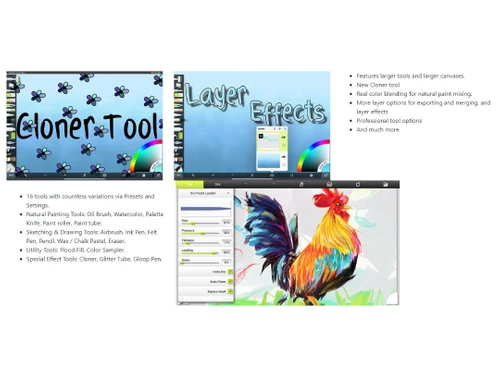
ArtRage is a digital artist's studio featuring realistic painting tools that mimic traditional media, from oils and watercolors to pencils and crayons. The software combines natural artistic tools with powerful digital utilities, making it accessible for beginners while maintaining professional-grad...
See MoreHave you used ArtRage before?
Share your insights for better experience
Brand: Ambient Design
Founded Year: 2000
Ambient Design is a New Zealand based software development company specialising in the design and development of creative products for a range of users from consumers to professionals.
 Paint Effects Digital Artworks Blending Modes Color Grading Illustration for Design An unlimited canvas for unlimited creativity Cartoon and pencil effects Drawing Tools Utilities & Tools Sketch Render

Watch the demo video to explore key features, real workflows, and how the software fits your business needs.
 Windows
  iOS
iOS  Android MacOS
  Desktop
  Mobile
  iPad
iPad  Cloud-Based
  Perpetual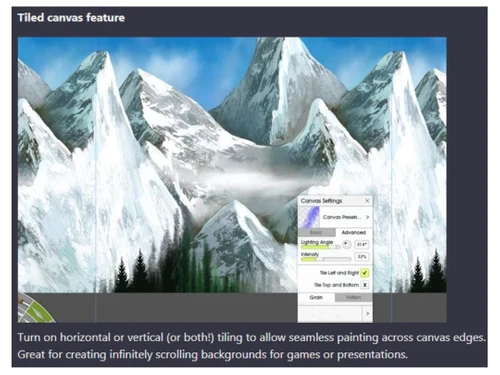
Small Business
Designed for startups and growing businesses
Medium Business
Built for business growth and flexibility
Enterprises
Designed for complex and large-scale business needs
4.1
Out of 5

Overall Rating
Based on
4 Verified Ratings
Rating Breakdown
90% Recommend this Product
Add ReviewTechjockey Trusted Reviews from Verified Users
No reviews are currently available for ArtRage. Discover similar Sketching Software reviews

ibisPaint
Whats great - Layer support is comparable to desktop software. read more

Sketchbook
Whats great - Great for quick sketching and idea generation, customizable brushes, smooth performance even on large canvases, scan sketch f... read more

Fusion 360
Whats great - I use Fusion 360 as a speedy and straightforward approach to effortlessly coax things out. It is an a lot quicker stacking an... read more

ArtRage
Price On Request
Desktop
Mobile
Web based
On Premises
Windows
Mac OS

Procreate
₹ 999
Desktop
Mobile
Web based
On Premises
Windows
Mac OS

ZBrush
₹ 5767
Desktop
Mobile
Web based
On Premises
Windows
Mac OS

dreamlike art
Price On Request
Desktop
Mobile
Web based
On Premises
Windows
Mac OS
Tux Paint
Price On Request
Desktop
Mobile
Web based
On Premises
Windows
Mac OS
ibisPaint
Price On Request
Desktop
Mobile
Web based
On Premises
Windows
Mac OS
Sketchbook
Price On Request
Desktop
Mobile
Web based
On Premises
Windows
Mac OS

Vizcom
Price On Request
Desktop
Mobile
Web based
On Premises
Windows
Mac OS

Clip Studio Paint
Price On Request
Desktop
Mobile
Web based
On Premises
Windows
Mac OS

Flame Painter
₹ 1560
Desktop
Mobile
Web based
On Premises
Windows
Mac OS

Apexwin
Price On Request
Desktop
Mobile
Web based
On Premises
Windows
Mac OS
(2) Product(s) selected
Starting Price:
$16 /Month
Available
Price on Request
Starting Price:
₹1,560 /Quantity
Starting Price:
$395 /Quantity

Starting Price:
$5 /License

Available
Price on Request

Starting Price:
$20 /Month

Starting Price:
$2 /License

Starting Price:
$2 /Monthly

Available
Price on Request
ArtRage pricing starts at $5 at techjockey.com. Pricing is customised based on specific business needs.
ArtRage software supports Windows, macOS, iOS, and Android.
ArtRage simulates real-world painting tools, allowing artists to create digital art using realistic oils, watercolors, pencils, and more. It combines natural painting with digital utilities like layers and blend modes. The software is helpful for both beginners and professionals.
Yes, the ArtRage app is available for both Android and iOS users.
ArtRage offers realistic paint effects, digital art tools, blending modes, color grading, illustration tools, unlimited canvas size, cartoon effects, drawing tools, utilities, and sketch rendering. You can contact our product experts for more information.
Contact techjockey.com to explore trial options for ArtRage. They can provide information about available testing periods. You can contact our product experts for more information.
Yes, ArtRage can be suitable for small businesses, especially those involved in design, illustration, or education. Its cost-effective pricing and versatile tools make it a valuable asset for creating marketing materials, educational content, or product visuals.
ArtRage is designed for a wide range of users, including students, hobbyists, and professional artists. Its intuitive interface and realistic tools cater to both beginners and experienced digital painters, while its educational value makes it ideal for classroom settings. In short, anyone interested in exploring realistic digital painting can benefit from using ArtRage.
ArtRage, being a reputable software, likely employs standard data protection measures. Its cross-platform compatibility suggests file encryption and secure cloud storage options may be available for protecting artwork.
Yes, ArtRage is designed with an intuitive interface and familiar tools, making it easy to learn, especially for those with traditional art experience.
ArtRage excels at simulating natural media, making it ideal for creating realistic digital paintings, illustrations, and sketches. It's also great for experimenting with different art styles and techniques.
ArtRage focuses on realistic traditional media simulation, while Procreate offers a broader range of digital art tools and features. The 'better' software depends on individual artistic preferences and needs. For more information on Procreate, you can visit techjockey.com.
ArtRage primarily focuses on static images and illustrations. While it doesn't have traditional animation features, its script recording capability can capture the painting process, which can be used for creating time-lapses or tutorials.
20,000+ Software Listed
Best Price Guranteed
Free Expert Consultation
2M+ Happy Customers
Terms and Condtions

Users with registered businesses can purchase goods from merchants on the platform to satisfy their business needs. Users are not permitted to utilize any products acquired through the platform for resale, advertising, business, or further distribution.
For each purchase made, users will receive a Tax Invoice (or 'GST invoice') that includes specific details such as:
the GSTIN of the user associated with their registered business, and
the specified Entity Name for their business.
It should be noted that not all products are eligible for GST Invoice. Only the products displayed by participating sellers with the 'GST-based Invoice Available' callout on the product description page would qualify.
Certain goods and services are not eligible to get a GST Invoice, including items with VAS, i.e., Value Added Services (e.g., Total Mobile Protection/Assured Buyback) and those involving an exchange offer at the time of purchase.
Users must ensure the accuracy of the GSTIN, and business entity name provided for the GST Invoice. Requests for corrections into GST Invoice would not be accommodated by Techjockey.com or any Seller, and any issues arising from user-provided information are the sole responsibility of users.
Techjockey.com is not liable for the GST Invoice or any associated input tax credit. To efficiently claim an input tax credit, users should select the registered place of business address as per the GST authority's data and follow the provisions of the GST Act and rules.
To claim an input tax credit, the delivery and billing addresses must match. Furthermore, input tax credits will not be granted if the delivery address and GSTIN on the invoice are from different states. In case of incorrect GST details provided during the order placement, the order will be canceled automatically.



