linkedin
Vizcom logo
play The Art of Drawing with AI: Vizcom's Two Drawing Modes Explained
Vizcom Authorship
Vizcom Build

Vizcom

Brand: Vizcom

  • 4.4

  • 3 Ratings

A design tool that lets users turn sketches into digital renderings and 3D models, making it easy to visualize and share creative ideas.

See More

Have you used Vizcom before?

Share your insights for better experience

Add a Review
Starting Price
$49

View plans

100% Genuine
Products
Best Price
Guaranteed
Safe & Secure
Payment
  • Description

  • Pricing

  • Features

  • Specification

  • Review

  • Compare

  • Alternatives

  • FAQ

Starting at $49

Vizcom Software Overview

What is Vizcom?

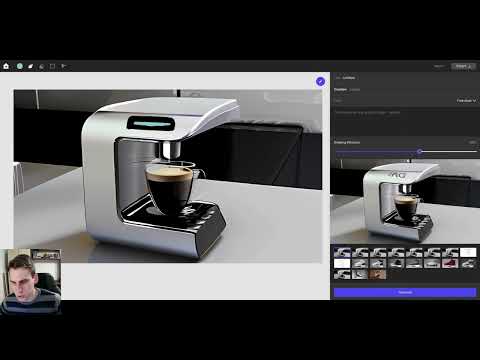
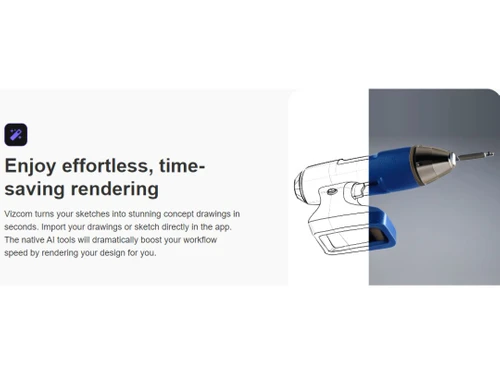
Vizcom is a creative design tool that allows users to easily turn their sketches into digital renderings. You can either take a picture of your hand-drawn sketches or draw directly within Vizcom's studio. The software then helps you render your design in various styles, including options to use your own color palette.

One of its standout features is the ability to generate a 3D model from your rendering, allowing you to view your design from different angles. This model can also be exported for use in augmented reality (AR) or for 3D printing. Vizcom is designed to streamline the design process, making it accessible for both professional designers and hobbyists.

Why Choose Vizcom Software?

  • AI-Powered Design Tools: It accelerates the creative process with intelligent sketching and rendering tools for real-time concept visualization.
  • Ease of Use: Its intuitive interface makes it accessible for beginners while offering advanced features for professionals.
  • Rapid Rendering: It quickly transforms hand-drawn sketches into high-quality, photorealistic 3D designs, speeding up the design process.
  • Real-Time Rendering: Designers can instantly see changes and adjust perspectives, colors, and lighting for refined outcomes.
  • Seamless Workflow: Integrates traditional sketching with 3D modeling, reducing the need for multiple software tools.
  • Enhanced Productivity: Automates repetitive tasks, allowing users to focus on creativity and innovation.
  • Drawing Tools: It includes familiar drawing tools that enhance control over the design process, allowing for detailed adjustments and refinements.
  • Inpainting Capabilities: Users can modify specific areas of their designs by selecting parts of the image and applying new textures or styles easily.
  • Versatility: Ideal for a range of industries, including product design, industrial engineering, and creative arts.

Benefits of Vizcom Software

  • Collaboration-Friendly: Enables teams to work together efficiently by sharing designs and receiving feedback in real-time.
  • Customizable Features: Offers adjustable tools to match individual workflows and specific design requirements.
  • Infinite Canvas Layout: The infinite canvas feature allows users to work on multiple renderings simultaneously, enhancing creativity and workflow.
  • Cloud-Based Access: Allows users to access projects anytime, anywhere, ensuring flexibility and convenience.
  • High-Quality Output: Produces professional-grade sketches and 3D models suitable for presentations and client pitches.
  • Learning Resources: Comes with tutorials, guides, and community support to help users master the software quickly.

Pricing of Vizcom

Vizcom price in India starts at $49 at techjockey.com.

The pricing model is based on different parameters, including extra features, deployment type, and the total number of users. For further queries related to the product, you can contact our product team and learn more about the pricing and offers.

Read more

Vizcom Pricing & Plans

Professional
Key Features
  • Collaborate with your team
  • Unlimited exports
  • Manage user roles
  • AI model customizations
  • Multiple image variations in one-click
  • Access to topic-specific webinars
  • Priority support from our team
Starting at $49
    • Licenses

      Licenses
      Licenses
    • Monthly

      Monthly
      Monthly

Key Features

  • Collaborate with your team

  • Unlimited exports

  • Manage user roles

  • AI model customizations

  • Multiple image variations in one-click

  • Access to topic-specific webinars

  • Priority support from our team

Vizcom Features

  • icon_check Rendering
    Creates high-quality, realistic visual outputs from sketches and 3D models.
  • icon_check Design Tools
    Offers a wide range of intuitive tools for precise and creative designing.
  • icon_check Collaborate
    Facilitates teamwork with real-time sharing and feedback on designs.
  • icon_check Graphic Design
    Supports professional-grade graphics creation for various industries.
  • icon_check Artificial Intelligence
    Enhances productivity with AI-driven automation and smart suggestions.
  • icon_check Sketch Tools
    Provides versatile sketching features for quick ideation and detailing.
  • icon_check Layers
    Enables complex designs by organizing elements on separate, editable layers.
  • icon_check Visualizations
    Delivers dynamic previews and concept visualizations to bring designs to life.
  • icon_check Data Import/Export
    Simplifies integration by supporting various file formats for seamless data transfer.
Vizcom Demo Video play icon

Get Vizcom Demo

Watch the demo video to explore key features, real workflows, and how the software fits your business needs.

Understand
Key Features
Personal
Demo Insights
Interactive
Demo Support

Vizcom Specifications

Supported Platforms
Ubuntu Ubuntu Windows Windows MacOS MacOS Linux Linux
Devices
Desktop Desktop Mobile Mobile Tablet Tablet iPad iPad
Deployment
Cloud-Based Cloud-Based
Suitable For
All Industries
Business Specific
All Businesses
Business Size
Small Business Startups Medium Business Enterprises
Customer Support
Email Communities
Language
English
Training Resources
Documentation Videos
AI Features
AI Integrated

Explore the Best Alternative Solutions Similar to Your Business Size and Needs

Vizcom Review

4.4

Out of 5

img

Overall Rating

Based on
3 Verified Ratings

Rating Breakdown

  • Features 4
  • Value for Money 4.5
  • Ease of Use 4.5
  • Customer Support 4.6

86% Recommend this Product

Add Review

Techjockey Trusted Reviews from Verified Users

No reviews are currently available for Vizcom. Discover similar Sketching Software reviews

  • ibisPaint

    4.5

    Whats great - Layer support is comparable to desktop software. read more

  • Sketchbook

    4.2

    Whats great - Great for quick sketching and idea generation, customizable brushes, smooth performance even on large canvases, scan sketch f... read more

  • Fusion 360

    4.5

    Whats great - I use Fusion 360 as a speedy and straightforward approach to effortlessly coax things out. It is an a lot quicker stacking an... read more

Compare Vizcom With other Sketching Software

Products
Ratings
Pricing
Device Supported
Deployment
Supported Platforms
  • img

    Vizcom

  • 4.4

  • Price On Request

  • Desktop

    Mobile

  • Web based

    On Premises

  • Windows

    Mac OS

  • img

    Procreate

  • 4.6

  • ₹ 999

  • Desktop

    Mobile

  • Web based

    On Premises

  • Windows

    Mac OS

  • img

    ZBrush

  • 4.3

  • ₹ 5767

  • Desktop

    Mobile

  • Web based

    On Premises

  • Windows

    Mac OS

  • img

    dreamlike art

  • 4.7

  • Price On Request

  • Desktop

    Mobile

  • Web based

    On Premises

  • Windows

    Mac OS

  • img

    Tux Paint

  • 4.3

  • Price On Request

  • Desktop

    Mobile

  • Web based

    On Premises

  • Windows

    Mac OS

  • img

    ibisPaint

  • 4.4

  • Price On Request

  • Desktop

    Mobile

  • Web based

    On Premises

  • Windows

    Mac OS

  • img

    Sketchbook

  • 4.2

  • Price On Request

  • Desktop

    Mobile

  • Web based

    On Premises

  • Windows

    Mac OS

  • img

    Flame Painter

  • 4.3

  • ₹ 1560

  • Desktop

    Mobile

  • Web based

    On Premises

  • Windows

    Mac OS

  • img

    Clip Studio Paint

  • 4.4

  • Price On Request

  • Desktop

    Mobile

  • Web based

    On Premises

  • Windows

    Mac OS

  • img

    Apexwin

  • 4.4

  • Price On Request

  • Desktop

    Mobile

  • Web based

    On Premises

  • Windows

    Mac OS

  • img

    Rebelle

  • 4.1

  • ₹ 2800

  • Desktop

    Mobile

  • Web based

    On Premises

  • Windows

    Mac OS

(2) Product(s) selected

Vizcom Alternatives

See All Vizcom Alternatives

Available

Price on Request

Starting Price:

$395 /Quantity

SAVE UPTO 67%

Starting Price:

$5 /License

Starting Price:

$2 /License

Starting Price:

$2 /Monthly

How much does Vizcom Software cost?

The price of Vizcom in India starts at $49, available on Techjockey.com.

Is there any Vizcom Software app?

No, Vizcom does not offer an app for enhanced accessibility and portability.

Which operating system does Vizcom Software support?

Vizcom supports both Ubuntu, Linux, Windows, and macOS operating systems.

Does this product offer a free trial?

Yes, Vizcom Software provides a free trial for users to explore its features.

How does Vizcom Software work?

Vizcom uses AI-driven tools to enable sketching, rendering, and 3D modeling in real-time.

Who are the potential users of Vizcom Software?

Product designers, industrial engineers, graphic artists, and creative professionals can benefit from Vizcom.

Is there any free demo for Vizcom Software?

Yes, Vizcom offers a free demo to showcase its capabilities to potential users.

Is Vizcom Software free?

No, Vizcom Software is not free but offers a free trial to evaluate its features.

Can Vizcom Software be used offline?

No, Vizcom primarily operates online, leveraging cloud-based features for real-time updates and collaboration.

What industries benefit most from Vizcom Software?

Industries like product design, automotive design, industrial engineering, and graphic arts gain the most from Vizcom.

20,000+ Software Listed

Best Price Guranteed

Free Expert Consultation

2M+ Happy Customers

Terms and Condtions

close

Users with registered businesses can purchase goods from merchants on the platform to satisfy their business needs. Users are not permitted to utilize any products acquired through the platform for resale, advertising, business, or further distribution.

For each purchase made, users will receive a Tax Invoice (or 'GST invoice') that includes specific details such as:

  • the GSTIN of the user associated with their registered business, and

  • the specified Entity Name for their business.

It should be noted that not all products are eligible for GST Invoice. Only the products displayed by participating sellers with the 'GST-based Invoice Available' callout on the product description page would qualify.

Certain goods and services are not eligible to get a GST Invoice, including items with VAS, i.e., Value Added Services (e.g., Total Mobile Protection/Assured Buyback) and those involving an exchange offer at the time of purchase.

Users must ensure the accuracy of the GSTIN, and business entity name provided for the GST Invoice. Requests for corrections into GST Invoice would not be accommodated by Techjockey.com or any Seller, and any issues arising from user-provided information are the sole responsibility of users.

Techjockey.com is not liable for the GST Invoice or any associated input tax credit. To efficiently claim an input tax credit, users should select the registered place of business address as per the GST authority's data and follow the provisions of the GST Act and rules.

To claim an input tax credit, the delivery and billing addresses must match. Furthermore, input tax credits will not be granted if the delivery address and GSTIN on the invoice are from different states. In case of incorrect GST details provided during the order placement, the order will be canceled automatically.