linkedin
Artweaver logo
artwear art work
artwear new project
artwear option

Artweaver

Brand: Boris Eyrich Software

  • 4.2

  • 4 Ratings

Artweaver is an advanced designing solution, suitable for beginners as well as professional artists. The software features an in-built brush editor and is also equipped with a wide variety of realistic brushes including airbrush, hairy brush, circular, pixel airbrush and more. You can change a pre-existing image into an artwork by cloning the individual colours with a brush. Moreover, you can als...

See More

Have you used Artweaver before?

Share your insights for better experience

Add a Review
Starting Price
€34

View plans

100% Genuine
Products
Best Price
Guaranteed
Safe & Secure
Payment
  • Description

  • Pricing

  • Features

  • Specification

  • Review

  • Compare

  • Alternatives

  • FAQ

Starting at €34

Artweaver Software Overview

What is Artweaver?

Artweaver is an advanced designing solution, suitable for beginners as well as professional artists. The software features an in-built brush editor and is also equipped with a wide variety of realistic brushes including airbrush, hairy brush, circular, pixel airbrush and more. You can change a pre-existing image into an artwork by cloning the individual colours with a brush. Moreover, you can also rotate, move, resize and dock the canvases and palettes as per choice. Artweaver is capable of recording the entire progress of a particular drawing in the form of an event. You can replay the recordings to demonstrate their drawing style. Further, large teams can easily collaborate over the platform via LAN or internet. Team members can communicate with each other using the intuitive chat feature offered by the software.   

How does Artweaver help artists with drawing projects?

  1. The software offers advanced image editing tools like crop, gradient, selection and fill, compatible with industry standards. 
  2. It supports Pen Tablet, offering a realistic painting-like feeling to the artist. 
  3. The history feature offered by the software enables the team leaders to monitor the progress of a particular artwork and redo or undo the last changes as per their needs. 
  4. Artweaver offers a wide variety of filters including blur, sharpen, mosaic and emboss.
  5. You get to use a wide variety of digital brushes like charcoal, chalk, pencils and more.  

Pricing of Artweaver

The pricing of Artweaver is available on request. In case you want to know more about the software, do request for a callback and our in-house product experts will get back to you. 

Compatible Platforms for Artweaver

Artweaver is compatible with Windows 7, 8 and 10 versions. 

Benefits of Artweaver

  1. Advanced Gradient Tool: Artists can customize the position and property of a gradient while they are using the tool. It also showcases an instant preview based on the changes made within the particular drawing. 
  2. Plugins: Plugins extends the overall capability of Artweaver. The software offers a wide variety of internal plugins like import, export, effects filters and file format. It can also be integrated with third-party plugins as well. 
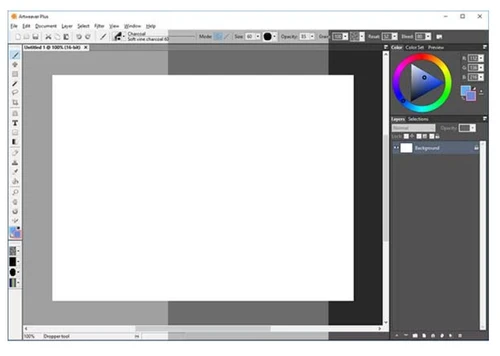
  3. Palettes: Artists can access multiple controls, commands and settings using the palettes offered by Artweaver. They can customize the layout of an individual palette as per their working styles. 
  4. Paper Textures: With Artweaver, you can configure the texture of a particular canvas to get realistic results. You can adjust the contrast and brightness levels of the paper texture, resize the particular and invert them as well. 
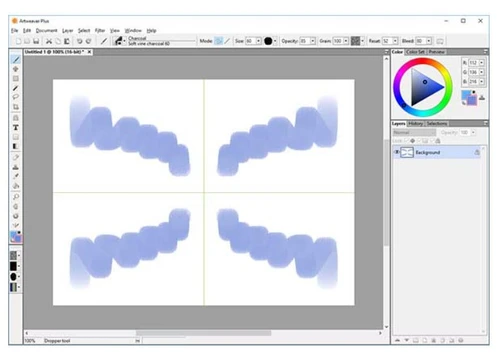
  5. Mirror Painting: Artists can draw a symmetrical image using the mirror painting feature. The software allows them to paint on one half of the screen, while it replicates the same image on the other half. 
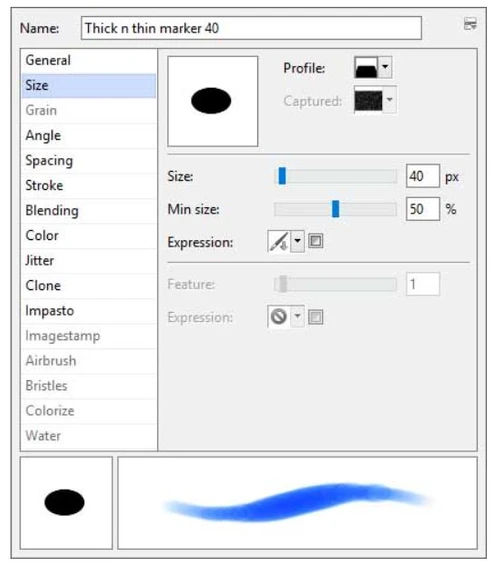
  6. Impasto: With Artweaver, you can adjust the settings of an individual brush to create a natural illusion of depth within a particular drawing. You can use different types of brushes to get the required effects. 
Read more

Artweaver Pricing & Plans

Artweaver Plus
Key Features
  • Basic functionality
  • Enhanced functionality
  • Detailed brush control
  • 16 Bits/Channel
  • 64 bit & More performance
Starting at €34
    • Quantity

      Quantity
      Quantity

Key Features

  • Basic functionality

  • Enhanced functionality

  • Detailed brush control

  • 16 Bits/Channel

  • 64 bit & More performance

Artweaver Features

  • icon_check Unlimited Brush Customization
    Artweaver features a wide variety of brushes including hairy brush, circular, pixel and airbrush. It also houses a 16-bit high
  • icon_check User Interface
    The software features an easy to use and free-flowing interface, housing movable canvas, multiple colour themes etc. You can also
  • icon_check Events and Tasks
    Artists can record their entire painting process as an event and showcase the particular to demonstrate their painting style.
  • icon_check Powerful Core
    The software is backed up by a powerful core. It supports documents having 8 and 16 bits. It also supports layer groups,
  • icon_check Teamwork
    Team members can easily collaborate with each other and work on the same project using the internet or LAN. They can also chat

Artweaver Specifications

Supported Platforms
Windows Windows
Devices
Desktop Desktop
Deployment
Cloud-Based Cloud-Based
Suitable For
All Industries
Business Specific
All Businesses
Language
English

Explore the Best Alternative Solutions Similar to Your Business Size and Needs

Medium Business

Built for business growth and flexibility

ibisPaint

4.4

Krita

4.2

Vizcom

4.4

See More

Artweaver Review

4.2

Out of 5

img

Overall Rating

Based on
4 Verified Ratings

Rating Breakdown

  • Features 4.2
  • Value for Money 4
  • Ease of Use 4.2
  • Customer Support 4.3

95% Recommend this Product

Add Review

Techjockey Trusted Reviews from Verified Users

No reviews are currently available for Artweaver. Discover similar Sketching Software reviews

  • ibisPaint

    4.5

    Whats great - Layer support is comparable to desktop software. read more

  • Sketchbook

    4.2

    Whats great - Great for quick sketching and idea generation, customizable brushes, smooth performance even on large canvases, scan sketch f... read more

  • Fusion 360

    4.5

    Whats great - I use Fusion 360 as a speedy and straightforward approach to effortlessly coax things out. It is an a lot quicker stacking an... read more

Compare Artweaver With other Sketching Software

Products
Ratings
Pricing
Device Supported
Deployment
Supported Platforms
  • img

    Artweaver

  • 4.2

  • Price On Request

  • Desktop

    Mobile

  • Web based

    On Premises

  • Windows

    Mac OS

  • img

    Procreate

  • 4.6

  • ₹ 999

  • Desktop

    Mobile

  • Web based

    On Premises

  • Windows

    Mac OS

  • img

    ZBrush

  • 4.3

  • ₹ 5767

  • Desktop

    Mobile

  • Web based

    On Premises

  • Windows

    Mac OS

  • img

    dreamlike art

  • 4.7

  • Price On Request

  • Desktop

    Mobile

  • Web based

    On Premises

  • Windows

    Mac OS

  • img

    Tux Paint

  • 4.3

  • Price On Request

  • Desktop

    Mobile

  • Web based

    On Premises

  • Windows

    Mac OS

  • img

    ibisPaint

  • 4.4

  • Price On Request

  • Desktop

    Mobile

  • Web based

    On Premises

  • Windows

    Mac OS

  • img

    Sketchbook

  • 4.2

  • Price On Request

  • Desktop

    Mobile

  • Web based

    On Premises

  • Windows

    Mac OS

  • img

    Vizcom

  • 4.4

  • Price On Request

  • Desktop

    Mobile

  • Web based

    On Premises

  • Windows

    Mac OS

  • img

    Flame Painter

  • 4.3

  • ₹ 1560

  • Desktop

    Mobile

  • Web based

    On Premises

  • Windows

    Mac OS

  • img

    Clip Studio Paint

  • 4.4

  • Price On Request

  • Desktop

    Mobile

  • Web based

    On Premises

  • Windows

    Mac OS

  • img

    Apexwin

  • 4.4

  • Price On Request

  • Desktop

    Mobile

  • Web based

    On Premises

  • Windows

    Mac OS

(0) Product(s) selected

Artweaver Alternatives

See All Artweaver Alternatives

Available

Price on Request

Starting Price:

$395 /Quantity

SAVE UPTO 67%

Starting Price:

$5 /License

Starting Price:

$2 /License

Starting Price:

$2 /Monthly

What is the use of the Preset Manager within Artweaver?

The Preset Manager can be used to monitor brushes, image stamps, colour sets, gradients, paper textures and captured brushes. You can also name, rearrange, delete, import or export other materials as well.

What type of data formats are supported by Artweaver?

The software supports a wide variety of data formats like PCX, BMP, PNG, TIFF, PSD, GIF, AWD and more.

Can I get a demo of Artweaver?

Yes, you can request an online demo of Artweaver. Our executives will get back to you on the date and time mentioned within the demo schedule.

What are the system requirements for installing Artweaver?

You need to have: RAM:1GB Processor: Pentium 4 processor, running at a clock speed of 1500MHz. Hard Disk: 100MB out of the available space.

Is there a dedicated mobile app for Artweaver?

No. Artweaver does not have a mobile app as of now.

20,000+ Software Listed

Best Price Guranteed

Free Expert Consultation

2M+ Happy Customers

Terms and Condtions

close

Users with registered businesses can purchase goods from merchants on the platform to satisfy their business needs. Users are not permitted to utilize any products acquired through the platform for resale, advertising, business, or further distribution.

For each purchase made, users will receive a Tax Invoice (or 'GST invoice') that includes specific details such as:

  • the GSTIN of the user associated with their registered business, and

  • the specified Entity Name for their business.

It should be noted that not all products are eligible for GST Invoice. Only the products displayed by participating sellers with the 'GST-based Invoice Available' callout on the product description page would qualify.

Certain goods and services are not eligible to get a GST Invoice, including items with VAS, i.e., Value Added Services (e.g., Total Mobile Protection/Assured Buyback) and those involving an exchange offer at the time of purchase.

Users must ensure the accuracy of the GSTIN, and business entity name provided for the GST Invoice. Requests for corrections into GST Invoice would not be accommodated by Techjockey.com or any Seller, and any issues arising from user-provided information are the sole responsibility of users.

Techjockey.com is not liable for the GST Invoice or any associated input tax credit. To efficiently claim an input tax credit, users should select the registered place of business address as per the GST authority's data and follow the provisions of the GST Act and rules.

To claim an input tax credit, the delivery and billing addresses must match. Furthermore, input tax credits will not be granted if the delivery address and GSTIN on the invoice are from different states. In case of incorrect GST details provided during the order placement, the order will be canceled automatically.