linkedin
ZBrush logo
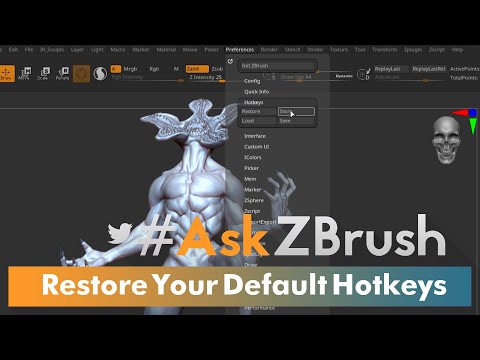
play Restore ZBrush's Default Hotkeys
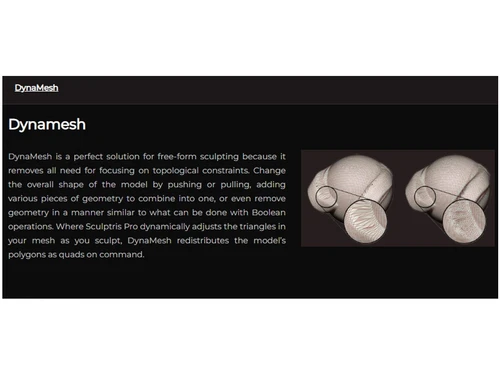
zbrush dynamo
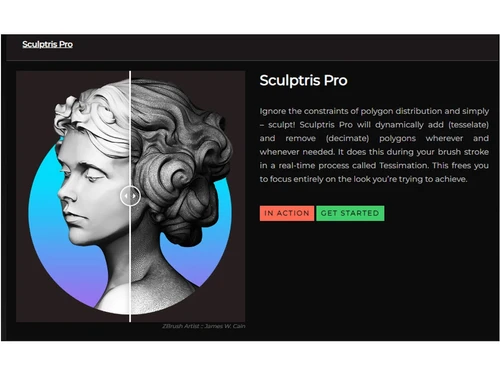
zbrush sculptris pro

ZBrush

Brand: MAXON Computer

  • 4.3

  • 4 Ratings

ZBrush is a digital sculpting and sketching software that allows artists to create highly detailed 3D models with advanced brushes and textures.

See More

Have you used ZBrush before?

Share your insights for better experience

Add a Review
Starting Price
₹5,767 excl.GST
₹ 6,805 incl. GST

View plans

offer Save upto 18%, Get GST Invoice on your business purchase T&C
offer Buy Now & Pay Later, Check offer on payment page.
Buy Now
100% Genuine
Products
Best Price
Guaranteed
Safe & Secure
Payment
  • Description

  • Pricing

  • Features

  • Specification

  • Review

  • Compare

  • Alternatives

  • FAQ

Starting at ₹5,767
Buy Now

ZBrush Software Overview

What is ZBrush?

ZBrush is a powerful digital sculpting and sketching software used for creating high-resolution 3D models. It offers advanced tools for sculpting, texturing, and rendering, making it a preferred choice for artists in gaming, film, and animation industries.

Unlike traditional modeling software, ZBrush uses a unique 'pixol' technology that stores depth, color, and lighting information. It provides a dynamic and intuitive workflow, enabling artists to sculpt complex details with precision. The software includes features like DynaMesh, ZRemesher, and SubTools for efficient modeling. ZBrush is widely used for character design, concept art, and 3D printing applications.

Why Choose ZBrush Software?

  • Advanced Sculpting Tools: ZBrush provides industry-leading sculpting features with intuitive brushes and detailing options.
  • High-Resolution Modeling: It allows the creation of highly detailed 3D models with millions of polygons.
  • Dynamic Workflow: Features like DynaMesh and ZRemesher enable seamless shape creation and topology optimization.
  • Realistic Texturing & Painting: Users can paint directly on 3D models with Polypaint, eliminating the need for UV maps.
  • Efficient Rendering: The built-in BPR renderer produces high-quality images with realistic lighting and shadows.
  • Industry Standard: Widely used in gaming, animation, film, and 3D printing industries.
  • Seamless Integration: Works with other 3D software like Maya, Blender, and 3ds Max for a smooth workflow.

Benefits of ZBrush Software

  • Non-Destructive Workflow: Artists can make changes without permanently affecting the model, allowing for flexible design iterations.
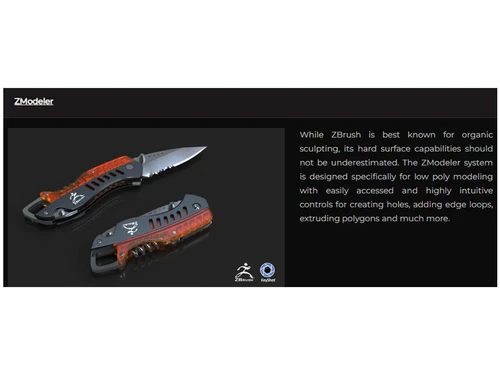
  • ZModeler for Hard Surface Modeling: Provides precise tools for creating mechanical and hard-surface designs along with organic sculpting.
  • 3D Printing Support: Includes features like Decimation Master and 3D Print Exporter to optimize models for 3D printing.
  • Vector Displacement Meshes (VDM): Allows artists to sculpt highly detailed custom brushes for quick detailing.
  • FiberMesh for Hair & Fur: Enables realistic hair, fur, and fiber creation directly within the software.
  • Multi-Language Support: Available in multiple languages for a wider range of users across different regions.
  • Frequent Updates & Community Support: Regular software updates and an active user community provide new features and learning resources.

ZBrush Pricing

ZBrush price in India starts at INR 5767 per month at techjockey.com.

The pricing model is based on different parameters, including extra features, deployment type, and the total number of users. For further queries related to the product, you can contact our product team and learn more about the pricing and offers.

Read more

MAXON Computer Company Details

Founded Year:  1985

MAXON Computer develops 3D software for the creative industries. The company is best known for its flagship product, CINEMA 4D: a 3D modeling, painting, rendering, and animation software solution used to create 3D motion graphics, architectural and product visualizations, video game graphics.

Director/Founders Harald Egel, Harald Schneider, Uwe Bärtels
Company Size 1-100 Employees

ZBrush Pricing & Plans

ZBrush
Key Features
  • shaping, texturing & painting virtual 3D clay
  • Multi-resolution sculpting
  • create 3D models and illustrations

Calculated Price

5767 Exclusive of all taxes
    • Licenses

      Licenses
      Licenses
    • Monthly

      Monthly
      Monthly

Key Features

  • shaping, texturing & painting virtual 3D clay

  • Multi-resolution sculpting

  • create 3D models and illustrations

ZBrush Features

  • icon_check Natural Brush System
    Experience a lifelike sculpting feel using customizable brushes that respond to pressure and tilt like real tools on clay.
  • icon_check Dynamic Dynamesh Tool
    Sculpt without topology constraints using digital clay that redistributes polygons to maintain a smooth surface always.
  • icon_check ZRemesher Automation
    Convert high-resolution organic sculpts into clean, animation-ready base meshes with optimized polygon flow instantly today.
  • icon_check Live Boolean System
    Preview complex additions and subtractions between 3D models in real-time before committing to a final production mesh.
  • icon_check Redshift Render Hub
    Create stunning, photorealistic renders with advanced lighting and materials directly inside your ZBrush workspace now.
  • icon_check 3D Modeling
    Enables artists to create highly detailed and complex 3D models with millions of polygons.
  • icon_check 3D Rendering & Virtual Tours
    Offers high-quality rendering tools for realistic visualizations and interactive presentations.
  • icon_check 3D Effects
    Provides tools to add depth, lighting, and special effects to enhance model realism.
  • icon_check Data Import/Export
    Supports multiple file formats, allowing seamless integration with other 3D software.
  • icon_check 2D Drawing
    Includes sketching tools for concept art, allowing users to design directly on a digital canvas.
  • icon_check Collaborations
    Enables team members to work together by sharing assets and projects efficiently.
  • icon_check Character Art
    Specializes in sculpting lifelike characters with intricate details for games, films, and animation.
  • icon_check Pipeline Management
    Integrates smoothly with industry-standard workflows, ensuring efficient production pipelines.
  • icon_check Unlimited Brush Customization
    Allows users to modify or create custom brushes for unique sculpting styles.
  • icon_check Annotations
    Lets artists add notes directly on models to enhance workflow communication and project documentation.
ZBrush Demo Video play icon

Get ZBrush Demo

Watch the demo video to explore key features, real workflows, and how the software fits your business needs.

Understand
Key Features
Personal
Demo Insights
Interactive
Demo Support

ZBrush Specifications

Supported Platforms
Windows Windows MacOS MacOS Linux Linux
Devices
Desktop Desktop iPad iPad
Deployment
Cloud-Based Cloud-Based
Suitable For
All Industries
Business Specific
All Businesses
Business Size
Small Business Startups Medium Business Enterprises
Customer Support
Phone Email
Language
English
Training Resources
Live Online Webinars Documentation

Explore the Best Alternative Solutions Similar to Your Business Size and Needs

ZBrush Review

4.3

Out of 5

img

Overall Rating

Based on
4 Verified Ratings

Rating Breakdown

  • Features 4
  • Value for Money 4.3
  • Ease of Use 4.5
  • Customer Support 4.5

92% Recommend this Product

Add Review

Techjockey Trusted Reviews from Verified Users

No reviews are currently available for ZBrush. Discover similar Sketching Software reviews

  • ibisPaint

    4.5

    Whats great - Layer support is comparable to desktop software. read more

  • Sketchbook

    4.2

    Whats great - Great for quick sketching and idea generation, customizable brushes, smooth performance even on large canvases, scan sketch f... read more

  • Fusion 360

    4.5

    Whats great - I use Fusion 360 as a speedy and straightforward approach to effortlessly coax things out. It is an a lot quicker stacking an... read more

Compare ZBrush With other Sketching Software

Products
Ratings
Pricing
Device Supported
Deployment
Supported Platforms
  • img

    ZBrush

  • 4.3

  • ₹ 5766.87 excl. GST

  • Desktop

    Mobile

  • Web based

    On Premises

  • Windows

    Mac OS

  • img

    Procreate

  • 4.6

  • ₹ 999

  • Desktop

    Mobile

  • Web based

    On Premises

  • Windows

    Mac OS

  • img

    dreamlike art

  • 4.7

  • Price On Request

  • Desktop

    Mobile

  • Web based

    On Premises

  • Windows

    Mac OS

  • img

    Tux Paint

  • 4.3

  • Price On Request

  • Desktop

    Mobile

  • Web based

    On Premises

  • Windows

    Mac OS

  • img

    ibisPaint

  • 4.4

  • Price On Request

  • Desktop

    Mobile

  • Web based

    On Premises

  • Windows

    Mac OS

  • img

    Sketchbook

  • 4.2

  • Price On Request

  • Desktop

    Mobile

  • Web based

    On Premises

  • Windows

    Mac OS

  • img

    Vizcom

  • 4.4

  • Price On Request

  • Desktop

    Mobile

  • Web based

    On Premises

  • Windows

    Mac OS

  • img

    Flame Painter

  • 4.3

  • ₹ 1560

  • Desktop

    Mobile

  • Web based

    On Premises

  • Windows

    Mac OS

  • img

    Clip Studio Paint

  • 4.4

  • Price On Request

  • Desktop

    Mobile

  • Web based

    On Premises

  • Windows

    Mac OS

  • img

    Apexwin

  • 4.4

  • Price On Request

  • Desktop

    Mobile

  • Web based

    On Premises

  • Windows

    Mac OS

  • img

    Rebelle

  • 4.1

  • ₹ 2800

  • Desktop

    Mobile

  • Web based

    On Premises

  • Windows

    Mac OS

(0) Product(s) selected

ZBrush Alternatives

See All ZBrush Alternatives

Available

Price on Request

Starting Price:

$395 /Quantity

SAVE UPTO 67%

Starting Price:

$5 /License

Starting Price:

$2 /License

Starting Price:

$2 /Monthly

How much does ZBrush software cost?

ZBrush price in India starts at INR 5767 per month at techjockey.com.

Does ZBrush software have a mobile app?

No, ZBrush is not available as a mobile app.

Which operating systems support ZBrush software?

ZBrush is compatible with Windows and macOS.

Is there a free trial available for ZBrush software?

Yes, ZBrush offers a free trial.

How does ZBrush software work?

ZBrush uses digital sculpting tools to create high-resolution 3D models with advanced detailing.

Who uses ZBrush software?

Artists, designers, game developers, animators, and 3D printing professionals can benefit from ZBrush.

Does ZBrush sketching software provide a free demo?

Yes, ZBrush free demo is available upon request.

Can ZBrush software be used for free?

No, ZBrush is a paid software, but a free trial is available.

What is ZBrush primarily used for?

ZBrush sketching software is mainly used for 3D sculpting, character design, digital painting, and texturing.

Does ZBrush require a high-end PC?

ZBrush performs well on mid-range systems but benefits from powerful processors and more RAM.

20,000+ Software Listed

Best Price Guranteed

Free Expert Consultation

2M+ Happy Customers

Terms and Condtions

close

Users with registered businesses can purchase goods from merchants on the platform to satisfy their business needs. Users are not permitted to utilize any products acquired through the platform for resale, advertising, business, or further distribution.

For each purchase made, users will receive a Tax Invoice (or 'GST invoice') that includes specific details such as:

  • the GSTIN of the user associated with their registered business, and

  • the specified Entity Name for their business.

It should be noted that not all products are eligible for GST Invoice. Only the products displayed by participating sellers with the 'GST-based Invoice Available' callout on the product description page would qualify.

Certain goods and services are not eligible to get a GST Invoice, including items with VAS, i.e., Value Added Services (e.g., Total Mobile Protection/Assured Buyback) and those involving an exchange offer at the time of purchase.

Users must ensure the accuracy of the GSTIN, and business entity name provided for the GST Invoice. Requests for corrections into GST Invoice would not be accommodated by Techjockey.com or any Seller, and any issues arising from user-provided information are the sole responsibility of users.

Techjockey.com is not liable for the GST Invoice or any associated input tax credit. To efficiently claim an input tax credit, users should select the registered place of business address as per the GST authority's data and follow the provisions of the GST Act and rules.

To claim an input tax credit, the delivery and billing addresses must match. Furthermore, input tax credits will not be granted if the delivery address and GSTIN on the invoice are from different states. In case of incorrect GST details provided during the order placement, the order will be canceled automatically.