linkedin
Sketchpad logo
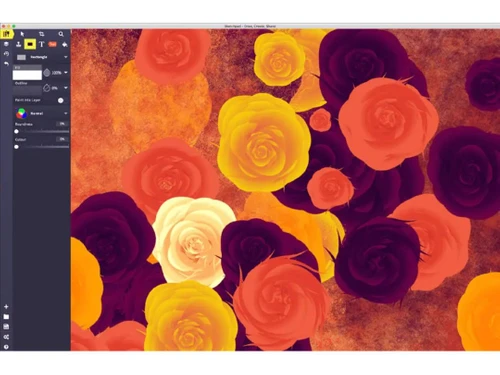
Sketchpad Drawing
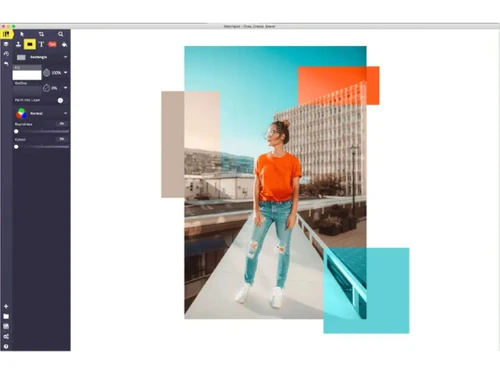
Sketchpad Photo Editing
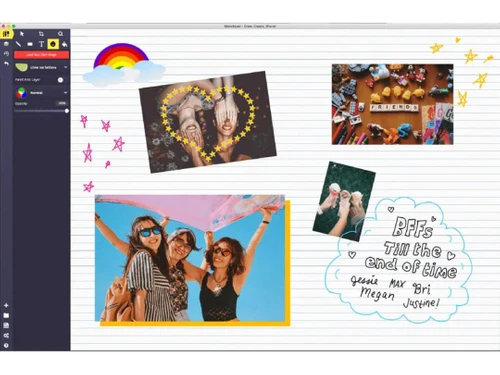
Sketchpad Shapes

Sketchpad

Brand: Sketch IO

  • 4.3

  • 3 Ratings

Sketchpad software is a digital drawing tool used for creating artwork, illustrations, and designs on computers or tablets. It offers various drawing tools like pencils, brushes, and shapes, along with features such as layers and color palettes for creativity.

See More

Have you used Sketchpad before?

Share your insights for better experience

Add a Review
Starting Price
$5

View plans

100% Genuine
Products
Best Price
Guaranteed
Safe & Secure
Payment
  • Description

  • Pricing

  • Features

  • Specification

  • Review

  • Compare

  • Alternatives

  • FAQ

Starting at $5

Sketchpad Software Overview

What is Sketchpad?

Sketchpad software is a sketching software which is used for creating art, illustrations, and designs on computers or tablets. It offers a range of drawing tools like pencils, brushes, and shapes, enabling users to express their creativity digitally. With features such as layers and color palettes, Sketchpad provides versatility and control over the artistic process.

Artists, designers, and hobbyists utilize Sketchpad for a wide array of projects, from quick sketches to intricate illustrations. Its user-friendly interface and extensive toolset make it accessible to both beginners and experienced professionals in the digital art world. Whether for concept sketches, character designs, or graphic compositions, Sketchpad serves as a powerful and versatile platform for digital creativity.

Why Choose Sketchpad Sketching Software?

  • Versatility: It offers a wide range of drawing tools and features, providing users with the versatility to create various types of artwork, illustrations, and designs.
  • Ease of Use: With its intuitive interface and user-friendly tools, it is accessible to artists of all skill levels, from beginners to experienced professionals.
  • Flexibility: Users can work on their creations digitally, allowing for easy experimentation, editing, and iteration without the limitations of traditional media.
  • Efficiency: It streamlines the creative process, enabling artists to work more efficiently and produce high-quality artwork in less time.
  • Portability: Many options are available for tablets and mobile devices, allowing artists to create on the go without the need for bulky traditional art supplies.
  • Collaboration: Some platforms offer collaboration features, allowing multiple users to work on the same project simultaneously, fostering teamwork and creativity.
  • Cost-Effectiveness: Compared to traditional art supplies, it is often more cost-effective in the long run, as it eliminates the need for constant replenishment of materials.

Benefits of Sketchpad Software

  • Shape Tools: It provides various shape tools such as rectangles, circles, and polygons for precise geometric drawing.
  • Blending Modes: Users can apply blending modes to layers or elements within their artwork to achieve different visual effects and enhance creativity.
  • Selection Tools: It offers selection tools like lasso, marquee, and magic wand for selecting and manipulating specific areas of the artwork.
  • Gradient Tool: Users can apply gradients to their artwork, allowing for smooth transitions between colors and adding depth to illustrations.
  • Filters and Effects: It may include filters and effects such as blur, sharpen, and noise to enhance or stylize artwork.
  • Grids and Guides: It provides grids and guides to assist users in aligning elements and maintaining consistency in their compositions.
  • History Panel: Users can access a history panel to view and revert to previous states of their artwork, enabling non-linear editing and experimentation.
  • Brush Libraries: Some versions offer libraries of pre-defined brushes, including brushes for textures, patterns, and special effects, expanding creative possibilities.
  • Masking: It allows users to apply masks to layers or elements, enabling selective editing and creating complex compositions.
  • Animation Tools: Certain versions of it offer animation tools, allowing users to create frame-based animations or motion graphics directly within the program.

Pricing of Sketchpad

Sketchpad price in India starts at $5 at techjockey.com.

The pricing model is based on different parameters, including extra features, deployment type, and the total number of users. For further queries related to the product, you can contact our product team and learn more about the pricing and offers.

Read more

Sketch IO Company Details

Founded Year:  2013

Sketch.IO creates a variety of annotation, editing, and design tools.

Director/Founders N/A
Company Size 1-100 Employees

Sketchpad Pricing & Plans

Basic
Key Features
  • 18 Brushes
  • 5,000+ Clipart
  • 14 Shapes
  • 800+ Fonts
Starting at $5
    • Licenses

      Licenses
      Licenses

Key Features

  • 18 Brushes

  • 5,000+ Clipart

  • 14 Shapes

  • 800+ Fonts

Sketchpad Features

  • icon_check Brushes
    Offers a variety of brushes for different drawing styles and effects.
  • icon_check Drawing Tools
    Provides tools such as pencils, pens, and shapes for creating digital artwork.
  • icon_check Graphic Design
    Supports graphic design tasks with features like layers, text tools, and blending modes.
  • icon_check Collaboration
    Enables collaboration among multiple users, allowing them to work on the same canvas simultaneously.
  • icon_check Data Visualizations
    Provides tools for creating data visualizations, charts, and diagrams.
  • icon_check Image Editor
    Includes basic image editing features like cropping, resizing, and adjusting colors.
  • icon_check Templates
    Offers pre-designed templates for various projects, providing a starting point for users.

Sketchpad Specifications

Supported Platforms
Ubuntu Ubuntu Windows Windows iOS iOS Android Android MacOS MacOS Linux Linux
Devices
Desktop Desktop Mobile Mobile Tablet Tablet iPad iPad
Deployment
Cloud-Based Cloud-Based
Suitable For
All Industries
Business Specific
All Businesses
Business Size
Small Business Medium Business Enterprises
Customer Support
Email
Language
English

Explore the Best Alternative Solutions Similar to Your Business Size and Needs

Medium Business

Built for business growth and flexibility

ibisPaint

4.4

Krita

4.2

Vizcom

4.4

See More

Sketchpad Review

4.3

Out of 5

img

Overall Rating

Based on
3 Verified Ratings

Rating Breakdown

  • Features 4.3
  • Value for Money 4.3
  • Ease of Use 4.3
  • Customer Support 4.3

90% Recommend this Product

Add Review

Techjockey Trusted Reviews from Verified Users

No reviews are currently available for Sketchpad. Discover similar Sketching Software reviews

  • ibisPaint

    4.5

    Whats great - Layer support is comparable to desktop software. read more

  • Sketchbook

    4.2

    Whats great - Great for quick sketching and idea generation, customizable brushes, smooth performance even on large canvases, scan sketch f... read more

  • Fusion 360

    4.5

    Whats great - I use Fusion 360 as a speedy and straightforward approach to effortlessly coax things out. It is an a lot quicker stacking an... read more

Compare Sketchpad With other Sketching Software

Products
Ratings
Pricing
Device Supported
Deployment
Supported Platforms
  • img

    Sketchpad

  • 4.3

  • Price On Request

  • Desktop

    Mobile

  • Web based

    On Premises

  • Windows

    Mac OS

  • img

    Procreate

  • 4.6

  • ₹ 999

  • Desktop

    Mobile

  • Web based

    On Premises

  • Windows

    Mac OS

  • img

    ZBrush

  • 4.3

  • ₹ 5767

  • Desktop

    Mobile

  • Web based

    On Premises

  • Windows

    Mac OS

  • img

    dreamlike art

  • 4.7

  • Price On Request

  • Desktop

    Mobile

  • Web based

    On Premises

  • Windows

    Mac OS

  • img

    Tux Paint

  • 4.3

  • Price On Request

  • Desktop

    Mobile

  • Web based

    On Premises

  • Windows

    Mac OS

  • img

    ibisPaint

  • 4.4

  • Price On Request

  • Desktop

    Mobile

  • Web based

    On Premises

  • Windows

    Mac OS

  • img

    Sketchbook

  • 4.2

  • Price On Request

  • Desktop

    Mobile

  • Web based

    On Premises

  • Windows

    Mac OS

  • img

    Vizcom

  • 4.4

  • Price On Request

  • Desktop

    Mobile

  • Web based

    On Premises

  • Windows

    Mac OS

  • img

    Flame Painter

  • 4.3

  • ₹ 1560

  • Desktop

    Mobile

  • Web based

    On Premises

  • Windows

    Mac OS

  • img

    Clip Studio Paint

  • 4.4

  • Price On Request

  • Desktop

    Mobile

  • Web based

    On Premises

  • Windows

    Mac OS

  • img

    Apexwin

  • 4.4

  • Price On Request

  • Desktop

    Mobile

  • Web based

    On Premises

  • Windows

    Mac OS

(0) Product(s) selected

Sketchpad Alternatives

See All Sketchpad Alternatives

Available

Price on Request

Starting Price:

$395 /Quantity

SAVE UPTO 67%

Starting Price:

$2 /License

Starting Price:

$2 /Monthly

Which operating system does Sketchpad Support?

Sketchpad is compatible with Windows, Linux, and MacOS devices.

Is there any Sketchpad App?

Yes, Sketchpad app is not available for Android and iOS app users.

What is the deployment type of Sketchpad?

Sketchpad supports web-based deployment.

How much does Sketchpad Cost?

Sketchpad price in India starts at $5 at techjockey.com.

Who are the potential users of Sketchpad?

Sketchpad is typically used by all industries for creating artwork, illustrations, and designs on computer systems or tablets.

Is there any free trial or demo for Sketchpad?

Yes, Sketchpad free demo is available at techjockey.com.

Is Sketchpad Free?

Yes, Sketchpad sketching is available for free.

Does Sketchpad Sketching offer a free trial?

Sketchpad offers a free trial. However, the premium plan with advanced features is available at techjockey.com with exciting deals.

How can you download Sketchpad?

Sketchpad installation is not required, as it is web-based. Just open the Setup Wizard to get started.

How does Sketchpad Work?

Sketchpad provides a digital canvas and drawing tools for users to create artwork and designs. With features like layers and blending modes, it enables users to manipulate and enhance their creations digitally.

20,000+ Software Listed

Best Price Guranteed

Free Expert Consultation

2M+ Happy Customers

Terms and Condtions

close

Users with registered businesses can purchase goods from merchants on the platform to satisfy their business needs. Users are not permitted to utilize any products acquired through the platform for resale, advertising, business, or further distribution.

For each purchase made, users will receive a Tax Invoice (or 'GST invoice') that includes specific details such as:

  • the GSTIN of the user associated with their registered business, and

  • the specified Entity Name for their business.

It should be noted that not all products are eligible for GST Invoice. Only the products displayed by participating sellers with the 'GST-based Invoice Available' callout on the product description page would qualify.

Certain goods and services are not eligible to get a GST Invoice, including items with VAS, i.e., Value Added Services (e.g., Total Mobile Protection/Assured Buyback) and those involving an exchange offer at the time of purchase.

Users must ensure the accuracy of the GSTIN, and business entity name provided for the GST Invoice. Requests for corrections into GST Invoice would not be accommodated by Techjockey.com or any Seller, and any issues arising from user-provided information are the sole responsibility of users.

Techjockey.com is not liable for the GST Invoice or any associated input tax credit. To efficiently claim an input tax credit, users should select the registered place of business address as per the GST authority's data and follow the provisions of the GST Act and rules.

To claim an input tax credit, the delivery and billing addresses must match. Furthermore, input tax credits will not be granted if the delivery address and GSTIN on the invoice are from different states. In case of incorrect GST details provided during the order placement, the order will be canceled automatically.