linkedin
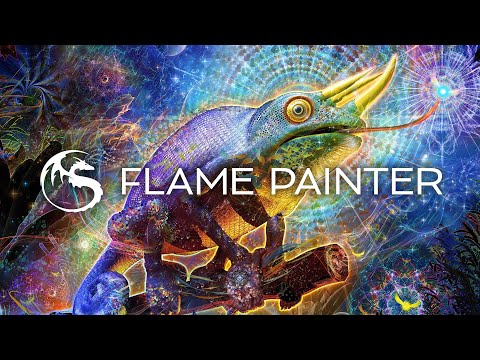
Flame Painter logo
play Flame Painter 4 demo
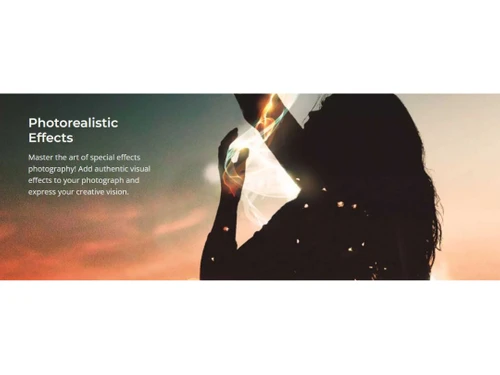
Flame painter Photorealistic Effects
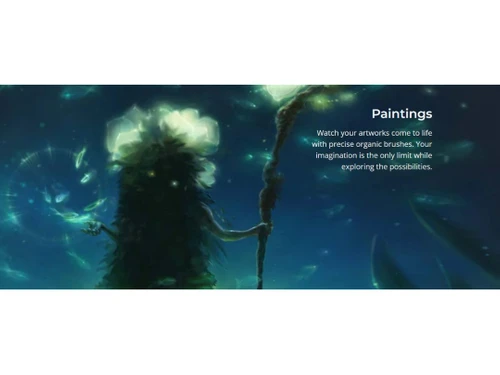
Flame painter Paintings

Flame Painter

Brand: Escape Motions

  • 4.3

  • 6 Ratings

Flame Painter is a digital sketching software that adds unique visual effects and motion effects using particle brushes.

See More

Have you used Flame Painter before?

Share your insights for better experience

Add a Review
Starting Price
₹1,560 excl.GST
₹ 1,841 incl. GST

View plans

offer Save upto 18%, Get GST Invoice on your business purchase T&C
offer Buy Now & Pay Later, Check offer on payment page.
Buy Now
100% Genuine
Products
Best Price
Guaranteed
Safe & Secure
Payment
  • Description

  • Pricing

  • Features

  • Specification

  • Review

  • Compare

  • Alternatives

  • FAQ

Starting at ₹1,560
Buy Now

Flame Painter Software Overview

What is Flame Painter?

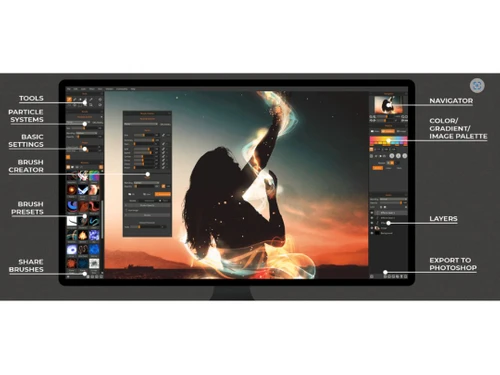
Flame Painter is a unique digital painting or sketching software that helps in creating stunning visual artwork with particle brushes. It uses a special technology called particle effects that mimic real-life motion and textures. The particle system allows users to paint with light and create dynamic, organic art. The software interface comprises tools for particle systems, navigators, customizable brushes, vector layers, and an advanced Brush Creator for detailed control over strokes. The interface layout helps users to easily paint, edit, and add effects to their design.

Flame Painter comprises six particle systems namely Flame, Ribbon, Follow, Liner, Elastic, and Fuzzy which help in creating different brush styles for different designs. The Brush Creator allows full customization of textures, gradients, and behaviors. Vector layers help in the stroke adjustments. The software provides 12 color and effect filters for fine-tuning, 23 Photoshop blending modes, and high-resolution rendering. It supports Photoshop integration and SVG import of design. The multi-touch gestures and dynamic composition add stunning effects to the design. The software is tablet compatible and with rich features, it is unique for digital paintings, dynamic compositions, and adding effects to photography.

Why choose Flame Painter Sketching Software?

  • Digital Painting : Create stunning artworks with particle brushes, customizable textures, gradients, and organic strokes for expressive compositions.
  • Special Effects Photography : Enhance photos with realistic fire, smoke, and light trails, adding depth, drama, and creativity to visual storytelling.
  • Graphic Design : Design posters, backgrounds, and patterns using dynamic multi-brushes, blending modes, and vector tools for professional-quality results.
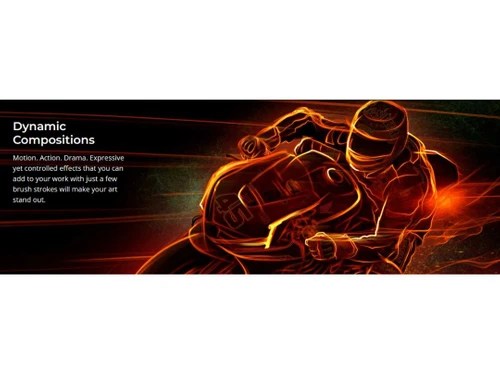
  • Motion Graphics & Animation : Generate fluid, animated brush strokes and export layered compositions to enhance videos with mesmerizing special effects.
  • Texturing & Game Design : Create seamless textures and effects for game assets, concept art, and 3D models with high-resolution rendering.

Benefits of Flame Painter

  • Photoshop Integration : Supports smooth transfer of layers between Flame Painter and Photoshop, for easy management of workflow for designers and digital artists.
  • User-Friendly Interface : Enjoy an intuitive, customizable interface with rich tool set, and multi-touch gestures for a creative design experience.
  • High-Resolution Rendering : Produce crisp, detailed artwork suitable for professional design, print, and digital applications without quality loss.
  • Unique Particle Brushes : Create dynamic, organic strokes with lifelike motion, allowing artists to achieve stunning artistic effects.
  • High-Quality Export : Export artwork in multiple formats, including PSD, PNG, SVG, and TIFF, ensuring professional-quality output.
  • Add Animations : Generate fluid, animated brush strokes and dynamic effects, enhancing videos and motion graphics with unique visuals.

Pricing of Flame Painter

Flame Painter price in India starts at INR 1560 at techjockey.com. Flame Painter comes with multiple pricing plans and caters to a diverse customer base.

For subscription-related details and offers on premium packages, please request a call back from our product experts.

Read more

Escape Motions Company Details

Founded Year:  2012

Escape Motions is a small studio of creatives and programmers based in a beautiful spa town Piestany, Slovakia. We love to experiment with art and code to find a new visual expression in digital media.

Director/Founders Peter Blaškovi
Company Size 1-100 Employees

Flame Painter Pricing & Plans

Flame Painter 4
Key Features
  • Photorealistic Effects
  • Dynamic Compositions
  • Customizable Brushes
  • Vector Layers
  • SVG Import
  • Particle Brushes
  • Layers & Effects
  • Interface & Connection
  • File System

Calculated Price

1560 Exclusive of all taxes
    • Quantity

      Quantity
      Quantity

Key Features

  • Photorealistic Effects

  • Dynamic Compositions

  • Customizable Brushes

  • Vector Layers

  • SVG Import

  • Particle Brushes

  • Layers & Effects

  • Interface & Connection

  • File System

Flame Painter Features

  • icon_check Brush Creator Panel
    Fully customize almost any brush parameter including size, opacity, and shape to design unique artistic tools fast today.
  • icon_check Particle System
    Access high-end simulation engines like Flame, Follow, and Ribbon to create organic, lifelike brush strokes in your art.
  • icon_check Multi-Touch Support
    Utilize intuitive gestures on Wacom tablets or Microsoft Surface devices to zoom, rotate, and pan your digital canvas fast.
  • icon_check Photoshop Connect
    Seamlessly exchange layers between Flame Painter and Adobe Photoshop to maintain a smooth and efficient design pipeline.
  • icon_check Symmetry Tool Pro
    Create beautiful and complex symmetrical patterns with a few simple strokes using the integrated and interactive axis now.
  • icon_check Data Import/Export
    Easily transfer your work across different platforms, ensuring compatibility and seamless workflow.
  • icon_check Drag & Drop
    Simplify your workflow by easily moving elements within your project for efficient organization.
  • icon_check Presentation Tools
    Create compelling presentations with built-in features for showcasing your digital art.
  • icon_check Custom Fonts
    Personalize your designs with a wide variety of fonts to match your creative vision.
  • icon_check Design Tools
    Access a comprehensive set of tools for innovative and professional-quality graphic design.
  • icon_check 2D Drawing
    Create intricate 2D artwork with intuitive drawing capabilities for detailed and expressive designs.
  • icon_check Layers
    Organize your artwork with layers, making editing and adjustments more manageable and precise.
  • icon_check Unlimited Brush Customization
    Tailor your brushes to achieve unique effects and perfect your artistic style.
  • icon_check Concept Art & Painting
    Develop your ideas into detailed concept art and paintings with versatile painting tools.
Flame Painter Demo Video play icon

Get Flame Painter Demo

Watch the demo video to explore key features, real workflows, and how the software fits your business needs.

Understand
Key Features
Personal
Demo Insights
Interactive
Demo Support

Flame Painter Specifications

Supported Platforms
Windows Windows iOS iOS MacOS MacOS
Devices
Desktop Desktop Mobile Mobile Tablet Tablet iPad iPad
Deployment
Perpetual Perpetual
Suitable For
All Industries
Business Specific
All Businesses
Business Size
Individual Small Business Startups Medium Business Enterprises SMBs SMEs MSMEs Freelancers
Customer Support
Email Communities Forums
Language
English
Training Resources
Documentation Videos
Technology
Next Generation
Compliance Regulation
CCPA

Explore the Best Alternative Solutions Similar to Your Business Size and Needs

Medium Business

Built for business growth and flexibility

ibisPaint

4.4

Krita

4.2

Vizcom

4.4

See More

Flame Painter Review

4.3

Out of 5

img

Overall Rating

Based on
6 Verified Ratings

Rating Breakdown

  • Features 4.4
  • Value for Money 4.4
  • Ease of Use 4.0
  • Customer Support 4.3

90% Recommend this Product

Add Review

Techjockey Trusted Reviews from Verified Users

No reviews are currently available for Flame Painter. Discover similar Sketching Software reviews

  • ibisPaint

    4.5

    Whats great - Layer support is comparable to desktop software. read more

  • Sketchbook

    4.2

    Whats great - Great for quick sketching and idea generation, customizable brushes, smooth performance even on large canvases, scan sketch f... read more

  • Fusion 360

    4.5

    Whats great - I use Fusion 360 as a speedy and straightforward approach to effortlessly coax things out. It is an a lot quicker stacking an... read more

Compare Flame Painter With other Sketching Software

Products
Ratings
Pricing
Device Supported
Deployment
Supported Platforms
  • img

    Flame Painter

  • 4.3

  • ₹ 1560.00 excl. GST

  • Desktop

    Mobile

  • Web based

    On Premises

  • Windows

    Mac OS

  • img

    Rebelle

  • 4.1

  • ₹ 2800

  • Desktop

    Mobile

  • Web based

    On Premises

  • Windows

    Mac OS

  • img

    Procreate

  • 4.6

  • ₹ 999

  • Desktop

    Mobile

  • Web based

    On Premises

  • Windows

    Mac OS

  • img

    ZBrush

  • 4.3

  • ₹ 5767

  • Desktop

    Mobile

  • Web based

    On Premises

  • Windows

    Mac OS

  • img

    dreamlike art

  • 4.7

  • Price On Request

  • Desktop

    Mobile

  • Web based

    On Premises

  • Windows

    Mac OS

  • img

    Tux Paint

  • 4.3

  • Price On Request

  • Desktop

    Mobile

  • Web based

    On Premises

  • Windows

    Mac OS

  • img

    ibisPaint

  • 4.4

  • Price On Request

  • Desktop

    Mobile

  • Web based

    On Premises

  • Windows

    Mac OS

  • img

    Sketchbook

  • 4.2

  • Price On Request

  • Desktop

    Mobile

  • Web based

    On Premises

  • Windows

    Mac OS

  • img

    Vizcom

  • 4.4

  • Price On Request

  • Desktop

    Mobile

  • Web based

    On Premises

  • Windows

    Mac OS

  • img

    Clip Studio Paint

  • 4.4

  • Price On Request

  • Desktop

    Mobile

  • Web based

    On Premises

  • Windows

    Mac OS

  • img

    Apexwin

  • 4.4

  • Price On Request

  • Desktop

    Mobile

  • Web based

    On Premises

  • Windows

    Mac OS

(0) Product(s) selected

Flame Painter Alternatives

See All Flame Painter Alternatives
SAVE UPTO 67%

Available

Price on Request

Starting Price:

$395 /Quantity

Starting Price:

$5 /License

Starting Price:

$2 /License

Starting Price:

$2 /Monthly

Can I use Flame Painter on both Windows and Mac OS?

Yes, Flame Painter is compatible with both Windows and Mac OS, supporting 32-bit and 64-bit systems.

How can I create custom brushes in Flame Painter Sketching Software?

To create and customize brushes in Flame Painter use the Brush Creator, to adjust shape, texture, color, and behavior.

Can I import vector files into Flame Painter?

Yes, you can import SVG vector files into Flame Painter, convert them to bitmap or vector paths, and apply particle brushes.

What format does Flame Painter Sketching Software give to export high-resolution images?

Flame Painter supports exporting designs or images in PSD, PNG, TIFF, SVG, and other high-quality formats.

Who can use Flame Painter, and what are its potential applications?

Digital artists, graphic designers, photographers, and animators use Flame Painter for painting, effects, textures, and motion graphics.

Is a demo version of Flame Painter Sketching Software available?

Yes, a demo version is available for users to try before purchasing the full version.

Can I use a graphics tablet with Flame Painter?

Yes, Flame Painter supports Wacom and other pen tablets with pressure-sensitive controls for precise strokes.

How can a user animate their artwork in Flame Painter Sketching Software?

Users can use the Animation tool in Flame Painter to create dynamic, moving art pieces.

Can I use Flame Painter as a plug-in for other software?

Yes, Flame Painter offers a Photoshop Plug-In for easy integration with Adobe Photoshop.

Can I apply color corrections in Flame Painter Sketching Software?

Yes, Flame Painter includes Advanced Color Corrections for fine-tuning colors and enhancing artwork.

How much does Flame Painter cost?

Flame Painter price in India starts at INR 1560 at techjockey.com. Flame Painter comes with multiple pricing plans and caters to a diverse customer base.

20,000+ Software Listed

Best Price Guranteed

Free Expert Consultation

2M+ Happy Customers

Terms and Condtions

close

Users with registered businesses can purchase goods from merchants on the platform to satisfy their business needs. Users are not permitted to utilize any products acquired through the platform for resale, advertising, business, or further distribution.

For each purchase made, users will receive a Tax Invoice (or 'GST invoice') that includes specific details such as:

  • the GSTIN of the user associated with their registered business, and

  • the specified Entity Name for their business.

It should be noted that not all products are eligible for GST Invoice. Only the products displayed by participating sellers with the 'GST-based Invoice Available' callout on the product description page would qualify.

Certain goods and services are not eligible to get a GST Invoice, including items with VAS, i.e., Value Added Services (e.g., Total Mobile Protection/Assured Buyback) and those involving an exchange offer at the time of purchase.

Users must ensure the accuracy of the GSTIN, and business entity name provided for the GST Invoice. Requests for corrections into GST Invoice would not be accommodated by Techjockey.com or any Seller, and any issues arising from user-provided information are the sole responsibility of users.

Techjockey.com is not liable for the GST Invoice or any associated input tax credit. To efficiently claim an input tax credit, users should select the registered place of business address as per the GST authority's data and follow the provisions of the GST Act and rules.

To claim an input tax credit, the delivery and billing addresses must match. Furthermore, input tax credits will not be granted if the delivery address and GSTIN on the invoice are from different states. In case of incorrect GST details provided during the order placement, the order will be canceled automatically.