USA
USA UAE
UAESmall Business
Designed for startups and growing businesses


See More


Brand: Audio Mass
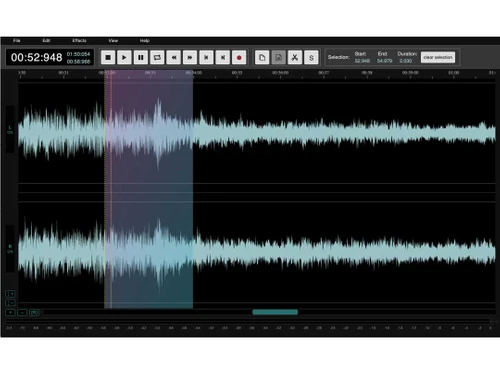
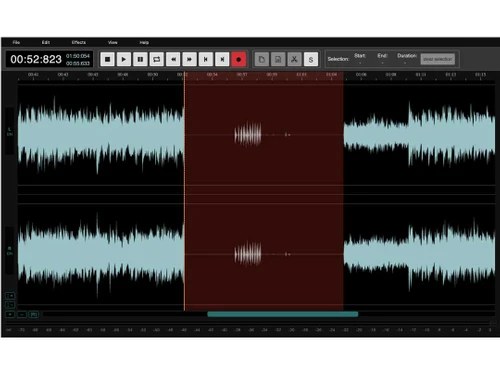
AudioMass is a free, browser-based audio editing tool. It's user-friendly and requires no software download, making it ideal for simple audio projects.
See MoreHave you used AudioMass before?
Share your insights for better experience
Looking for The Right Pricing?
Share your requirements and get a plan built around your business.
Price Available on Request
Get personalised AudioMass pricing that fits your needs. Our team will connect with you.
 Audio Trimming Equalizer Multitrack Editing Visualizations Trim, Crop & Resize Audio Recording Compressor Audio Waveforms Effects Audio Editing Timelines Drag & Drop
  Windows
  Android
  Desktop
  Mobile
  Cloud-Based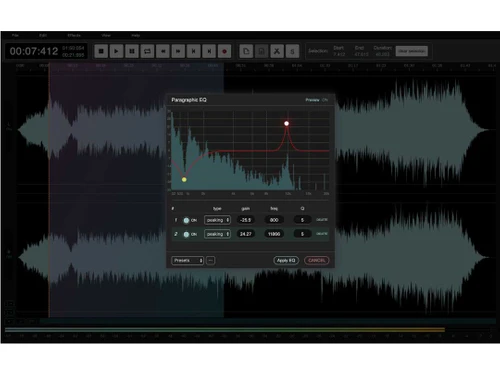
Small Business
Designed for startups and growing businesses
Medium Business
Built for business growth and flexibility
Enterprises
Designed for complex and large-scale business needs
4.2
Out of 5

Overall Rating
Based on
10 Verified Reviews
Rating Breakdown
87% Recommend this Product
Add ReviewOverall, users appreciate AudioMass for its accessibility and ease of use, particularly for quick edits and basic audio tasks. The open-source nature and community-driven approach are also highlighted positively. However, many users note limitations such as the lack of advanced features, real-time effects, and collaborative capabilities, which hinder its effectiveness for larger projects. Additionally, the need for better support resources and a more modern interface are common concerns among reviewers.
Pros
"Since it is an open-source, it is community-driven. It has the potential to grow and evolve with upcoming user contributions."
"Easy offline usage, which is surprising since it is a web-based tool. You can download the app and use it without any internet connection, which adds flexibility."
"I really like the fact that there is no login required or account creation. I can save time and directly just start using it for my work."
Cons
"It will be nice if they allow you to work with multiple users on the same project, especially in today’s collaborative work environment."
"You cannot really use it for large projects. I have tried to edit long or high-quality recordings, most of them have froze and slowed down significantly."
"There are no real-time effects which is a bummer. I find it infuriating to apply effects and then listen, rather than hear them outright."

Dec 4, 2024
Techjockey Verified
“Community Driven and Open Source”
Audio Mas is open-source and community-driven too. I feel like it has the potential to improve with new user contributions. It cannot be a replacement for a fill DAW, while it is great for quick edits and basic tasks, I still need a powerful tool for professional work.
Pros
Since it is an open-source, it is community-driven. It has the potential to grow and evolve with upcoming user contributions.
Cons
At the end of the day, it is not a replacement for a DAW. It is great for quick edits and basics; I always must turn to a fully featured DAW for anything professional or detailed.
Reason to switch
I moved to Mass Audio since Wavacity was getting slow and clunky for my needs. Audio Mass is simple and faster for my small tasks, though I still need to find a DAW for more complex projects.
Sep 17, 2024
Techjockey Verified
“Good Export Options, Lacks Helpful Support”
I like that Audio Mass enables me to export audio in multiple formats like MP3 and WAV, this covers the basics for most of my projects. However, there are not many tutorials or online videos to guide me.
Pros
I like how it has an export option; it supports exporting audio in multiple formats such as MP3 and WAV, which covers the basics for most projects.
Cons
It does not have too many videos and tutorials online, so it made it quite difficult for me to get help. For a beginner, figuring out these features took unnecessary time.
Reason to switch
Cakewalk was too complex for my needs, so that is why I switched to Audio Mass. I needed something that was simpler and quicker, Audio Mass offered just that.
Dec 1, 2024
Techjockey Verified
“Flexible Offline Tool”
I was surprised that Audio Mass can be used by downloading the app, this made it convenient and added a lot of flexibility. However, it would be great if it allowed multiple users to collaborate on the same project, which feels like a must-have in today’s work environment.
Pros
Easy offline usage, which is surprising since it is a web-based tool. You can download the app and use it without any internet connection, which adds flexibility.
Cons
It will be nice if they allow you to work with multiple users on the same project, especially in today’s collaborative work environment.
Reason to switch
Spek is more of an analysis tool and does not have any editing features. Audio Mass gave me basic editing options with the flexibility to work offline.

AudioMass
Price On Request
Desktop
Mobile
Web based
On Premises
Windows
Mac OS
Audacity
Price On Request
Desktop
Mobile
Web based
On Premises
Windows
Mac OS

Cleanvoice AI
Price On Request
Desktop
Mobile
Web based
On Premises
Windows
Mac OS

AudioDirector 365
₹ 1599
Desktop
Mobile
Web based
On Premises
Windows
Mac OS

Supertone CLEAR
Price On Request
Desktop
Mobile
Web based
On Premises
Windows
Mac OS
BandLab
Price On Request
Desktop
Mobile
Web based
On Premises
Windows
Mac OS

Adobe Audition
Price On Request
Desktop
Mobile
Web based
On Premises
Windows
Mac OS

Moises
Price On Request
Desktop
Mobile
Web based
On Premises
Windows
Mac OS

Adobe Podcast
Price On Request
Desktop
Mobile
Web based
On Premises
Windows
Mac OS

FMOD
Price On Request
Desktop
Mobile
Web based
On Premises
Windows
Mac OS

Podcastle AI
Price On Request
Desktop
Mobile
Web based
On Premises
Windows
Mac OS
(0) Product(s) selected
Starting Price:
$69 /License
Starting Price:
$15 /month
Available
Price on Request
Starting Price:
$9 /Month

Starting Price:
₹9,281
Available
Price on Request

Available
Price on Request

Available
Price on Request
Available
Price on Request
Available
Price on Request
Available
Price on Request



Yes, AudioMass is safe to use. It is a browser-based audio editor, meaning you don’t need to download or install any software, reducing the risk of malware or unwanted software.
Yes, AudioMass is completely free. There are no hidden costs, subscriptions, or fees required to access its features. You can start editing directly in your browser without downloading or paying for anything.
No, AudioMass is entirely web-based. You can access and use it directly from your browser without any need for downloads or installations.
AudioMass supports multiple popular audio formats, including WAV and MP3. You can import audio files in these formats, edit them, and export the final version as needed.
AudioMass pricing is customised based on specific business needs.
AudioMass software is available for Android and iOS app users.
AudioMass is a free web-based audio editing tool that offers a quick and easy way to edit audio files. It is beginner-friendly and has zero learning curve, making it ideal for short audio projects. AudioMass is an open-source program that can be used to record audio tracks, trim, cut, paste.
Contact techjockey.com to explore trial options for AudioMass. They can provide information about available testing periods. You can contact our product experts for more information.
The potential users of AudioMass include individuals or professionals who are beginners who are looking for a user-friendly and easy-to-use audio editing tool. It's also great for short audio projects for content creators and educators.
AudioMass software supports Windows and Android operating systems.
Yes, AudioMass is available as an app on the Google Play Store and Apple App Store for iOS and Android users.
0 0
AudioMass provides features like Audio Recording, Audio Editing, Audio Waveforms, Trim Crop & Resize, Compressor, Effects, Drag & Drop, Timelines, Visualisations. You can contact our product experts for more information.
0 0
No, AudioMass does not support third-party plugins like VST, AU, or AAX. It focuses on providing basic audio editing tools without the need for external plugins.
0 0
Yes, AudioMass can be a suitable tool for small businesses with basic audio editing needs, such as creating simple audio content for marketing or internal communications. Also, it's a free tool so it can be used by small businesses with limited budgets.
0 0
Audio Mass offers several built-in audio effects to enhance your sound, such as Reverb, Echo, Modulation Effects, Equalization (EQ), Compression and Limiting and more.
0 0
20,000+ Software Listed
Best Price Guranteed
Free Expert Consultation
2M+ Happy Customers
Terms and Condtions

Users with registered businesses can purchase goods from merchants on the platform to satisfy their business needs. Users are not permitted to utilize any products acquired through the platform for resale, advertising, business, or further distribution.
For each purchase made, users will receive a Tax Invoice (or 'GST invoice') that includes specific details such as:
the GSTIN of the user associated with their registered business, and
the specified Entity Name for their business.
It should be noted that not all products are eligible for GST Invoice. Only the products displayed by participating sellers with the 'GST-based Invoice Available' callout on the product description page would qualify.
Certain goods and services are not eligible to get a GST Invoice, including items with VAS, i.e., Value Added Services (e.g., Total Mobile Protection/Assured Buyback) and those involving an exchange offer at the time of purchase.
Users must ensure the accuracy of the GSTIN, and business entity name provided for the GST Invoice. Requests for corrections into GST Invoice would not be accommodated by Techjockey.com or any Seller, and any issues arising from user-provided information are the sole responsibility of users.
Techjockey.com is not liable for the GST Invoice or any associated input tax credit. To efficiently claim an input tax credit, users should select the registered place of business address as per the GST authority's data and follow the provisions of the GST Act and rules.
To claim an input tax credit, the delivery and billing addresses must match. Furthermore, input tax credits will not be granted if the delivery address and GSTIN on the invoice are from different states. In case of incorrect GST details provided during the order placement, the order will be canceled automatically.