 USA
USA UAE
UAESmall Business
Designed for startups and growing businesses

See More




Brand: Online Media Technologies
AVS Audio Editor is a Windows-based software that lets you edit, mix, and enhance audio files. It supports popular formats like MP3, WAV, and FLAC, offering tools for audio effects, noise removal, text-to-speech, and audio extraction from video. Perfect for both beginners and pros!
See MoreHave you used AVS Audio Editor before?
Share your insights for better experience
 Audio Editing Effects Audio Recording Text-to-Speech Export Audio from Video Create Ringtone for iPhone Multilingual Mixing Multitrack MIDI Editing Audio Conversion Noise Removal Audio Effects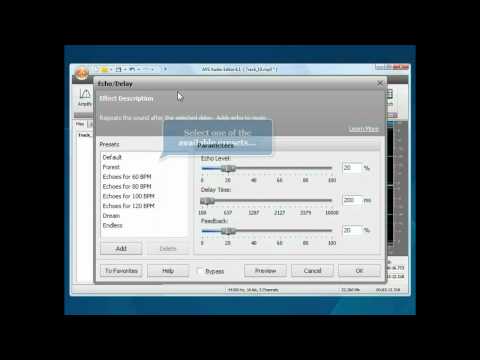

Watch the demo video to explore key features, real workflows, and how the software fits your business needs.
 Ubuntu
  Windows
  Desktop
  Cloud-Based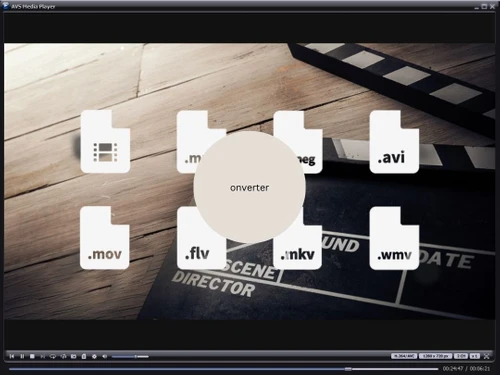
Small Business
Designed for startups and growing businesses
Medium Business
Built for business growth and flexibility
Enterprises
Designed for complex and large-scale business needs
4.4
Out of 5

Overall Rating
Based on
10 Verified Reviews
Rating Breakdown
88% Recommend this Product
Add ReviewOverall, users appreciate AVS Audio Editor for its ease of use, affordability, and effective basic audio editing capabilities, particularly for live recordings and batch processing. Many find it stable and compatible with various audio formats, though some express frustration with its limited support options and outdated interface. Common complaints include the lack of advanced features for complex editing tasks and the watermark in the free version, which can deter casual users. While it suits basic needs well, users desire more flexibility and modern functionality.
Pros
"I love how unique its integrated audio recording is as it as the ability to record audio into the editor when I want to capture live sound without using separate tools."
"It does not hog my system’s resources, so I can even run it on older hardware but must make sure it is Windows."
"The developers keep updating their software which makes it stable, and they are trying to make it more compatible with other operating systems."
Cons
"I was stuck with a problem and found that the support options were limited, with responses taking longer than expected for technical issues."
"In the free version of the software, there is an annoying watermark when you must export files, making it less appealing for casual use."
"While the simple edits are easy, the more advanced tasks do require so exploration through menus and get frustrating."

Dec 7, 2024
Techjockey Verified
“Great for Live Recording but Support Needs Improvement”
I really like that AVS Audio Editor lets me record sound right in the program. It is easy when I want to capture live audio without extra equipment. But when I had a problem, I noticed that help was hard to find, and it took a long time to get answers for my tech issues.
Pros
I love how unique its integrated audio recording is as it as the ability to record audio into the editor when I want to capture live sound without using separate tools.
Cons
I was stuck with a problem and found that the support options were limited, with responses taking longer than expected for technical issues.
Reason to switch
I made a mover to AVS Audio Editor from Logic Pro X because I needed something simpler and more affordable. Logic Pro X had way more features but was too complex and expensive for my basic needs.
Dec 3, 2024
Techjockey Verified
“Lightweight but Watermark in Trial Version”
AVS Audio Editor works well on older computers, which is great for me since I do not have the newest one. But the free version adds a watermark to your files when you save them, which can be frustrating if you just want to use it casually.
Pros
It does not hog my system’s resources, so I can even run it on older hardware but must make sure it is Windows.
Cons
In the free version of the software, there is an annoying watermark when you must export files, making it less appealing for casual use.
Reason to switch
I started using AVS Audio Editor instead of GarageBand because it was easier and lighter for quick changes. GarageBand was too complicated and used too many resources for what I needed.
Dec 3, 2024
Techjockey Verified
“Stable and Updated”
AVS Audio Editor gets regular updates, making it more stable and working better with other systems. But for more complicated editing, it can be a hassle because I must go through a lot of menus, which can be annoying.
Pros
The developers keep updating their software which makes it stable, and they are trying to make it more compatible with other operating systems.
Cons
While the simple edits are easy, the more advanced tasks do require so exploration through menus and get frustrating.
Reason to switch
I changed from WavePad to AVS Audio Editor because I wanted a program that works better and gets updates more often. WavePad was okay for simple edits, but it did not get better regularly like AVS Audio Editor does.

AVS Audio Editor
Price On Request
Desktop
Mobile
Web based
On Premises
Windows
Mac OS
Audacity
Price On Request
Desktop
Mobile
Web based
On Premises
Windows
Mac OS

Cleanvoice AI
Price On Request
Desktop
Mobile
Web based
On Premises
Windows
Mac OS

AudioDirector 365
₹ 1599
Desktop
Mobile
Web based
On Premises
Windows
Mac OS

Supertone CLEAR
Price On Request
Desktop
Mobile
Web based
On Premises
Windows
Mac OS

BandLab
Price On Request
Desktop
Mobile
Web based
On Premises
Windows
Mac OS

Adobe Audition
Price On Request
Desktop
Mobile
Web based
On Premises
Windows
Mac OS

Moises
Price On Request
Desktop
Mobile
Web based
On Premises
Windows
Mac OS

FMOD
Price On Request
Desktop
Mobile
Web based
On Premises
Windows
Mac OS

Adobe Podcast
Price On Request
Desktop
Mobile
Web based
On Premises
Windows
Mac OS

Podcastle AI
Price On Request
Desktop
Mobile
Web based
On Premises
Windows
Mac OS
(0) Product(s) selected
Starting Price:
$69 /License
Starting Price:
$15 /month
Available
Price on Request
Starting Price:
$9 /Month

Starting Price:
₹9,281

Starting Price:
$10 /Month
Available
Price on Request

Available
Price on Request

Available
Price on Request

Available
Price on Request
Available
Price on Request




AVS Audio Editor is a Windows-based audio editing software that supports various audio formats. It allows users to edit, mix, and enhance audio files with built-in effects, tools, and features for both personal and professional projects.
AVS Audio Editor has a Free plan with basic features, and the paid version starts at $99 per month. For larger projects or teams, custom pricing plans are also available upon request.
In AVS Audio Editor, you can easily cut, join, trim, and split audio files. The software provides various tools for mixing, adding effects, and applying enhancements to modify and polish your audio.
AVS Audio Editor offers a free plan with limited features. However, to access advanced tools like enhanced content management and team collaboration, users need to upgrade to the paid plan starting at $99 per month.
To extract audio from a video in AVS Audio Editor, simply import the video file and use the software’s extraction tool to isolate and edit the audio track without needing separate software for video editing.
20,000+ Software Listed
Best Price Guranteed
Free Expert Consultation
2M+ Happy Customers
Terms and Condtions

Users with registered businesses can purchase goods from merchants on the platform to satisfy their business needs. Users are not permitted to utilize any products acquired through the platform for resale, advertising, business, or further distribution.
For each purchase made, users will receive a Tax Invoice (or 'GST invoice') that includes specific details such as:
the GSTIN of the user associated with their registered business, and
the specified Entity Name for their business.
It should be noted that not all products are eligible for GST Invoice. Only the products displayed by participating sellers with the 'GST-based Invoice Available' callout on the product description page would qualify.
Certain goods and services are not eligible to get a GST Invoice, including items with VAS, i.e., Value Added Services (e.g., Total Mobile Protection/Assured Buyback) and those involving an exchange offer at the time of purchase.
Users must ensure the accuracy of the GSTIN, and business entity name provided for the GST Invoice. Requests for corrections into GST Invoice would not be accommodated by Techjockey.com or any Seller, and any issues arising from user-provided information are the sole responsibility of users.
Techjockey.com is not liable for the GST Invoice or any associated input tax credit. To efficiently claim an input tax credit, users should select the registered place of business address as per the GST authority's data and follow the provisions of the GST Act and rules.
To claim an input tax credit, the delivery and billing addresses must match. Furthermore, input tax credits will not be granted if the delivery address and GSTIN on the invoice are from different states. In case of incorrect GST details provided during the order placement, the order will be canceled automatically.


