USA
USA UAE
UAESmall Business
Designed for startups and growing businesses


See More




Brand: CyberLink Corp
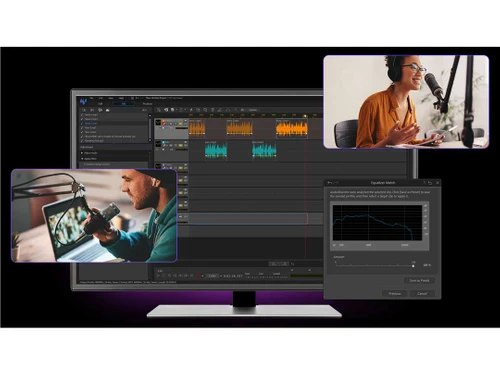
AudioDirector 365 is a robust, AI-powered audio editing software designed for professionals and enthusiasts alike. Its intuitive interface and advanced features make it a versatile tool for a wide array of audio projects including recording, mixing, and restoration.
See MoreHave you used AudioDirector 365 before?
Share your insights for better experience
View plans
 Save upto 18%, Get GST Invoice on your business purchase T&C Buy Now & Pay Later, Check offer on payment page.
 Brand: CyberLink Corp
Founded Year: 1996
Founded in 1996, CyberLink Corp. (5203.TW) is the world leader in multimedia software and AI face recognition technology.
 Audio Effects Audio Recording AI Voice Changer Fades Trim and Merge Audio Files Dialogue Contour Insert Noise/Insert Silence Batch Processing Audio Files Surround Sound Panner Podcast Studio Audio Transcription One-Click Enhancement Multi-Track Mixing Restoration Assistant Vocal Removal/Boost

Watch the demo video to explore key features, real workflows, and how the software fits your business needs.
 Windows
  Desktop
  Perpetual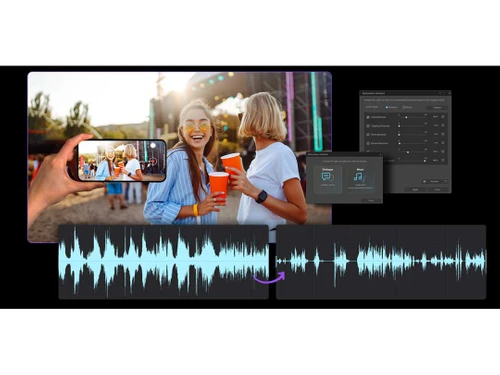
Small Business
Designed for startups and growing businesses
Medium Business
Built for business growth and flexibility
Enterprises
Designed for complex and large-scale business needs
4.3
Out of 5

Overall Rating
Based on
10 Verified Reviews
Rating Breakdown
89% Recommend this Product
Add ReviewUsers generally appreciate CyberLink AudioDirector for its affordability, frequent updates, and useful features like customizable hotkeys and effective audio restoration tools. Many find it particularly beneficial for podcasting and video editing, citing the real-time preview and spatial audio tools as standout elements. However, concerns arise regarding the lack of third-party plugin support, occasional audio desync issues, and limitations in MIDI editing. Additionally, some users express dissatisfaction with the subscription model and performance lags when handling larger files.
Pros
"The standout feature for me was the spatial audio editing tools for 360-degree videos. This made my projects more immersive and engaging."
"I love how the developers frequently update AudioDirector with new features and bug fixes. This shows a commitment to keeping the software relevant and secure."
"Being able to set shortcuts is such a time saver and makes my workflow so much smoother. The customizable hotkeys are a big productivity booster."
Cons
"Although they update their software often, some of these updates feel redundant. It just feels like a rebranding of old features rather than offering fresh tools and features."
"Even though the restoration tools are great, they sometimes overprocess the audio, which leaves an unnatural sound if you are not careful with the settings."
"If you are a music producer who focuses on new instruments you would be disappointed since it has a very basic MIDI editing. It is not the most versatile tool in this area."

Nov 29, 2024
Techjockey Verified
“Frequent Updates Are Good, but Sometimes Lack New Features”
I like how CyberLink AudioDirector gets updated regularly with new features and fixes. But some updates feel more like tweaks to old features rather than introducing something new and exciting.
Pros
I love how the developers frequently update AudioDirector with new features and bug fixes. This shows a commitment to keeping the software relevant and secure.
Cons
Although they update their software often, some of these updates feel redundant. It just feels like a rebranding of old features rather than offering fresh tools and features.
Reason to switch
I switched because SoundForge felt outdated and did not receive any updates as often. AudioDirector’s consistent updates and improvements have gradually made it better to stay current with audio editing tools.
Nov 13, 2024
Techjockey Verified
“Affordable and Powerful”
For me personally, I do not mind the pricing model as much since it is reasonable compared to other high-end tools. It is budget-friendly and offers great features for the price. The restoration tools however can be a little over the top leading to audio sounding unnatural if I am not precise.
Pros
I choose CyberLink AudioDirector due to its affordable subscription options. When compared with some other industry-standard audio tools, the subscription is reasonable and budget-friendly.
Cons
Even though the restoration tools are great, they sometimes overprocess the audio, which leaves an unnatural sound if you are not careful with the settings.
Reason to switch
Cakewalk, while free did not have the advanced restoration features I needed. AudioDirector offered better tools for cleaning up recordings.
Oct 28, 2024
Techjockey Verified
“Customizable Hotkeys Make It Worth”
CyberLink AudioDirector really allows me to customize my hot keeps which saves my time and keeps my workflow efficient. I although have run into audio desync issues, especially with longer video clips. I can fix them, but it is an extra hassle I do not want to deal with.
Pros
Being able to set shortcuts is such a time saver and makes my workflow so much smoother. The customizable hotkeys are a big productivity booster.
Cons
I have faced occasional bugs with the audio desync especially while editing videos, particularly with longer clips. It is fixable but it adds a lot of unnecessary steps to the workflow.
Reason to switch
Spek was too basic for my needs. AudioDirector gave me more features and customization options, making it an ideal fit for my video projects.

AudioDirector 365
₹ 1599.00 excl. GST
Desktop
Mobile
Web based
On Premises
Windows
Mac OS
Audacity
Price On Request
Desktop
Mobile
Web based
On Premises
Windows
Mac OS

Cleanvoice AI
Price On Request
Desktop
Mobile
Web based
On Premises
Windows
Mac OS

Supertone CLEAR
Price On Request
Desktop
Mobile
Web based
On Premises
Windows
Mac OS

BandLab
Price On Request
Desktop
Mobile
Web based
On Premises
Windows
Mac OS

Adobe Audition
Price On Request
Desktop
Mobile
Web based
On Premises
Windows
Mac OS

Moises
Price On Request
Desktop
Mobile
Web based
On Premises
Windows
Mac OS

FMOD
Price On Request
Desktop
Mobile
Web based
On Premises
Windows
Mac OS

Adobe Podcast
Price On Request
Desktop
Mobile
Web based
On Premises
Windows
Mac OS

Podcastle AI
Price On Request
Desktop
Mobile
Web based
On Premises
Windows
Mac OS

Cubase Elements
₹ 9281
Desktop
Mobile
Web based
On Premises
Windows
Mac OS
(0) Product(s) selected
Starting Price:
$69 /License
Starting Price:
$15 /month
Available
Price on Request
Starting Price:
$9 /Month
Starting Price:
₹9,281

Starting Price:
$10 /Month
Available
Price on Request

Available
Price on Request

Available
Price on Request
Available
Price on Request

Available
Price on Request




CyberLink AudioDirector offers a free trial, but it is primarily a paid software with a subscription starting at INR 1599 per month. The subscription includes all features, regular updates, and access to new sound packs.
Cyberlink AudioDirector is a comprehensive audio editing software that allows you to edit, mix, record, and restore audio. It’s ideal for anyone working on sound for video production, podcasts, music, or voiceovers. With AI-powered tools, it helps users quickly clean up and enhance audio, making it sound professional.
Cyberlink AudioDirector is available for Windows. Users can download the software and access all features, including AI-powered tools and sound packs. Additionally, it offers a monthly subscription model with continuous updates and access to new sound effects.
AudioDirector 365 software pricing starts at INR 1599 per month at techjockey.com.
AudioDirector 365 software is not available as a mobile app for Android and iOS.
The software supports only Windows Operating System.
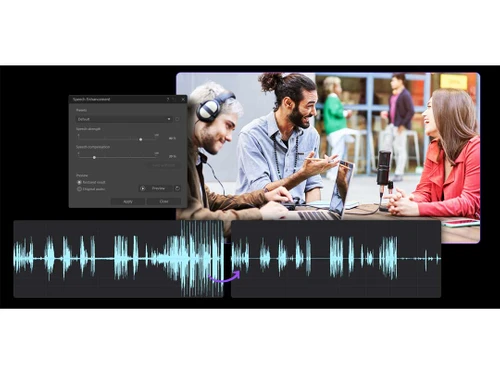
AudioDirector 365 uses AI to enhance audio quality, remove noise, and easily edit multi-track projects, making audio production more efficient even for those without expert-level skills.
AudioDirector offers multi-track editing, AI-powered noise reduction and vocal removal, restoration tools, and various audio effects, along with features like punch and roll recording, 5.1/7.1 surround sound panning, and batch processing.
Contact techjockey.com to explore trial options for AudioDirector. They can provide information about available testing periods. You can contact our product experts for more information.
AudioDirector likely employs standard security measures to protect user data during processing and storage, but specific details about its security features are not readily available in the provided context.
AudioDirector targets content creators, musicians, podcasters, and videographers who require a robust platform for editing, mixing, and enhancing audio, making professional-level results achievable without extensive technical expertise.
Yes, Cyberlink AudioDirector removes vocals from a song to create instrumental or karaoke tracks.
0 0
Yes, AudioDirector includes a Vocal Removal feature powered by AI. This tool allows you to either completely remove vocals from a track or boost them for clarity. It’s perfect for creating karaoke tracks or isolating vocals for remixing purposes.
0 0
In AudioDirector, use the Vocal Removal tool found in the Adjustment tab. The AI-powered tool allows you to isolate or remove vocals from any audio track, making it ideal for creating instrumental or karaoke versions.
0 0
Yes, AudioDirector can be helpful for small businesses that need to create and edit audio content such as podcasts, marketing materials, or training videos, without needing specialised audio editing staff.
0 0
To record audio in AudioDirector, open the software, go to the Record tab, and select your input device (microphone). Then, click the Record button to start capturing your audio directly into the software.
0 0
20,000+ Software Listed
Best Price Guranteed
Free Expert Consultation
2M+ Happy Customers
Terms and Condtions

Users with registered businesses can purchase goods from merchants on the platform to satisfy their business needs. Users are not permitted to utilize any products acquired through the platform for resale, advertising, business, or further distribution.
For each purchase made, users will receive a Tax Invoice (or 'GST invoice') that includes specific details such as:
the GSTIN of the user associated with their registered business, and
the specified Entity Name for their business.
It should be noted that not all products are eligible for GST Invoice. Only the products displayed by participating sellers with the 'GST-based Invoice Available' callout on the product description page would qualify.
Certain goods and services are not eligible to get a GST Invoice, including items with VAS, i.e., Value Added Services (e.g., Total Mobile Protection/Assured Buyback) and those involving an exchange offer at the time of purchase.
Users must ensure the accuracy of the GSTIN, and business entity name provided for the GST Invoice. Requests for corrections into GST Invoice would not be accommodated by Techjockey.com or any Seller, and any issues arising from user-provided information are the sole responsibility of users.
Techjockey.com is not liable for the GST Invoice or any associated input tax credit. To efficiently claim an input tax credit, users should select the registered place of business address as per the GST authority's data and follow the provisions of the GST Act and rules.
To claim an input tax credit, the delivery and billing addresses must match. Furthermore, input tax credits will not be granted if the delivery address and GSTIN on the invoice are from different states. In case of incorrect GST details provided during the order placement, the order will be canceled automatically.