 USA
USA UAE
UAESmall Business
Designed for startups and growing businesses

See More


Brand: Pamsys
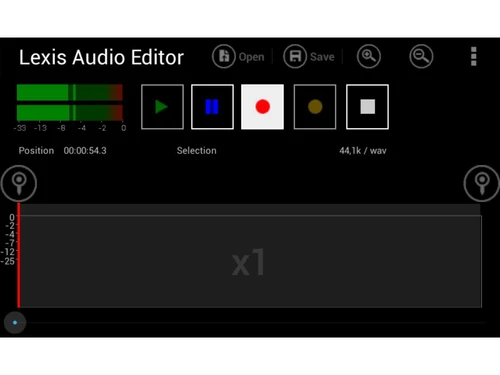
An audio editing software for recording, importing, and editing audio files with tools like trim, effects, and noise reduction, supporting formats such as MP3, WAV, and FLAC.
See MoreHave you used Lexis Audio Editor before?
Share your insights for better experience
Looking for The Right Pricing?
Share your requirements and get a plan built around your business.
Price Available on Request
Get personalised Lexis Audio Editor pricing that fits your needs. Our team will connect with you.
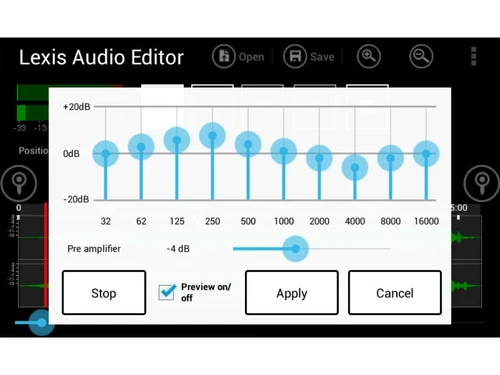
 Record & Edit Audio Multiple Formats Supported Cut, Copy, Paste & Delete Noise Reduction Change Tempo, Pitch & Speed Audio Effects File Export & Sharing Audio Mixing Import & Export Multi-Format Export Voice Cleaner
  Windows
  iOS
iOS  Android MacOS
  Desktop
  Mobile
  Tablet
  iPad
iPad  Cloud-Based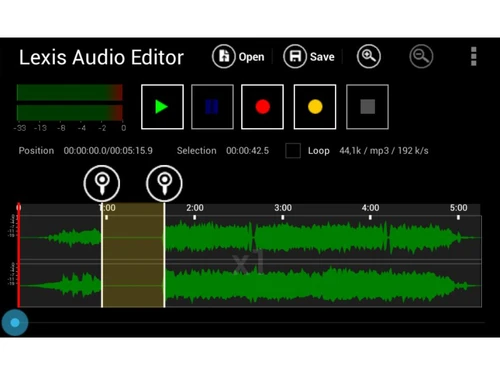
Small Business
Designed for startups and growing businesses
Medium Business
Built for business growth and flexibility
Enterprises
Designed for complex and large-scale business needs
4.6
Out of 5

Overall Rating
Based on
3 Verified Ratings
Rating Breakdown
86% Recommend this Product
Add ReviewTechjockey Trusted Reviews from Verified Users
No reviews are currently available for Lexis Audio Editor. Discover similar Audio Editing Software reviews

Luna DAW
Whats great - Innovative features, high-quality sound, seamless Apollo integration. read more

ocenaudio
Whats great - I appreciate that Ocenaudio supports VST plugins, so I can explore and expand the functionality of the software with more too... read more

GoldWave
Whats great - As a veteran user of GoldWave I have seen that it has retained the same basic look and features over the last 10 years which ... read more

Lexis Audio Editor
Price On Request
Desktop
Mobile
Web based
On Premises
Windows
Mac OS
Audacity
Price On Request
Desktop
Mobile
Web based
On Premises
Windows
Mac OS

Cleanvoice AI
Price On Request
Desktop
Mobile
Web based
On Premises
Windows
Mac OS

AudioDirector 365
₹ 1599
Desktop
Mobile
Web based
On Premises
Windows
Mac OS

Supertone CLEAR
Price On Request
Desktop
Mobile
Web based
On Premises
Windows
Mac OS

BandLab
Price On Request
Desktop
Mobile
Web based
On Premises
Windows
Mac OS

Adobe Audition
Price On Request
Desktop
Mobile
Web based
On Premises
Windows
Mac OS

Moises
Price On Request
Desktop
Mobile
Web based
On Premises
Windows
Mac OS

Adobe Podcast
Price On Request
Desktop
Mobile
Web based
On Premises
Windows
Mac OS

Podcastle AI
Price On Request
Desktop
Mobile
Web based
On Premises
Windows
Mac OS

FMOD
Price On Request
Desktop
Mobile
Web based
On Premises
Windows
Mac OS
(0) Product(s) selected
Starting Price:
$69 /License
Starting Price:
$15 /month
Available
Price on Request
Starting Price:
$9 /Month

Starting Price:
$10 /Month

Starting Price:
₹9,281
Available
Price on Request

Available
Price on Request

Available
Price on Request
Available
Price on Request

Available
Price on Request




Lexis Audio Editor pricing information can be requested from Techjockey.com.
Yes, Lexis Audio Editor is available as a mobile app for Android and iOS devices.
Lexis Audio is compatible with MacOS, Android, iOS, and Windows operating systems.
Yes, a free version with basic features is available to try before upgrading.
Lexis Audio allows users to record, import, edit, and export audio files with various tools and effects.
Lexis Audio is used by podcasters, musicians, voice-over artists, and anyone needing audio editing.
Yes, the free version acts as a demo with limited features to test the software.
Yes, a free version with basic functionality is available for all users.
20,000+ Software Listed
Best Price Guranteed
Free Expert Consultation
2M+ Happy Customers
Terms and Condtions

Users with registered businesses can purchase goods from merchants on the platform to satisfy their business needs. Users are not permitted to utilize any products acquired through the platform for resale, advertising, business, or further distribution.
For each purchase made, users will receive a Tax Invoice (or 'GST invoice') that includes specific details such as:
the GSTIN of the user associated with their registered business, and
the specified Entity Name for their business.
It should be noted that not all products are eligible for GST Invoice. Only the products displayed by participating sellers with the 'GST-based Invoice Available' callout on the product description page would qualify.
Certain goods and services are not eligible to get a GST Invoice, including items with VAS, i.e., Value Added Services (e.g., Total Mobile Protection/Assured Buyback) and those involving an exchange offer at the time of purchase.
Users must ensure the accuracy of the GSTIN, and business entity name provided for the GST Invoice. Requests for corrections into GST Invoice would not be accommodated by Techjockey.com or any Seller, and any issues arising from user-provided information are the sole responsibility of users.
Techjockey.com is not liable for the GST Invoice or any associated input tax credit. To efficiently claim an input tax credit, users should select the registered place of business address as per the GST authority's data and follow the provisions of the GST Act and rules.
To claim an input tax credit, the delivery and billing addresses must match. Furthermore, input tax credits will not be granted if the delivery address and GSTIN on the invoice are from different states. In case of incorrect GST details provided during the order placement, the order will be canceled automatically.


