 USA
USA UAE
UAESmall Business
Designed for startups and growing businesses

See More





Brand: Universal Audio
LUNA Audio Editing Software empowers creators with intuitive tools for professional-grade audio editing, mixing, and mastering, complemented by real-time effects processing and seamless integration.
See MoreHave you used Luna DAW before?
Share your insights for better experience
Brand: Universal Audio
Founded Year: 1958
Universal Audio, Inc., a manufacturer of audio hardware and software plug-ins.
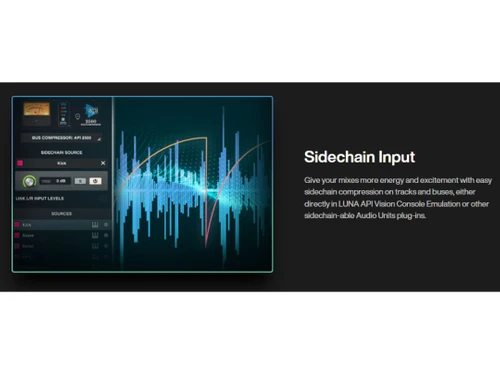
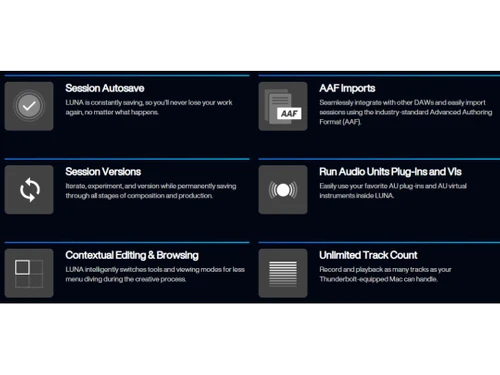
 Audio Recording Multitrack Recording and Mixing Multitrack MIDI Editing ARA Integration Audio Editing Sound Editing Tools Integrations Sidechain Input Contextual Editing AAF Imports Unlimited Track Count Audio Effects

Watch the demo video to explore key features, real workflows, and how the software fits your business needs.
 Windows
  MacOS
MacOS  Desktop
  Cloud-Based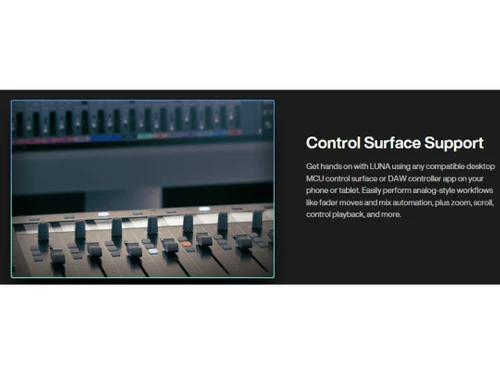
Small Business
Designed for startups and growing businesses
Medium Business
Built for business growth and flexibility
Enterprises
Designed for complex and large-scale business needs
4.4
Out of 5

Overall Rating
Based on
12 Verified Reviews
Rating Breakdown
89% Recommend this Product
Add ReviewOverall, users appreciate Luna DAW for its impressive sound quality, seamless integration with Apollo interfaces, and efficient workflow, making it particularly suitable for mixing and recording. However, many reviews highlight limitations in MIDI capabilities and a lack of built-in instruments, which can hinder music production, especially for those relying on virtual instruments. Additionally, some users have reported a steep learning curve and occasional software crashes, impacting the overall user experience.
Pros
"Excellent sound quality, seamless integration with Apollo interfaces, and intuitive audio editing."
"Innovative features, high-quality sound, seamless Apollo integration."
"Streamlined workflow, efficient for tracking and mixing, and high-quality plugins."
Cons
"Limited customization options, lacks flexibility in interface layout."
"Limited support for third-party plugins, restricted plugin ecosystem."
"Lacks features for music production, limited virtual instruments."


Apr 24, 2025
Techjockey Verified
“Promising DAW, but Needs More Features”
LUNA brings innovative features to the table, and the sound quality is impressive. The integration with Apollo interfaces enhances the recording experience. However, it's missing some standard DAW features, and the MIDI editing capabilities are limited. I hope future updates address these gaps.
Pros
Innovative features, high-quality sound, seamless Apollo integration.
Cons
Missing some standard DAW features, limited MIDI editing.
Reason to switch
I adopted LUNA for its innovative approach and superior sound quality, anticipating future enhancements to its feature set.
Mar 13, 2025
Techjockey Verified
“Ideal for Mixing Engineers, Less for Producers”
As a mixing engineer, LUNA has been ideal. The tools are exceptional, and the sound quality is top-tier. The workflow is efficient, allowing me to focus on the mix. However, for music producers, especially those relying on virtual instruments, LUNA might feel lacking.
Pros
Exceptional mixing tools, high-quality sound, and efficient workflow.
Cons
Lacks features for music production, limited virtual instruments.
Reason to switch
I transitioned to LUNA to enhance my mixing capabilities, even though it offers fewer features for music production.
Mar 18, 2025
Techjockey Verified
“High-Quality Plugins, but Limited Third-Party Support”
LUNA's built-in plugins are top-notch, delivering excellent sound quality. The interface is user-friendly, making the production process enjoyable. However, the limited support for third-party plugins restricts the flexibility I have in choosing tools.
Pros
Top-notch built-in plugins, excellent sound quality, user-friendly interface.
Cons
Limited support for third-party plugins, restricted plugin ecosystem.
Reason to switch
I chose LUNA for its high-quality built-in plugins, accepting the trade-off of limited third-party plugin support.

Luna DAW
Price On Request
Desktop
Mobile
Web based
On Premises
Windows
Mac OS
Audacity
Price On Request
Desktop
Mobile
Web based
On Premises
Windows
Mac OS

Cleanvoice AI
Price On Request
Desktop
Mobile
Web based
On Premises
Windows
Mac OS

AudioDirector 365
₹ 1599
Desktop
Mobile
Web based
On Premises
Windows
Mac OS

Supertone CLEAR
Price On Request
Desktop
Mobile
Web based
On Premises
Windows
Mac OS

BandLab
Price On Request
Desktop
Mobile
Web based
On Premises
Windows
Mac OS

Adobe Audition
Price On Request
Desktop
Mobile
Web based
On Premises
Windows
Mac OS

Moises
Price On Request
Desktop
Mobile
Web based
On Premises
Windows
Mac OS

Adobe Podcast
Price On Request
Desktop
Mobile
Web based
On Premises
Windows
Mac OS

FMOD
Price On Request
Desktop
Mobile
Web based
On Premises
Windows
Mac OS

Podcastle AI
Price On Request
Desktop
Mobile
Web based
On Premises
Windows
Mac OS
(2) Product(s) selected
Starting Price:
$69 /License
Starting Price:
$15 /month
Available
Price on Request
Starting Price:
$9 /Month

Starting Price:
₹9,281
Available
Price on Request

Available
Price on Request

Available
Price on Request

Available
Price on Request

Available
Price on Request

Available
Price on Request





LUNA DAW software is compatible with Windows and macOS operating systems.
The LUNA DAW audio editing app is unavailable on Android and iOS devices.
Yes, Luna DAW can only run in a Mac environment. Mac users can access Luna DAW for free, you just need an iLok account.
LUNA Audio Editing software price is available on request at techjockey.com.
LUNA DAW can be used by video editors, musicians, music directors, instrumentalists and individuals looking for robust audio editing software.
The LUNA DAW demo is available for free with techjockey.com.
LUNA DAW does not offer a free trial.
LUNA DAW is a cloud-based platform. So, you need not download any software or app to use it.
LUNA DAW is a versatile audio editing software that allows users to remove vocals, extract individual audio stems, learn and practice songs, remix tracks, and fix audio. Additionally, users can utilize Audioshop for in-depth audio editing.
Luna DAW uses AU(Audio Unit) plug-ins along with UAD-2, UADx plug-ins, LUNA extensions and UAD Instructions.
20,000+ Software Listed
Best Price Guranteed
Free Expert Consultation
2M+ Happy Customers
Terms and Condtions

Users with registered businesses can purchase goods from merchants on the platform to satisfy their business needs. Users are not permitted to utilize any products acquired through the platform for resale, advertising, business, or further distribution.
For each purchase made, users will receive a Tax Invoice (or 'GST invoice') that includes specific details such as:
the GSTIN of the user associated with their registered business, and
the specified Entity Name for their business.
It should be noted that not all products are eligible for GST Invoice. Only the products displayed by participating sellers with the 'GST-based Invoice Available' callout on the product description page would qualify.
Certain goods and services are not eligible to get a GST Invoice, including items with VAS, i.e., Value Added Services (e.g., Total Mobile Protection/Assured Buyback) and those involving an exchange offer at the time of purchase.
Users must ensure the accuracy of the GSTIN, and business entity name provided for the GST Invoice. Requests for corrections into GST Invoice would not be accommodated by Techjockey.com or any Seller, and any issues arising from user-provided information are the sole responsibility of users.
Techjockey.com is not liable for the GST Invoice or any associated input tax credit. To efficiently claim an input tax credit, users should select the registered place of business address as per the GST authority's data and follow the provisions of the GST Act and rules.
To claim an input tax credit, the delivery and billing addresses must match. Furthermore, input tax credits will not be granted if the delivery address and GSTIN on the invoice are from different states. In case of incorrect GST details provided during the order placement, the order will be canceled automatically.


