linkedin
Cakewalk logo
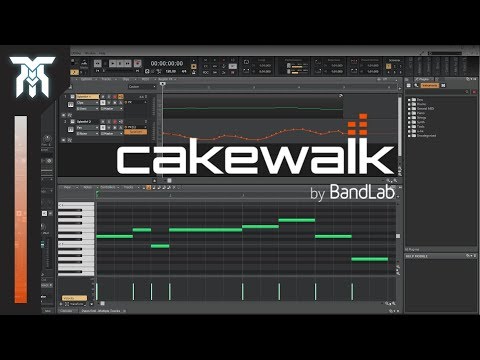
play How To Use Cakewalk by Bandlab - Tutorial For Beginners (FREE DAW)
Cakewalk Creativity
Cakewalk Home Studio

Cakewalk

Brand: BandLab

  • 4.6

  • 1 Rating & 1 Review

Unlock your creative potential with Cakewalk, a comprehensive audio editing software that will help you quickly record and edit your musical masterpiece.

See More

Have you used Cakewalk before?

Share your insights for better experience

Add a Review

Price Available on Request

Questions about pricing or customization? We’re here to help, just a click away.

100% Genuine
Products
Best Price
Guaranteed
Safe & Secure
Payment
  • Description

  • Pricing

  • Features

  • Specification

  • Review

  • Compare

  • Alternatives

  • FAQ

  • Questions

Cakewalk Software Overview

What is Cakewalk Software?

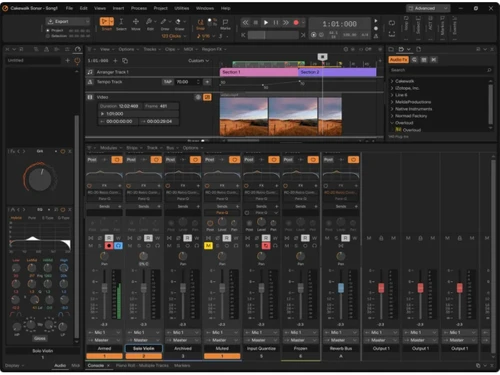
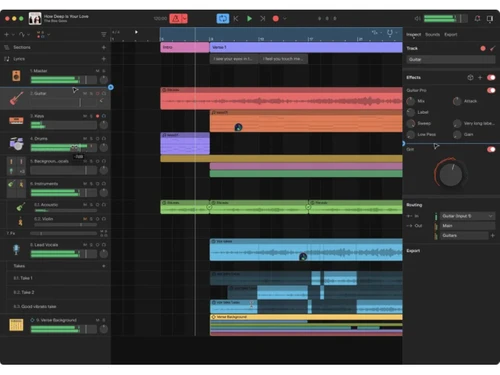
Cakewalk is a digital audio workstation software that assists in music production. It is a desktop application that provides tools for creating, editing, mixing, recording, and sharing music. The interface helps you to manage projects seamlessly and supports the industry's best audio engine.

Cakewalk provides advanced MIDI controllers, FX plugins, a tool for automating vocal timing tracks, a 64-bit mix engine, virtual instruments, and audio editing functionalities. You can add audio effects like reverb, filtering, echo, compression, peak limiting, voice-time alignment for lip-syncing, voice synch during track replacement, etc.

Cakewalk is Windows-compatible and touch-screen-compatible software. It allows numerous audio formats and offers robust professional performances that help music creators display their creativity effortlessly to the world.

Why Choose Cakewalk System?

  • Make professional music: It provides comprehensive tools to create quality music with advanced audio effects quality.
  • Apply effects: It supports the FX plugin and powerful mix engine that allows adding more audio effects and synth in the tracks.?
  • Editing tools: With this software, you can compose, record, edit, mix, synchronize audio timings, add effects, and transform your ideas into quality music.?
  • Touch enabled: The software is compatible with touchscreen-based devices running on the Windows platform, helping you use the interface efficiently.

Additional Features Of Cakewalk Audio Editing Software

Cakewalk is loaded with features designed to elevate your music production experience:

  • Next-Gen Music Creation: Cakewalk Next is a user-friendly, desktop-based platform designed to simplify modern music workflows. It empowers musicians to create professional tracks while maintaining ease of use.
  • Classic DAW Powerhouse: Cakewalk Sonar is a robust, classic DAW that brings the modern recording studio to your desktop. It features advanced mixing, recording, and mastering tools that allow you to produce studio-quality audio.
  • Full MIDI Support: Cakewalk offers complete MIDI integration, allowing you to connect external instruments and use them to control virtual instruments within the software.
  • Unlimited Tracks: With Cakewalk, you can record unlimited audio, MIDI, and instrument tracks, giving you the freedom to build complex, layered soundscapes.
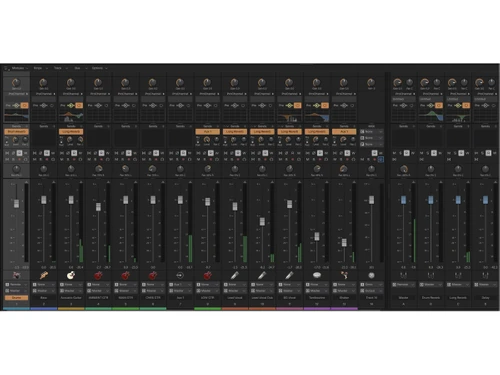
  • Advanced Mixing & Mastering: Cakewalk provides advanced mixing tools like ProChannel, which offers a range of built-in effects, EQ, and dynamic processing to polish your tracks.
  • Third-Party Plugin Support: Cakewalk supports VST3, Audio Units, and other plugin formats, giving you access to a wide variety of third-party plugins to enhance your audio production.

Pricing of Cakewalk Audio Editing System

Cakewalk Audio editing system pricing is available on request at techjockey.com.

The overall pricing model is based on different factors such as personalization, extra features required, total users, and the deployment type. Please feel free to request a call from our product experts if you want to learn more about our subscription plans or premium package deals.

Read more

BandLab Company Details

Founded Year:  2014

BandLab is a cloud platform where musicians and fans create music, collaborate and engage with each other across the globe.

Director/Founders Meng Ru Kuok, Steve Skillings
Company Size 1-100 Employees

Cakewalk Pricing & Plans

Looking for The Right Pricing?

Share your requirements and get a plan built around your business.

  • Define your business needs
  • Get customised pricing
  • Choose features that fit your workflow

Price Available on Request

Get personalised Cakewalk pricing that fits your needs. Our team will connect with you.

Cakewalk Features

  • icon_check Audio Editing
    It offers an audio editing tool to apply audio effects, fix mistakes, manipulate, trim, slice, and crossfade your audio.
  • icon_check Integrations
    It seamlessly integrates plugins, ARA support, MIDI controllers, virtual instruments, and powerful audio editing tools.
  • icon_check Audio Effects
    You can use audio effects like compression, reverb, echo, EQ, and modulation to enhance sound quality and creativity.
  • icon_check Record Live Audio
    Use the software plugins to integrate Live audio into your project in real-time.
  • icon_check Sound Editing Tools
    Use powerful sound editing tools to correct audio timings and noise reduction, pitch correction, audio arrangements, etc.
  • icon_check Export Audio (Multiple File Types)
    Export your audio file into multiple file types like FLAC, MP3, WAV, OGG, etc.
  • icon_check Record Multiple Simultaneous Tracks
    Record and capture multiple audio tracks from various sources to allow layered music composition.
  • icon_check Batch Processing Audio Files
    Use this software to batch-process audio files, apply various effects, and edit and export them simultaneously.
Cakewalk Demo Video play icon

Get Cakewalk Demo

Watch the demo video to explore key features, real workflows, and how the software fits your business needs.

Understand
Key Features
Personal
Demo Insights
Interactive
Demo Support

Cakewalk Specification

Supported Platforms
Ubuntu Ubuntu Windows Windows MacOS MacOS Linux Linux
Devices
Desktop Desktop Mobile Mobile Tablet Tablet iPad iPad
Deployment
Web-Based Web-Based
Suitable For
All Industries
Business Specific
All Businesses
Business Size
Small Business Startups Medium Business Enterprises
Customer Support
Email Communities
Language
English

Explore the Best Alternative Solutions Similar to Your Business Size and Needs

Cakewalk Review

4.6

Out of 5

img

Overall Rating

Based on
1 Verified Review

Rating Breakdown

  • Features 5
  • Value for Money 4.5
  • Ease of Use 4
  • Customer Support 5

100% Recommend this Product

Add Review
Cakewalk Video Review

youtubeVideoId

4.6

“Cakewalk by BandLab Review [Powerful Free DAW Exploration]”

Review by: Higher HZ

Compare Cakewalk With other Audio Editing Software

Products
Ratings
Pricing
Device Supported
Deployment
Supported Platforms
  • img

    Cakewalk

  • 4.6

  • Price On Request

  • Desktop

    Mobile

  • Web based

    On Premises

  • Windows

    Mac OS

  • img

    BandLab

  • 4.5

  • Price On Request

  • Desktop

    Mobile

  • Web based

    On Premises

  • Windows

    Mac OS

  • img

    Cleanvoice AI

  • 4.3

  • Price On Request

  • Desktop

    Mobile

  • Web based

    On Premises

  • Windows

    Mac OS

  • img

    Cubase Elements

  • 4.7

  • ₹ 9281

  • Desktop

    Mobile

  • Web based

    On Premises

  • Windows

    Mac OS

  • img

    Moises

  • 4.7

  • Price On Request

  • Desktop

    Mobile

  • Web based

    On Premises

  • Windows

    Mac OS

  • img

    Audacity

  • 4.6

  • Price On Request

  • Desktop

    Mobile

  • Web based

    On Premises

  • Windows

    Mac OS

  • img

    Adobe Podcast

  • 4.2

  • Price On Request

  • Desktop

    Mobile

  • Web based

    On Premises

  • Windows

    Mac OS

  • img

    Qtractor

  • 4.1

  • Price On Request

  • Desktop

    Mobile

  • Web based

    On Premises

  • Windows

    Mac OS

  • img

    Supertone CLEAR

  • 4.5

  • Price On Request

  • Desktop

    Mobile

  • Web based

    On Premises

  • Windows

    Mac OS

  • img

    LALAL AI

  • 4.3

  • Price On Request

  • Desktop

    Mobile

  • Web based

    On Premises

  • Windows

    Mac OS

(0) Product(s) selected

Cakewalk Alternatives

See All Cakewalk Alternatives

Starting Price:

$15 /month

Starting Price:

$25 /month

Available

Price on Request

Starting Price:

$15

Available

Price on Request

Articles for Cakewalk

See All Related Articles

Which operating system does the Cakewalk Software Support?

Cakewalk software is compatible with Windows and macOS operating systems.

Is there any Cakewalk app?

Cakewalk app is unavailable on Android and iOS devices.

What is the deployment type of the Cakewalk System?

Cakewalk system supports on-premises deployment.

How much does the Cakewalk Audio Editing Software cost?

Cakewalk Audio Editing software price is available on request at techjockey.com.

Who are the potential users of the Cakewalk Audio Editing System?

Cakewalk Audio Editing system can be used by video editors, musicians, music directors, instrumentalists, and individuals looking for robust audio editing software.

Is there any free trial or demo for Cakewalk?

Cakewalk demo is available for free with techjockey.com.

Is the Cakewalk Audio Editing Platform free?

Cakewalk audio editing platform does not offer any free trial.

How can you download the Cakewalk Audio Editing software?

Cakewalk is a cloud-based platform. So, download the installation file on your system and open the Setup Wizard to get started.

How does the Cakewalk Audio Editing Software work?

Cakewalk is a versatile audio editing software that simplifies manipulating audio tracks. It offers a user-friendly interface with multi-track recording, editing, mixing, and mastering features. With its powerful tools and intuitive controls, Cakewalk empowers musicians and sound engineers to easily create professional-quality audio projects.

Cakewalk Questions

Q:

How to import audio/MIDI files into Cakewalk?

Lallitt sablok Nov 18, 2024
A:

To import audio/MIDI files into Cakewalk, follow the steps given below:

  • Open Cakewalk
  • Create a new project or open an existing one
  • Navigate to 'File'
  • Click on 'Import'
  • Choose the audio or MIDI file from your PC
Amit Kumar Nov 18, 2024
A:

To reduce latency while recording on Cakewalk, follow the steps given below:

  • Open your Cakewalk account
  • Open the 'Preferences' menu
  • Navigate to 'Audio'
  • Go to 'Driver Settings'
  • Set the buffer size to a smaller value
  • Use a dedicated audio interface with ASIO drivers for lower latency.
Saurabh Kumar Nov 18, 2024
Q:

How do I use a MIDI controller with Cakewalk?

Rajat Gupta Nov 18, 2024
A:

To use a MIDI controller with Cakewalk, follow the steps given below:

  • Connect your MIDI controller to your computer.
  • Open Cakewalk
  • Navigate to the 'Preferences' menu
  • Under 'MIDI', choose your MIDI controller as the input device
  • Create a new MIDI track
  • Choose your MIDI controller as the input to start recording
Robin Nov 18, 2024
A:

The minimum system requirements for Cakewalk Sonar include an operating system of Windows 10 or later, a multi-core processor, and at least 4GB of RAM. A compatible audio interface is recommended for best performance.

manoj jadhav Nov 18, 2024
Q:

How do I know if Cakewalk Sonar is up to date?

R Rakshamzzz Nov 18, 2024
A:

To know if Cakewalk Sonar is up to date, follow the steps given below:

  • Open BandLab Assistant
  • Navigate to the 'Updates' section
  • Check for updates
naina agarwalla Nov 18, 2024
See All Cakewalk Questions

20,000+ Software Listed

Best Price Guranteed

Free Expert Consultation

2M+ Happy Customers

Terms and Condtions

close

Users with registered businesses can purchase goods from merchants on the platform to satisfy their business needs. Users are not permitted to utilize any products acquired through the platform for resale, advertising, business, or further distribution.

For each purchase made, users will receive a Tax Invoice (or 'GST invoice') that includes specific details such as:

  • the GSTIN of the user associated with their registered business, and

  • the specified Entity Name for their business.

It should be noted that not all products are eligible for GST Invoice. Only the products displayed by participating sellers with the 'GST-based Invoice Available' callout on the product description page would qualify.

Certain goods and services are not eligible to get a GST Invoice, including items with VAS, i.e., Value Added Services (e.g., Total Mobile Protection/Assured Buyback) and those involving an exchange offer at the time of purchase.

Users must ensure the accuracy of the GSTIN, and business entity name provided for the GST Invoice. Requests for corrections into GST Invoice would not be accommodated by Techjockey.com or any Seller, and any issues arising from user-provided information are the sole responsibility of users.

Techjockey.com is not liable for the GST Invoice or any associated input tax credit. To efficiently claim an input tax credit, users should select the registered place of business address as per the GST authority's data and follow the provisions of the GST Act and rules.

To claim an input tax credit, the delivery and billing addresses must match. Furthermore, input tax credits will not be granted if the delivery address and GSTIN on the invoice are from different states. In case of incorrect GST details provided during the order placement, the order will be canceled automatically.