linkedin
BricsCAD logo
play What is BricsCAD? - Introduction video
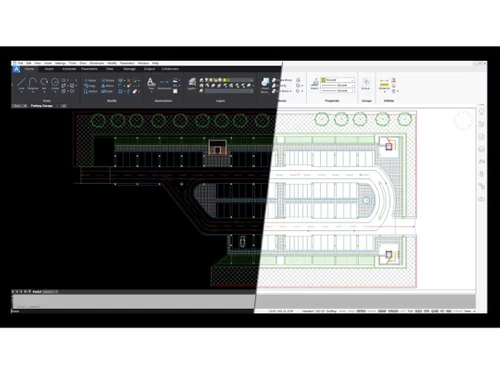
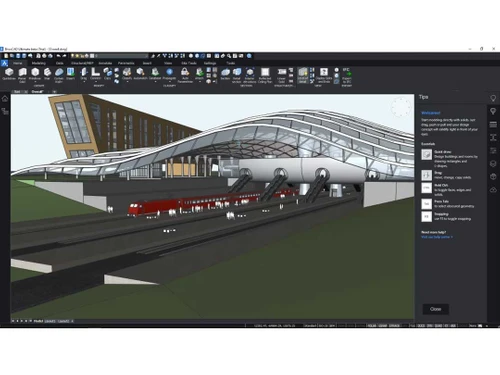
bricscad 2d drawing
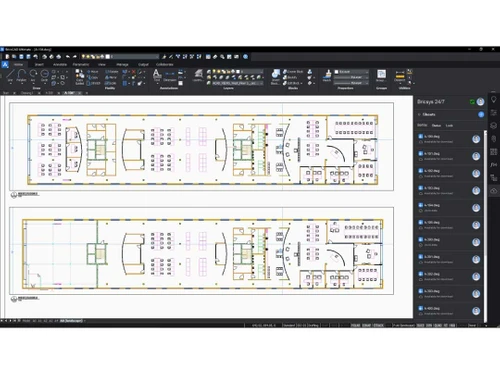
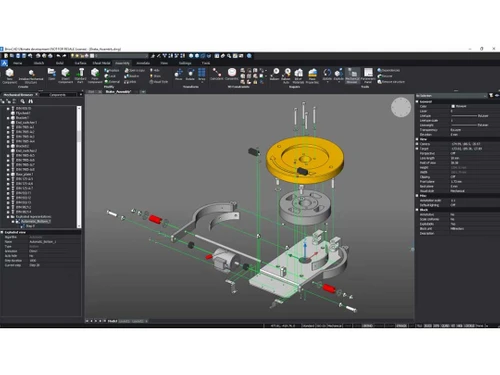
bricscad 3d drawing

BricsCAD

Brand: Bricsys

  • 4.7

  • 4 Ratings & 1 Review

BricsCAD is a robust, DWG-native CAD solution providing 2D drawing, 3D modeling, and BIM capabilities for architects, engineers, and manufacturers.

See More

Have you used BricsCAD before?

Share your insights for better experience

Add a Review
Starting Price
€160

View plans

100% Genuine
Products
Best Price
Guaranteed
Safe & Secure
Payment
  • Description

  • Pricing

  • Features

  • Specification

  • Review

  • Compare

  • Alternatives

  • FAQ

Starting at €160

BricsCAD Software Overview

What is BricsCAD?

BricsCAD is a professional-level computer-aided design software (CAD) that includes 2D drafting, 3D modeling, and Building Information Modeling (BIM) features. It is much cheaper than Autocad but offers the same native DWG file support, which allows for easy integration.

This software also includes specialized tools for mechanical design, artificial intelligence-automated processes, and sheet metal models and architectural BIM workflows. BricsCAD supports customization through LISP, .NET, and C++ and provides perpetual licenses. Because of these reasons, the software is popular in construction, manufacturing, engineering, and many other industries, along with its modern tools and DWG-native environment.

Features of BricsCAD

  • AI-Powered Automation: With BricsCAD, users can automate processes such as block recognition or layout creation, which helps save time. Additionally, the software suggests smart modifications that save time by further accelerating workflow.
  • Sheet Metal Design: Bending and unfolding calculations are part of advanced sheet metal modeling techniques. They are complemented by the support for design-ready flat patterns, which make these ideal for industrial and mechanical work.
  • Parametric Constraints: Design intent is maintained when geometric and dimensional constraints are applied. Dynamic editing is another form of flexible change that protects adjustment relationships, maintaining accuracy alongside changes in 3D and 2D models.
  • BIM Classification (BricsCAD BIM): AI automatically classifies building elements like walls, doors, and windows. Streamlines BIM workflows with intelligent object recognition. Enhances collaboration through IFC 4.3 compliance.

Benefits of Using BricsCAD

  • Cost-Effective Alternative to AutoCAD: BricsCAD comes with flexible perpetual licensing and CAD capabilities that undercut competitors in price. There are no forced subscriptions, which cuts long-term costs, especially for businesses trying to save money.
  • Native DWG Compatibility: No conversion is needed to work with AutoCAD files (DWG format), which guarantees that collaboration with clients and partners that use other CAD platforms is seamless.
  • AI & Automation Boost Productivity: Smart tools automate tedious work such as block recognition, BIM classification, or layout generation, which reduces repetitive work and speeds up project completion.
  • Powerful 3D & BIM Capabilities: BricsCAD BIM contains AI-powered smart building design and documentation capabilities for efficient architectural, construction, and mechanical model design work.
  • Customizable & Developer-Friendly: BricsCAD allows for externally customized workflows with LISP, .NET, C++, and Python support. Tailored shifts for industry requirements or other software are simply implemented.
  • Lightweight & High Performance: Even on older hardware, BricsCAD runs seamlessly and with faster processing than some competitors; it is optimized for use on complex projects and large files.
  • Cloud & Mobile Integration: Bricsys 24/7 offers secure cloud storage as well as allowing for real-time collaboration and access to documents remotely. The touch-optimized UI enables tablet work on-site.

BricsCAD Pricing

The starting price of BricsCAD is €160 per year at Techjockey.com. You can contact them for more information.

Pricing Plans:

  • Lite: €160 per year
  • Pro: €339 per year
Read more

Bricsys Company Details

Founded Year:  2002

Bricsys offers innovative solutions for 2D drafting, 3D direct modeling, sheet metal design and Building Information Modeling (BIM).

Director/Founders Bricsys
Company Size 101-500 Employees

BricsCAD Pricing & Plans

BricsCAD® Lite
Starting at €160
    • Licenses

      Licenses
      Licenses
    • Yearly

      Yearly
      Yearly

Key Features

  • Including BricsCAD Maintenance

  • High-performing, compatible

  • Concise 2D drafting and detailing

  • 2D drafting toolsets

  • LISP routines

BricsCAD® Pro
Starting at €339
    • Licenses

      Licenses
      Licenses
    • Yearly

      Yearly
      Yearly

Key Features

  • Including BricsCAD Maintenance

  • Powerful, intuitive

  • Interoperable 2D/3D CAD and modeling

  • All BricsCAD Lite features

  • 3D modeling toolsets

  • 3rd party applications

  • Civil & Surveying toolsets

BricsCAD® Mechanical
Starting at €475
    • Licenses

      Licenses
      Licenses
    • Yearly

      Yearly
      Yearly

Key Features

  • Including BricsCAD Maintenance

  • Mechanical 2D design and drafting combined

  • Intelligent 3D assembly modeling

  • All BricsCAD Pro features

  • Drag-and-drop Drawing Layout

  • Mechanical symbols and annotations

  • Bill of Material (BOM) generation

BricsCAD Features

  • icon_check 2D Drawing
    Precise 2D drafting tools with DWG support for technical drawings, schematics, and detailed floor plans.
  • icon_check 3D Modeling
    Robust 3D modeling with solids, surfaces, and mesh tools for mechanical, architectural, and product design.
  • icon_check Annotations
    Smart dimensioning, text, and leaders with style controls for clear, professional documentation.
  • icon_check Data Import/Export
    Seamless DWG/DXF compatibility plus STEP, IGES, PDF, and more for smooth cross-platform collaboration.
  • icon_check Templates
    Customizable templates with preset layers, styles, and layouts to standardize and speed up projects.
  • icon_check Document Management
    Organize drawings with sheet sets, Xrefs, and version control for efficient project handling.
  • icon_check Design tools
    Parametric constraints, blocks, and dynamic editing for flexible, intelligent design workflows.
BricsCAD Demo Video play icon

Get BricsCAD Demo

Watch the demo video to explore key features, real workflows, and how the software fits your business needs.

Understand
Key Features
Personal
Demo Insights
Interactive
Demo Support

BricsCAD Specifications

Supported Platforms
Windows Windows MacOS MacOS Linux Linux
Devices
Desktop Desktop
Deployment
Perpetual Perpetual
Suitable For
All Industries
Business Specific
All Businesses
Business Size
Small Business Startups Medium Business Enterprises
Customer Support
Phone Email Live Chat Forums
Language
English
Integration
API Integration
Training Resources
Documentation Videos
AI Features
AI Integrated

Explore the Best Alternative Solutions Similar to Your Business Size and Needs

BricsCAD Review

4.7

Out of 5

img

Overall Rating

Based on
1 Verified Review

Rating Breakdown

  • Features 4.2
  • Value for Money 4.8
  • Ease of Use 4.7
  • Customer Support 5

85% Recommend this Product

Add Review

Divya Jyothi

Civil Engineer

Industry: Construction User since: 6-12 months

5

Reviewed on: Feb 26, 2024

Techjockey Verified

“One of the best cad software for elcetrical design”

The generation of PDF interface is cool and easy to use. Other tools migrated to BricsCAD too, making our daily use easier. The software runs lighter and fast!

Pros

It is fully compatible with .dwg files; Easy to migrate LISP routines to BricsCAD

Cons

Some commands are diferent from Autodesk AutoCAD

Switched from Autodesk AutoCAD

Compare BricsCAD With other CAD Software

Products
Ratings
Pricing
Device Supported
Deployment
Supported Platforms
  • img

    BricsCAD

  • 4.7

  • Price On Request

  • Desktop

    Mobile

  • Web based

    On Premises

  • Windows

    Mac OS

  • img

    Solid Edge

  • 4.6

  • Price On Request

  • Desktop

    Mobile

  • Web based

    On Premises

  • Windows

    Mac OS

  • img

    Autodesk AutoCAD

  • 4.7

  • ₹ 16520

  • Desktop

    Mobile

  • Web based

    On Premises

  • Windows

    Mac OS

  • img

    Siemens NX

  • 4.7

  • ₹ 623869

  • Desktop

    Mobile

  • Web based

    On Premises

  • Windows

    Mac OS

  • img

    AutoCAD LT

  • 4.4

  • ₹ 4720

  • Desktop

    Mobile

  • Web based

    On Premises

  • Windows

    Mac OS

  • img

    CADMATE

  • 4.3

  • ₹ 25000

  • Desktop

    Mobile

  • Web based

    On Premises

  • Windows

    Mac OS

  • img

    progeCAD

  • 4.3

  • Price On Request

  • Desktop

    Mobile

  • Web based

    On Premises

  • Windows

    Mac OS

  • img

    MicroStation

  • 4.1

  • ₹ 121046

  • Desktop

    Mobile

  • Web based

    On Premises

  • Windows

    Mac OS

  • img

    Visao

  • 4.1

  • Price On Request

  • Desktop

    Mobile

  • Web based

    On Premises

  • Windows

    Mac OS

  • img

    KOMPAS-3D

  • 4.4

  • Price On Request

  • Desktop

    Mobile

  • Web based

    On Premises

  • Windows

    Mac OS

  • img

    Shapr3D

  • 4.6

  • Price On Request

  • Desktop

    Mobile

  • Web based

    On Premises

  • Windows

    Mac OS

(0) Product(s) selected

BricsCAD Alternatives

See All BricsCAD Alternatives

Available

Price on Request

Starting Price:

$38 /Seat/Month

Starting Price:

$15 /Month

Starting Price:

$70 /License

QCAD

4.5

Starting Price:

€41 /Quantity

Starting Price:

$70 /License

Starting Price:

$100 /Quantity

Starting Price:

$25 /Quantity

How much does BricsCAD cost?

The basic cost of BricsCAD is Euro 160 per year. You can contact Techjockey.com for more information.

What is BricsCAD used for?

BricsCAD is an impressive CAD application for 2D drafting, 3D modeling, BIM, and mechanical design in industries such as architecture, engineering, and manufacturing. BricsCAD provides DWG compatibility, AI tools, and affordable licensing as a solid AutoCAD alternative.

How does BricsCAD work?

BricsCAD behaves like regular CAD software with DWG-native drafting & 3D capabilities augmented by AI-driven automation and perpetual licensing for economic efficiency. It runs through user-configurable workflows, cloud-based collaboration, and industry-specific modules for architecture, engineering, or manufacturing.

Is BricsCAD available for free?

No, BricsCAD is not available for free. However, there is a 30-day free trial available.

Is a free demo available in BricsCAD?

No, there is no demo available in BricsCAD.

Who can use BricsCAD?

BricsCAD is majorly used by Architects, Engineers, Manufacturers, Mechanical Designers, Construction Teams, Educators, Students, and more.

Is there a mobile app for BricsCAD?

Yes, the mobile app for BricsCAD is available on Google Play and the App Store.

20,000+ Software Listed

Best Price Guranteed

Free Expert Consultation

2M+ Happy Customers

Terms and Condtions

close

Users with registered businesses can purchase goods from merchants on the platform to satisfy their business needs. Users are not permitted to utilize any products acquired through the platform for resale, advertising, business, or further distribution.

For each purchase made, users will receive a Tax Invoice (or 'GST invoice') that includes specific details such as:

  • the GSTIN of the user associated with their registered business, and

  • the specified Entity Name for their business.

It should be noted that not all products are eligible for GST Invoice. Only the products displayed by participating sellers with the 'GST-based Invoice Available' callout on the product description page would qualify.

Certain goods and services are not eligible to get a GST Invoice, including items with VAS, i.e., Value Added Services (e.g., Total Mobile Protection/Assured Buyback) and those involving an exchange offer at the time of purchase.

Users must ensure the accuracy of the GSTIN, and business entity name provided for the GST Invoice. Requests for corrections into GST Invoice would not be accommodated by Techjockey.com or any Seller, and any issues arising from user-provided information are the sole responsibility of users.

Techjockey.com is not liable for the GST Invoice or any associated input tax credit. To efficiently claim an input tax credit, users should select the registered place of business address as per the GST authority's data and follow the provisions of the GST Act and rules.

To claim an input tax credit, the delivery and billing addresses must match. Furthermore, input tax credits will not be granted if the delivery address and GSTIN on the invoice are from different states. In case of incorrect GST details provided during the order placement, the order will be canceled automatically.