linkedin
ArcSite logo
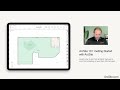
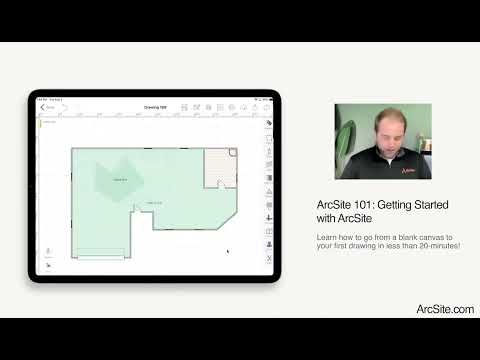
play Free ArcSite Training - Getting Started with ArcSite - Creating your First Drawing
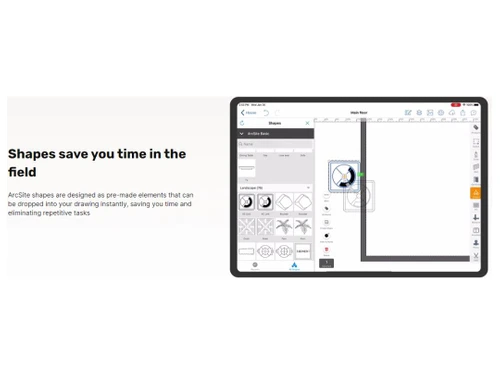
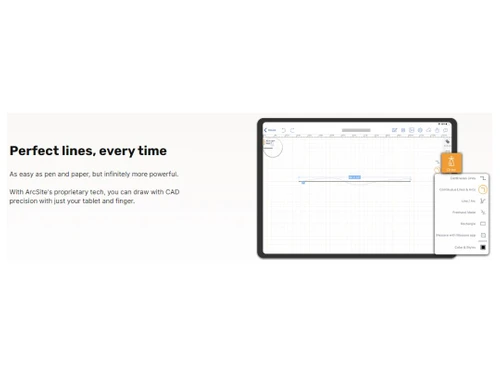
ArcSite-Perfect lines everytime
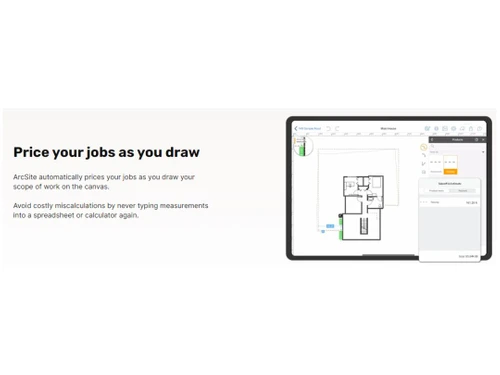
ArcSite-Price your job as you draw

ArcSite

Brand: ArcSite

  • 4.3

  • 5 Ratings

ArcSite is an engineering design and CAD software that allows users to create, edit, and share detailed technical drawings and sketches on mobile devices. It provides tools for precise measurements, annotations, and quick on-site drafting.

See More

Have you used ArcSite before?

Share your insights for better experience

Add a Review
Starting Price
$15

View plans

100% Genuine
Products
Best Price
Guaranteed
Safe & Secure
Payment
  • Description

  • Pricing

  • Features

  • Specification

  • Review

  • Compare

  • Alternatives

  • FAQ

Starting at $15

ArcSite Software Overview

What is ArcSite?

ArcSite is a powerful engineering design and CAD software designed for professionals who need to create accurate technical drawings on mobile devices. It offers a range of tools for drafting, designing, and editing floor plans, site plans, and technical diagrams.

The software provides features like dimensioning, annotations, and precise measurements to ensure high-quality results. Users can import and export designs in various formats, making collaboration and sharing easy. ArcSite is ideal for industries like construction, architecture, and engineering. Its mobile-first approach allows for on-the-go drafting and real-time project updates.

Why Choose ArcSite Software?

  • Mobile Flexibility: Its mobile-first design allows you to create and edit designs directly on your phone or tablet, making it ideal for on-site work.
  • Precision and Accuracy: It offers tools for precise measurements, annotations, and dimensioning, ensuring your designs are accurate and professional.
  • Collaboration-Friendly: You can easily share your designs and collaborate with others, improving communication within teams.
  • User-Friendly Interface: The intuitive interface makes it easy to learn and use, even for those without advanced CAD experience.
  • Integration with Other Tools: It supports importing and exporting designs in various formats, seamlessly integrating with other design and project management software.
  • Cost-Effective: As a mobile-based solution, it provides an affordable alternative to traditional, expensive CAD software while offering powerful capabilities.

Benefits of ArcSite Software

  • Customizable Templates: It allows users to create and save custom templates, speeding up the design process for repetitive tasks.
  • Offline Access: You can work without an internet connection, allowing you to complete designs in remote locations and sync them later.
  • Cloud Storage Integration: Designs can be backed up and stored securely on the cloud, ensuring easy access and safe storage.
  • Real-Time Updates: Changes made on the mobile app are instantly reflected in your design, providing real-time updates for teams.
  • Intelligent Object Recognition: It recognizes and snaps to existing objects like walls, windows, and doors, which increases drafting efficiency.
  • Advanced Layer Management: Users can organize their designs using layers, making it easier to manage complex projects and focus on specific details.

Pricing of ArcSite

ArcSite prices in India start at $15 at techjockey.com.

The pricing model is based on different parameters, including extra features, deployment type, and the total number of users. For further queries related to the product, you can contact our product team and learn more about the pricing and offers.

Read more

ArcSite Company Details

Founded Year:  2014

ArcSite is a comprehensive drawing, take-off, and estimate platform that accelerates your business. We maximize your operational efficiency with professional proposals created in real-time, decreasing costly errors from manual drawings and processes.

Director/Founders Pei Zhan
Company Size 1-100 Employees

ArcSite Pricing & Plans

Draw Basic
Starting at $15
    • Licenses

      Licenses
      Licenses
    • Monthly

      Monthly
      Monthly

Key Features

  • Unlimited Projects & Drawings

  • Cloud Backup

  • Shape Libraries (Basic)

  • Shape Libraries (Basic)

  • Export to PNG/PDF

  • Shareable Link

  • Community & Help Center Access

  • Build on iOS, Android, Windows & Mac

Draw Pro
Starting at $35
    • Licenses

      Licenses
      Licenses
    • Monthly

      Monthly
      Monthly

Key Features

  • All features in Basic, plus:

  • Advanced Cloud Features

  • Create Layers

  • Create Layers

  • Create Custom Shapes

  • Location Based Photos & Mark-up

  • Import and Mark-up PDFs

  • Export to PNG/PDF/DXF/DWG

ArcSite Features

  • icon_check Drawing Tools
    Create precise sketches with easy-to-use tools.
  • icon_check CAD Drawing
    Allows precise creation of detailed technical drawings using advanced CAD tools for accuracy.
  • icon_check Intelligent Formatting
    Automatically adjusts design elements for alignment, spacing, and scaling, improving workflow efficiency.
  • icon_check 2D Drawing
    Focuses on creating 2D diagrams and floor plans, ideal for construction and architectural projects.
  • icon_check Annotations
    Users can add notes, labels, and comments to their designs for clarity and communication.
  • icon_check Design Templates
    Provides pre-built templates to streamline the design process, saving time for repetitive tasks.
  • icon_check Rendering
    Offers realistic rendering options to visualize your designs in 3D or photorealistic styles.
  • icon_check Symbol Library
    Includes a wide range of customizable symbols for common design elements like doors, windows, and electrical components.
  • icon_check Presentation Tools
    Enables users to create polished presentations of their designs with features like exportable PDF formats and image outputs.
  • icon_check Drafting
    Offers advanced drafting tools for detailed and accurate technical drawings.
  • icon_check Import/Export Management
    Supports the import and export of files in various formats (like DXF, SVG) to ensure smooth integration with other software.
  • icon_check API Integration
    Allows seamless integration with third-party tools and software, enhancing its versatility in various workflows.
ArcSite Demo Video play icon

Get ArcSite Demo

Watch the demo video to explore key features, real workflows, and how the software fits your business needs.

Understand
Key Features
Personal
Demo Insights
Interactive
Demo Support

ArcSite Specifications

Supported Platforms
Windows Windows iOS iOS Android Android MacOS MacOS
Devices
Desktop Desktop Mobile Mobile iPad iPad
Deployment
Cloud-Based Cloud-Based Perpetual Perpetual
Suitable For
Designers
Business Specific
All Businesses
Business Size
Small Business Startups Enterprises SMBs SMEs
Customer Support
Phone Email Communities
Language
English 普通话
Integration
API Integration
Training Resources
Webinars Documentation Videos

Explore the Best Alternative Solutions Similar to Your Business Size and Needs

ArcSite Review

4.3

Out of 5

img

Overall Rating

Based on
5 Verified Ratings

Rating Breakdown

  • Features 4.2
  • Value for Money 4.4
  • Ease of Use 4.4
  • Customer Support 4.4

92% Recommend this Product

Add Review

Techjockey Trusted Reviews from Verified Users

No reviews are currently available for ArcSite. Discover similar CAD Software reviews

  • Tinkercad

    4.9

    Whats great - One of the best experiences I had with Tinkercad is its ability to provide primitive shapes that I could easily drag out, man... read more

  • Autocad Mechanical

    4.6

    Whats great - As same as customary autocad I like all the visual enhancements in most recent form, for the most part I like the best approa... read more
  • Autodesk Autocad Mobile App

    4.6

    Whats great - AutoCAD portable (once in the past AutoCAD 360) is a simple to utilize drawing and drafting application from Autodesk. It tha... read more

Compare ArcSite With other CAD Software

Products
Ratings
Pricing
Device Supported
Deployment
Supported Platforms
  • img

    ArcSite

  • 4.3

  • Price On Request

  • Desktop

    Mobile

  • Web based

    On Premises

  • Windows

    Mac OS

  • img

    Solid Edge

  • 4.6

  • Price On Request

  • Desktop

    Mobile

  • Web based

    On Premises

  • Windows

    Mac OS

  • img

    Autodesk AutoCAD

  • 4.7

  • ₹ 16520

  • Desktop

    Mobile

  • Web based

    On Premises

  • Windows

    Mac OS

  • img

    Siemens NX

  • 4.7

  • ₹ 623869

  • Desktop

    Mobile

  • Web based

    On Premises

  • Windows

    Mac OS

  • img

    AutoCAD LT

  • 4.4

  • ₹ 4720

  • Desktop

    Mobile

  • Web based

    On Premises

  • Windows

    Mac OS

  • img

    CADMATE

  • 4.3

  • ₹ 25000

  • Desktop

    Mobile

  • Web based

    On Premises

  • Windows

    Mac OS

  • img

    progeCAD

  • 4.3

  • Price On Request

  • Desktop

    Mobile

  • Web based

    On Premises

  • Windows

    Mac OS

  • img

    MicroStation

  • 4.1

  • ₹ 121046

  • Desktop

    Mobile

  • Web based

    On Premises

  • Windows

    Mac OS

  • img

    Visao

  • 4.1

  • Price On Request

  • Desktop

    Mobile

  • Web based

    On Premises

  • Windows

    Mac OS

  • img

    KOMPAS-3D

  • 4.4

  • Price On Request

  • Desktop

    Mobile

  • Web based

    On Premises

  • Windows

    Mac OS

  • img

    Shapr3D

  • 4.6

  • Price On Request

  • Desktop

    Mobile

  • Web based

    On Premises

  • Windows

    Mac OS

(0) Product(s) selected

ArcSite Alternatives

See All ArcSite Alternatives

Available

Price on Request

Starting Price:

$38 /Seat/Month

Starting Price:

$70 /License

QCAD

4.5

Starting Price:

€41 /Quantity

Starting Price:

$70 /License

Starting Price:

$100 /Quantity

Starting Price:

$25 /Quantity

How much does ArcSite Software Cost?

ArcSite pricing in India starts at $15, available on techjockey.com.

Is there any ArcSite Software App?

Yes, ArcSite has a mobile app available for both iOS and Android, allowing users to create, edit, and manage designs on the go.

Which operating system does ArcSite Software Support?

ArcSite supports Windows, MacOS, iOS, and Android devices for mobile platforms.

Does ArcSite offer a free trial?

No, ArcSite does not offer a free trial.

How does ArcSite Software Work?

ArcSite works by providing users with a mobile app that allows them to create, edit, and share detailed technical drawings. It includes tools for measurement, drafting, annotations, and importing/exporting designs, all optimized for mobile devices.

Who are the potential users of ArcSite Software?

Potential users of ArcSite include architects, engineers, contractors, designers, field technicians, and anyone in need of mobile drafting and CAD tools for creating detailed technical designs.

Is there any free demo for ArcSite Software?

Yes, ArcSite offers a demo to help users understand how the software works and evaluate its features before purchasing.

Is ArcSite Software Free?

No, ArcSite software is not free.

Can I use ArcSite for both residential and commercial projects?

Yes, ArcSite is versatile and can be used for both residential and commercial projects, making it suitable for various design and drafting needs.

Is ArcSite compatible with other CAD software?

Yes, ArcSite supports importing and exporting files in various formats like DXF and SVG, allowing for seamless integration with other CAD software.

Can I use ArcSite without an internet connection?

Yes, ArcSite allows you to work offline and sync your designs once you have an internet connection again.

20,000+ Software Listed

Best Price Guranteed

Free Expert Consultation

2M+ Happy Customers

Terms and Condtions

close

Users with registered businesses can purchase goods from merchants on the platform to satisfy their business needs. Users are not permitted to utilize any products acquired through the platform for resale, advertising, business, or further distribution.

For each purchase made, users will receive a Tax Invoice (or 'GST invoice') that includes specific details such as:

  • the GSTIN of the user associated with their registered business, and

  • the specified Entity Name for their business.

It should be noted that not all products are eligible for GST Invoice. Only the products displayed by participating sellers with the 'GST-based Invoice Available' callout on the product description page would qualify.

Certain goods and services are not eligible to get a GST Invoice, including items with VAS, i.e., Value Added Services (e.g., Total Mobile Protection/Assured Buyback) and those involving an exchange offer at the time of purchase.

Users must ensure the accuracy of the GSTIN, and business entity name provided for the GST Invoice. Requests for corrections into GST Invoice would not be accommodated by Techjockey.com or any Seller, and any issues arising from user-provided information are the sole responsibility of users.

Techjockey.com is not liable for the GST Invoice or any associated input tax credit. To efficiently claim an input tax credit, users should select the registered place of business address as per the GST authority's data and follow the provisions of the GST Act and rules.

To claim an input tax credit, the delivery and billing addresses must match. Furthermore, input tax credits will not be granted if the delivery address and GSTIN on the invoice are from different states. In case of incorrect GST details provided during the order placement, the order will be canceled automatically.