linkedin
MicroStation logo
play MicroStation - Element Quantity
microstation-models
microstation-editing

MicroStation

Brand: Bentley Systems

  • 4.1

  • 6 Ratings

MicroStation is an advanced CAD software used for creating 2D and 3D designs in engineering, architecture, and construction projects.

See More

Have you used MicroStation before?

Share your insights for better experience

Add a Review
Starting Price
₹121,046 excl.GST
₹ 142,834 incl. GST

View plans

offer Save upto 18%, Get GST Invoice on your business purchase T&C
offer Buy Now & Pay Later, Check offer on payment page.
Buy Now
100% Genuine
Products
Best Price
Guaranteed
Safe & Secure
Payment
  • Description

  • Pricing

  • Features

  • Specification

  • Review

  • Compare

  • Alternatives

  • FAQ

Starting at ₹121,046
Buy Now

MicroStation Software Overview

What is MicroStation?

MicroStation is a powerful CAD software developed by Bentley Systems, used for designing and drafting in various engineering fields. It supports both 2D and 3D design and offers advanced features for modeling, visualization, and analysis.

MicroStation is widely used in industries such as civil engineering, architecture, and construction for creating detailed project designs. Its compatibility with other design software and its ability to handle large-scale projects make it a preferred choice for professionals in the field.

Why Choose MicroStation Software?

  • Industry-Leading DGN Format: MicroStation is the native platform for the DGN file format, widely used in infrastructure design and engineering.
  • Advanced 2D and 3D Design Tools: Offers robust tools for precise 2D drafting and complex 3D modeling, suitable for architecture, engineering, and construction (AEC) professionals.
  • High Performance for Large Projects: Designed to handle large, complex infrastructure models efficiently without performance issues.
  • Interoperability with Other Formats: Supports seamless collaboration by working with DWG, DXF, IFC, and other file formats.
  • BIM-Ready Environment: Integrates well with Building Information Modeling (BIM) workflows, enhancing design accuracy and project coordination.
  • Automated Drawing Production: Streamlines the creation of construction documentation, saving time and reducing manual effort.
  • Geospatial Integration: Includes geospatial tools for location-aware designs, ideal for civil and infrastructure projects.
  • Customizable and Scalable: Supports scripting and APIs for automation and customization, making it adaptable for enterprise needs.
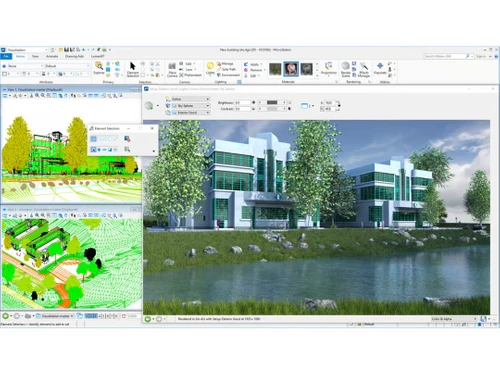
  • Strong Visualization Capabilities: Built-in visualization tools for rendering and animation, helping communicate design intent clearly.
  • Reliable and Secure: Developed by Bentley Systems, a trusted name in infrastructure software, ensuring continuous updates, support, and data security.

Benefits of MicroStation Software

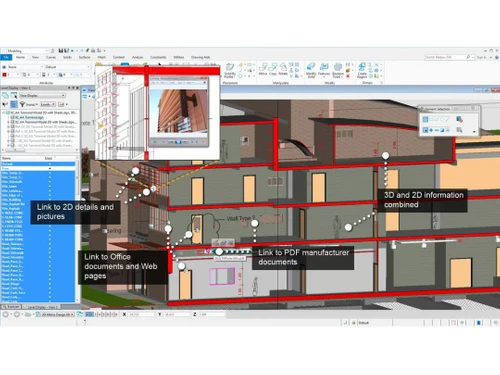
  • Intelligent Object Modeling: Enables the creation of intelligent objects that retain metadata, making models more informative and useful for analysis and asset management.
  • Clash Detection and Design Validation: Built-in tools allow users to identify and resolve conflicts early in the design process, reducing costly rework during construction.
  • Integrated Reality Modeling: Supports integration with point clouds, photogrammetry, and reality meshes for accurate real-world context in design.
  • Unified Platform Across Disciplines: Offers a single solution that caters to civil, structural, architectural, and mechanical needs, reducing the need for multiple software platforms.
  • Efficient Change Management: Tracks design revisions and maintains a detailed history of changes, ensuring consistency and accountability in project development.
  • Team Collaboration in Real Time: Facilitates multi-user collaboration with tools that allow teams to work on the same project simultaneously with version control.
  • Low Learning Curve for Experienced CAD Users: Familiar interface for users coming from other CAD platforms, enabling faster onboarding and reduced training time.
  • Rich Annotation and Detailing Capabilities: Offers sophisticated annotation tools that help maintain design clarity and enhance communication with stakeholders.
  • High-Quality Publishing and Plotting: Produces professional-grade plots, PDFs, and reports with high accuracy and presentation quality.
  • Global Standards Compliance: Supports design standards from various international agencies, helping firms meet regulatory and contractual requirements globally.

MicroStation Pricing

The Pricing of MicroStation is available at INR 1,21,046 per quantity at techjockey.com.

The pricing model is based on different parameters, including extra features, deployment type, and the total number of users. For further queries related to the product, you can contact our product team and learn more about the pricing and offers.

Read more

Bentley Systems Company Details

Founded Year:  1984

Bentley Systems is the infrastructure engineering software company. We provide innovative software to advance the world's infrastructure.

Director/Founders Greg Bentley
Company Size 1000+ Employees

MicroStation Pricing & Plans

Basic
Key Features
  • Produce all deliverables with one application
  • Explore more design options
  • Integrate any data type
  • Localize and add geospatial context
  • Purchase includes 2 Keys

Calculated Price

121046 Exclusive of all taxes
    • Quantity

      Quantity
      Quantity

Key Features

  • Produce all deliverables with one application

  • Explore more design options

  • Integrate any data type

  • Localize and add geospatial context

  • Purchase includes 2 Keys

MicroStation Features

  • icon_check Native DGN Interop
    Seamlessly work with native DGN files while incorporating legacy data and DWG formats without any complex conversions.
  • icon_check Automated Documenting
    Quickly produce industry-compliant 2D and 3D documents that communicate your design intent with total professional ease.
  • icon_check Built-in Visualizing
    Perform deep data visualizations and professional renderings based on model geometry or specific underlying attributes.
  • icon_check CAD Standard Enforce
    Ensure project quality by enforcing strict CAD standards through robust configuration and management capabilities today.
  • icon_check Point-Cloud Support
    Incorporate high-resolution point-cloud data directly into your design environment to provide accurate physical context.
  • icon_check Universal Data Input
    Utilize critical project data from various sources regardless of its age or original creation software for easy workflows.
  • icon_check VUE Rendering Engine
    Provides high-quality movies and simulations using realistic rendering.
  • icon_check 2D Drafting
    Offers precise tools for creating accurate 2D designs and layouts.
  • icon_check 3D Modeling
    Allows the development of detailed 3D models within a real-world context.
  • icon_check Interactive Snapping
    Enhances workflow and precision by snapping to key points automatically.
  • icon_check Digital Signature
    Secures documents with digital signatures to maintain integrity and control access.
  • icon_check Dynamic Annotations
    Automatically updates annotations to reflect any design changes across documents.
  • icon_check Clash Detection and Resolution
    Identifies and resolves potential design conflicts within models to avoid issues during construction.
  • icon_check Photorealistic Rendering
    Delivers near real-time photorealistic renders with accurate lighting and materials.
  • icon_check Geospatial Project Location
    Integrates real-world geospatial data to position designs within their actual locations for better planning.
MicroStation Demo Video play icon

Get MicroStation Demo

Watch the demo video to explore key features, real workflows, and how the software fits your business needs.

Understand
Key Features
Personal
Demo Insights
Interactive
Demo Support

MicroStation Specifications

Supported Platforms
Windows Windows
Devices
Desktop Desktop
Deployment
Cloud-Based Cloud-Based Perpetual Perpetual
Suitable For
All Industries
Business Specific
All Businesses
Business Size
Individual Small Business Startups Medium Business Enterprises SMBs SMEs Freelancers
Customer Support
Phone Email Live Chat Communities Forums
Language
English
Integration
API Integration
Training Resources
In Person Live Online Webinars Documentation Videos
AI Features
AI Integrated
Technology
Next Generation
Compliance Regulation
CCPA

Explore the Best Alternative Solutions Similar to Your Business Size and Needs

MicroStation Review

4.1

Out of 5

img

Overall Rating

Based on
6 Verified Ratings

Rating Breakdown

  • Features 4
  • Value for Money 4
  • Ease of Use 4.2
  • Customer Support 4.1

90% Recommend this Product

Add Review

Techjockey Trusted Reviews from Verified Users

No reviews are currently available for MicroStation. Discover similar CAD Software reviews

  • Tinkercad

    4.9

    Whats great - One of the best experiences I had with Tinkercad is its ability to provide primitive shapes that I could easily drag out, man... read more

  • Autocad Mechanical

    4.6

    Whats great - As same as customary autocad I like all the visual enhancements in most recent form, for the most part I like the best approa... read more
  • Autodesk Autocad Mobile App

    4.6

    Whats great - AutoCAD portable (once in the past AutoCAD 360) is a simple to utilize drawing and drafting application from Autodesk. It tha... read more

Compare MicroStation With other CAD Software

Products
Ratings
Pricing
Device Supported
Deployment
Supported Platforms
  • img

    MicroStation

  • 4.1

  • ₹ 121046.00 excl. GST

  • Desktop

    Mobile

  • Web based

    On Premises

  • Windows

    Mac OS

  • img

    Solid Edge

  • 4.6

  • Price On Request

  • Desktop

    Mobile

  • Web based

    On Premises

  • Windows

    Mac OS

  • img

    Autodesk AutoCAD

  • 4.7

  • ₹ 16520

  • Desktop

    Mobile

  • Web based

    On Premises

  • Windows

    Mac OS

  • img

    Siemens NX

  • 4.7

  • ₹ 623869

  • Desktop

    Mobile

  • Web based

    On Premises

  • Windows

    Mac OS

  • img

    AutoCAD LT

  • 4.4

  • ₹ 4720

  • Desktop

    Mobile

  • Web based

    On Premises

  • Windows

    Mac OS

  • img

    CADMATE

  • 4.3

  • ₹ 25000

  • Desktop

    Mobile

  • Web based

    On Premises

  • Windows

    Mac OS

  • img

    progeCAD

  • 4.3

  • Price On Request

  • Desktop

    Mobile

  • Web based

    On Premises

  • Windows

    Mac OS

  • img

    Visao

  • 4.1

  • Price On Request

  • Desktop

    Mobile

  • Web based

    On Premises

  • Windows

    Mac OS

  • img

    KOMPAS-3D

  • 4.4

  • Price On Request

  • Desktop

    Mobile

  • Web based

    On Premises

  • Windows

    Mac OS

  • img

    Shapr3D

  • 4.6

  • Price On Request

  • Desktop

    Mobile

  • Web based

    On Premises

  • Windows

    Mac OS

  • img

    Actcad

  • 4.4

  • Price On Request

  • Desktop

    Mobile

  • Web based

    On Premises

  • Windows

    Mac OS

(2) Product(s) selected

MicroStation Alternatives

See All MicroStation Alternatives

Available

Price on Request

Starting Price:

$38 /Seat/Month

Starting Price:

$15 /Month

Starting Price:

$70 /License

QCAD

4.5

Starting Price:

€41 /Quantity

Starting Price:

$70 /License

Starting Price:

$100 /Quantity

Starting Price:

$25 /Quantity

How much does MicroStation Software cost?

The Pricing of MicroStation is available at INR 1,21,046 per quantity at techjockey.com.

Is there a mobile app available for MicroStation Software?

No, MicroStation does not offer a dedicated mobile app.

Which operating systems are compatible with MicroStation Software?

MicroStation is compatible with Windows operating systems only.

Does MicroStation Software offer a free trial?

Yes, MicroStation offers a free trial for a limited period via the Bentley website.

How does MicroStation Software function?

MicroStation functions as a CAD platform for designing, modeling, visualizing, and documenting 2D and 3D engineering projects.

Who uses MicroStation Software?

Engineers, architects, designers, and construction professionals benefit from using MicroStation.

Is a free demo available for MicroStation Software?

Yes, MicroStation provides a free demo or guided tour upon request.

Is MicroStation Software available for free?

No, MicroStation is a paid software and is not available for free.

20,000+ Software Listed

Best Price Guranteed

Free Expert Consultation

2M+ Happy Customers

Terms and Condtions

close

Users with registered businesses can purchase goods from merchants on the platform to satisfy their business needs. Users are not permitted to utilize any products acquired through the platform for resale, advertising, business, or further distribution.

For each purchase made, users will receive a Tax Invoice (or 'GST invoice') that includes specific details such as:

  • the GSTIN of the user associated with their registered business, and

  • the specified Entity Name for their business.

It should be noted that not all products are eligible for GST Invoice. Only the products displayed by participating sellers with the 'GST-based Invoice Available' callout on the product description page would qualify.

Certain goods and services are not eligible to get a GST Invoice, including items with VAS, i.e., Value Added Services (e.g., Total Mobile Protection/Assured Buyback) and those involving an exchange offer at the time of purchase.

Users must ensure the accuracy of the GSTIN, and business entity name provided for the GST Invoice. Requests for corrections into GST Invoice would not be accommodated by Techjockey.com or any Seller, and any issues arising from user-provided information are the sole responsibility of users.

Techjockey.com is not liable for the GST Invoice or any associated input tax credit. To efficiently claim an input tax credit, users should select the registered place of business address as per the GST authority's data and follow the provisions of the GST Act and rules.

To claim an input tax credit, the delivery and billing addresses must match. Furthermore, input tax credits will not be granted if the delivery address and GSTIN on the invoice are from different states. In case of incorrect GST details provided during the order placement, the order will be canceled automatically.