USA
USA UAE
UAESmall Business
Designed for startups and growing businesses
See More




Brand: Autodesk
AutoCAD Mechanical helps engineers and designers create precise 2D mechanical drawings using specialized tools, standards-based drafting features, and an extensive library of intelligent mechanical parts.
See MoreHave you used Autocad Mechanical before?
Share your insights for better experience
Brand: Autodesk
Founded Year: 1982
Autodesk makes software for people who make things. If you’ve ever driven a high-performance car, admired a towering skyscraper, used a smartphone, or watched a great film, chances are you’ve experienced what millions of Autodesk customers are doing with our software.
Looking for The Right Pricing?
Share your requirements and get a plan built around your business.
Price Available on Request
Get personalised Autocad Mechanical pricing that fits your needs. Our team will connect with you.
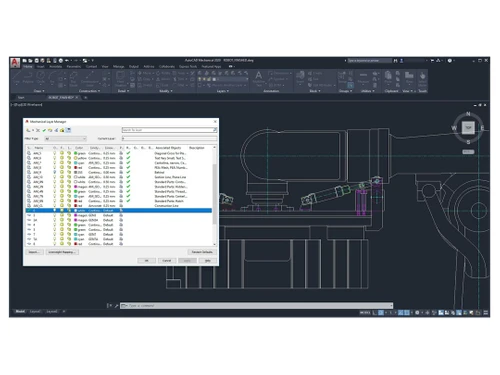
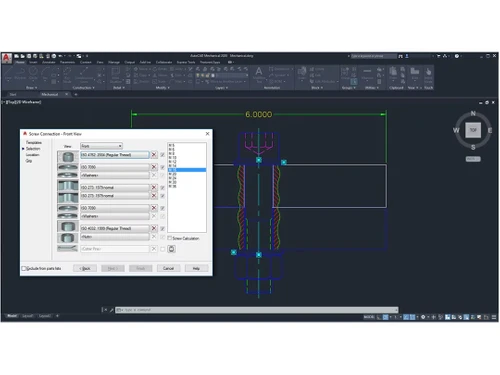
 Layering System Hides System Drives Produce Time Schedules Virtual Machine Monitoring 3D CAD Reinvented E-Detailing Custom Fields Search for menu commands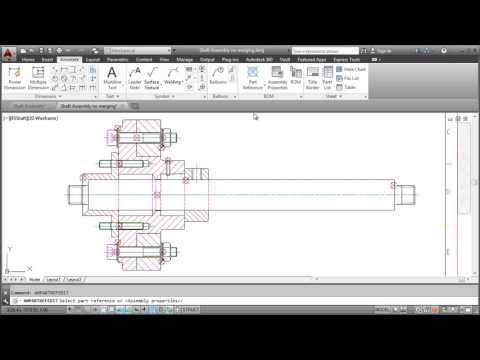

Watch the demo video to explore key features, real workflows, and how the software fits your business needs.
 Windows
  MacOS
MacOS  Desktop
  Cloud-Based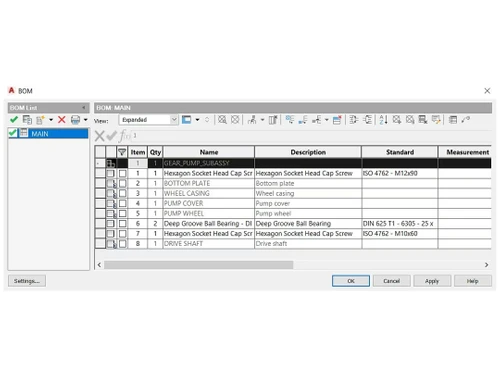
Small Business
Designed for startups and growing businesses
Medium Business
Built for business growth and flexibility
Enterprises
Designed for complex and large-scale business needs
4.6
Out of 5

Overall Rating
Based on
3 Verified Reviews
Rating Breakdown
86% Recommend this Product
Add ReviewUsers generally appreciate the visual enhancements and user-friendly shortcuts in Autocad Mechanical, noting that it simplifies the illustration preparation process compared to other software. The support from consultants is also highlighted as knowledgeable and helpful. However, while the reviews are predominantly positive, there are limited mentions of specific drawbacks, indicating a generally favorable sentiment towards the product with no major complaints noted.

Jan 29, 2019
Techjockey Verified
“Visual enhancements ”
Pros
As same as customary autocad I like all the visual enhancements in most recent form, for the most part I like the best approach to work with both autocad and autocad mechanical as far as getting ready of illustrations, no some other programming projects other than autodesk items will offer us a such kind of least demanding strides to get ready illustrations, As I like best the console easy route direction choices like move, duplicate, extend and so on client does not have to pursuit order catch on screen on the off chance that you know all the shorcuts no some other virtual products other than autodesk items will offer us a such sort of best thing
Cons
NO CONS
Jun 14, 2018
Techjockey Verified
“they are worth”
Pros
Fast, Attentive, and Thorough Help in Sorting Software Options!
Cons
N/A
Jun 7, 2018
Techjockey Verified
“They suggested several good matches ”
Pros
The Techjockey consultant was very knowledgeable about different software and was eager to learn the nature of the business my requirement was for. I wasn't necessarily prepared with all the information as I was just browsing but he knew the right questions to ask so I could do some research of my own.?
Cons
N/A

Autocad Mechanical
Price On Request
Desktop
Mobile
Web based
On Premises
Windows
Mac OS

Autodesk AutoCAD
₹ 16520
Desktop
Mobile
Web based
On Premises
Windows
Mac OS

AutoCAD LT
₹ 4720
Desktop
Mobile
Web based
On Premises
Windows
Mac OS

Fusion 360
₹ 5900
Desktop
Mobile
Web based
On Premises
Windows
Mac OS

Autodesk Inventor
₹ 20060
Desktop
Mobile
Web based
On Premises
Windows
Mac OS

Tinkercad
Price On Request
Desktop
Mobile
Web based
On Premises
Windows
Mac OS
Autodesk Autocad Mobile App
₹ 2520
Desktop
Mobile
Web based
On Premises
Windows
Mac OS

Solid Edge
Price On Request
Desktop
Mobile
Web based
On Premises
Windows
Mac OS

Siemens NX
₹ 623869
Desktop
Mobile
Web based
On Premises
Windows
Mac OS
CADMATE
₹ 25000
Desktop
Mobile
Web based
On Premises
Windows
Mac OS

progeCAD
Price On Request
Desktop
Mobile
Web based
On Premises
Windows
Mac OS
(0) Product(s) selected
Starting Price:
₹20,060 /User/Month
Available
Price on Request
Starting Price:
₹15,000 /License

Starting Price:
₹121,046 /Quantity

Available
Price on Request

Starting Price:
$38 /Seat/Month

Starting Price:
$15 /Month

Starting Price:
$70 /License

Starting Price:
€41 /Quantity

Starting Price:
$70 /License

Starting Price:
$39 /Month
Yes, the functionality and offering of AutoCAD Architecture is the same as the Architecture toolset. This is true for the other specialized toolsets (Mechanical, Electrical, Map 3D, etc.)
No, Autodesk Civil 3D is not included. Civil 3D remains our primary BIM modeling platform for civil design in the AEC industry. Over the past several years Autodesk has been investing heavily in developing InfraWorks as the preliminary planning and design platform for civil engineers. Civil 3D and InfraWorks have been tightly integrated in order to provide a seamless user experience for civil engineers to move data from preliminary design through detail design and construction. As a result, it was felt that although Civil 3D is built on top of the AutoCAD platform it is becoming more tightly coupled with InfraWorks going forward as the platform for civil engineers in BIM. In addition, on April 13th, 2018, the product name for AutoCAD Civil 3D will officially be changed to Civil 3D. As of that date, the product will be referred to as: Autodesk Civil 3D.
No, there are no plans to stop developing or delivering vertical functionality. The goal is to bring more value and differentiation to AutoCAD subscription. This change provides our subscribers access to everything you need in one product offering including vertical functionality.
AutoCAD is a general-purpose CAD software, while AutoCAD Mechanical is a specialized toolset that includes all of AutoCAD's functionality plus a library of over 700,000 standards-based parts and features specifically for mechanical engineering design.
Yes, the Mechanical toolset is not a separate product but is included as part of a standard subscription to the AutoCAD software.
AutoCAD Mechanical is used to design, draft, and document mechanical components and assemblies with specialized tools that automate tasks like creating bills of materials and using standard parts.
After installing AutoCAD, you can access the Mechanical toolset by launching the dedicated AutoCAD Mechanical application shortcut that is typically created on your desktop or in your start menu.
The toolset provides access to a library of more than 700,000 standards-based intelligent parts, features, and tools to accelerate mechanical design tasks.
Yes, the Mechanical toolset includes features that automate common engineering tasks, including the creation of bills of materials for your designs.
Yes, the toolset is updated to support recent industry standards, such as the latest revisions for ISO 13715:2017 and ASME Y14.5M-2018 symbols.
The software features an intelligent layering system that helps isolate and restore layer groups and automatically places items on the correct layers as you create your drawing.
AutoCAD Mechanical pricing details are available on request on techjockey.com.
AutoCAD Mechanical is ideal for mechanical engineers, product designers, drafters, detailers, fabricators, machinists, and students and educators involved in mechanical design, drafting, manufacturing, and engineering education.
The cause of the problem is still unknown, however, there is a solution for it. One method is to turn off Amshide, save the drawing, and open it again to run Match Properties. The second method is to change the Command Preview variable to zero.
0 0
To carry a drawing from to another go to LAYISO isolate and command the objects. Then, copy to the work and paste it to the newly made drawing. You will find the objects copied with the right information.
0 0
To fix the issue go to the Properties Panel. Under properties go to Text, then click on Text Override. Lastly, make sure that Text Override is set to blank.
0 0
To get the correct detailing you need to use circles, lines, and arcs. Apply the necessary dimensions as in the reference diagram and save the changes.
0 0
Firstly, start the Create Associative Hide. Then select the objects to hide. The Create Hide Situation dialog box opens which shows the levels and drawings. Choose the drawing you want to hide the object in and save the changes.
0 0
20,000+ Software Listed
Best Price Guranteed
Free Expert Consultation
2M+ Happy Customers
Terms and Condtions

Users with registered businesses can purchase goods from merchants on the platform to satisfy their business needs. Users are not permitted to utilize any products acquired through the platform for resale, advertising, business, or further distribution.
For each purchase made, users will receive a Tax Invoice (or 'GST invoice') that includes specific details such as:
the GSTIN of the user associated with their registered business, and
the specified Entity Name for their business.
It should be noted that not all products are eligible for GST Invoice. Only the products displayed by participating sellers with the 'GST-based Invoice Available' callout on the product description page would qualify.
Certain goods and services are not eligible to get a GST Invoice, including items with VAS, i.e., Value Added Services (e.g., Total Mobile Protection/Assured Buyback) and those involving an exchange offer at the time of purchase.
Users must ensure the accuracy of the GSTIN, and business entity name provided for the GST Invoice. Requests for corrections into GST Invoice would not be accommodated by Techjockey.com or any Seller, and any issues arising from user-provided information are the sole responsibility of users.
Techjockey.com is not liable for the GST Invoice or any associated input tax credit. To efficiently claim an input tax credit, users should select the registered place of business address as per the GST authority's data and follow the provisions of the GST Act and rules.
To claim an input tax credit, the delivery and billing addresses must match. Furthermore, input tax credits will not be granted if the delivery address and GSTIN on the invoice are from different states. In case of incorrect GST details provided during the order placement, the order will be canceled automatically.