linkedin
Browsereporter logo
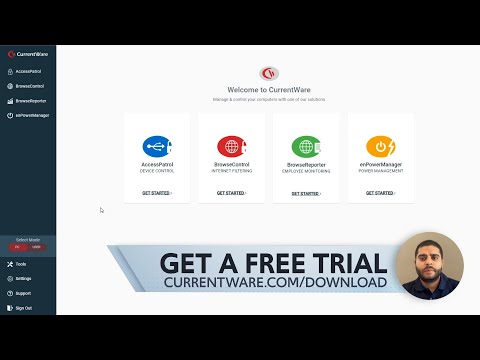
play CurrentWare Overview - Employee Monitoring, Web Filtering, Device Control, & Remote PC Power Manager
browsereporter
browsereporter

Browsereporter

Brand: CurrentWare

  • 4.2

  • 5 Ratings

BrowseReporter is an easy-to-use employee monitoring software that tracks web and app activity to help businesses boost productivity and ensure policy compliance.

See More

Have you used Browsereporter before?

Share your insights for better experience

Add a Review
Starting Price
$6

View plans

100% Genuine
Products
Best Price
Guaranteed
Safe & Secure
Payment
  • Description

  • Pricing

  • Features

  • Specification

  • Review

  • Compare

  • Alternatives

  • FAQ

Starting at $6

Browsereporter Software Overview

What is Browsereporter?

BrowseReporter is an employee monitoring software developed by CurrentWare, designed to help organizations track and analyze computer usage to enhance productivity and enforce company policies. It provides detailed reports on web browsing habits, application usage, and idle time, allowing managers to identify unproductive activities and optimize workflow.

The software also features real-time monitoring capabilities, including live desktop views and automatic screenshot capture, to ensure compliance and detect potential security risks. With its centralized web console, BrowseReporter offers customizable alerts and scheduled reports, making it easier for businesses to manage both in-office and remote employees effectively. Additionally, it supports privacy features and can operate in stealth mode, balancing oversight with employee confidentiality.

Why Choose Browsereporter Software?

  • Monitor Browsing Activity: Tracks visited websites, URLs, and browsing time for detailed internet usage reports.
  • Boost Productivity: Identifies time-wasting sites (social media, streaming) to enforce acceptable use policies.
  • No Endpoint Installation: Deploys via Active Directory, Group Policy, or SCCM without installing software on devices.
  • Real-Time & Historical Reports: Generates customizable reports by user, department, or time for compliance and audits.
  • Multi-Browser Support: Works with Chrome, Firefox, Edge, IE, and Safari for comprehensive monitoring.
  • Data Privacy & Security: Keeps logs on-premises (no cloud) and detects unauthorized/malicious web activity.
  • CurrentWare Integration: Combines with BrowseControl (web filtering) and BrowseReporter Plus (advanced analytics).
  • Cost-Effective: Affordable alternative to enterprise tools with a free trial available.

Benefits of Browsereporter Software

  • Passive Monitoring: Runs silently in the background without disrupting user workflow.
  • Bandwidth Usage Insights: Helps identify high-bandwidth-consuming websites.
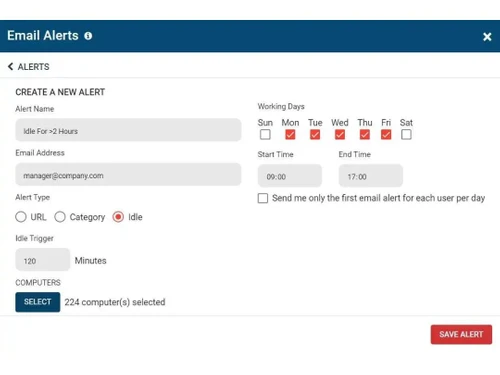
  • Custom Alerts & Thresholds: Set notifications for excessive or suspicious browsing activity.
  • User Behavior Trends: Tracks long-term patterns to improve policy decisions.
  • Off-Network Tracking: Logs browsing activity even when users are on VPN or remote networks.
  • Minimal Performance Impact: Lightweight design ensures no slowdown on endpoints.
  • Role-Based Access Control: Restricts report access to authorized personnel only.
  • Automatic Report Scheduling: Emails pre-configured reports at set intervals.
  • Compliance Ready: Supports GDPR, HIPAA, and other regulatory requirements with audit trails.
  • Anonymous Mode Option: Can track activity without associating it with individual users (privacy-focused deployments).

Browsereporter Pricing

Browsereporter price in India starts at $6 at Techjockey.com.

The pricing model is based on different parameters, including extra features, deployment type, and the total number of users. For further queries related to the product, you can contact our product team and learn more about the pricing and offers.

Read more

CurrentWare Company Details

Founded Year:  2003

CurrentWare is a software company that provides a suite of monitoring solutions for endpoint security, data loss prevention & web filtering/monitoring.

Director/Founders Divyesh Lakhani and Jay Lakhani
Company Size 1-100 Employees

Browsereporter Pricing & Plans

Browse Reporter
Key Features
  • User Monitoring
  • Web Browsing
  • Software use
  • Screenshot Monitoring
  • Bandwidth Use
Starting at $6
    • Users

      Users
      Users
    • Monthly

      Monthly
      Monthly

Key Features

  • User Monitoring

  • Web Browsing

  • Software use

  • Screenshot Monitoring

  • Bandwidth Use

Browsereporter Features

  • icon_check Analytics Dashboard & Reports
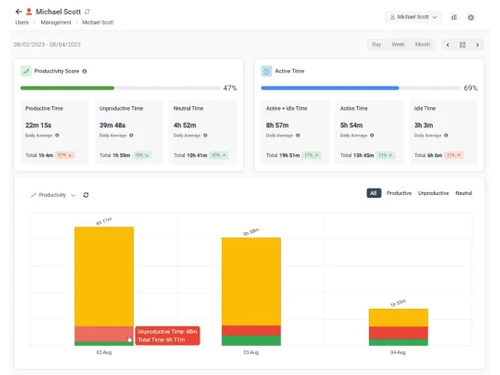
    Provides a centralized dashboard with detailed reports on employee activity, web usage, and productivity metrics.
  • icon_check Increase Productivity
    Helps businesses identify and reduce time spent on non-work-related tasks, boosting overall productivity.
  • icon_check Time Tracking
    Tracks the amount of time employees spend on various tasks, helping optimize work schedules and project management.
  • icon_check Monitor Bandwidth
    Monitors and analyzes bandwidth usage, helping identify excessive or inappropriate consumption of network resources.
  • icon_check Internet Monitoring
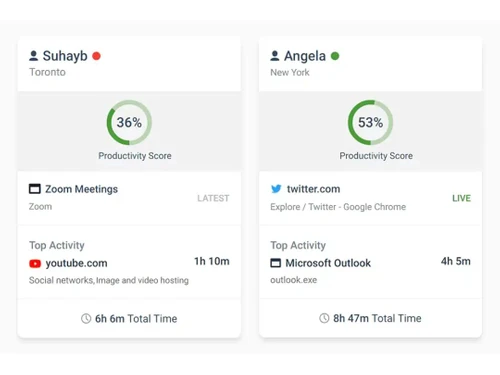
    Tracks and records websites visited by employees, ensuring they stay within company-approved sites.
  • icon_check Screenshot Monitoring
    Captures periodic screenshots of employees' screens to monitor their activity in real time.
  • icon_check Email Reports
    Sends automated email reports to managers summarizing employee activity and productivity insights.
  • icon_check Offsite Management
    Enables monitoring of remote employees, ensuring productivity and security standards are met across locations.
  • icon_check Email Alert
    Receive alerts when users visit flagged websites or break set rules.
  • icon_check Insights
    Provides data-driven insights into employee behavior and performance to make informed management decisions.
  • icon_check Employee Management
    Manage and monitor multiple users or departments from a central console.
  • icon_check Data Theft Protection
    Monitors and prevents potential data theft by tracking sensitive file access and unauthorized activity.
Browsereporter Demo Video play icon

Get Browsereporter Demo

Watch the demo video to explore key features, real workflows, and how the software fits your business needs.

Understand
Key Features
Personal
Demo Insights
Interactive
Demo Support

Browsereporter Specifications

Supported Platforms
Windows Windows
Devices
Desktop Desktop
Deployment
Cloud-Based Cloud-Based Perpetual Perpetual
Suitable For
All Industries
Business Specific
All Businesses
Business Size
Small Business Medium Business Enterprises SMBs SMEs
Customer Support
Phone Live Chat Communities Forums
Language
English
Training Resources
Documentation Videos

Explore the Best Alternative Solutions Similar to Your Business Size and Needs

Browsereporter Review

4.2

Out of 5

img

Overall Rating

Based on
5 Verified Ratings

Rating Breakdown

  • Features 4
  • Value for Money 4.4
  • Ease of Use 4
  • Customer Support 4.4

94% Recommend this Product

Add Review

Techjockey Trusted Reviews from Verified Users

No reviews are currently available for Browsereporter. Discover similar Employee Monitoring Software reviews

  • WorkTime

    4.7

    Whats great - Great piece of kit with support team that’s a lifesaver and their response time is super fast. Major plus for me. read more
  • Mera Work

    5.0

    Whats great - User-friendly interface read more

  • DeskTrack

    5.0

    Whats great - Best DeskTrack Employee Monitoring Software, I am using nearly 1 year. support is good, our employees' activities are tracked... read more

Compare Browsereporter With other Employee Monitoring Software

Products
Ratings
Pricing
Device Supported
Deployment
Supported Platforms
  • img

    Browsereporter

  • 4.2

  • Price On Request

  • Desktop

    Mobile

  • Web based

    On Premises

  • Windows

    Mac OS

  • img

    CurrentWare

  • Price On Request

  • Desktop

    Mobile

  • Web based

    On Premises

  • Windows

    Mac OS

  • img

    DeskTrack

  • 4.9

  • Price On Request

  • Desktop

    Mobile

  • Web based

    On Premises

  • Windows

    Mac OS

  • img

    WorkWitness

  • 4.8

  • Price On Request

  • Desktop

    Mobile

  • Web based

    On Premises

  • Windows

    Mac OS

  • img

    We360 ai

  • 5

  • ₹ 399

  • Desktop

    Mobile

  • Web based

    On Premises

  • Windows

    Mac OS

  • img

    Mera Work

  • 4.9

  • ₹ 325

  • Desktop

    Mobile

  • Web based

    On Premises

  • Windows

    Mac OS

  • img

    Time Champ

  • 4.7

  • ₹ 200

  • Desktop

    Mobile

  • Web based

    On Premises

  • Windows

    Mac OS

  • img

    Hoverwatch

  • 4.4

  • Price On Request

  • Desktop

    Mobile

  • Web based

    On Premises

  • Windows

    Mac OS

  • img

    Twib

  • 4.7

  • ₹ 199

  • Desktop

    Mobile

  • Web based

    On Premises

  • Windows

    Mac OS

  • img

    TheOneSpy

  • 4.2

  • Price On Request

  • Desktop

    Mobile

  • Web based

    On Premises

  • Windows

    Mac OS

  • img

    WorkTrack

  • 4.1

  • ₹ 299

  • Desktop

    Mobile

  • Web based

    On Premises

  • Windows

    Mac OS

(0) Product(s) selected

Browsereporter Alternatives

See All Browsereporter Alternatives

Starting Price:

$30 /Month

Starting Price:

$29 /Month

Starting Price:

₹299 /Month

Starting Price:

$4 User/Month

Articles for Browsereporter

See All Related Articles

How much does Browsereporter cost?

Browsereporter price in India starts at $6 at Techjockey.com.

Is there a mobile application for Browsereporter Software?

Currently, Browsereporter Software does not offer a dedicated mobile app.

Which operating systems are compatible with Browsereporter Software?

Browsereporter is compatible with Windows operating systems.

Does Browsereporter Software provide a free trial?

Yes, Browsereporter offers a free trial for users to explore its features.

How does Browsereporter Software work?

Browsereporter monitors employee activities by tracking internet usage, application use, and screen activity during work hours.

Who uses Browsereporter Software?

Businesses and organizations looking to improve productivity, monitor employee behavior, and ensure data security can benefit from Browsereporter.

Is there a free demo available for Browsereporter Software?

Yes, Browsereporter offers a demo version for users to experience its features before purchase.

Can Browsereporter Software be used for free?

Browsereporter does not offer a completely free version but provides a free trial period for testing.

Can Browsereporter monitor remote employees?

Yes, Browsereporter can track and monitor remote employees' activities, ensuring consistency in productivity regardless of location.

Is Browsereporter Software easy to install?

Yes, Browsereporter is easy to install and configure with minimal technical expertise required.

20,000+ Software Listed

Best Price Guranteed

Free Expert Consultation

2M+ Happy Customers

Terms and Condtions

close

Users with registered businesses can purchase goods from merchants on the platform to satisfy their business needs. Users are not permitted to utilize any products acquired through the platform for resale, advertising, business, or further distribution.

For each purchase made, users will receive a Tax Invoice (or 'GST invoice') that includes specific details such as:

  • the GSTIN of the user associated with their registered business, and

  • the specified Entity Name for their business.

It should be noted that not all products are eligible for GST Invoice. Only the products displayed by participating sellers with the 'GST-based Invoice Available' callout on the product description page would qualify.

Certain goods and services are not eligible to get a GST Invoice, including items with VAS, i.e., Value Added Services (e.g., Total Mobile Protection/Assured Buyback) and those involving an exchange offer at the time of purchase.

Users must ensure the accuracy of the GSTIN, and business entity name provided for the GST Invoice. Requests for corrections into GST Invoice would not be accommodated by Techjockey.com or any Seller, and any issues arising from user-provided information are the sole responsibility of users.

Techjockey.com is not liable for the GST Invoice or any associated input tax credit. To efficiently claim an input tax credit, users should select the registered place of business address as per the GST authority's data and follow the provisions of the GST Act and rules.

To claim an input tax credit, the delivery and billing addresses must match. Furthermore, input tax credits will not be granted if the delivery address and GSTIN on the invoice are from different states. In case of incorrect GST details provided during the order placement, the order will be canceled automatically.