linkedin
CleverControl logo
play CleverControl Logs
clevercontrol keystroke logging
clevercontrol video recording

CleverControl

Brand: Clevercontrol

  • 4.2

  • 5 Ratings

CleverControl is an employee monitoring software designed for offices to optimize their workforce’s productivity and maintain the data confidentiality. The software provides complete control over employee’s activities on their desktop. This employee monitoring solution provides details about the employee’s web activity and application usage in real-time. The software also provides direct r...

See More

Have you used CleverControl before?

Share your insights for better experience

Add a Review
Starting Price
$33

View plans

100% Genuine
Products
Best Price
Guaranteed
Safe & Secure
Payment
  • Description

  • Pricing

  • Features

  • Specification

  • Review

  • Compare

  • Alternatives

  • FAQ

Starting at $33

CleverControl Software Overview

What is CleverControl? 

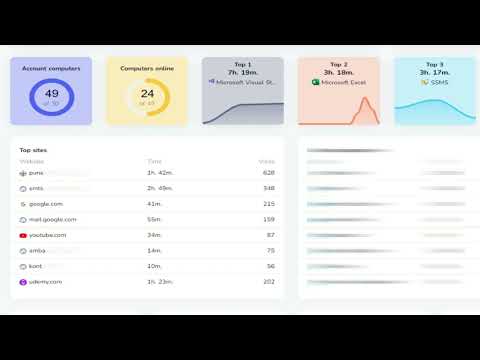
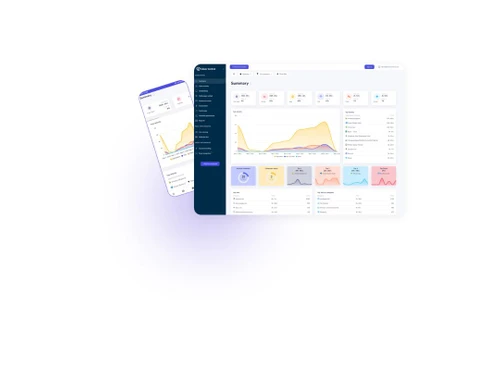
CleverControl is an employee monitoring software designed for offices to optimize their workforce’s productivity and maintain the data confidentiality. The software provides complete control over employee’s activities on their desktop. This employee monitoring solution provides details about the employee’s web activity and application usage in real-time. The software also provides direct remote access through a web account with no dedicated server support required. CleverControl allows managers to investigate employee’s unlawful actions such as sharing confidential data with the competitors, while simultaneously protecting the office network from any type of information leakage. 

CleverControl employee monitoring software solution helps boost the overall productivity by detecting slackers and resulting in improved workforce engagement rates. This employee monitoring solution helps more than 6500 customers online every day along with 25000 employees monitored in real-time. 

Real-time live monitoring with CleverControl

CleverControl provides access to all the collected data not only in hindsight but in real-time. Managers/monitoring teams can check employee’s system in live panels and monitor their activity as if they are in front of them. The live panel provides access to up to 16 screens simultaneously and can be configured easily. 

CleverControl makes it easy to track employees’ activities from time to time without interrupting with their work routine. Live viewing feature of this employee monitoring software also allows users to comprehend the employee behaviour as they approach a task.

What are the features offered by CleverControl employee monitoring software? 

Here are some core features offered by CleverControl: 

  1. Remote monitoring 
  2. Live monitoring 
  3. Web activity 
  4. Application usage 
  5. Search engine monitoring 
  6. Screenshotting 
  7. Removable storage device monitoring 
  8. Printing controls 
  9. Mic Sound recording
  10. Webcam video 

What is CleverControl Pricing? 

The price of CleverControl starts at USD 33 at techjockey.com. Please request a call for further inquiries.

Read more

Clevercontrol Company Details

Founded Year:  2009

CleverControl Inc. has made it its goal to create effective solutions for businesses.

Director/Founders Rolf Isaksen
Company Size 1-100 Employees

CleverControl Pricing & Plans

Cloud Based-Solution (3 Months)
Starting at $33
    • Pc

      Pc
      Pc
    • Monthly

      Monthly
      Monthly

Key Features

  • Screen Recording

  • Face Recognition

  • Webcam Recording

  • Live Viewing

On Premise-Solution
Starting at $290
    • Pc

      Pc
      Pc
    • Yearly

      Yearly
      Yearly

Key Features

  • Screen Recording

  • Face Recognition

  • Webcam Recording

  • Live Viewing

  • 1 PC per month

CleverControl Features

  • icon_check Remote Monitoring
    The employee monitoring solution facilitates surveillance from remote location.
  • icon_check Real Time Monitoring
    The software allows managers/monitoring teams to check the employee’s computer in real-time.
  • icon_check Website Activity
    The software can capture the web activity of an employee in real-time. 
  • icon_check Application Activity
    CleverControl also provides detailed insight about the application activity of an employee during workhours. 
  • icon_check Keystroke Logging
    The employee monitoring software checks and records every keystroke of the employee.
  • icon_check Skype
    The software even administers personal interaction through applications like Skype to ensure that data is not going in the wrong
  • icon_check Screen Capture
    CleverControl takes automated instant screenshots of the employee’s system to keep it as a proof of any suspicious activity.
  • icon_check Social Network
    It also checks through the social networking sites that employees use.
  • icon_check Video Recording
    The software helps record live screen of your employees to track their activities.
  • icon_check Control over Printing
    Monitoring teams and managers can manage the print function of the employee’s PC to prevent them from misusing the printer.
  • icon_check Face Recognition
    Detects and logs individuals using the computer via webcam to confirm user identity and prevent buddy-punching.
  • icon_check AI Productivity Scoring
    Uses AI to analyze activity data and automatically assign productivity scores to employees.
CleverControl Demo Video play icon

Get CleverControl Demo

Watch the demo video to explore key features, real workflows, and how the software fits your business needs.

Understand
Key Features
Personal
Demo Insights
Interactive
Demo Support

CleverControl Specifications

Supported Platforms
Windows Windows MacOS MacOS
Devices
Desktop Desktop
Deployment
Cloud-Based Cloud-Based Perpetual Perpetual

Suitable For
All Industries
Business Specific
All Businesses
Business Size
Individual Small Business Medium Business Enterprises SMBs SMEs
Customer Support
Phone Email
Language
English
Training Resources
Documentation
AI Features
AI Integrated

Explore the Best Alternative Solutions Similar to Your Business Size and Needs

CleverControl Review

4.2

Out of 5

img

Overall Rating

Based on
5 Verified Ratings

Rating Breakdown

  • Features 4.2
  • Value for Money 4.2
  • Ease of Use 4
  • Customer Support 4.4

92% Recommend this Product

Add Review

Techjockey Trusted Reviews from Verified Users

No reviews are currently available for CleverControl. Discover similar Employee Monitoring Software reviews

  • WorkTime

    4.7

    Whats great - Great piece of kit with support team that’s a lifesaver and their response time is super fast. Major plus for me. read more
  • Mera Work

    5.0

    Whats great - User-friendly interface read more

  • DeskTrack

    5.0

    Whats great - Best DeskTrack Employee Monitoring Software, I am using nearly 1 year. support is good, our employees' activities are tracked... read more

Compare CleverControl With other Employee Monitoring Software

Products
Ratings
Pricing
Device Supported
Deployment
Supported Platforms
  • img

    CleverControl

  • 4.2

  • Price On Request

  • Desktop

    Mobile

  • Web based

    On Premises

  • Windows

    Mac OS

  • img

    DeskTrack

  • 4.9

  • Price On Request

  • Desktop

    Mobile

  • Web based

    On Premises

  • Windows

    Mac OS

  • img

    WorkWitness

  • 4.8

  • Price On Request

  • Desktop

    Mobile

  • Web based

    On Premises

  • Windows

    Mac OS

  • img

    We360 ai

  • 5

  • ₹ 399

  • Desktop

    Mobile

  • Web based

    On Premises

  • Windows

    Mac OS

  • img

    Mera Work

  • 4.9

  • ₹ 325

  • Desktop

    Mobile

  • Web based

    On Premises

  • Windows

    Mac OS

  • img

    Time Champ

  • 4.7

  • ₹ 200

  • Desktop

    Mobile

  • Web based

    On Premises

  • Windows

    Mac OS

  • img

    Hoverwatch

  • 4.4

  • Price On Request

  • Desktop

    Mobile

  • Web based

    On Premises

  • Windows

    Mac OS

  • img

    Twib

  • 4.7

  • ₹ 199

  • Desktop

    Mobile

  • Web based

    On Premises

  • Windows

    Mac OS

  • img

    TheOneSpy

  • 4.2

  • Price On Request

  • Desktop

    Mobile

  • Web based

    On Premises

  • Windows

    Mac OS

  • img

    WorkTrack

  • 4.1

  • ₹ 299

  • Desktop

    Mobile

  • Web based

    On Premises

  • Windows

    Mac OS

  • img

    TeamTrace

  • 4.9

  • Price On Request

  • Desktop

    Mobile

  • Web based

    On Premises

  • Windows

    Mac OS

(0) Product(s) selected

CleverControl Alternatives

See All CleverControl Alternatives

Starting Price:

$30 /Month

Starting Price:

$29 /Month

Starting Price:

₹299 /Month

Starting Price:

$4 User/Month

Starting Price:

$8 /User/Month

Starting Price:

₹13,625 /Quantity

Articles for CleverControl

See All Related Articles

Which devices can operate CleverControl?

CleverControl can be used on both Windows and Mac operating systems.

Can CleverControl be invisible and operate stealthily on the computer?

Yes, CleverControl has a special hidden mode that which makes it invisible in system tray, task manager and even in the installed program listing.

Can I block websites for employees using CleverControl?

CleverControl allows users to block specific websites on employee’s PC as per their requirements.

Where can I see all the collected data in CleverControl?

To see all the collected user information you need in the dashboard.

Can I install CleverControl remotely?

No, you need to have the administration rights of the provided by the employee.

How much does CleverControl cost?

The price of CleverControl starts at USD 33 at techjockey.com. 

20,000+ Software Listed

Best Price Guranteed

Free Expert Consultation

2M+ Happy Customers

Terms and Condtions

close

Users with registered businesses can purchase goods from merchants on the platform to satisfy their business needs. Users are not permitted to utilize any products acquired through the platform for resale, advertising, business, or further distribution.

For each purchase made, users will receive a Tax Invoice (or 'GST invoice') that includes specific details such as:

  • the GSTIN of the user associated with their registered business, and

  • the specified Entity Name for their business.

It should be noted that not all products are eligible for GST Invoice. Only the products displayed by participating sellers with the 'GST-based Invoice Available' callout on the product description page would qualify.

Certain goods and services are not eligible to get a GST Invoice, including items with VAS, i.e., Value Added Services (e.g., Total Mobile Protection/Assured Buyback) and those involving an exchange offer at the time of purchase.

Users must ensure the accuracy of the GSTIN, and business entity name provided for the GST Invoice. Requests for corrections into GST Invoice would not be accommodated by Techjockey.com or any Seller, and any issues arising from user-provided information are the sole responsibility of users.

Techjockey.com is not liable for the GST Invoice or any associated input tax credit. To efficiently claim an input tax credit, users should select the registered place of business address as per the GST authority's data and follow the provisions of the GST Act and rules.

To claim an input tax credit, the delivery and billing addresses must match. Furthermore, input tax credits will not be granted if the delivery address and GSTIN on the invoice are from different states. In case of incorrect GST details provided during the order placement, the order will be canceled automatically.