USA
USA UAE
UAESmall Business
Designed for startups and growing businesses


See More



Brand: WorkWitness
Have you used WorkWitness before?
Share your insights for better experience
Brand: WorkWitness
Founded Year: 2026
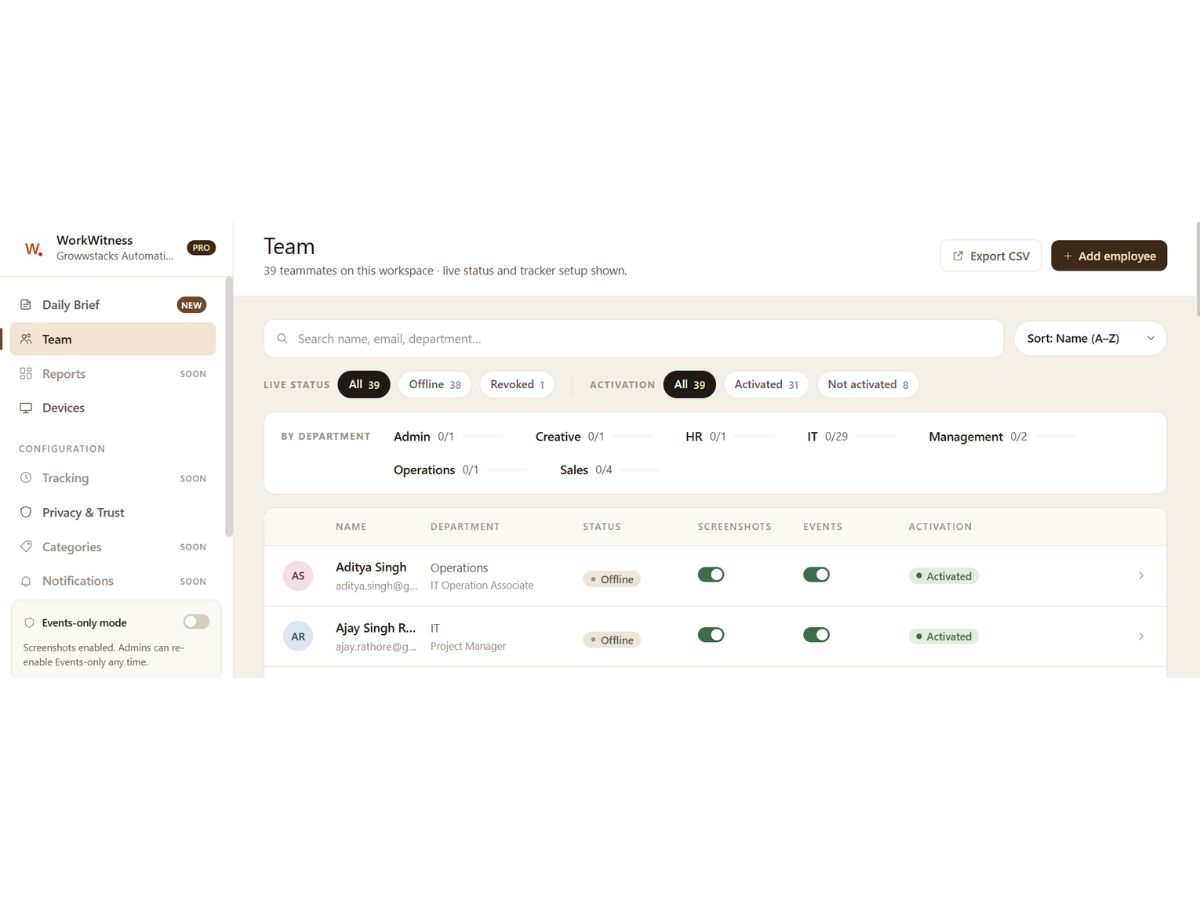
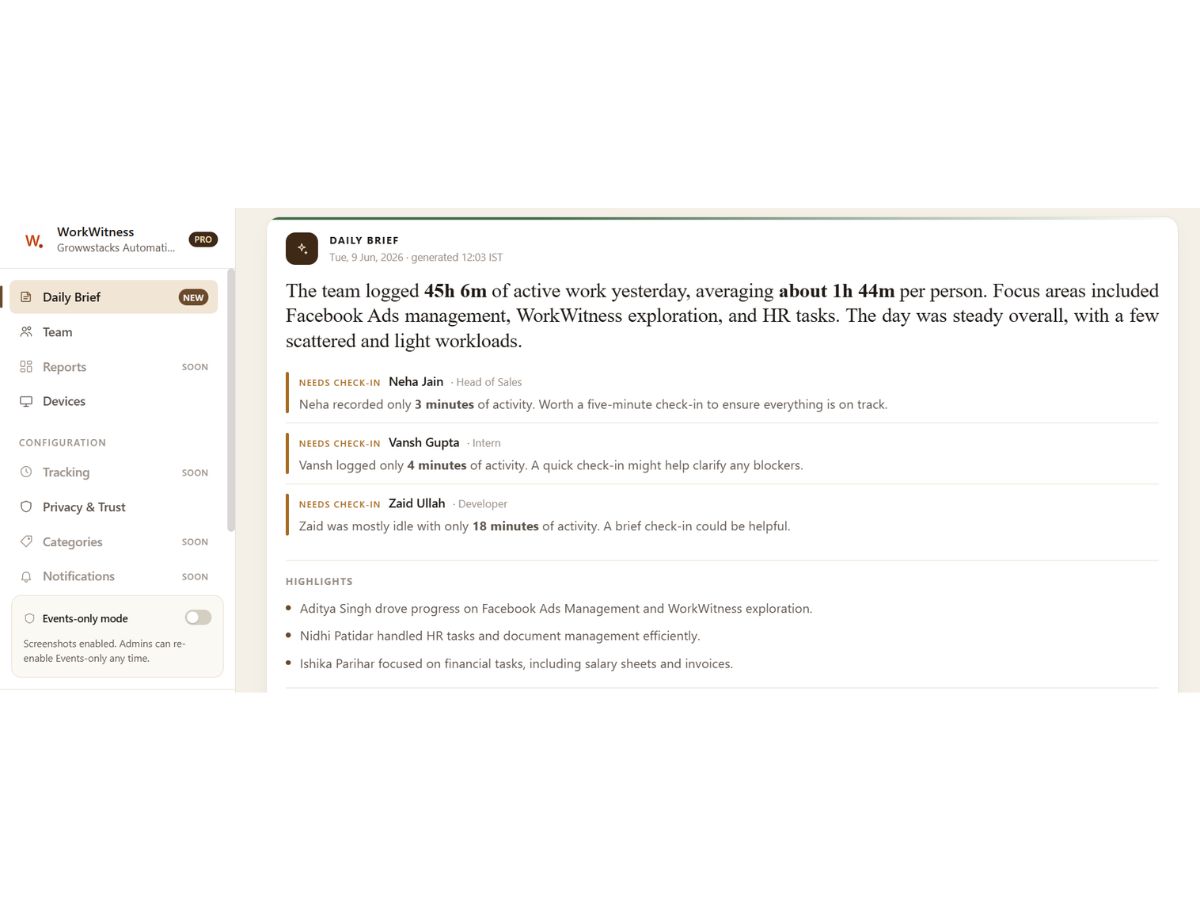
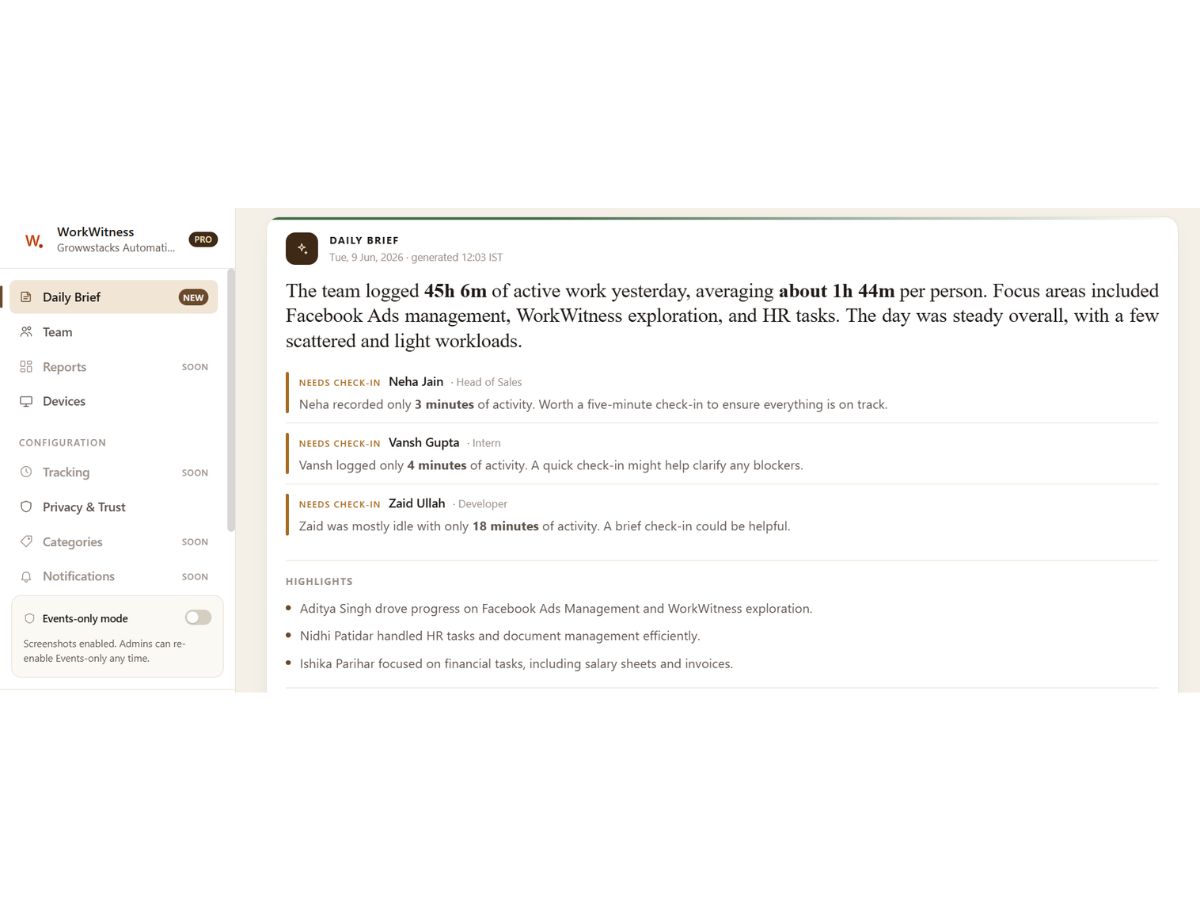
WorkWitness sends Indian founders a daily AI brief on what their team did yesterday — one paragraph per teammate, delivered to WhatsApp and email at 7am IST. No timesheets, no dashboards to learn. Built for Windows teams. DPDP-aligned, AES-256 encrypted.
 Automated Reports Employee Monitoring Productivity Insights Reports Employee Tracking Time Analysis Screenshot Monitoring Application Usage Tracking Website Monitoring Performance Analytics Dashboards Automated Timesheets Live Activity Tracking Productivity Alerts Privacy Control Role-Based Access Control (RBAC) Data Security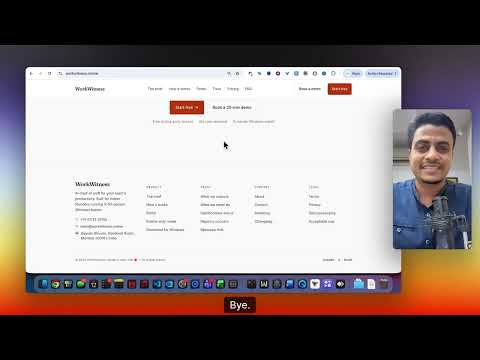

Watch the demo video to explore key features, real workflows, and how the software fits your business needs.
 Windows
  MacOS
MacOS  Desktop
  Cloud-Based
  Perpetual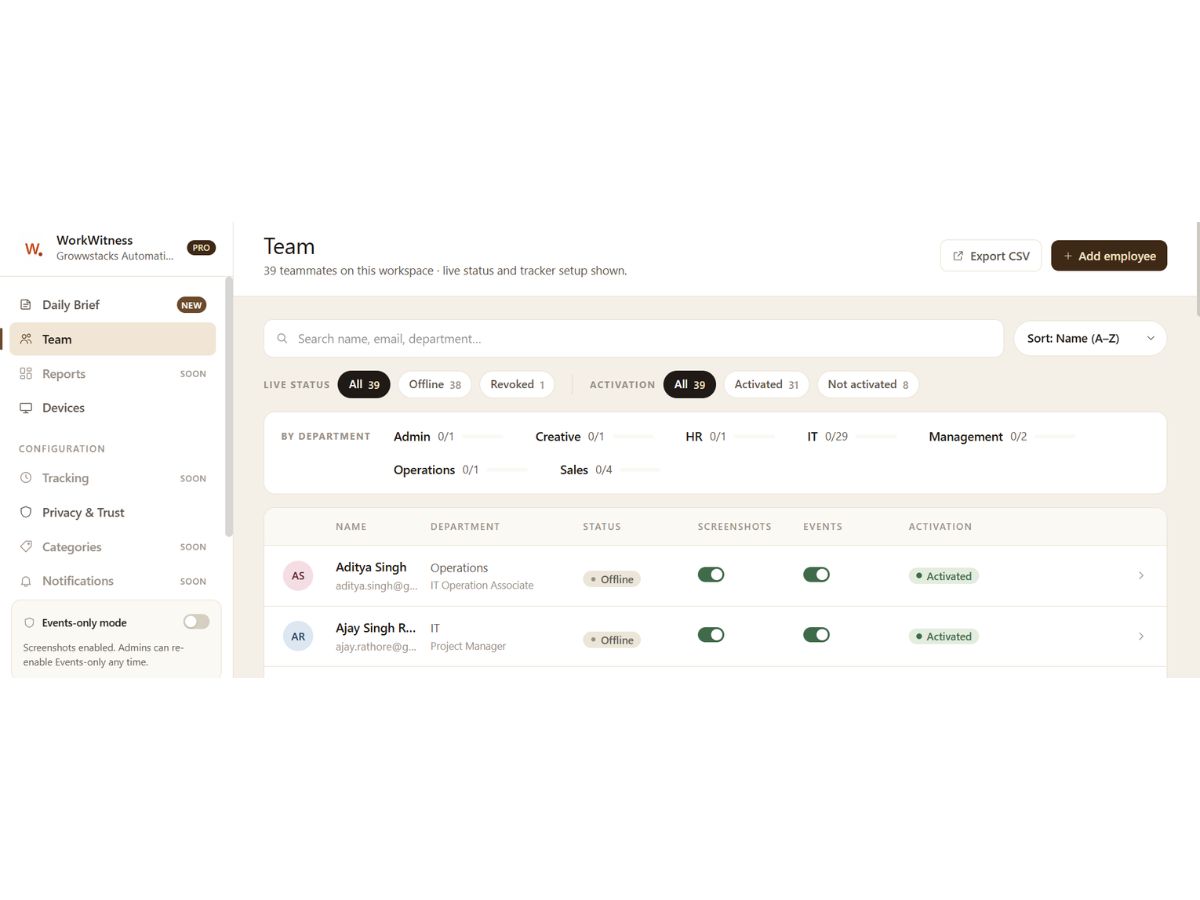

Small Business
Designed for startups and growing businesses
Medium Business
Built for business growth and flexibility
Enterprises
Designed for complex and large-scale business needs
4.8
Out of 5

Overall Rating
Based on
5 Verified Reviews
Rating Breakdown
94% Recommend this Product
Add ReviewPros
"WorkWitness offers great visibility without compromising privacy. The Events-only mode tracks work patterns, not screenshots, making it team-friendly and effective."
Cons
"Data retention on the free plan is limited to seven days, which is too short to identify recurring weekly patterns in the early trial period."
"Currently Windows-only. More integrations and advanced reporting options would be helpful."

Jun 23, 2026
Techjockey Verified
“Remote team visibility without adding reporting overhead to the team”
Setup took under fifteen minutes across three laptops. No IT involvement required. The morning brief arrived consistently and covered what actually needed attention rather than everything that happened.
Pros
The biggest operational win is what it removes, status update calls, Friday check-ins, end-of-day reports. Workflow gaps and quietly stuck situations surface in the brief before they require a conversation to uncover. The events-only privacy mode is a genuine design decision, not just a policy statement. Employees can see the agent running in Task Manager, which makes transparency straightforward rather than something that needs to be managed. At ?65 per user, the value against time saved is difficult to argue with for Indian SMB teams.
Cons
Data retention on the free plan is limited to seven days, which is too short to identify recurring weekly patterns in the early trial period.
Reason to switch
The daily brief reduces the time spent on status collection. Workflow gaps and quietly stuck situations surface automatically, which means follow-up conversations happen with context rather than guesswork.
Jun 22, 2026
Techjockey Verified
“Productivity monitoring tool with privacy controls”
Since we started using WorkWitness, it’s been much easier to get a clear picture of how the team is working without constantly asking for updates. The daily AI summaries delivered to WhatsApp and email are especially helpful because they highlight the most important information in one place. Setup was simple, the platform runs smoothly, and its privacy-conscious approach makes employee monitoring feel fair and transparent.
Pros
What I like most about WorkWitness is that it keeps me updated on team activity without needing constant check-ins or status reports. The daily summaries are genuinely useful, and the platform gives a clear view of productivity while remaining easy to set up and respectful of employee privacy.
Cons
One drawback is that WorkWitness works better in Windows-based environments, so teams using a mix of Windows and Mac devices may face some limitations. I’d also like to see more flexibility in report customization, especially for organizations that need to track specific performance metrics.
Reason to switch
WorkWitness helps us manage remote and hybrid teams more effectively by providing clear visibility into employee productivity, attendance, time allocation, and project progress. The AI-generated daily summaries save managers significant time by highlighting key activities and trends without requiring constant dashboard monitoring. It also supports reporting, email activity insights, and workflow tracking, enabling us to make better operational decisions while maintaining employee privacy through its built-in privacy controls.
Jun 20, 2026
Techjockey Verified
“Privacy-Friendly Employee Monitoring That Actually Works”
My experience with WorkWitness has been very positive, thanks to its privacy-focused approach. The screenshot-free monitoring helped my team stay comfortable while giving us valuable insights into work patterns and bottlenecks. It’s an effective way to improve productivity without creating a culture of micromanagement.
Pros
WorkWitness offers great visibility without compromising privacy. The Events-only mode tracks work patterns, not screenshots, making it team-friendly and effective.
Cons
A drawback is the lack of native integrations with popular project management tools like Jira, Trello, and Asana. Connecting work activity directly to assigned tasks would make the platform even more useful.

WorkWitness
Price On Request
Desktop
Mobile
Web based
On Premises
Windows
Mac OS

DeskTrack
Price On Request
Desktop
Mobile
Web based
On Premises
Windows
Mac OS

We360 ai
₹ 399
Desktop
Mobile
Web based
On Premises
Windows
Mac OS
Mera Work
₹ 325
Desktop
Mobile
Web based
On Premises
Windows
Mac OS

Time Champ
₹ 200
Desktop
Mobile
Web based
On Premises
Windows
Mac OS

Twib
₹ 199
Desktop
Mobile
Web based
On Premises
Windows
Mac OS

Hoverwatch
Price On Request
Desktop
Mobile
Web based
On Premises
Windows
Mac OS

TheOneSpy
Price On Request
Desktop
Mobile
Web based
On Premises
Windows
Mac OS

WorkTrack
₹ 299
Desktop
Mobile
Web based
On Premises
Windows
Mac OS

TeamTrace
Price On Request
Desktop
Mobile
Web based
On Premises
Windows
Mac OS

Net Monitor For Employee
Price On Request
Desktop
Mobile
Web based
On Premises
Windows
Mac OS
(0) Product(s) selected
Starting Price:
$30 /Month
Starting Price:
$29 /Month
Starting Price:
₹299 /Month
Starting Price:
$10 /Month

Starting Price:
$21 /Month

Starting Price:
₹1,730 /Year

Starting Price:
$33 /3Months

Starting Price:
$4 User/Month

Starting Price:
$8 /User/Month

Starting Price:
₹13,625 /Quantity
20,000+ Software Listed
Best Price Guranteed
Free Expert Consultation
2M+ Happy Customers
Terms and Condtions

Users with registered businesses can purchase goods from merchants on the platform to satisfy their business needs. Users are not permitted to utilize any products acquired through the platform for resale, advertising, business, or further distribution.
For each purchase made, users will receive a Tax Invoice (or 'GST invoice') that includes specific details such as:
the GSTIN of the user associated with their registered business, and
the specified Entity Name for their business.
It should be noted that not all products are eligible for GST Invoice. Only the products displayed by participating sellers with the 'GST-based Invoice Available' callout on the product description page would qualify.
Certain goods and services are not eligible to get a GST Invoice, including items with VAS, i.e., Value Added Services (e.g., Total Mobile Protection/Assured Buyback) and those involving an exchange offer at the time of purchase.
Users must ensure the accuracy of the GSTIN, and business entity name provided for the GST Invoice. Requests for corrections into GST Invoice would not be accommodated by Techjockey.com or any Seller, and any issues arising from user-provided information are the sole responsibility of users.
Techjockey.com is not liable for the GST Invoice or any associated input tax credit. To efficiently claim an input tax credit, users should select the registered place of business address as per the GST authority's data and follow the provisions of the GST Act and rules.
To claim an input tax credit, the delivery and billing addresses must match. Furthermore, input tax credits will not be granted if the delivery address and GSTIN on the invoice are from different states. In case of incorrect GST details provided during the order placement, the order will be canceled automatically.