USA
USA UAE
UAESmall Business
Designed for startups and growing businesses


See More





Brand: iMonitor
iMonitor EAM is one of the best Desktop/Employee Monitoring Software in India. It is an easy-to-use surveillance solution that provides total employee computer monitoring software, desktop monitoring free to enterprises at any size - from large ones to SMEs. iMonitor EAM professional solution enable...
See MoreHave you used iMonitor EAM before?
Share your insights for better experience
Brand: iMonitor
Founded Year: 2009
iMonitor
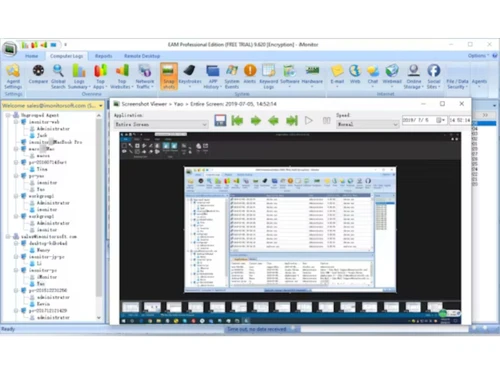
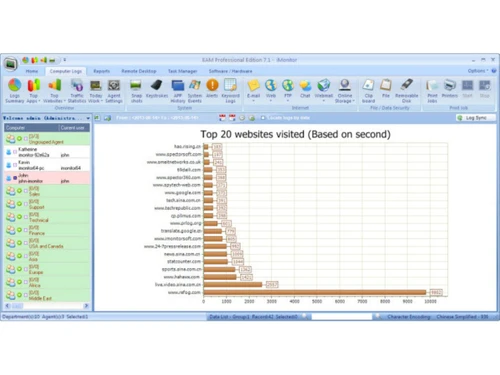
 Centralized Activity Monitoring Stealth Mode Monitoring Real-Time Desktop Viewing Screenshot Capture & Playback Internet Activity Tracking Application Usage Monitoring Chat & IM Monitoring Email & Webmail Recording Print Job Monitoring Encryption System Event Monitoring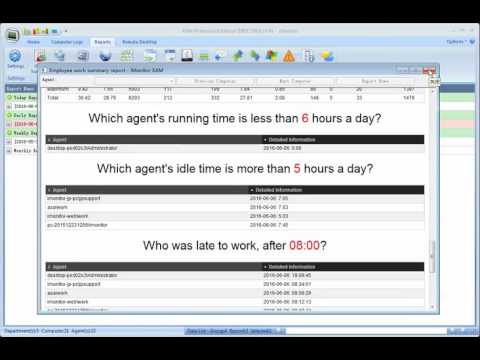

Watch the demo video to explore key features, real workflows, and how the software fits your business needs.
 Windows
  MacOS
MacOS  Desktop
  Perpetual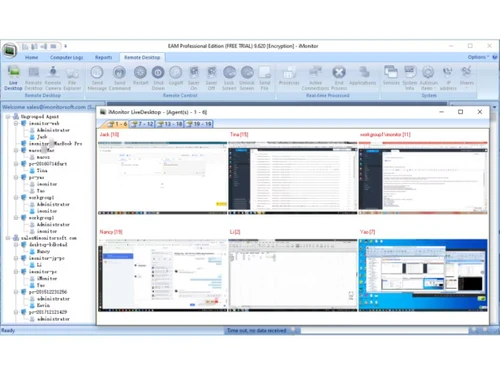
Small Business
Designed for startups and growing businesses
Medium Business
Built for business growth and flexibility
Enterprises
Designed for complex and large-scale business needs
4.6
Out of 5

Overall Rating
Based on
3 Verified Reviews
Rating Breakdown
90% Recommend this Product
Add ReviewUsers generally appreciate iMonitor EAM for its effective project tracking and email monitoring capabilities, with many highlighting its user-friendly interface and integration for team communication. The trigger system for capturing email interactions is particularly praised. However, some users note that the mobile version could use improvements. Overall, the sentiment is positive, with users feeling satisfied with the software's performance and its impact on their workflow, despite minor limitations.

Mar 6, 2019
Techjockey Verified
“Email Connect”
Pros
In the wake of testing 7 diverse programming, I found one in particular which gave a respectable observing of online email connections. Different highlights were exceptionally normal to every, couple of varieties of little significance. EAM Professional Edition (iMonitor) has gone ahead top, it has a trigger framework to begin taking screen captures should any email be sent with connections, keystrokes would not demonstrate this but rather the screen captures would demonstrate the move being made. This was given to be as a basic thing. This trigger framework can be utilized to begin previews on different occasions too.
Cons
NO CONS
May 16, 2019
Techjockey Verified
“Great for organizing project and team tracking”
Pros
It is great for tracking projects especially when they are short, quite good solution with communication with client on the same platform, for logging time and for those who love easy care.
Cons
it can be much better on phone version but I am still happy to have it.
Jan 30, 2017
Techjockey Verified
“first class experience”
Pros
After a few weeks we are able to find the best fit for our company.
Cons
N/A

iMonitor EAM
Price On Request
Desktop
Mobile
Web based
On Premises
Windows
Mac OS

WorkWitness
Price On Request
Desktop
Mobile
Web based
On Premises
Windows
Mac OS

DeskTrack
Price On Request
Desktop
Mobile
Web based
On Premises
Windows
Mac OS

We360 ai
₹ 399
Desktop
Mobile
Web based
On Premises
Windows
Mac OS
Mera Work
₹ 325
Desktop
Mobile
Web based
On Premises
Windows
Mac OS

Time Champ
₹ 200
Desktop
Mobile
Web based
On Premises
Windows
Mac OS

TheOneSpy
Price On Request
Desktop
Mobile
Web based
On Premises
Windows
Mac OS

Hoverwatch
Price On Request
Desktop
Mobile
Web based
On Premises
Windows
Mac OS

WorkTrack
₹ 299
Desktop
Mobile
Web based
On Premises
Windows
Mac OS

Twib
₹ 199
Desktop
Mobile
Web based
On Premises
Windows
Mac OS

TeamTrace
Price On Request
Desktop
Mobile
Web based
On Premises
Windows
Mac OS
(2) Product(s) selected
Starting Price:
₹65 /Month
Starting Price:
$29 /Month
Starting Price:
$30 /Month
Starting Price:
₹299 /Month

Starting Price:
$10 /Month

Starting Price:
$21 /Month

Starting Price:
₹1,730 /Year

Starting Price:
$8 /User/Month

Starting Price:
$4 User/Month

Starting Price:
$33 /3Months
iMonitor EAM license size is based on the number of the computer you are going to monitor, i.e. the number of computers which you install Agent in your organization. You will not be able to monitor more computers than the license size as you purchase, and each EAM agent license can monitor one Windows/Mac computer or an user session on Windows Terminal Server/Citrix. For example if you want to monitor 25 computers, you need to purchase the 25 agent license, and we will provide one monitor license for free. If you want more monitor license, then need to purchase additional monitor license.
Yes, If one computer breaks down and you need to put it out of commission and replace it with another computer, the licenses can be transferred over in iMonitor EAM Software. You just need to delete the broken one and install the agent on the new one.
You can copy the agent installer on a flash drive and insert it to the target computer to install.
The agent program will work in totally stealth mode, no pop-up windows, no item in Add/Remove Programs, not item in windows start up menu, and can not be ended by the user.
Yes, you can, iMonitor EAM supports remotely install the windows agent program. Firstly please choose Agent section on your console, after installing window pop up, EAM will scan the computers what in the same network with your server computer. Then please choose the one(s) you want to install, click remotely install, the installation will be automatically done.
20,000+ Software Listed
Best Price Guranteed
Free Expert Consultation
2M+ Happy Customers
Terms and Condtions

Users with registered businesses can purchase goods from merchants on the platform to satisfy their business needs. Users are not permitted to utilize any products acquired through the platform for resale, advertising, business, or further distribution.
For each purchase made, users will receive a Tax Invoice (or 'GST invoice') that includes specific details such as:
the GSTIN of the user associated with their registered business, and
the specified Entity Name for their business.
It should be noted that not all products are eligible for GST Invoice. Only the products displayed by participating sellers with the 'GST-based Invoice Available' callout on the product description page would qualify.
Certain goods and services are not eligible to get a GST Invoice, including items with VAS, i.e., Value Added Services (e.g., Total Mobile Protection/Assured Buyback) and those involving an exchange offer at the time of purchase.
Users must ensure the accuracy of the GSTIN, and business entity name provided for the GST Invoice. Requests for corrections into GST Invoice would not be accommodated by Techjockey.com or any Seller, and any issues arising from user-provided information are the sole responsibility of users.
Techjockey.com is not liable for the GST Invoice or any associated input tax credit. To efficiently claim an input tax credit, users should select the registered place of business address as per the GST authority's data and follow the provisions of the GST Act and rules.
To claim an input tax credit, the delivery and billing addresses must match. Furthermore, input tax credits will not be granted if the delivery address and GSTIN on the invoice are from different states. In case of incorrect GST details provided during the order placement, the order will be canceled automatically.