USA
USA UAE
UAESmall Business
Designed for startups and growing businesses


See More



Brand: Mera Work
This employee management software helps organisations gain clear visibility into how work is performed, enabling managers to improve productivity, accountability, and operational efficiency.
See MoreHave you used Mera Work before?
Share your insights for better experience
View plans
 Save upto 18%, Get GST Invoice on your business purchase T&C Buy Now & Pay Later, Check offer on payment page.
 Brand: Mera Work
Founded Year: 2022
Mera Work is a workforce visibility and productivity platform that helps organizations understand how work happens across office-based, remote, and hybrid teams.
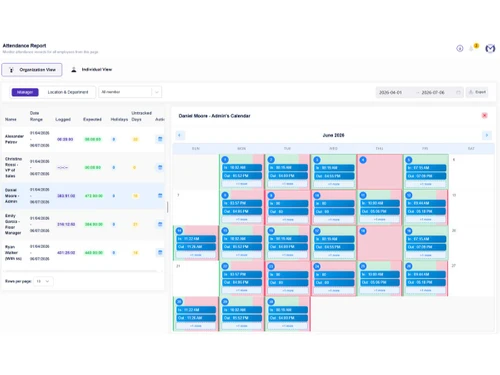
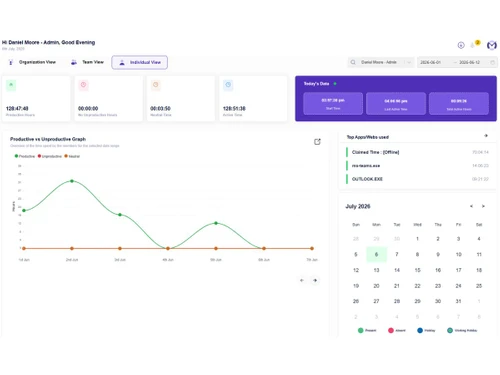
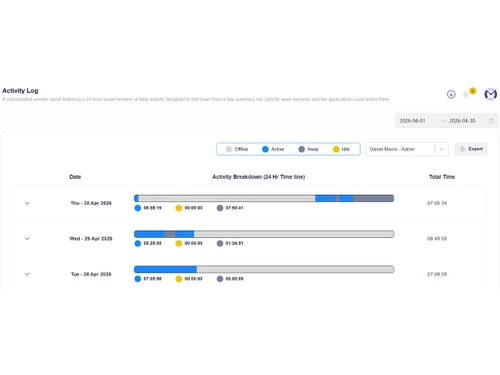
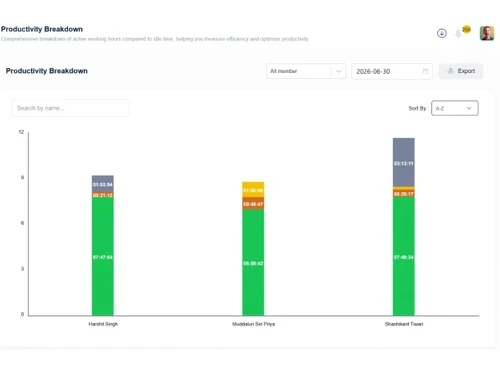
 Workforce Management User Activity Monitoring Screenshot Monitoring Productivity Tracking Live Screen Monitoring Attendance Tracking Task-Based Time Tracking Project Time Tracking Shift Management Offline Time Tracking Secure single sign-on (SSO) Data Retention Role-Based Access Control (RBAC) Alerts & Notifications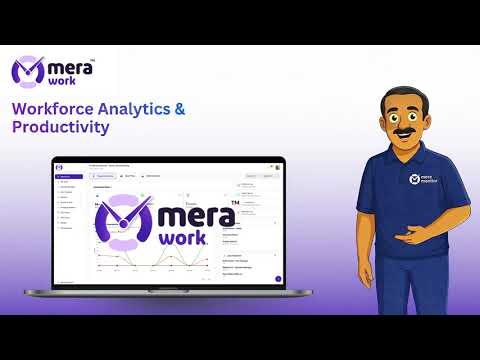

Watch the demo video to explore key features, real workflows, and how the software fits your business needs.
 Ubuntu
  Windows
  iOS
iOS  Android MacOS
  Desktop
  Cloud-Based
Small Business
Designed for startups and growing businesses
Medium Business
Built for business growth and flexibility
Enterprises
Designed for complex and large-scale business needs
4.9
Out of 5

Overall Rating
Based on
16 Verified Reviews
Rating Breakdown
96% Recommend this Product
Add ReviewUsers generally express high satisfaction with Mera Work, highlighting its user-friendly interface, effective productivity tracking, and valuable reporting features that enhance team accountability and efficiency. Many appreciate the smooth onboarding process and responsive support team. However, some users note limitations such as the need for more customization options, challenges with initial activity tracking adaptation, and issues with the email alert system being overwhelming. Overall, the software is seen as a strong tool for managing remote and hybrid teams effectively.
Pros
"Mera Monitor gave us clear insights into team productivity, helping us optimize workloads and consistently meet project deadlines."
"Live streaming, project management, and task tracking features in one platform."
"Helps in tracking performances and managing projects. It is a good productivity tool."
Cons
"Initial onboarding may require employee training, some users may need time to adapt to productivity tracking tools, and advanced report customization could be more flexible."
"In the initial days, adapting to activity-based tracking may feel unfamiliar for employees; however, once accustomed, it integrates smoothly into the daily workflow."
"It takes a little time to get used to activity tracking in the beginning. After that, it feels normal in daily work."

May 19, 2026
Techjockey Verified
“Good experience overall. The software is user-friendly and works smoothly. Helpful features and decent support team.”
The software has a clean and user-friendly interface, which made navigation easy even for beginners. I especially liked how smoothly the features worked without lag
Pros
User-friendly interface
Cons
Needs more customization options
May 18, 2026
Techjockey Verified
“Mera Monitor Revealed Our Team Was Overworking and Helped Us Fix It Before Burnout Set In”
Mera Monitor has provided valuable visibility into our team's productivity and workload distribution. The detailed tracking and reporting features helped us improve efficiency, optimize workflows, and achieve project goals more consistently, all while maintaining a smooth user experience.
Pros
Mera Monitor gave us clear insights into team productivity, helping us optimize workloads and consistently meet project deadlines.
Cons
No major issues encountered so far.
Reason to switch
Mera Monitor gives me a real-time view of how each team member is spending their work hours. It helped me identify that the team was consistently overworking, which was causing burnout and missed deadlines. With that data I was able to restructure project timelines, automate repetitive tasks, and balance workloads properly. Project delivery has improved significantly since.
May 18, 2026
Techjockey Verified
“Good Product”
A useful platform for managing projects and monitoring team activities. It offers a smooth experience and helps improve collaboration and productivity.
Pros
Live streaming, project management, and task tracking features in one platform.
Cons
NA
Reason to switch
Good
Mera Work
₹ 325.00 excl. GST
Desktop
Mobile
Web based
On Premises
Windows
Mac OS

DeskTrack
Price On Request
Desktop
Mobile
Web based
On Premises
Windows
Mac OS

WorkWitness
Price On Request
Desktop
Mobile
Web based
On Premises
Windows
Mac OS

We360 ai
₹ 399
Desktop
Mobile
Web based
On Premises
Windows
Mac OS

Time Champ
₹ 200
Desktop
Mobile
Web based
On Premises
Windows
Mac OS

Twib
₹ 199
Desktop
Mobile
Web based
On Premises
Windows
Mac OS

Hoverwatch
Price On Request
Desktop
Mobile
Web based
On Premises
Windows
Mac OS
TheOneSpy
Price On Request
Desktop
Mobile
Web based
On Premises
Windows
Mac OS

WorkTrack
₹ 299
Desktop
Mobile
Web based
On Premises
Windows
Mac OS

TeamTrace
Price On Request
Desktop
Mobile
Web based
On Premises
Windows
Mac OS

Net Monitor For Employee
Price On Request
Desktop
Mobile
Web based
On Premises
Windows
Mac OS
(0) Product(s) selected
Starting Price:
₹65 /Month
Starting Price:
$30 /Month
Starting Price:
$29 /Month
Starting Price:
₹299 /Month
Starting Price:
$10 /Month

Starting Price:
$21 /Month

Starting Price:
₹1,730 /Year

Starting Price:
$33 /3Months

Starting Price:
$4 User/Month

Starting Price:
$8 /User/Month

Starting Price:
₹13,625 /Quantity
Mera Work pricing typically starts at INR 325 per user per month at techjockey.com.
No, Mera Work does not currently offer native Android or iOS mobile apps. It is a web-based software compatible with Windows, macOS, and Linux.
Mera Work is compatible with major desktop operating systems, including Windows, macOS, and Linux, supporting its use across diverse work environments for monitoring productivity on PCs and Macs.
Yes, Mera Work offers a free trial, typically 14 days, allowing users to test its employee monitoring features like time tracking, activity monitoring, and productivity analytics without needing a credit card to sign up.
Mera Work functions as a cloud-based employee monitoring software that tracks computer activity, time, and attendance. It boosts productivity for remote and hybrid teams by capturing data like app/website usage, screenshots (with configurable intervals and blur), keystrokes, and idle time to provide managers with detailed reports and insights via interactive dashboards for better workflow management and accountability.
Mera Work software is used by a diverse range of businesses, from Freelancers and Startups to Small & Medium Businesses (SMBs), Mid-Market, and Enterprises, across industries like IT, Marketing, and Outsourcing.
Yes, Mera Work offers both a free demo and a free trial (typically 14 days), allowing you to test its employee monitoring features.
No, Mera Work is not entirely free; it's a paid employee monitoring software.
20,000+ Software Listed
Best Price Guranteed
Free Expert Consultation
2M+ Happy Customers
Terms and Condtions

Users with registered businesses can purchase goods from merchants on the platform to satisfy their business needs. Users are not permitted to utilize any products acquired through the platform for resale, advertising, business, or further distribution.
For each purchase made, users will receive a Tax Invoice (or 'GST invoice') that includes specific details such as:
the GSTIN of the user associated with their registered business, and
the specified Entity Name for their business.
It should be noted that not all products are eligible for GST Invoice. Only the products displayed by participating sellers with the 'GST-based Invoice Available' callout on the product description page would qualify.
Certain goods and services are not eligible to get a GST Invoice, including items with VAS, i.e., Value Added Services (e.g., Total Mobile Protection/Assured Buyback) and those involving an exchange offer at the time of purchase.
Users must ensure the accuracy of the GSTIN, and business entity name provided for the GST Invoice. Requests for corrections into GST Invoice would not be accommodated by Techjockey.com or any Seller, and any issues arising from user-provided information are the sole responsibility of users.
Techjockey.com is not liable for the GST Invoice or any associated input tax credit. To efficiently claim an input tax credit, users should select the registered place of business address as per the GST authority's data and follow the provisions of the GST Act and rules.
To claim an input tax credit, the delivery and billing addresses must match. Furthermore, input tax credits will not be granted if the delivery address and GSTIN on the invoice are from different states. In case of incorrect GST details provided during the order placement, the order will be canceled automatically.