 USA
USA UAE
UAESmall Business
Designed for startups and growing businesses


See More





Brand: Constant Contact
Constant Contact is a user-friendly email and digital marketing platform designed to help businesses create, send, and monitor professional campaigns.
See MoreHave you used Constant Contact before?
Share your insights for better experience
View plans
 Save upto 18%, Get GST Invoice on your business purchase T&C Buy Now & Pay Later, Check offer on payment page.
 Brand: Constant Contact
Founded Year: 1998
We deliver for small businesses with powerful tools to simplify and amplify digital marketing. Whether it's driving sales, growing a customer base or engaging an audience, we help you build strong connections and generate powerful results.
 Email Marketing Drag & Drop eCommerce Social Marketing Contact List Management Tracking Polls & Surveys

Watch the demo video to explore key features, real workflows, and how the software fits your business needs.
 Windows
  Desktop
  Cloud-Based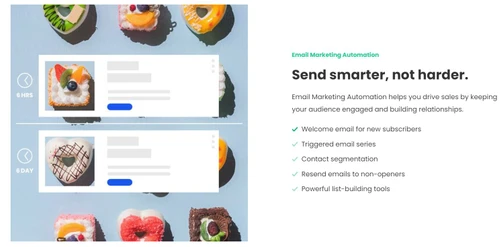

Small Business
Designed for startups and growing businesses
Medium Business
Built for business growth and flexibility
Enterprises
Designed for complex and large-scale business needs
4.4
Out of 5

Overall Rating
Based on
10 Verified Reviews
Rating Breakdown
89% Recommend this Product
Add ReviewUsers generally appreciate Constant Contact for its solid analytics, user-friendly interface, and effective email scheduling, making it a good choice for both small businesses and non-profits. The drag-and-drop editor and built-in social media tools are highlighted as particularly beneficial. However, several users report frustrations with the email builder's glitches, limited A/B testing options, and challenges in canceling subscriptions. Additionally, as user bases grow, many find the pricing structure to be a concern, especially with added features.
Pros
"Live chat & phone support, helpful knowledge base, international numbers."
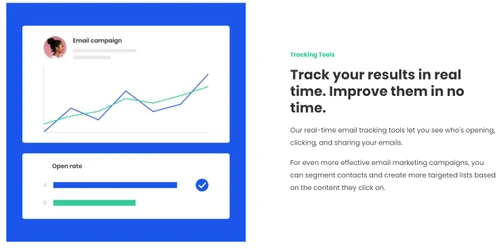
"Real-time campaign stats, click heatmaps, subject-line A/B tests."
"Super beginner-friendly, easy contact import, templates help."
Cons
" Editor glitches like reverting changes, slow loading, unstable."
"A/B limited to subject lines; no spam testing or multivariable tests."
"Costs increase fast as contact lists grow; extra fees for previews."


May 3, 2025
Techjockey Verified
“Analytics Are Solid, But A/B Testing Is Basic”
I track opens, clicks, and even heatmaps—Constant Contact gives detailed analytics, which helps tweak campaigns weekly. The subject-line A/B is handy—but that’s it. I’d love to test different body copy or images, but it doesn’t let me. And there’s no spam score preview unless I pay extra. A bit limiting for anyone wanting deeper insights.
Pros
Real-time campaign stats, click heatmaps, subject-line A/B tests.
Cons
A/B limited to subject lines; no spam testing or multivariable tests.
Reason to switch
I’m moving from ActiveCampaign to Constant Contact for simpler analytics and easier UI—but may need to switch again for better A/B testing.
Apr 3, 2025
Techjockey Verified
“Social Posting Saves So Much Time”
As a solo marketer, I love that Constant Contact lets me write an email and schedule a post to Facebook and Instagram at the same time. Brand kits help me maintain consistency. That said, I can’t tailor posts per platform (e.g., hashtags for Instagram), and social tagging is limited. So, if I want polished social content I still end up posting separately.
Pros
Built-in social media scheduling, cross-posting, brand kits.
Cons
Limited customization per platform; lack of robust tagging tools.
Reason to switch
I upgraded from Buffer to Constant Contact to consolidate email and social scheduling—though truly optimized social needs a backup tool.
Feb 21, 2025
Techjockey Verified
“Great for NonProfits, But Cancellation’s a Pain”
We’re a small charity using Constant Contact for fundraising emails. We love how we can organize donors and segment lists. There’s a sweet discount for nonprofits, too. But when we tried pausing our plan recently, we learned canceling requires a phone call—and we had to argue to get them to stop billing. There’s no simple unsubscribe button, which feels like a trap.
Pros
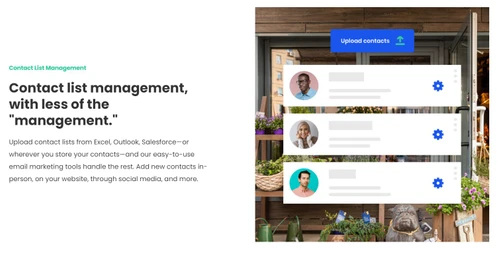
Easy list management, non-profit discount, friendly UI.
Cons
Canceling subscription is a nightmare—phone required, no online option.
Reason to switch
We moved from Mailchimp to Constant Contact because of the nonprofit discount and better list tools, but cancelling isn’t easy.

Constant Contact
₹ 990.00 excl. GST
Desktop
Mobile
Web based
On Premises
Windows
Mac OS
SendGrid
Price On Request
Desktop
Mobile
Web based
On Premises
Windows
Mac OS
Salesforce Email Studio
Price On Request
Desktop
Mobile
Web based
On Premises
Windows
Mac OS
Privy
Price On Request
Desktop
Mobile
Web based
On Premises
Windows
Mac OS

Litmus
Price On Request
Desktop
Mobile
Web based
On Premises
Windows
Mac OS
Knak
Price On Request
Desktop
Mobile
Web based
On Premises
Windows
Mac OS

PostyMan
₹ 2000
Desktop
Mobile
Web based
On Premises
Windows
Mac OS

Mumara One
₹ 1390
Desktop
Mobile
Web based
On Premises
Windows
Mac OS

Zoho Campaigns
₹ 240
Desktop
Mobile
Web based
On Premises
Windows
Mac OS

Convertkit
Price On Request
Desktop
Mobile
Web based
On Premises
Windows
Mac OS
MailTact
Price On Request
Desktop
Mobile
Web based
On Premises
Windows
Mac OS
(2) Product(s) selected
Starting Price:
$20 /Month
Starting Price:
$30 /Month
Starting Price:
$500 /Month
Available
Price on Request
Starting Price:
$9
Starting Price:
$29

Starting Price:
$38 /Month

Starting Price:
$15 /Month

Starting Price:
$59 /month

Starting Price:
$5 /Month

Starting Price:
$29



Constant Contact works as a comprehensive platform where you can effortlessly create, automate, and monitor your professional email campaigns and social media promotions, all thanks to its user-friendly tools and templates.
No, the free edition of Constant Contact is not available, but you can use a free trial.
The major users of Constant Contact are Small businesses & startups, Nonprofits & charities, Freelancers, and more.
Constant Contact pricing starts from INR 990.
Yes, Constant Contact has a dedicated mobile app.
Constant Contact is a Digital and Email Marketing Platform.
Yes, Constant Contact has an API.
They suit small to mid-size senders but are less robust than Salesforce Marketing Cloud for complex enterprise automation.
0 0
MailerLite and Brevo are popular newsletter alternatives with modern editors and lower pricing.
0 0
Mailchimp offers stronger automation and analytics; Constant Contact is praised for support and event tools. The best depends on your priorities.
0 0
Many users find Brevo, ActiveCampaign, or MailerLite better for automation and value, depending on needs.
0 0
Companies similar to Constant Contact include Mailchimp, Brevo, MailerLite, GetResponse, and Campaign Monitor.
0 0
20,000+ Software Listed
Best Price Guranteed
Free Expert Consultation
2M+ Happy Customers
Terms and Condtions

Users with registered businesses can purchase goods from merchants on the platform to satisfy their business needs. Users are not permitted to utilize any products acquired through the platform for resale, advertising, business, or further distribution.
For each purchase made, users will receive a Tax Invoice (or 'GST invoice') that includes specific details such as:
the GSTIN of the user associated with their registered business, and
the specified Entity Name for their business.
It should be noted that not all products are eligible for GST Invoice. Only the products displayed by participating sellers with the 'GST-based Invoice Available' callout on the product description page would qualify.
Certain goods and services are not eligible to get a GST Invoice, including items with VAS, i.e., Value Added Services (e.g., Total Mobile Protection/Assured Buyback) and those involving an exchange offer at the time of purchase.
Users must ensure the accuracy of the GSTIN, and business entity name provided for the GST Invoice. Requests for corrections into GST Invoice would not be accommodated by Techjockey.com or any Seller, and any issues arising from user-provided information are the sole responsibility of users.
Techjockey.com is not liable for the GST Invoice or any associated input tax credit. To efficiently claim an input tax credit, users should select the registered place of business address as per the GST authority's data and follow the provisions of the GST Act and rules.
To claim an input tax credit, the delivery and billing addresses must match. Furthermore, input tax credits will not be granted if the delivery address and GSTIN on the invoice are from different states. In case of incorrect GST details provided during the order placement, the order will be canceled automatically.



