linkedin
eQuipMe logo
play eQuipMe Digital E Business Suite All-in-One Mobile App for Oracle ERP | Aspire Systems
equipme digital
equipme features

eQuipMe

Brand: Aspire Systems

  • 4.5

  • 3 Ratings

eQuipMe is a mobile solution that lets you mobilize your Oracle EBS and Fusion ERP apps, boosting workforce productivity and driving enterprise-wide efficiency.

See More

Have you used eQuipMe before?

Share your insights for better experience

Add a Review

Price Available on Request

Questions about pricing or customization? We’re here to help, just a click away.

100% Genuine
Products
Best Price
Guaranteed
Safe & Secure
Payment
  • Description

  • Pricing

  • Features

  • Specification

  • Review

  • Compare

  • Alternatives

  • FAQ

eQuipMe Software Overview

What is eQuipMe?

eQuipMe is a comprehensive productivity software designed to function as a cutting-edge mobile workforce solution. It specializes in mobilizing Oracle enterprise systems, including E-Business Suite (EBS), Fusion ERP, Siebel, and JDE, to enhance enterprise-wide efficiency and workforce optimization. By extending backend IT systems to a mobile application, eQuipMe removes workstation dependencies and provides a single, secure gateway to key business applications.

The platform is available as both hybrid and web applications, built for iOS and Android devices. It comes equipped with an extensive library of over 200 pre-built reusable modules and connectors, alongside more than 30 pre-built applications, allowing for rapid deployment and customization. This robust framework enables businesses to automate critical activities across various departments, from HR and finance to supply chain and field service, directly from mobile devices.

Why Choose eQuipMe?

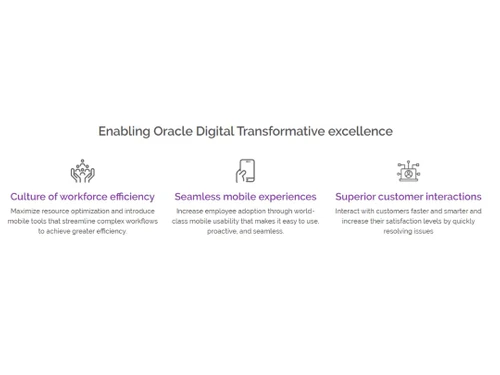
  • Achieve Full Workforce Optimization: By mobilizing essential ERP functions, eQuipMe empowers employees to perform tasks remotely, maximizing resource utilization and streamlining complex workflows for greater overall efficiency.
  • Deliver Seamless Mobile Experiences: The software is designed with world-class mobile usability in mind. Its intuitive and proactive interface encourages high employee adoption, making it easy for users to manage enterprise data and processes on the go.
  • Enhance Security and Integration: eQuipMe creates a powerful and secure mobile ecosystem. It integrates seamlessly with existing enterprise infrastructure like Oracle Mobile Cloud Service (MCS), Active Directory (AD), and SharePoint, while ensuring data is protected through encrypted assets, secure data transfers, and robust user authentication protocols.
  • Enable Superior Customer Interactions: A mobilized workforce can interact with customers faster and more effectively. Field service technicians, sales teams, and support staff can access real-time information and resolve issues quickly, leading to increased customer satisfaction levels.

Advanced Features of eQuipMe

  • Robust Integration Framework: The platform can be quickly integrated with Oracle Mobile Cloud Service (MCS), Integration Cloud Service (ICS), and the Oracle SOA suite without business disruption. It also supports easy middleware connectivity with BizTalk, OSB, and others, along with integration into OAM, Active Directory (AD), SharePoint, and Outlook.
  • Comprehensive Security Measures: Security is paramount, with encrypted mobile assets, data transfers, code files, and libraries. eQuipMe enforces strict security protocols for user authentication, password management, and session handling to protect sensitive enterprise data.
  • Deep Customization Capabilities: Organizations can deeply customize modules to ensure perfect alignment with their specific business validation processes and transaction workflows. This flexibility allows the software to adapt to unique operational needs rather than forcing a one-size-fits-all approach.
  • Cross-Platform Availability: Built for modern device platforms like iOS and Android, eQuipMe ensures a consistent and reliable experience for all users, regardless of their preferred mobile device.

Modules of eQuipMe

  • Accruals Management: Automates the management of accruals by interfacing with multiple modules to significantly reduce processing time.
  • Business Approvals: Allows managers to respond to and process approval notifications directly from their mobile devices, eliminating delays.
  • Enterprise Asset Management: Establishes a comprehensive asset tracking process for managing all assets and related Work Orders.
  • Expense Management: Empowers employees to submit expense claims, scan receipts, and manage the entire claims process online.
  • Field Service Management: Enables technicians to coordinate with customers to manage installations, services, and repairs seamlessly.
  • Human Resource Management: Automates critical HR tasks, allowing employees to manage profiles, view paystubs, apply for leave, and access contact details.
  • Inventory Management: Provides remote capabilities to record, manage, and track inventory items and transactions, including stock checks and transfers.
  • Order Management: Accelerates the sales cycle by enabling remote creation of sales orders and invoices, streamlining order-to-cash workflows.
  • Procurement Management: Modernizes the creation and viewing of Purchase Requisitions (PR), Purchase Orders (PO), and Receipts with greater flexibility.
  • Time and Labor Management: Extends time-tracking capabilities to mobile, helping employees record time entries flexibly and accurately.

How to Use eQuipMe?

  1. Integration: The first step is to integrate eQuipMe with your core Oracle enterprise systems (EBS, Fusion, etc.) and other relevant infrastructure like Active Directory or SharePoint.
  2. Customization: Next, the pre-built modules are customized to align with your organization's specific workflows, business rules, and validation processes.
  3. Deployment: The application is deployed to your workforce's iOS and Android devices, making it accessible through a secure login.
  4. Usage: Once deployed, employees can immediately begin using the mobile app to access data, manage tasks, process approvals, and perform their roles more effectively from any location.

eQuipMe Pricing

eQuipMe pricing details are available on request on techjockey.com.

The pricing model is based on different parameters, including extra features, deployment type, and the total number of users. For further queries related to the product, you can contact our product team and learn more about the pricing and offers.

Read more

Aspire Systems Company Details

Founded Year:  1996

Aspire Systems, an Oracle Partner has built iEstate, a SaaS (software as a service), cloud-based Real Estate Property Management Solution on the Oracle Cloud platform.

Director/Founders Gowri Shankar Subramanian
Company Size 1000+ Employees

eQuipMe Pricing & Plans

Looking for The Right Pricing?

Share your requirements and get a plan built around your business.

  • Define your business needs
  • Get customised pricing
  • Choose features that fit your workflow

Price Available on Request

Get personalised eQuipMe pricing that fits your needs. Our team will connect with you.

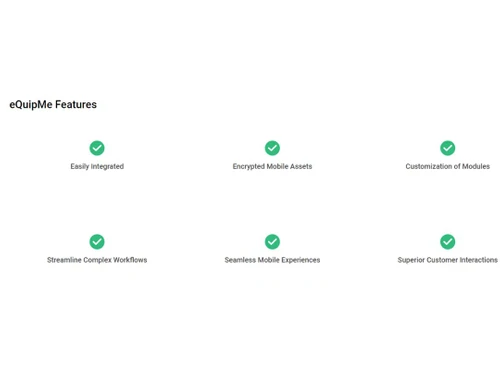
eQuipMe Features

  • icon_check Easily Integrated
  • icon_check Encrypted Mobile Assets
  • icon_check Customization of Modules
  • icon_check Streamline Complex Workflows
  • icon_check Seamless Mobile Experiences
  • icon_check Superior Customer Interactions
eQuipMe Demo Video play icon

Get eQuipMe Demo

Watch the demo video to explore key features, real workflows, and how the software fits your business needs.

Understand
Key Features
Personal
Demo Insights
Interactive
Demo Support

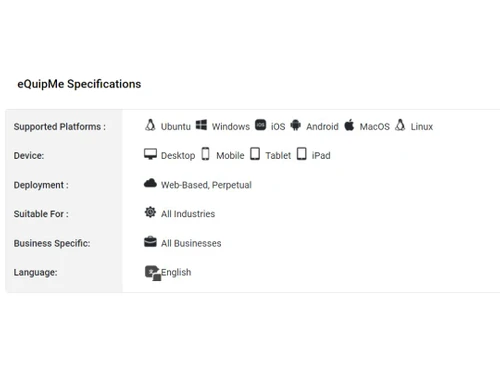
eQuipMe Specifications

Supported Platforms
Ubuntu Ubuntu Windows Windows iOS iOS Android Android MacOS MacOS Linux Linux
Devices
Desktop Desktop Mobile Mobile Tablet Tablet iPad iPad
Deployment
Cloud-Based Cloud-Based Perpetual Perpetual
Suitable For
All Industries
Business Specific
All Businesses
Business Size
Small Business Startups Medium Business Enterprises SMBs SMEs MSMBs MSMEs
Customer Support
Live Chat Forums
Language
English
Training Resources
Videos
AI Features
AI Integrated

Explore the Best Alternative Solutions Similar to Your Business Size and Needs

eQuipMe Review

4.5

Out of 5

img

Overall Rating

Based on
3 Verified Ratings

Rating Breakdown

  • Features 3.8
  • Value for Money 4.5
  • Ease of Use 4.8
  • Customer Support 4.8

90% Recommend this Product

Add Review

Techjockey Trusted Reviews from Verified Users

No reviews are currently available for eQuipMe. Discover similar Productivity Software reviews

  • Microsoft Word

    4.4

    Whats great - Word is the industry standard—everyone accepts .docx files. I never worry about compatibility. read more

  • SysTools DBX To PST Converter

    5.0

    Whats great - I was looking for a solution to convert my all crucial DBX files into PST file format. But I did not get any solution. Then, ... read more

  • think cell

    4.7

    Whats great - My present partners with perpetual designer positions have completed a magnificent activity in their glassdoor surveys, depic... read more

Compare eQuipMe With other Productivity Software

Products
Ratings
Pricing
Device Supported
Deployment
Supported Platforms
  • img

    eQuipMe

  • 4.5

  • Price On Request

  • Desktop

    Mobile

  • Web based

    On Premises

  • Windows

    Mac OS

  • img

    Google Workspace

  • 4.3

  • ₹ 325

  • Desktop

    Mobile

  • Web based

    On Premises

  • Windows

    Mac OS

  • img

    Cold Turkey

  • 4.3

  • Price On Request

  • Desktop

    Mobile

  • Web based

    On Premises

  • Windows

    Mac OS

  • img

    Office 365 E3

  • 5

  • ₹ 1740

  • Desktop

    Mobile

  • Web based

    On Premises

  • Windows

    Mac OS

  • img

    InboxPro

  • 4.5

  • Price On Request

  • Desktop

    Mobile

  • Web based

    On Premises

  • Windows

    Mac OS

  • img

    Snippets AI

  • 4.4

  • Price On Request

  • Desktop

    Mobile

  • Web based

    On Premises

  • Windows

    Mac OS

  • img

    Office 365 E5

  • 4

  • ₹ 3240

  • Desktop

    Mobile

  • Web based

    On Premises

  • Windows

    Mac OS

  • img

    Microsoft 365 F3

  • 4.4

  • ₹ 996

  • Desktop

    Mobile

  • Web based

    On Premises

  • Windows

    Mac OS

  • img

    Raycast

  • 4.1

  • Price On Request

  • Desktop

    Mobile

  • Web based

    On Premises

  • Windows

    Mac OS

  • img

    Microsoft 365 F1

  • 4.2

  • ₹ 300

  • Desktop

    Mobile

  • Web based

    On Premises

  • Windows

    Mac OS

  • img

    SmartPanels

  • 4.4

  • Price On Request

  • Desktop

    Mobile

  • Web based

    On Premises

  • Windows

    Mac OS

(0) Product(s) selected

eQuipMe Alternatives

See All eQuipMe Alternatives

Starting Price:

₹2,499 /One-Time

Starting Price:

$24

Starting Price:

$6 /User/Month

Starting Price:

$10 /Month

Starting Price:

$4 /Monthly

Starting Price:

$7 /Month

Starting Price:

$8 /Monthly

Starting Price:

$60
Articles for eQuipMe

See All Related Articles

Which operating system does eQuipMe support?

eQuipMe Productivity Software is compatible with Ubuntu, Windows, IOS, Android, MacOS and Linux operating systems.

Is there any eQuipMe app?

eQuipMe Productivity Software app is available for , Mobile, Tablet and iPad.

What is deployment type of eQuipMe?

eQuipMe Productivity Software supports Web-Based and Perpetual.

Who are the potential users of eQuipMe?

eQuipMe Productivity Software is typically used in All Industries.

Is there any eQuipMe demo or free trial?

eQuipMe demo is available for free with Techjockey.com. Please request a call back.

Is eQuipMe free?

eQuipMe Productivity Software offers a free trial. However, the premium plan with advanced features available at Techjockey.com.

How can you download eQuipMe?

For eQuipMe installation, insert the given CD/USB flash storage in your system and open the Setup Wizard to get started. The web-based version can be accessed directly through eQuipMe portal.

How does eQuipMe work?

eQuipMe Productivity Software helps with Easily Manage & Grow Your Sales,Encrypted Email,Customization and Streamline your dealer network. It's a complete solution for Seamless Integration and Superior System.

Are there any hidden charges for eQuipMe updates?

eQuipMe regular updates are available free of cost. There are no hidden software update charges.

What is eQuipMe used for?

eQuipMe Productivity Software used for Easily Manage & Grow Your Sales,Encrypted Email,Customization and Streamline your dealer network.

How do I contact eQuipMe support?

You can directly visit eQuipMe portal and get in touch with eQuipMe customer support for any software-related query.

How to get eQuipMe lifetime deal?

Please contact our product experts to get eQuipMe lifetime deal with exclusive offers.

What is eQuipMe?

eQuipMe is a productivity software that mobilizes Oracle enterprise systems like E-Business Suite and Fusion ERP, providing a comprehensive mobile solution to optimize workforce efficiency.

What is eQuipMe used for?

eQuipMe is used to mobilize key business applications from Oracle enterprise systems, allowing employees to manage tasks like approvals, expenses, inventory, and HR processes from their mobile devices.

How much does eQuipMe cost?

eQuipMe pricing details are available on request on techjockey.com

What is eQuipMe for ServiceNow?

eQuipMe is primarily designed to mobilize Oracle enterprise systems like E-Business Suite and Fusion ERP, and the provided information does not detail a specific version for ServiceNow.

Who uses eQuipMe?

eQuipMe is used by a range of businesses, including startups, SMBs, and large agencies, to empower their mobile workforce with access to key enterprise applications and data.

What mobile platforms does eQuipMe support?

eQuipMe is built to support both iOS and Android device platforms, enabling business users to access enterprise data on their preferred mobile devices.

Does eQuipMe offer pre-built applications?

Yes, eQuipMe provides over 30 pre-built applications and more than 200 reusable modules and connectors to help mobilize your enterprise systems quickly.

How does eQuipMe handle data security?

eQuipMe ensures security through encrypted mobile assets, data transfers, and code files, along with robust measures for user authentication, password management, and session handling.

Is it possible to customize eQuipMe for our specific business processes?

Yes, eQuipMe offers deep customization of its modules to ensure they align perfectly with your organization's specific business validation processes and transaction workflows.

20,000+ Software Listed

Best Price Guranteed

Free Expert Consultation

2M+ Happy Customers

Terms and Condtions

close

Users with registered businesses can purchase goods from merchants on the platform to satisfy their business needs. Users are not permitted to utilize any products acquired through the platform for resale, advertising, business, or further distribution.

For each purchase made, users will receive a Tax Invoice (or 'GST invoice') that includes specific details such as:

  • the GSTIN of the user associated with their registered business, and

  • the specified Entity Name for their business.

It should be noted that not all products are eligible for GST Invoice. Only the products displayed by participating sellers with the 'GST-based Invoice Available' callout on the product description page would qualify.

Certain goods and services are not eligible to get a GST Invoice, including items with VAS, i.e., Value Added Services (e.g., Total Mobile Protection/Assured Buyback) and those involving an exchange offer at the time of purchase.

Users must ensure the accuracy of the GSTIN, and business entity name provided for the GST Invoice. Requests for corrections into GST Invoice would not be accommodated by Techjockey.com or any Seller, and any issues arising from user-provided information are the sole responsibility of users.

Techjockey.com is not liable for the GST Invoice or any associated input tax credit. To efficiently claim an input tax credit, users should select the registered place of business address as per the GST authority's data and follow the provisions of the GST Act and rules.

To claim an input tax credit, the delivery and billing addresses must match. Furthermore, input tax credits will not be granted if the delivery address and GSTIN on the invoice are from different states. In case of incorrect GST details provided during the order placement, the order will be canceled automatically.