linkedin
Ezy Rokad (रोकड़) logo
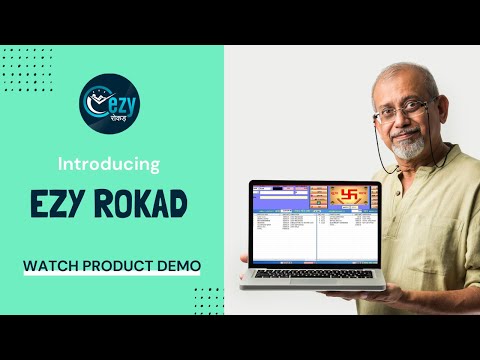
play Ezy Rokad Accounting Software Demo
Ezy Rokad logo
Ezy Rokad logo

Ezy Rokad (रोकड़)

Brand: Ezy Rokad (रोकड़)

  • 4.8

  • 10 Ratings & 9 Reviews

Ezy रोकड़, India’s first accounting software based on handwritten cashbook—रोकड़ पाना. No need to deal with complicated DR/CR software. Switch to EZY रोकड़ today. The software allows you to manage the accounts in a personal manual style with zero training required. Any business owner, family member or an unskilled staff can use Ezy रोकड़ easily to track the...

See More

Have you used Ezy Rokad (रोकड़) before?

Share your insights for better experience

Add a Review
Starting Price
₹6,999 excl.GST
₹ 8,259 incl. GST

View plans

offer Save upto 18%, Get GST Invoice on your business purchase T&C
offer Buy Now & Pay Later, Check offer on payment page.
Buy Now
100% Genuine
Products
Best Price
Guaranteed
Safe & Secure
Payment
  • Description

  • Pricing

  • Features

  • Specification

  • Review

  • Compare

  • Alternatives

  • FAQ

Starting at ₹6,999
Buy Now

Ezy Rokad (रोकड़) Software Overview

What is Ezy Rokad?

Ezy रोकड़, India’s first accounting software based on handwritten cashbook—रोकड़ पाना. No need to deal with complicated DR/CR software. Switch to EZY रोकड़ today. The software allows you to manage the accounts in a personal manual style with zero training required.

Any business owner, family member or an unskilled staff can use Ezy रोकड़ easily to track their financial transactions or to generate financial reports instantly. The software has many unique features that give you the ability to manage inventory and control outstanding in your own manual style. Ezy रोकड़ follows an uncomplicated Indian approach that has made it popular among customers within the country.

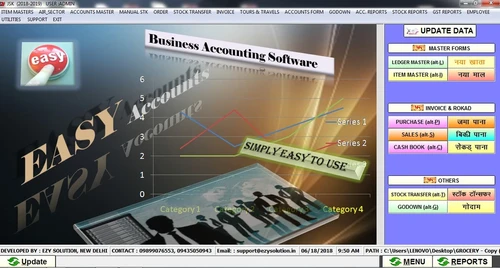
Ezy रोकड़ is super simple to use (3-page software-Purchase, sale & रोकड़ पाना) and customized enough to fit the unique requirements of several businesses.

भारतीय स्टाइल के इस एकाउंटिंग सॉफ्टवेयर की मदद से आप 5 मिनट में रोकड़ पाना छाप सकते है, बिलिंग कर सकते है, तकादा /फरदी लिस्ट निकाल सकते है, होलायती व् उच्चंती, गोदाम वार स्टॉक आदि का हिसाब रख सकते है और GST Return भी लगा सकते है.

Benefits of Ezy Rokad

  • 100% authentic: Ezy Rokad is authentic software suitable for all businesses. You can even request a call or get a free demo to clear your doubts before going for it.
  • No Pending works: Any family member can update accounts in your absence
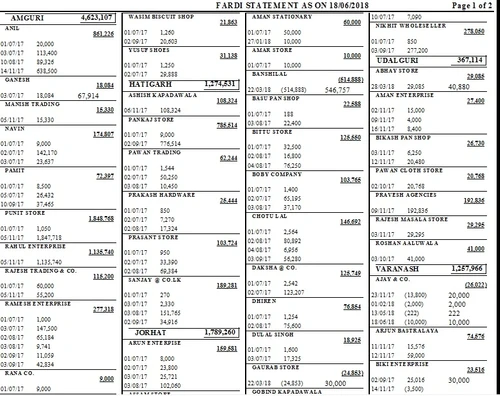
  • 100% Control: You can now control your business by getting many unique and essential reports in time like purja by purja takada /fardi outstanding list etc
  • Complete your work in just NO minutes: By Ezy Rokad you can complete your work in just one-fifth time comparing to any other software

How does Ezy Rokad Help Businesses with Accounting?

Ezy Rokad comprises unique features and flexibility which makes it easier for business owners to manage financial procedures and tasks quickly.

  1. User-Friendly Features: Ezy Rokad is suitable of all customers. A small business owner, a housewife or a person using a laptop for the first time, Ezy Rokad will help you generate the financial reports quickly and efficiently. Even you don’t have an idea of DR/CR accounting and GST, Ezy Rokad will act as your personal financial expert and guide you throughout in the process.
  2. Simple: The software is simple and helps businesses gain complete visibility into their finances. It is customizable to serve 25 plus trades and is very simple to use. 
  3. Flexibility: Being an advanced and flexible accounting software, Ezy Rokad users can customize things as per their needs. The software has been customized to serve over 25 trades. Ezy Rokad is super simple to use (3-page software) and flexible enough to fit the unique requirements of several businesses.
  4. Free Support: Free support helps you to clear doubts related to any tool or process during your financial calculations. Though it is an easy accounting software, you will get support for all your query.

Ezy Rokad Pricing:

  • EZY Accounts> Single User Costs Rs. 9999 for lifetime
  • EZY Silver Version Costs Rs. 12999 for single user for lifetime and Multi User Costs Rs. 24999 (excluding taxes)
    • All Ezy Rokad Accounts features Included
    • Fast Billing
    • Inventory management
    • Barcode
    • GST
  • EZY Gold Version Costs Rs. 16999 for single user for lifetime and Multi User Costs Rs. 28999 (excluding taxes)
    • All Ezy Rokad Silver features plus
    • Flexi Interest calculation
    • Godown wise
    • Auto Production
    • Tally Export/import feature
Read more

Ezy Rokad (रोकड़) Pricing & Plans

EZY-Rokad-Basic

Calculated Price

6999 Exclusive of all taxes
  • Options

    • Users (Single User)

      Users (Single User)
      Users (Single User)

Key Features

  • Accounting Reports

  • GST Return Support

  • Inventory Control

  • User-Friendly for Non-Accountants

Ezy Rokad-Accounts

Calculated Price

9999 Exclusive of all taxes
    • Users (Lifetime)

      Users (Lifetime)
      Users (Lifetime)

Key Features

  • All Ezy Rokad Basic Features

  • Daily Pana

  • Takada Fardi list (Bill by party’s outstanding)

  • Trial balance, P& L , Balance Sheet

  • General ledger (Both in Mahajani & English Style)

Ezy Rokad-Silver

Calculated Price

12999 Exclusive of all taxes
  • Options

    • Users (Lifetime)

      Users (Lifetime)
      Users (Lifetime)

Key Features

  • All Accounts features

  • Fast Billing

  • Inventory management

  • Barcode

  • GST

Ezy Rokad-Gold

Calculated Price

16999 Exclusive of all taxes
  • Options

    • Users (Lifetime)

      Users (Lifetime)
      Users (Lifetime)

Key Features

  • All Ezy Rokad Silver features

  • Flexi Interest calculation

  • Godown wise

  • Auto Production

  • Tally Export/import feature

Ezy Rokad (रोकड़) Features

Core Functionalities

  • icon_check Accounts Payable
    Refers to the money a business owes to its suppliers or vendors for goods or services purchased on credit.
  • icon_check Accounts Receivable
    It represents money owed to a business by its customers or clients for goods or services delivered but not yet paid for.
  • icon_check Alerts & Notifications
    They are automated messages that inform users of important financial events, deadlines, or discrepancies.
  • icon_check Bank Reconciliation
    It is a process of comparing the balances in the company's records with the balances shown on the bank statement.
  • icon_check Document Management
    Refers to the digital storage, organization, & retrieval of financial documents & records.
  • icon_check Bookkeeping Capabilities
    Involves recording and managing financial transactions, tracking income and expenses, and keeping records current.
  • icon_check Bank Settlement
    Refers to the process of reconciling transactions between a company's bank account records & its accounting system.
  • icon_check Gst Report Preparations
    Involves the process of compiling data on Goods and Services Tax (GST) transactions from various financial records within an
  • icon_check Tds Report Generations
    Includes the automated creation of reports detailing Tax Deducted at Source (TDS) from payments made to vendors or contractors.
  • icon_check GST Input Reconciliations
    Involves matching the Input Tax Credit (ITC) claimed on purchases with the GST details provided by suppliers.
  • icon_check Quotation & Estimates
    Offers detailed price estimates to clients before finalizing sales, while estimates offer preliminary cost projections.
  • icon_check Transaction Management
    Tracks, records, and categorizes financial transactions for accurate reporting.
  • icon_check General Ledger
    It is a comprehensive record of all a business's financial transactions, categorized by accounts.
  • icon_check Tax Management
    It automates the calculation, tracking, and reporting of various taxes.
  • icon_check Payroll Management
    Streamlines the process of calculating employee salaries, tax deductions, and benefits.
  • icon_check Time & Expenses Management
    It is a process of recording, tracking, and managing employee working hours and business-related expenses.
  • icon_check Asset Management
    Consists of tracking & managing a company's assets throughout their lifecycle.
  • icon_check Fund Accounting
    It is a method of segregating resources into self-balancing sets of accounts, or funds, according to their intended use or
  • icon_check Multi Currency Support
    Refers to the software's capability to handle transactions, reporting, and financial management in multiple currencies.
  • icon_check Cost Centres
    A vital unit where costs are allocated for internal tracking & management purposes.
  • icon_check Fixed Asset Register (FAR) Management
    A Fixed Asset Register tracks and manages a company's fixed assets, including their acquisition cost, depreciation, and current
  • icon_check Trial Balance Preparation
    It consists of compiling and listing all ledger accounts and their balances to verify the accuracy of recorded transactions.
  • icon_check Return Filings
    Return filings are crucial in accounting software, where businesses prepare and submit tax returns to relevant authorities.
  • icon_check Variant Analysis
    Includes comparing & evaluating different versions or scenarios of financial data to identify variations, discrepancies, or
  • icon_check Batch Management
    It enables users to handle multiple transactions collectively, streamlining processes such as invoicing, payments, and updates.
  • icon_check Branch Management
    It allows businesses to manage financial transactions, reports, and data specific to different branches or locations, ensuring
  • icon_check Broker Management
    Involves tracking & managing broker transactions, commissions, & related financial activities to streamline brokerage
  • icon_check Claims Management
    Includes tracking, processing, & settling claims efficiently, ensuring accurate record-keeping and financial reporting.
  • icon_check Collection Management
    A robust field that involves tracking & managing receivables, including invoicing, payment reminders, & follow-ups.
  • icon_check Credit / Debit Note
    A credit note is issued to reduce the amount a customer owes, typically due to returns or overpayments.
  • icon_check Sales Management
    It consists of tracking sales transactions, managing customer accounts, and generating reports on sales performance.
  • icon_check Statutory Compliances
    Ensures adherence to legal regulations such as tax laws, payroll requirements, and financial reporting standards.
  • icon_check Receipt Management
    It involves capturing, organizing, & storing digital copies of receipts for expenses & purchases.

Billing & Invoicing

  • icon_check Payment Processing
    Refers to the handling of electronic transactions between buyers & sellers, ensuring the secure transfer of funds.
  • icon_check Invoice Processing
    It includes receiving and managing invoices from vendors or suppliers to ensure accurate payment and financial record-keeping.
  • icon_check Automatic Payment Reminders
    Automatic payment reminders are notifications sent to remind customers of upcoming payments.
  • icon_check Payment Tracking
    Monitors and records incoming and outgoing payments, ensuring accurate financial records and timely reconciliation.
  • icon_check Bill Of Materials (BOM)
    Refers to a detailed list of raw materials, components, and instructions required to manufacture a product.
  • icon_check E-Way Bill Generation
    E-Way Bill Generation involves creating and managing electronic invoices required for the transportation of goods under GST

Retail and Point of Sale

  • icon_check Point of Sale (POS)
    Integrates sales transactions with financial records, facilitating real-time inventory management and streamlined reporting.
  • icon_check Retail Management
    Consists of features for tracking inventory levels, sales transactions, & customer data along with generating reports for

Project and Workflow Management

  • icon_check Production Management
    It involves tracking & controlling the manufacturing process, including inventory levels, work orders, and production costs.
  • icon_check Transaction Management
    Tracks, records, and categorizes financial transactions for accurate reporting.
  • icon_check Project Accounting
    Project accounting tracks & manages financial information & activities specific to individuals or jobs.
  • icon_check Facility Management
    Refers to the tools used to track and manage the operational costs, maintenance, and usage of physical assets or facilities.
  • icon_check Time & Expenses Management
    It is a process of recording, tracking, and managing employee working hours and business-related expenses.
  • icon_check Workflow Management
    Streamlines tasks automate processes and enhances team collaboration for efficient operations.

Inventory and Supply Chain Management

  • icon_check Stock Management
    It includes tracking inventory levels, monitoring stock movements, & managing reorder points.
  • icon_check Barcode Scanning
    It streamlines inventory management by automatically tracking & recording product information.
  • icon_check Inventory Management
    It involves tracking, managing, and optimizing the stock of goods and materials.
  • icon_check Inventory Reconciliation
    Refers to the process of matching the inventory records in an accounting system with physical inventory.
  • icon_check Delivery Management
    It consists of tracking and managing the delivery of goods or services to customers, including scheduling, logistics, & more.
  • icon_check Distribution Management
    Involves tracking & managing the flow of goods from suppliers to customers, including inventory control.
  • icon_check Item Master
    A centralised database where detailed information about each inventory item or product is stored.
  • icon_check Product Management
    It includes overseeing the development and enhancement of features related to tracking, managing, and reporting financial data.
  • icon_check Store Management
    Helps track inventory, manage stock levels, and streamline purchase and sales processes.
  • icon_check Supply Chain Management
    Streamlines procurement, inventory, and logistics for efficient financial oversight.
  • icon_check Vendor & Supplier Management
    Tracks interactions, manages invoices and monitors payments for efficient procurement.
  • icon_check Warehouse Management
    Optimizes inventory, controls stock levels, and manages orders and shipments efficiently.

Sales and CRM

  • icon_check Customer Management
    It involves tracking & managing customer information, transactions, & interactions to streamline billing, payments, &
  • icon_check Order Management
    Handles the processing, tracking, & fulfilment of customer orders, thereby integrating them with inventory & financial
  • icon_check Quotation & Estimates
    Offers detailed price estimates to clients before finalizing sales, while estimates offer preliminary cost projections.
  • icon_check CRM Capabilities
    CRM capabilities are integrated to streamline & optimize the business processes associated with customer management.
  • icon_check Loyalty Program
    Tracks and manages rewards or incentives given to customers for their continued business.
  • icon_check Sales Management
    It consists of tracking sales transactions, managing customer accounts, and generating reports on sales performance.

Financial Management

  • icon_check Cash Flow Management
    Used for tracking, analyzing, & optimizing the net amount of cash receipts, barring cash expenses.
  • icon_check Cash and Bank Management
    It tracks and manages all cash inflows and outflows, including bank transactions and cash payments/receipts.
  • icon_check Financial Planning & Analysis
    It includes forecasting future financial performance based on historical data, and budgeting for expenses and revenue.
  • icon_check Budgeting & Forecasting
    They are vital financial planning tools businesses use to estimate future revenue & cash flow.
  • icon_check Revenue Management
    Refers to the systematic process of predicting, analyzing, & optimizing an organization's income by managing pricing &
  • icon_check Fund Accounting
    It is a method of segregating resources into self-balancing sets of accounts, or funds, according to their intended use or
  • icon_check Fund Planning
    Defined as a process of forecasting & managing the inflows and the outflows of cash.
  • icon_check Net Worth Management
    Defined as a process of tracking and managing an individual or organization's total assets and liabilities.

Integrations Supported

  • icon_check Import / Export Management
    Refers to the ability to transfer financial data in and out of the system, enabling seamless integration with various apps.

Analytics and Reporting

  • icon_check Profit & Loss
    It shows revenues, costs, and expenses to determine net profit or loss for a period.
  • icon_check Financial Accounting and Reporting
    It involves tracking and managing a company's fixed assets, such as equipment, vehicles, and buildings.
  • icon_check Financial Statement Generation & Analysis
    Refers to the process of automatically creating financial reports like balance sheets & income statements.
  • icon_check Gross Profit
    Refers to the difference between revenue from sales and the cost of goods sold.
  • icon_check Ratio Analysis
    It includes evaluating financial ratios derived from financial statements to assess a company's performance.
  • icon_check Net Profit Management
    Involves calculating, analyzing, & reporting the net profit earned by a business after deducting all expenses.
  • icon_check Audit Management
    Refers to a process of preparing for & conducting audits by organizing & tracking audit-related activities.
  • icon_check Profit Centers
    Defined as a segment within a business that is responsible for generating profits.

Administrative Features

  • icon_check Backup & Restore
    A process of creating a copy of data (backup) to prevent data loss and retrieving that data (restore) to recover the system to
  • icon_check User Access Management
    Includes roles, permissions, access control, and activity tracking to ensure secure operations.
  • icon_check Ledger Scrutiny
    Ledger scrutiny involves a detailed examination of financial records to ensure accuracy, completeness, and compliance.
  • icon_check Facility Management
    Refers to the tools used to track and manage the operational costs, maintenance, and usage of physical assets or facilities.
  • icon_check Admin Controls
    Allows administrators to manage user access, set permissions, and oversee the security of financial data within the system.
  • icon_check Self Service Portal
    Allows users to access and manage their financial information independently, including viewing reports, submitting invoices, and

Others

  • icon_check India’s 1st SMALLEST (3-page) Accounting Software
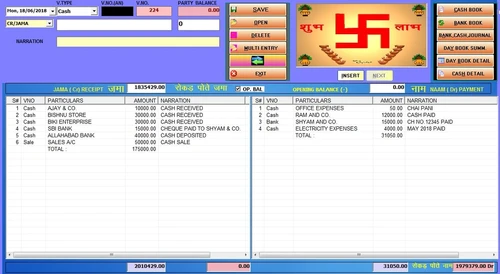
    A 3-page software, Ezy Rokad helps you take note of sale, purchase and cashbook (रोकड़ पाना-जमा नाम)
  • icon_check India’s 1st रोकड़ पाना Style Software
    Ezy Rokad works as a replica of your handwritten cash book. It has two sides – receipt (jama) and payment (naam).
  • icon_check India’s 1st Print day book in रोकड़ पाना style
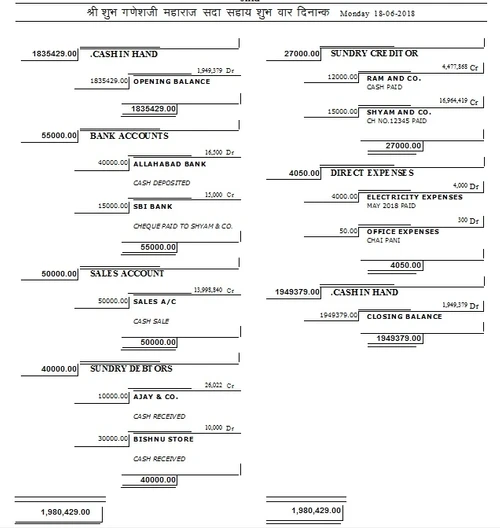
    Print your day book(Purchase, Sale, Bank, Journal)in रोकड़ पाना style.
  • icon_check India’s 1st पुर्जा by पुर्जा तकादा/फ़र्दी लिस्ट
    Generate slip to slip (फ़र्दी/तकादा लिस्ट) with due days in just 1 or 2 pages.
  • icon_check India’s 1St Data transfer security
    Unlike other software , Data will be auto-deleted after transfer to/merge with another pen drive's data.
  • icon_check Auto interest calculation (in महाजनी style)
    Generate interest after temporary adding/editing/deleting entries in party’s ledger but not effecting original ledger
  • icon_check Auto Posting of Salary & Wages
    Ezy Rokad also does auto-recording of employee salary and wages like bonuses, shifts, overtime, etc.
  • icon_check MISC. AUTOMATIC Features
    The software auto-creates GST/RCM masters. It allows auto posting of RCM & GST payable per month, auto-calculation of GST
  • icon_check Cash Detail (होलायती)
    Keeping/Maintaining a record of cash detail is easily with Ezy Rokad.
  • icon_check Work From Pen-Drive
    You can run the software from Pendrive also, No need to install in system.
  • icon_check Fastest Billing
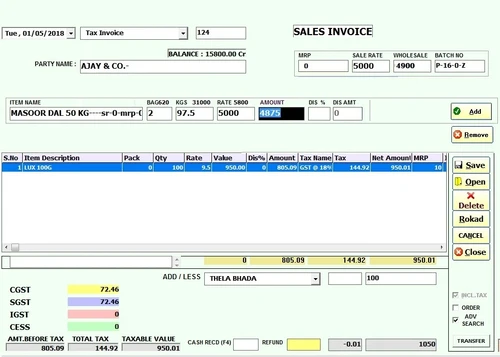
    A fast working accounting software, it helps you in billing fast without using much the Enter key.
  • icon_check Multi Customer Handling
    The multi customer handling feature of the software enables multi-sale window on a single computer.
  • icon_check Challan Management
    It allows you to keep a track of total number of items sold loose. The software converts those challans into bills afterwards.
  • icon_check Customized Bill Printing
    The software has 4 specific buttons that help you with customized bill printing and issue professional invoice in A4, A5 size,
  • icon_check Multi Rates & Discount
    You can also give multiple rates (party wise & item wise) and adjust discounts right in the bill books.
  • icon_check Last 3 Deals of Parties
    The software allows you to have a view of the last 3 deal rates of your buyer or seller at the time of billing. 
  • icon_check Cash Receiving & Returner
    The software allows you to make payment in advance & also a cash returner facility.
  • icon_check Advanced Billing
    Talpati, dalal, godown, mrp, imei, part no., item code wise billing facility.
  • icon_check Weight calculation for delivering goods
    It can automatically do a weight-wise calculation for transportation of goods. 
  • icon_check Outstanding Reports
    You can generate area/city/staff/head wise फ़र्दी/तकादा उधारी लिस्ट, and party’s balance
  • icon_check Jama bahi, Nakal bahi, Rokad bahi
    The software help you analyze your registers in various languages including English & Hindi.
  • icon_check Multi-company/Multi-godown functions
    It also helps you with maintaining accounts in case of multi-company or multi-godowns.
  • icon_check Customized to Serve 25+ Trades
    The software is customized to serve more than 25 trade types.
Ezy Rokad (रोकड़) Demo Video play icon

Get Ezy Rokad (रोकड़) Demo

Watch the demo video to explore key features, real workflows, and how the software fits your business needs.

Understand
Key Features
Personal
Demo Insights
Interactive
Demo Support

Ezy Rokad (रोकड़) Specifications

Supported Platforms
Windows Windows iOS iOS Android Android
Devices
Desktop Desktop Mobile Mobile
Deployment
Cloud-Based Cloud-Based Perpetual Perpetual
Suitable For
All Industries
Business Specific
All Businesses
Business Size
Small Business Startups Medium Business Enterprises SMBs SMEs
Customer Support
Phone Email Live Chat
Language
English हिन्दी
Integration
API Integration
Training Resources
In Person Live Online Documentation Videos

Explore the Best Alternative Solutions Similar to Your Business Size and Needs

Ezy Rokad (रोकड़) Reviews

4.8

Out of 5

img

Overall Rating

Based on
9 Verified Reviews

Rating Breakdown

  • Features 4.8
  • Value for Money 4.8
  • Ease of Use 4.9
  • Customer Support 4.9

85% Recommend this Product

Add Review

Pros

  • "The open-platform spirit of Ezy Rokad appeals to me the most. It's not just one feature; it's Ezy Rokad's entire approach to what that does, and it's evident across the product."

    Sonam Gupta Feb 18, 2021

  • "Customizing user rights has the added benefit of allowing employees to enter their own expenses, which saves time."

    Rashika13 JainFeb 18, 2021

  • "It is an Indian Style accounting software. You can do accounting in your own style."

    Jeena Feb 18, 2021

Cons

  • "For some reports I needed to do, I couldn't run a payment history by vendor. It's possible that it's a user error, however I was assured that the capability isn't available."

    Arihant JainFeb 18, 2021

  • "Sometime the software works slow but otherwise it works very well."

    Sonam Gupta Feb 18, 2021

  • "It would be fantastic if company could analyse the types of questions that their clients are asking."

    Rashika13 JainFeb 18, 2021

Bishal Jain

5

Reviewed on: Feb 18, 2021

Techjockey Verified

“Great software easy to use”

Pros

We've decided to become a Ezy Rokad-only bookkeeping firm because we love it so much. Almost every client we transferred from another accounting software to Ezy Rokad fell in love with it.

Cons

We haven't found any con yet with Ezy Rokad software.

Arihant jain

Administrator

User since: < 6 months

5

Reviewed on: Feb 18, 2021

Techjockey Verified

“Very easy and convenient to use.”

Pros

With no prior accounting experience, setting up rather sophisticated accounting was a breeze. I felt the bank reconciliation was fantastic, and I adored the payroll system while it was still available.

Cons

For some reports I needed to do, I couldn't run a payment history by vendor. It's possible that it's a user error, however I was assured that the capability isn't available.

Sonam gupta

Manager

4.2

Reviewed on: Feb 18, 2021

Techjockey Verified

“It is awesome & saves much time.”

Pros

The open-platform spirit of Ezy Rokad appeals to me the most. It's not just one feature; it's Ezy Rokad's entire approach to what that does, and it's evident across the product.

Cons

Sometime the software works slow but otherwise it works very well.

See All Ezy Rokad Reviews

Compare Ezy Rokad (रोकड़) With other Accounting Software

Products
Ratings
Pricing
Device Supported
Deployment
Supported Platforms
  • img

    Ezy Rokad (रोकड़)

  • 4.8

  • ₹ 6999.00 excl. GST

  • Desktop

    Mobile

  • Web based

    On Premises

  • Windows

    Mac OS

  • img

    OneFinOps

  • 5

  • ₹ 14994

  • Desktop

    Mobile

  • Web based

    On Premises

  • Windows

    Mac OS

  • img

    TallyPrime

  • 4.4

  • Price On Request

  • Desktop

    Mobile

  • Web based

    On Premises

  • Windows

    Mac OS

  • img

    LedgerX

  • 5

  • Price On Request

  • Desktop

    Mobile

  • Web based

    On Premises

  • Windows

    Mac OS

  • img

    LedgerFlo

  • 4.3

  • ₹ 2999

  • Desktop

    Mobile

  • Web based

    On Premises

  • Windows

    Mac OS

  • img

    DualEntry

  • 4.4

  • Price On Request

  • Desktop

    Mobile

  • Web based

    On Premises

  • Windows

    Mac OS

  • img

    Marg ERP 9+

  • 4.7

  • Price On Request

  • Desktop

    Mobile

  • Web based

    On Premises

  • Windows

    Mac OS

  • img

    GBooks

  • 4.3

  • Price On Request

  • Desktop

    Mobile

  • Web based

    On Premises

  • Windows

    Mac OS

  • img

    Sage Intacct

  • 4.1

  • Price On Request

  • Desktop

    Mobile

  • Web based

    On Premises

  • Windows

    Mac OS

(0) Product(s) selected

Ezy Rokad (रोकड़) Alternatives

See All Ezy Rokad (रोकड़) Alternatives

Starting Price:

₹750 /Month

Available

Price on Request

Available

Price on Request

Available

Price on Request

Available

Price on Request

Available

Price on Request

Articles for Ezy Rokad (रोकड़)

See All Related Articles

Where does Ezy Rokad save all the information?

Ezy Rokad uses on-premise based data storage system.

Can I get a demo for Ezy Rokad?

Ezy Rokad is available for an online demo before purchase at Techjockey. Please request a call to get your demo scheduled.

Is Ezy Rokad accessible on mobile phones?

As of now, Ezy Rokad is not available in the form of mobile apps.

Is my data secure with Ezy Rokad?

Ezy Rokad offers various features to protect the data from counterfeiting and unauthorized access. It uses data freezing, external storage auto backup, passwords, etc.

Can I use Ezy Rokad for my manufacturing plant?

Yes, Ezy Rokad can be used for seamless management of the manufacturing plants.

20,000+ Software Listed

Best Price Guranteed

Free Expert Consultation

2M+ Happy Customers

Terms and Condtions

close

Users with registered businesses can purchase goods from merchants on the platform to satisfy their business needs. Users are not permitted to utilize any products acquired through the platform for resale, advertising, business, or further distribution.

For each purchase made, users will receive a Tax Invoice (or 'GST invoice') that includes specific details such as:

  • the GSTIN of the user associated with their registered business, and

  • the specified Entity Name for their business.

It should be noted that not all products are eligible for GST Invoice. Only the products displayed by participating sellers with the 'GST-based Invoice Available' callout on the product description page would qualify.

Certain goods and services are not eligible to get a GST Invoice, including items with VAS, i.e., Value Added Services (e.g., Total Mobile Protection/Assured Buyback) and those involving an exchange offer at the time of purchase.

Users must ensure the accuracy of the GSTIN, and business entity name provided for the GST Invoice. Requests for corrections into GST Invoice would not be accommodated by Techjockey.com or any Seller, and any issues arising from user-provided information are the sole responsibility of users.

Techjockey.com is not liable for the GST Invoice or any associated input tax credit. To efficiently claim an input tax credit, users should select the registered place of business address as per the GST authority's data and follow the provisions of the GST Act and rules.

To claim an input tax credit, the delivery and billing addresses must match. Furthermore, input tax credits will not be granted if the delivery address and GSTIN on the invoice are from different states. In case of incorrect GST details provided during the order placement, the order will be canceled automatically.