linkedin
Faveo Helpdesk logo
play Faveo HELPDESK, Simplifying Customer Support
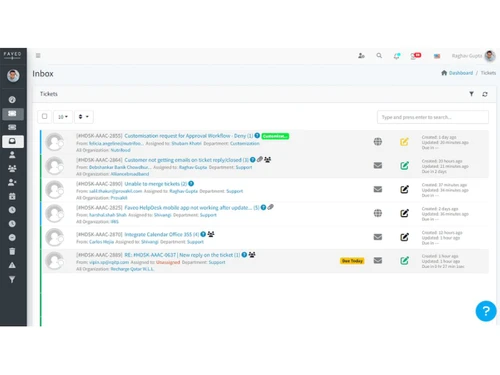
Faveo dashboard
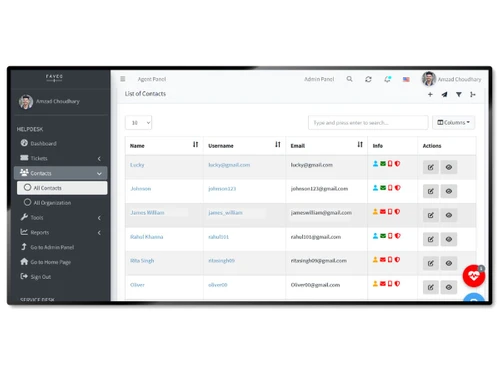
Faveo contacts

Faveo Helpdesk

Brand: Ladybird Web Solution

  • 4.4

  • 3 Ratings & 3 Reviews

Faveo Helpdesk helps startups and growing SMEs manage ticketing, SLAs, and omnichannel support with an all-in-one automated help desk solution.

See More

Have you used Faveo Helpdesk before?

Share your insights for better experience

Add a Review
Starting Price 20% OFF
₹771 excl.GST  ₹964
₹ 910 incl. GST

View plans

100% Genuine
Products
Best Price
Guaranteed
Safe & Secure
Payment
  • Description

  • Pricing

  • Features

  • Specification

  • Review

  • Compare

  • Alternatives

  • FAQ

Starting at ₹771

Faveo Helpdesk Software Overview

What is Faveo Helpdesk?

Faveo Helpdesk is a comprehensive, automated help desk software designed to streamline customer support operations for businesses of all sizes. It provides a robust platform for managing customer inquiries through an integrated ticketing system, Service Level Agreement (SLA) management, and intelligent workflow automation. Built with startups and SMEs in mind, Faveo is a cloud-based solution, ensuring it can be accessed from any location at any time. Its customizable nature allows businesses to tailor the platform to their specific support processes, integrating with multiple channels to create a unified customer service experience.

Why Choose Faveo Helpdesk?

  • Unified Omni-Channel Support: Faveo integrates with numerous platforms including email, WhatsApp, Facebook, Twitter, and telephony services. This allows agents to manage all customer interactions from a single, unified dashboard, ensuring no query is missed.
  • Powerful Automation: The software features a sophisticated workflow automator that can assign tickets based on agent skills or load (Round Robin), trigger notifications, and manage escalations, significantly reducing manual intervention and response times.
  • In-Depth Analytics: With customizable reports and dashboards, managers can track key metrics like ticket volume, agent performance, and customer satisfaction (CSAT). These insights are crucial for identifying trends and making data-driven decisions to improve service quality.
  • Scalability and Customization: Faveo is built to grow with your business. From startups to large enterprises, the platform offers tiered plans with increasing capabilities. Features like custom ticket forms, CSS customization, and API access allow for deep integration and branding.
  • Enhanced Agent Productivity: Tools like canned responses, internal notes, a comprehensive knowledge base, and task management features empower agents to resolve issues faster and more effectively, improving the overall Average Handling Time.

Advanced Features of Faveo Helpdesk

  • AI-Powered Assistance: The Enterprise plan includes Elea AI, a smart assistant that summarizes tickets, analyzes sentiment, drafts professional replies in one click, and automatically converts solved tickets into knowledge base articles, alongside an AI-powered chatbot that handles routine queries and provides instant, multilingual answers to customers.
  • Sophisticated Ticket Routing: Go beyond basic assignment with skill-based and round-robin routing. This ensures that tickets are automatically directed to the most qualified agent or distributed evenly across the team, optimizing workload and resolution quality.
  • Comprehensive SLA Management: Define multiple SLA policies based on product, company, or priority. The system automatically manages reminders and escalations for violations, ensuring that service commitments are consistently met.
  • Single Sign-On (SSO) and Identity Management: Securely manage user access with integrations for Microsoft Entra ID, LDAP, SAML, and oAuth, simplifying the login process for agents and ensuring compliance with corporate security policies.
  • Ad Hoc Approval Workflows: For processes that require managerial oversight, Faveo allows for the creation of ad hoc approval steps within a ticket's lifecycle, ensuring proper authorization before actions are taken.

Key Capabilities of Faveo Helpdesk

  • Ticket Management: Centralizes all customer requests. Capabilities include email ticketing, ticket merging and cloning, priority and status setting, custom fields, and customer satisfaction (CSAT) surveys.
  • Workflow Automation: Automates repetitive tasks. This includes an event-triggered workflow automator, business rules, listeners for external events, and various ticket assignment models (round robin, load balanced, skill-based).
  • SLA Management: Enforces service standards. Users can create multiple SLA policies, set up automated reminders, and configure escalation rules for violations to maintain service quality.
  • Omni-Channel Support: Engages customers everywhere. Integrates with social media channels like Facebook, WhatsApp Business, and Twitter, as well as telephony and chat services like 3CX and Tawk.
  • Reporting and Analytics: Provides actionable insights. Features include default and custom dashboards, ticket volume trend analysis, agent performance reports, and the ability to export data for further analysis.
  • Knowledge Base: Empowers self-service. Allows you to create a public or private repository of articles, with features like versioning, interlinking, and SEO optimization to help customers find answers on their own.

How to Use Faveo Helpdesk?

  1. Setup Channels: Begin by integrating your primary support channels, such as your support email addresses, social media accounts, and WhatsApp Business number.
  2. Configure Agents and Teams: Add your support agents to the system, organize them into teams or departments, and define their roles and access permissions.
  3. Define Business Rules and SLAs: Establish your Service Level Agreement policies for response and resolution times. Create business rules to automate ticket categorization and prioritization.
  4. Automate Workflows: Use the workflow automator to set up ticket assignment rules, such as round-robin or skill-based routing, and configure automated notifications for customers and agents.
  5. Build Your Knowledge Base: Populate the knowledge base with helpful articles, FAQs, and tutorials to encourage customer self-service and provide a resource for your agents.
  6. Monitor and Optimize: Regularly review the dashboards and reports to monitor team performance, track customer satisfaction, and identify areas for improvement in your support process.

Faveo Helpdesk Pricing

Faveo Helpdesk price starts at INR 771 at techjockey.com.

The pricing model is based on different parameters, including extra features, deployment type, and the total number of users. For further queries related to the product, you can contact our product team and learn more about the pricing and offers.

Read more

Ladybird Web Solution Company Details

Founded Year:  2009

Ladybird

Director/Founders Bhanu pratap singh
Company Size 1-100

Faveo Helpdesk Pricing & Plans

Startup

Calculated Price

771 ₹964
SAVE UPTO 20%
Exclusive of all taxes
    • Agent

      Agent
      Agent
    • Monthly

      Monthly
      Monthly

Key Features

  • Omni Channel Integration

  • Dynamic Ticket Form Management

  • SLA Process Management

  • Workflow & Approval Workflow Management

  • Workflow Automation

SME

Calculated Price

1199 ₹1499
SAVE UPTO 20%
Exclusive of all taxes
    • Agent

      Agent
      Agent
    • Monthly

      Monthly
      Monthly

Key Features

  • All the Features in Startup

  • LDAP

  • Azure Active Directory

  • Round-Robin routing

  • Skill-based routing

Enterprise

Calculated Price

1627 ₹2034
SAVE UPTO 20%
Exclusive of all taxes
    • Agent

      Agent
      Agent
    • Monthly

      Monthly
      Monthly

Key Features

  • All the Features in SME

  • Ad Hoc Approval

  • Department Status Link

  • Custom Js

Faveo Helpdesk Features

  • icon_check Multilingual
    Faveo also has multilingual support through which one can change the entire system to any language.
  • icon_check Email Template
    All the emails going out from the system can be customized to change design, as well as content.
  • icon_check Ticket Merging
    Merge duplicate tickets of the same owner.
  • icon_check Ticket Rating
    Client can give rating to every ticket reply and overall ticket satisfaction.
  • icon_check Help Topics
    Configurable help topics for web tickets. Route inquiries without exposing internal departments or priorities.
  • icon_check Canned Responses
    Faveo comes with ability to define template message for most common queries to save time.
  • icon_check Assign Tickets
    Faveo allows assignment of tickets to particular agent as well as team.
  • icon_check Internal Notes
    Faveo lets you maintain internal notes for each ticket for easy collaboration between the teams.
Faveo Helpdesk Demo Video play icon

Get Faveo Helpdesk Demo

Watch the demo video to explore key features, real workflows, and how the software fits your business needs.

Understand
Key Features
Personal
Demo Insights
Interactive
Demo Support

Faveo Helpdesk Specifications

Supported Platforms
Ubuntu Ubuntu Windows Windows Android Android MacOS MacOS
Devices
Desktop Desktop Mobile Mobile
Deployment
Cloud-Based Cloud-Based Perpetual Perpetual
Suitable For
All Industries
Business Specific
All Businesses
Business Size
Small Business Startups Enterprises SMBs SMEs
Customer Support
Phone Email Live Chat Forums
Language
English
Training Resources
In Person Live Online Webinars Documentation Videos

Explore the Best Alternative Solutions Similar to Your Business Size and Needs

Faveo Helpdesk Reviews

4.4

Out of 5

img

Overall Rating

Based on
3 Verified Reviews

Rating Breakdown

  • Features 4.6
  • Value for Money 4.6
  • Ease of Use 4.1
  • Customer Support 4.7

90% Recommend this Product

Add Review

Greg

Manager

Industry: IT User since: < 6 months

4

Reviewed on: Nov 26, 2021

Techjockey Verified

“Development of new product”

Pros

Flexibility and support is great. Also, the integration with other tools is seamless.

Cons

Multilingual feature is not complete yet.

Reason to switch

Provide UI to connect users with company departments to share documents and track actions to resolve conflicts.

Pankti Joshi

Administrator

User since: 1-2 years

5

Reviewed on: Nov 26, 2019

Techjockey Verified

“Very supportive team and a good product at a great”

Pros

After evaluating many helpdesk software providers we settled on Faveo Helpdesk. Faveo Helpdesk is the Most excellent and pocket-friendly online ticketing helpdesk software. They have Excellent software and support team. So, if you are looking for an affordable, reliable helpdesk software that is full of features then Faveo Helpdesk is the one you need to choose. Faveo helpdesk has helped us a great deal in integrating our ticket management and customer query resolution functions by allowing us to bring in tickets from all online sources such as the web, mobile, social media, etc. onto a single platform. We have improved our efficiency with the Faveo helpdesk

Cons

We are using Faveo Helpdesk for so long, and as far we haven't come across to any issue.

Abdul Khalek

User

4.4

Reviewed on: Mar 3, 2018

Techjockey Verified

“great professionals here”

Pros

Fast, Attentive, and Thorough Help in Sorting Software Options!

Cons

N/A

Compare Faveo Helpdesk With other Help Desk Software

Products
Ratings
Pricing
Device Supported
Deployment
Supported Platforms
  • img

    Faveo Helpdesk

  • 4.4

  • ₹ 771.20 excl. GST

  • Desktop

    Mobile

  • Web based

    On Premises

  • Windows

    Mac OS

  • img

    Freshdesk

  • 4.7

  • ₹ 1799

  • Desktop

    Mobile

  • Web based

    On Premises

  • Windows

    Mac OS

  • img

    Nuevadesk

  • 4.2

  • Price On Request

  • Desktop

    Mobile

  • Web based

    On Premises

  • Windows

    Mac OS

  • img

    Support CRM

  • 4.8

  • ₹ 3750

  • Desktop

    Mobile

  • Web based

    On Premises

  • Windows

    Mac OS

  • img

    Spinso ServiceDesk

  • 4.2

  • Price On Request

  • Desktop

    Mobile

  • Web based

    On Premises

  • Windows

    Mac OS

  • img

    Zoho Desk

  • 4.0

  • ₹ 540

  • Desktop

    Mobile

  • Web based

    On Premises

  • Windows

    Mac OS

  • img

    Zendesk

  • 4.5

  • Price On Request

  • Desktop

    Mobile

  • Web based

    On Premises

  • Windows

    Mac OS

  • img

    TxHelpDesk

  • 5

  • ₹ 1250

  • Desktop

    Mobile

  • Web based

    On Premises

  • Windows

    Mac OS

  • img

    Stingo Helpdesk

  • 5

  • ₹ 599

  • Desktop

    Mobile

  • Web based

    On Premises

  • Windows

    Mac OS

  • img

    Vision Helpdesk

  • 4.3

  • Price On Request

  • Desktop

    Mobile

  • Web based

    On Premises

  • Windows

    Mac OS

  • img

    Desku

  • 4.1

  • Price On Request

  • Desktop

    Mobile

  • Web based

    On Premises

  • Windows

    Mac OS

(0) Product(s) selected

Faveo Helpdesk Alternatives

See All Faveo Helpdesk Alternatives

Starting Price:

$25 /Agent/Month

Starting Price:

$19 /Month

Available

Price on Request

Starting Price:

$29 /Month

Available

Price on Request

Starting Price:

₹15,600 /Lifetime

Starting Price:

$89 /Month

Starting Price:

$12 /Month

Articles for Faveo Helpdesk

See All Related Articles

What are the technical requirement for Faveo?

Faveo HELPDESK is a platform-independent web-based application, meaning it is compatible with all operating systems. To install and run Faveo HELPDESK the following components are required. OS: CentOS7 Web Server: Apache PHP Version: 7.1+ PHP Extensions: Mcrypt, OpenSSL, Mbstring, Tokenizer Database: MySQL(5.0+) Job Scheduler: Cron Job or any task scheduler Web Server Extension: Pretty URLs or Search Engine Friendly URL’s have to be enabled in your web server configuration

Is there a cloud/SaaS version of Faveo?

At Faveo, We currently don’t have cloud/SaaS version, it’s part of our road map and you will see it in coming months.

Does Faveo have a mobile app?

Android & iOS app’s for Faveo are available on Google play store & Apple app store.

Can we switch from community to pro edition?

Yes absolutely, you can purchase pro license and we can help you.

What is Faveo used for?

Faveo is an automated helpdesk software used to assist businesses, particularly startups and SMEs, with customer support processes like ticketing, SLA management, and priority management.

Is Faveo Helpdesk free?

Yes, Faveo offers a free open-source version alongside its paid premium versions which include additional features, support, and multi-platform integrations.

How much does Faveo Helpdesk cost?

Faveo Helpdesk price starts at INR 771 at techjockey.com.

Is Faveo Helpdesk open source?

Yes, Faveo Helpdesk is available as a free open-source version, in addition to its commercially supported paid plans that offer more advanced features.

What kind of workflow automation does Faveo offer?

Faveo provides extensive workflow automation features, including event-triggered automations, business rules, approval workflows, and various ticket assignment methods like round-robin and skill-based routing.

Can Faveo Helpdesk manage Service Level Agreements (SLAs)?

Yes, the software includes comprehensive SLA process management, allowing you to set multiple SLA policies, configure reminders, and create automated escalation rules for violations.

What omni-channel integrations does Faveo support?

Faveo supports omni-channel integration with numerous platforms, including email, WhatsApp Business, Facebook, Twitter, Instagram, SMS, and chat services like Tawk and Intercom.

Does Faveo Helpdesk have AI capabilities?

Yes, the Enterprise plan of Faveo Helpdesk incorporates artificial intelligence features, such as the Elea AI and an AI-powered chatbot, to enhance support automation.

Who can use Faveo Helpdesk?

Faveo Helpdesk is ideal for startups, SMEs, large enterprises, IT services, e-commerce businesses, educational institutions, and other organizations that need efficient customer support and ticket management.

20,000+ Software Listed

Best Price Guranteed

Free Expert Consultation

2M+ Happy Customers

Terms and Condtions

close

Users with registered businesses can purchase goods from merchants on the platform to satisfy their business needs. Users are not permitted to utilize any products acquired through the platform for resale, advertising, business, or further distribution.

For each purchase made, users will receive a Tax Invoice (or 'GST invoice') that includes specific details such as:

  • the GSTIN of the user associated with their registered business, and

  • the specified Entity Name for their business.

It should be noted that not all products are eligible for GST Invoice. Only the products displayed by participating sellers with the 'GST-based Invoice Available' callout on the product description page would qualify.

Certain goods and services are not eligible to get a GST Invoice, including items with VAS, i.e., Value Added Services (e.g., Total Mobile Protection/Assured Buyback) and those involving an exchange offer at the time of purchase.

Users must ensure the accuracy of the GSTIN, and business entity name provided for the GST Invoice. Requests for corrections into GST Invoice would not be accommodated by Techjockey.com or any Seller, and any issues arising from user-provided information are the sole responsibility of users.

Techjockey.com is not liable for the GST Invoice or any associated input tax credit. To efficiently claim an input tax credit, users should select the registered place of business address as per the GST authority's data and follow the provisions of the GST Act and rules.

To claim an input tax credit, the delivery and billing addresses must match. Furthermore, input tax credits will not be granted if the delivery address and GSTIN on the invoice are from different states. In case of incorrect GST details provided during the order placement, the order will be canceled automatically.