linkedin
Filestage logo
play Meet Filestage: Where The Best Work Gets Approved
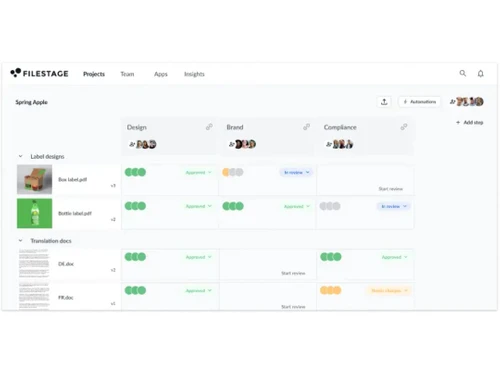
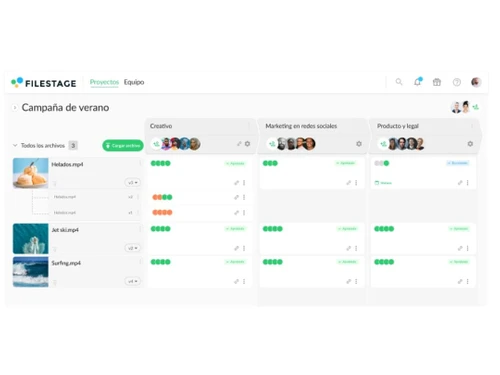
filestage dashboard
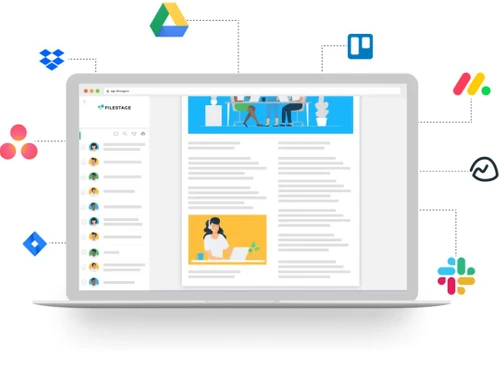
filestage integration

Filestage

Brand: Filestage

  • 4.5

  • 4 Ratings

Filestage is a robust solution that is designed to review platforms, accelerates approval processes and enhances collaboration efficiency.

See More

Have you used Filestage before?

Share your insights for better experience

Add a Review
Starting Price
$129

View plans

100% Genuine
Products
Best Price
Guaranteed
Safe & Secure
Payment
  • Description

  • Pricing

  • Features

  • Specification

  • Review

  • Compare

  • Alternatives

  • FAQ

Starting at $129

Filestage Software Overview

What is Filestage?

Filestage is a content review platform designed to streamline approval processes, ultimately cutting approval time by 30%. It empowers teams to set up custom workflows with collaborative reviewer groups, ensuring feedback is fast, focused, and easy to track. The platform’s features are tailored to various content types including designs, videos, websites, and documents. Filestage provides a centralized hub for efficient collaboration and decision-making.

It facilitates consolidated feedback on diverse content formats, thus eliminating the need for juggling emails and multiple tools. Its intuitive interface allows stakeholders to review and annotate files seamlessly, reducing friction in discussions and speeding up the decision-making process. Moreover, Filestage's GDPR compliance ensures data security and peace of mind for users, with enterprise-grade encryption and strict access controls.

Why Choose Filestage Software?

  • Centralized Content Management: Manage all file formats in one platform, from videos and designs to documents and websites.
  • Streamlined Feedback Process: Receive feedback in context, view version history, and invite unlimited reviewers to streamline the feedback loop.
  • Flexible Accessibility: Access from anywhere, on any device, ensuring seamless collaboration regardless of location.
  • Simplified Approval: Expedite approvals with one-click approvals and clear visibility into files needing changes.
  • Enhanced Project Management: Assign review tasks and track file statuses within project management tools for streamlined workflows.
  • Versatile Integration Options: Connect with favorite apps, share files across channels, and optimize content creation processes with custom integrations.

Benefits of Filestage Platform

  • Accelerate Approval Processes: Streamline content review and approval workflows, cutting approval time by 30%.
  • Enhance Collaboration Efficiency: Foster collaborative feedback with custom workflows, consolidating comments in one place.
  • Improve Content Quality: Maintain high standards across teams by ensuring every piece of content goes through the right review process.
  • Gain Real-Time Insights: Measure and optimize workflow efficiency with real-time analytics on review processes.
  • Ensure Data Security: Protect sensitive data with GDPR-compliant encryption and strict access controls.
  • Integrate with Existing Tools: Automate tasks and integrate Filestage with favorite apps via native and custom Zapier integrations.

Pricing of Filestage Workflow Management Software

The pricing of Filestage starts at $ 129 on techjockey.com. techjockey.com.

The pricing model is based on different parameters, including extra features, deployment type, and total users. For further queries related to the Filestage, you can contact our Filestage team and learn more about the pricing and offers.

Read more

Filestage Company Details

Founded Year:  2015

Filestage is a review and approval platform that frees teams from chaotic approval processes, making work more joyful and productive.

Director/Founders Maël Frize, Niklas Dorn, Simon Kontschak
Company Size 101-500 Employees

Filestage Pricing & Plans

Basic
Starting at $129
    • Licenses

      Licenses
      Licenses
    • Monthly

      Monthly
      Monthly

Key Features

  • 10 active projects

  • 1 TB secure storage

  • 2 reviewer groups

  • 2 automations per project

  • 1 project template

Professional
Starting at $369
    • Licenses

      Licenses
      Licenses
    • Monthly

      Monthly
      Monthly

Key Features

  • Everything in Basic

  • 25 active projects

  • 3 TB secure storage

  • 3 reviewer groups

  • 4 automations per project

Filestage Features

  • icon_check Version history
    Keep track of every version and review rounds of your files.
  • icon_check Role Management
    Control user roles and permissions within your Filestage account.
  • icon_check Workflow Automation
    Automate manual tasks to streamline your content review process.
  • icon_check Notification
    Stay updated with notifications for new feedback and approvals.
  • icon_check Auto-compare text
    Automatically compare text changes to streamline revisions.
  • icon_check Strikethrough text
    Easily mark text for deletion or revision with strikethrough formatting.
  • icon_check Insights & Analytics
    Gain valuable insights into your review process with analytics.
  • icon_check AES 256-bit encryption
    Ensure top-notch security with enterprise-grade encryption.
  • icon_check GDPR compliant
    Rest assured knowing your data is handled in compliance with GDPR.
  • icon_check Security Audit
    Conduct thorough security audits to maintain data integrity.
Filestage Demo Video play icon

Get Filestage Demo

Watch the demo video to explore key features, real workflows, and how the software fits your business needs.

Understand
Key Features
Personal
Demo Insights
Interactive
Demo Support

Filestage Specifications

Supported Platforms
Ubuntu Ubuntu Windows Windows MacOS MacOS Linux Linux
Devices
Desktop Desktop Mobile Mobile Tablet Tablet iPad iPad
Deployment
Cloud-Based Cloud-Based
Suitable For
All Industries
Business Specific
All Businesses
Business Size
Small Business Startups Medium Business Enterprises
Customer Support
Phone Email Communities
Language
English français Deutsche Español
Integration
API Integration
Training Resources
Webinars Documentation Videos
Compliance Regulation
GDPR

Explore the Best Alternative Solutions Similar to Your Business Size and Needs

Small Business

Designed for startups and growing businesses

Clickup

4.2

Asana

4.5

Trello

4.4

See More

Filestage Review

4.5

Out of 5

img

Overall Rating

Based on
4 Verified Ratings

Rating Breakdown

  • Features 4.2
  • Value for Money 4.6
  • Ease of Use 4.6
  • Customer Support 4.5

92% Recommend this Product

Add Review

Techjockey Trusted Reviews from Verified Users

No reviews are currently available for Filestage. Discover similar Workflow Management Software reviews

  • X-Booker

    4.8

    Whats great - It has a lot of features. I like the Kanban board feature which allows me to manage my projects easily. read more

  • Jira

    4.5

    Whats great - Jira's emphasis on visuals when tracking performance and tickets is something I appreciate. Since our project is a support pr... read more

  • Asana

    4.6

    Whats great - This is quite an easy-to-use tool compared to other tools. They provide app as well and the app is very user friendly and fas... read more

Compare Filestage With other Workflow Management Software

Products
Ratings
Pricing
Device Supported
Deployment
Supported Platforms
  • img

    Filestage

  • 4.5

  • Price On Request

  • Desktop

    Mobile

  • Web based

    On Premises

  • Windows

    Mac OS

  • img

    X-Booker

  • 4.8

  • Price On Request

  • Desktop

    Mobile

  • Web based

    On Premises

  • Windows

    Mac OS

  • img

    Clarity

  • 4.5

  • Price On Request

  • Desktop

    Mobile

  • Web based

    On Premises

  • Windows

    Mac OS

  • img

    Timereaction

  • 4.2

  • Price On Request

  • Desktop

    Mobile

  • Web based

    On Premises

  • Windows

    Mac OS

  • img

    Asana

  • 4.5

  • Price On Request

  • Desktop

    Mobile

  • Web based

    On Premises

  • Windows

    Mac OS

  • img

    Trello

  • 4.4

  • Price On Request

  • Desktop

    Mobile

  • Web based

    On Premises

  • Windows

    Mac OS

  • img

    Jira

  • 4.4

  • Price On Request

  • Desktop

    Mobile

  • Web based

    On Premises

  • Windows

    Mac OS

  • img

    Proworkflow

  • 4.2

  • Price On Request

  • Desktop

    Mobile

  • Web based

    On Premises

  • Windows

    Mac OS

  • img

    Spoors Effort

  • 4.0

  • Price On Request

  • Desktop

    Mobile

  • Web based

    On Premises

  • Windows

    Mac OS

  • img

    Clickup

  • 4.2

  • Price On Request

  • Desktop

    Mobile

  • Web based

    On Premises

  • Windows

    Mac OS

(0) Product(s) selected

Filestage Alternatives

See All Filestage Alternatives

Starting Price:

$20 /user/month

Starting Price:

$7 /User/Month

Starting Price:

$10 /User/Month

Available

Price on Request

Starting Price:

$175 /Month

Starting Price:

$24 /Month

Available

Price on Request
Available

Price on Request

Articles for Filestage

See All Related Articles

Which operating system does Filestage support?

Filestage is compatible with Ubuntu, Windows, Linux, and MacOS device systems.

Is there any Filestage App?

Filestage software is not available for Android and iOS devices.

What is the deployment type of Filestage?

Filestage supports web-based deployment.

How much does Filestage cost?

The pricing of Filestage starts at $ 129 on techjockey.com.

Who are the potential users of Filestage?

Filestage is ideal for marketing teams, advertising agencies, production companies, and enterprises seeking streamlined content review and collaboration.

Is there any free demo for Filestage?

Filestage platform demo is available with techjockey.com.

Is Filestage available for Free?

No, Filestage is not available for free.

Does Filestage Offer a Free Trial?

Yes, Filestage offers a free trial.

How can you download Filestage?

There is no need for software installation as it supports web-based deployment. So, just open the setup wizard and get started.

How Does Filestage Work?

Filestage simplifies content review by providing a centralized platform for collaborative feedback, efficient approval processes, and seamless integration with existing tools.

20,000+ Software Listed

Best Price Guranteed

Free Expert Consultation

2M+ Happy Customers

Terms and Condtions

close

Users with registered businesses can purchase goods from merchants on the platform to satisfy their business needs. Users are not permitted to utilize any products acquired through the platform for resale, advertising, business, or further distribution.

For each purchase made, users will receive a Tax Invoice (or 'GST invoice') that includes specific details such as:

  • the GSTIN of the user associated with their registered business, and

  • the specified Entity Name for their business.

It should be noted that not all products are eligible for GST Invoice. Only the products displayed by participating sellers with the 'GST-based Invoice Available' callout on the product description page would qualify.

Certain goods and services are not eligible to get a GST Invoice, including items with VAS, i.e., Value Added Services (e.g., Total Mobile Protection/Assured Buyback) and those involving an exchange offer at the time of purchase.

Users must ensure the accuracy of the GSTIN, and business entity name provided for the GST Invoice. Requests for corrections into GST Invoice would not be accommodated by Techjockey.com or any Seller, and any issues arising from user-provided information are the sole responsibility of users.

Techjockey.com is not liable for the GST Invoice or any associated input tax credit. To efficiently claim an input tax credit, users should select the registered place of business address as per the GST authority's data and follow the provisions of the GST Act and rules.

To claim an input tax credit, the delivery and billing addresses must match. Furthermore, input tax credits will not be granted if the delivery address and GSTIN on the invoice are from different states. In case of incorrect GST details provided during the order placement, the order will be canceled automatically.