 USA
USA UAE
UAESmall Business
Designed for startups and growing businesses
See More




Brand: Techinline
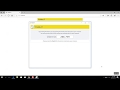
FixMe IT is a powerful remote desktop solution that enables seamless connectivity and support for clients' computers from anywhere in the world.
See MoreHave you used FixMe IT before?
Share your insights for better experience
Brand: Techinline
Founded Year: 2006
Techinline is a web based service for remote support, remote control, remote training, and file transfer between two computers.
 File Transfer Whiteboard Tools Session Management Reporting Multi-Platform Support Custom Branding Multi-Monitor Support Unattended Access

Watch the demo video to explore key features, real workflows, and how the software fits your business needs.
 Ubuntu
  Windows
  MacOS
MacOS  Linux
Linux  Desktop
  Cloud-Based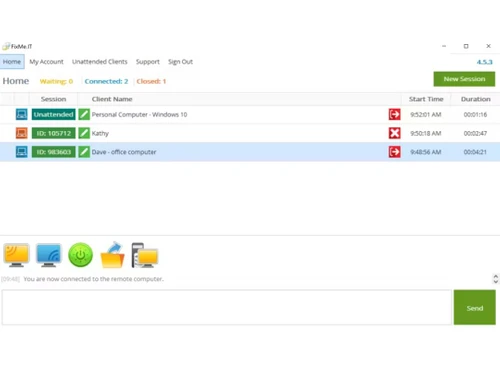
Small Business
Designed for startups and growing businesses
Medium Business
Built for business growth and flexibility
Enterprises
Designed for complex and large-scale business needs
4.3
Out of 5

Overall Rating
Based on
4 Verified Ratings
Rating Breakdown
90% Recommend this Product
Add ReviewTechjockey Trusted Reviews from Verified Users
No reviews are currently available for FixMe IT. Discover similar Remote Support Software reviews

LogMeIn Rescue (GoTo)
Whats great - Amazing Product. The user interface is so easy and user friendly. Good sessions conducted.Highly recommended! read more

GoTo Resolve
Whats great - It is super easy to use and interact with others remotely on their devices. read more

AnyDesk
Whats great - Lightning-fast remote desktop connections, allowing you to access your computer from anywhere with minimal delay. read more

FixMe IT
Price On Request
Desktop
Mobile
Web based
On Premises
Windows
Mac OS
LogMeIn Rescue (GoTo)
Price On Request
Desktop
Mobile
Web based
On Premises
Windows
Mac OS

EV Reach
Price On Request
Desktop
Mobile
Web based
On Premises
Windows
Mac OS
GoTo Resolve
Price On Request
Desktop
Mobile
Web based
On Premises
Windows
Mac OS

HelpWire
Price On Request
Desktop
Mobile
Web based
On Premises
Windows
Mac OS
Zendesk Remote Access Software
Price On Request
Desktop
Mobile
Web based
On Premises
Windows
Mac OS

Dameware
Price On Request
Desktop
Mobile
Web based
On Premises
Windows
Mac OS

Native Teams
Price On Request
Desktop
Mobile
Web based
On Premises
Windows
Mac OS

Teamviewer Remote Management
Price On Request
Desktop
Mobile
Web based
On Premises
Windows
Mac OS

SOTI Assist
Price On Request
Desktop
Mobile
Web based
On Premises
Windows
Mac OS
(0) Product(s) selected
Yes, FixMe IT is suitable for small businesses. It offers a cost-effective solution with a scalable pricing model based on the number of concurrent technicians. Small businesses can benefit from its features such as multi-session handling, unattended access, and file transfer, which can help improve efficiency and reduce downtime.
Yes, FixMe IT offers a 15-day free trial that allows users to explore all the features of the software without requiring a credit card for sign-up. You can contact our product experts at techjockey.com for more information about the free trial or to request a demo.
FixMe IT pricing starts at $30 per month per technician. Annual subscriptions are available at $300 per year per technician (equivalent to $25 per month). Volume discounts are available for organizations requiring multiple technician licence. Contact techjockey.com for detailed pricing information on FixMe IT. Pricing is customised based on specific business needs.
FixMe IT primarily supports Windows operating systems. While it is designed for Windows, its web-based client allows for remote access from any device with a web browser.
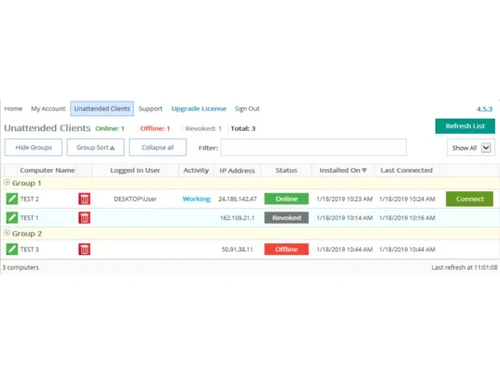
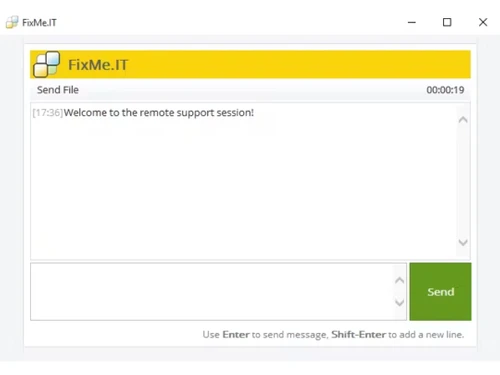
FixMe IT offers features such as multi-session handling, unattended access, file transfer, chat, whiteboard, video-session recording, and customization options. These features enable technicians to efficiently manage and troubleshoot remote systems. You can contact our product experts for more information about the features offered by FixMe IT.
FixMe IT is available as a desktop application for Windows operating systems. Although it does not offer dedicated mobile apps for iOS or Android devices, its web-based client allows users to access remote computers through a web browser on any device.
FixMe IT is highly secure, employing advanced encryption and security measures to protect data and privacy during remote support sessions. These features help ensure that remote connections are protected from unauthorised access and data breaches.
FixMe IT caters to a wide range of users, from individual proprietors to large-scale corporations across various sectors and industries. The software is particularly useful for IT professionals, help desk technicians, and managed service providers who need to provide remote support and troubleshooting for clients' computers.
FixMe IT is a remote desktop solution that allows technicians to connect to and manage remote computers. It uses a global network of communication servers to establish reliable connections, even in challenging network environments. The software also offers unattended access, allowing technicians to connect to remote computers without requiring user intervention.
20,000+ Software Listed
Best Price Guranteed
Free Expert Consultation
2M+ Happy Customers
Terms and Condtions

Users with registered businesses can purchase goods from merchants on the platform to satisfy their business needs. Users are not permitted to utilize any products acquired through the platform for resale, advertising, business, or further distribution.
For each purchase made, users will receive a Tax Invoice (or 'GST invoice') that includes specific details such as:
the GSTIN of the user associated with their registered business, and
the specified Entity Name for their business.
It should be noted that not all products are eligible for GST Invoice. Only the products displayed by participating sellers with the 'GST-based Invoice Available' callout on the product description page would qualify.
Certain goods and services are not eligible to get a GST Invoice, including items with VAS, i.e., Value Added Services (e.g., Total Mobile Protection/Assured Buyback) and those involving an exchange offer at the time of purchase.
Users must ensure the accuracy of the GSTIN, and business entity name provided for the GST Invoice. Requests for corrections into GST Invoice would not be accommodated by Techjockey.com or any Seller, and any issues arising from user-provided information are the sole responsibility of users.
Techjockey.com is not liable for the GST Invoice or any associated input tax credit. To efficiently claim an input tax credit, users should select the registered place of business address as per the GST authority's data and follow the provisions of the GST Act and rules.
To claim an input tax credit, the delivery and billing addresses must match. Furthermore, input tax credits will not be granted if the delivery address and GSTIN on the invoice are from different states. In case of incorrect GST details provided during the order placement, the order will be canceled automatically.

