linkedin
GoTo Resolve logo
play GoTo Resolve - Product Overview Demo
goto-resolve hr
goto-resolve patch

GoTo Resolve

Brand: GoTo

  • 4.6

  • 1 Rating & 1 Review

GoTo Resolve (Formerly GoToAssist) is a remote support software meant for establishing frictionless remote connections with customers. The remote management software offers simple plugins for viewing the customer's screen either using a desktop application or a web browser. With GoTo Resolve, you can address issues on the system of both your employees and customers. It also helps with remote diag...

See More

Have you used GoTo Resolve before?

Share your insights for better experience

Add a Review
Starting Price 21% OFF
$276 $348

View plans

100% Genuine
Products
Best Price
Guaranteed
Safe & Secure
Payment
  • Description

  • Pricing

  • Features

  • Specification

  • Review

  • Compare

  • FAQ

Starting at $276

GoTo Resolve Software Overview

What is GoTo Resolve?

GoTo Resolve (Formerly GoToAssist) is a remote support software meant for establishing frictionless remote connections with customers. The remote management software offers simple plugins for viewing the customer's screen either using a desktop application or a web browser.

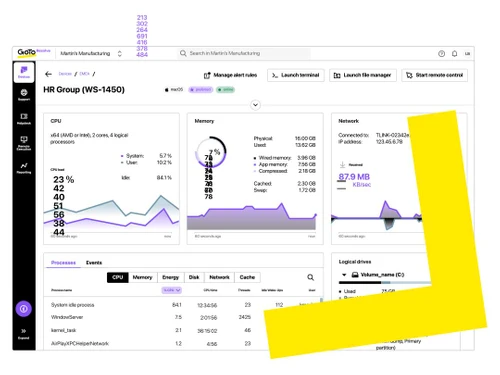
With GoTo Resolve, you can address issues on the system of both your employees and customers. It also helps with remote diagnostics, multi-monitor navigation and file transfer.

This Remote access software is also helpful in connecting with unattended computers. The simple process requires running an installer to start the remote set-up on a customer's device for troubleshooting issues or conducting live sessions. Next, you can check for the available computers and use the one-click option to connect anytime.

Key Modules of GoTo Resolve Remote Desktop Software

  1. Agent console for starting support sessions using the desktop or browser app.
  2. Remote diagnostics to do software and hardware configurations for session reporting.
  3. Multi-monitor navigation for switching between multiple computers with ease.
  4. Multi-session support for simultaneously hosting up to fifteen sessions per technician.
  5. Active directory connector to manage license provisioning and users with the GoTo Resolve account.

How to Start a Session with GoTo Resolve

  • Step 1: Launch GoTo Resolve from your mobile device, desktop or web browser
  • Step 2: Provide customers with the link so that they too can join you
  • Step 3: Use the inbuilt diagnostic tools for screen sharing

Benefits of GoTo Resolve Remote Support Software

  1. Complete security of customer data
  2. Faster IT support and management with Go To resolve IT support software
  3. Updated network equipment and high capacity servers for optimal performance
  4. Built-in brokers for balancing the sessions' load across several communication servers
  5. TLS (transport layer security) and AES encryption
  6. SRP authentication against all types of threats to the data
  7. HTTP outbound connections for secured screen sharing
  8. Centralized admin for customizing permissions
  9. Live user support for resolving queries
  10. Slack integration

GoTo Resolve Pricing

GoTo Resolve pricing starts from USD 348 per year at techjockey.com. It comes with multiple pricing plans and caters to a diverse customer base. For subscription-related details and offers on premium packages, please request a call back from our product experts.

Read more

GoTo Company Details

Founded Year:  2003

At GoTo, we're making IT easy, anywhere, with remote management and support, and business communication software, unified with one admin solution. We help you get things done simply and securely, so work time can be well-spent and free time can be better spent.

Director/Founders Mr. Veldran
Company Size 1000+ Employees

GoTo Resolve Pricing & Plans

Starter
Starting at $276 $348 SAVE UPTO 21%
    • Licenses

      Licenses
      Licenses
    • Yearly

      Yearly
      Yearly

Key Features

  • Unattended Remote Access

  • AI-Enhanced Knowledge Base

  • Terminal Access

  • Background File Manager

Growth
Starting at $528 $660 SAVE UPTO 20%
    • Licenses

      Licenses
      Licenses
    • Yearly

      Yearly
      Yearly

Key Features

  • Everything in 'Starter', plus

  • Desktop Remote Support License

  • Mobile Remote Support License

  • Incident Management

Advanced
Starting at $756 $936 SAVE UPTO 19%
    • Licenses

      Licenses
      Licenses
    • Yearly

      Yearly
      Yearly

Key Features

  • Everything in 'Growth', plus

  • Device Monitoring & Alerts

  • Windows Patch Management

  • AV Management

GoTo Resolve Features

  • icon_check Ipad Iphone Android Apps
    Simple tap options for accessing GoToAssist from multiple mobile operating systems or devices. 
  • icon_check Unattended Access
    An inbuilt toolbar in this remote support software makes it easy to add a computer for setting up unattended access.
  • icon_check File Transfer
    The remote management software offers proxy and firewall-friendly connection for sharing files. 
  • icon_check Mobile Device Support
    The remote support software provides seamless mobile device support for screen sharing even while on the go. 
  • icon_check Session Transfer
    You can transfer support sessions to another technician for resolving queries.   
  • icon_check Data Archiving
    Store long-term data, save recordings and export reports with GoToAssist collaboration software 
  • icon_check Zero Trust Security
    Protect your managed devices and network with a first-of-its-kind zero trust architecture and personal signature keys fast.
  • icon_check Conversational Ticket
    Create, manage, and close IT support tickets directly within Microsoft Teams or Slack to simplify your daily workflows now.
  • icon_check Remote Execution
    Automate repetitive IT tasks by deploying scripts to multiple devices simultaneously using a secure remote execution tool.
  • icon_check Multi-Platform Help
    Provide frictionless technical support across Windows, macOS, iOS, Android, and Chromebooks from a single cloud interface now.
  • icon_check AI-Powered GoPilot
    Leverage an AI assistant to turn complex agent queries into actionable insights and automated troubleshooting advice fast.
  • icon_check Background File Manager
    Manage and transfer files on a remote device without interrupting the user's current session or visible screen activity.
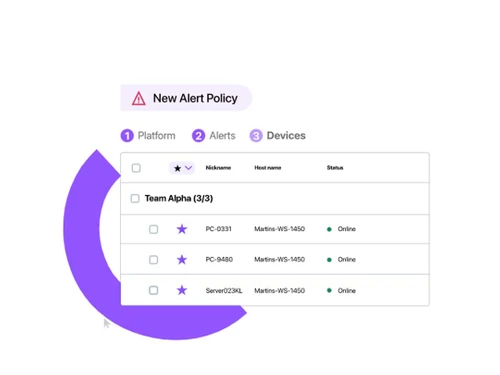
  • icon_check Self-Healing Alerts
    Automatically detect potential support issues and trigger pre-defined scripts to fix them on the spot before escalation.
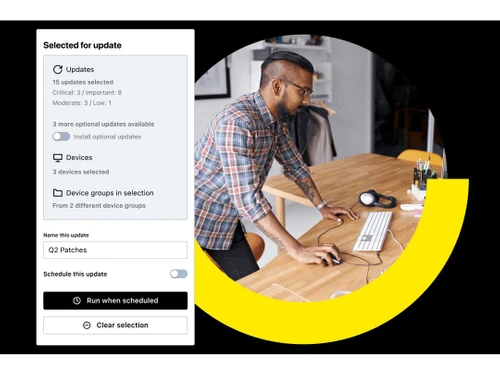
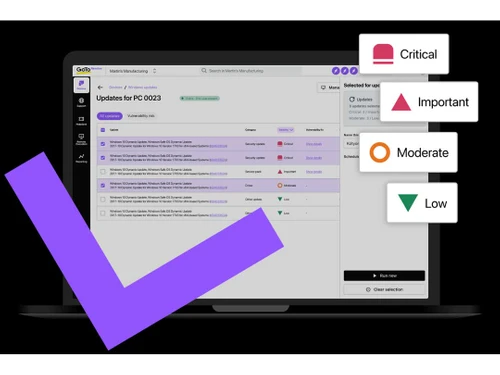
  • icon_check Patch Management
    Automate the identification and deployment of software updates and security patches across your entire device fleet fast.
  • icon_check Session Collaboration
    Allow multiple technicians to join a single remote support session to troubleshoot complex technical issues together fast.
  • icon_check Asset Management
    Maintain a complete digital inventory of all hardware and software assets with automated discovery and tracking tools now.
GoTo Resolve Demo Video play icon

Get GoTo Resolve Demo

Watch the demo video to explore key features, real workflows, and how the software fits your business needs.

Understand
Key Features
Personal
Demo Insights
Interactive
Demo Support
Product Enrichment Section Image

GoTo Resolve Specification

Supported Platforms
Ubuntu Ubuntu Windows Windows iOS iOS Android Android MacOS MacOS Linux Linux
Devices
Desktop Desktop Mobile Mobile Tablet Tablet iPad iPad
Deployment
Web-Based Web-Based
Suitable For
All Industries
Business Specific
All Businesses
Business Size
Individual Small Business Startups Medium Business Enterprises SMBs SMEs MSMBs Freelancers
Customer Support
Phone Email Live Chat Communities Forums
Language
English
Integration
API Integration
Training Resources
Live Online Webinars Documentation Videos
AI Features
AI Integrated
Technology
Next Generation
Compliance Regulation
HIPAA CCPA

Explore the Best Alternative Solutions Similar to Your Business Size and Needs

GoTo Resolve Review

4.6

Out of 5

img

Overall Rating

Based on
1 Verified Review

Rating Breakdown

  • Features 5
  • Value for Money 4.5
  • Ease of Use 4.5
  • Customer Support 4.5

90% Recommend this Product

Add Review

Jimit Dattani

User

4.6

Reviewed on: May 19, 2021

Techjockey Verified

“Best software to access computer remotely”

Pros

It is super easy to use and interact with others remotely on their devices.

Cons

NO CONS

Compare GoTo Resolve With other Remote Support Software

Products
Ratings
Pricing
Device Supported
Deployment
Supported Platforms
  • img

    GoTo Resolve

  • 4.6

  • $ 276.00 excl. GST

  • Desktop

    Mobile

  • Web based

    On Premises

  • Windows

    Mac OS

  • img

    EV Reach

  • 4.3

  • Price On Request

  • Desktop

    Mobile

  • Web based

    On Premises

  • Windows

    Mac OS

  • img

    HelpWire

  • 4.2

  • Price On Request

  • Desktop

    Mobile

  • Web based

    On Premises

  • Windows

    Mac OS

  • img

    FixMe IT

  • 4.3

  • Price On Request

  • Desktop

    Mobile

  • Web based

    On Premises

  • Windows

    Mac OS

  • img

    Dameware

  • 4.0

  • Price On Request

  • Desktop

    Mobile

  • Web based

    On Premises

  • Windows

    Mac OS

  • img

    Native Teams

  • 4.2

  • Price On Request

  • Desktop

    Mobile

  • Web based

    On Premises

  • Windows

    Mac OS

  • img

    SOTI Assist

  • 4.2

  • Price On Request

  • Desktop

    Mobile

  • Web based

    On Premises

  • Windows

    Mac OS

(2) Product(s) selected

Is file transferring secure with GoTo Resolve?

The remote management software uses AES encryption and TLS for a secured file transfer and screen sharing experience.

Can I use GoTo Resolve for switching between multiple customer screens?

The collaboration software offers a multi-monitor navigation system for switching simultaneously between different customer screens.

What is active directory connector in GoTo Resolve?

The connector is used for managing license provisioning and users for GoTo Resolve account.

Can GoTo Resolve be launched from a web browser?

GoTo Resolve can be launched from both web browsers and desktop application or mobile device easily.

is GoTo Resolve legitimate?

As long as your tech support professionals are using GoTo Resolve for assisting your employees and customers with their devices or any features, it’s legitimate.

How does GoTo Resolve work?

GoTo Resolve is a cloud-based solution that helps IT professionals connect with the laptop or mobile device of any customer or employee. It helps provide support anytime and from anywhere.

How much does GoTo Resolve cost?

GoTo Resolve pricing starts from USD 348 per year at techjockey.com.

20,000+ Software Listed

Best Price Guranteed

Free Expert Consultation

2M+ Happy Customers

Terms and Condtions

close

Users with registered businesses can purchase goods from merchants on the platform to satisfy their business needs. Users are not permitted to utilize any products acquired through the platform for resale, advertising, business, or further distribution.

For each purchase made, users will receive a Tax Invoice (or 'GST invoice') that includes specific details such as:

  • the GSTIN of the user associated with their registered business, and

  • the specified Entity Name for their business.

It should be noted that not all products are eligible for GST Invoice. Only the products displayed by participating sellers with the 'GST-based Invoice Available' callout on the product description page would qualify.

Certain goods and services are not eligible to get a GST Invoice, including items with VAS, i.e., Value Added Services (e.g., Total Mobile Protection/Assured Buyback) and those involving an exchange offer at the time of purchase.

Users must ensure the accuracy of the GSTIN, and business entity name provided for the GST Invoice. Requests for corrections into GST Invoice would not be accommodated by Techjockey.com or any Seller, and any issues arising from user-provided information are the sole responsibility of users.

Techjockey.com is not liable for the GST Invoice or any associated input tax credit. To efficiently claim an input tax credit, users should select the registered place of business address as per the GST authority's data and follow the provisions of the GST Act and rules.

To claim an input tax credit, the delivery and billing addresses must match. Furthermore, input tax credits will not be granted if the delivery address and GSTIN on the invoice are from different states. In case of incorrect GST details provided during the order placement, the order will be canceled automatically.