linkedin
Zendesk Remote Access Software logo
play Introducing Zendesk Connect. - Zendesk Remote Access Software Demo
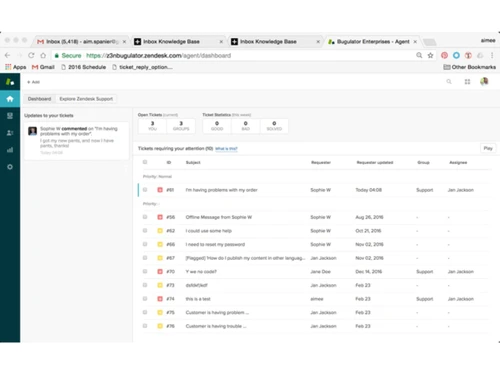
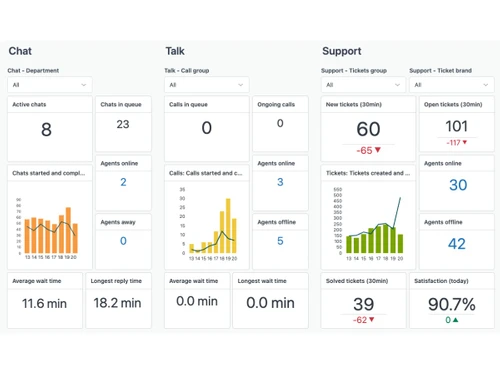
Zendesk Remote Access Software DASHBOARD
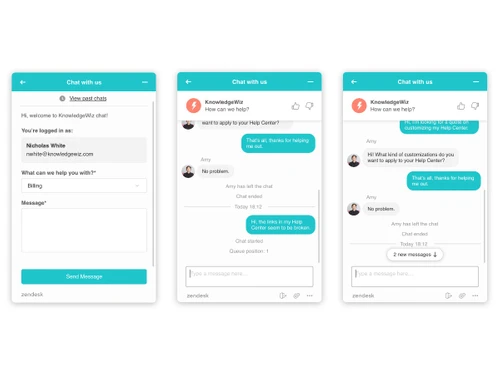
Zendesk Remote Access Software LIVE CHAT

Zendesk Remote Access Software

Brand: Zendesk

  • 4.3

  • 3 Ratings

Zendesk is a top-notch remote access software that helps connect with your customers to create an efficient relationship with them. This connection can be established on any platform like phone, chat, email, and social media. Zendesk helps bring all the customer interaction in an easy-to-use platform. With Zendesk, you can keep a track of all the support requests from your customers, provide them...

See More

Have you used Zendesk Remote Access Software before?

Share your insights for better experience

Add a Review
Starting Price
$25

View plans

100% Genuine
Products
Best Price
Guaranteed
Safe & Secure
Payment
  • Description

  • Pricing

  • Features

  • Specification

  • Review

  • Compare

  • FAQ

Starting at $25

Zendesk Remote Access Software Overview

What is Zendesk Remote Access?

Zendesk is a top-notch remote access software that helps connect with your customers to create an efficient relationship with them. This connection can be established on any platform like phone, chat, email, and social media. Zendesk helps bring all the customer interaction in an easy-to-use platform. With Zendesk, you can keep a track of all the support requests from your customers, provide them with quick answers and also monitor the customer service agents’ effectiveness at the same time.

Zendesk Remote Access has integrated CRM tools that are going to help you in improving your company’s standards. It does not matter whether you are a startup or an enterprise, Zendesk has the solution to all your customer support needs.

Does Zendesk Have a Knowledge Base Support System?

Zendesk helps the companies to provide customer support with Zendesk Guide. It is a self-service knowledge-based solution designed to deliver smarter answers to the customers. It provides quick solutions as per the context of the user’s needs, thus increasing the level of customer satisfaction. The software also has its own cloud app which makes it incredibly easy for the executives to answer customer’s questions with high-quality images and videos because words are not always enough.

How does Zendesk Help Businesses Connect with Customers?

Zendesk Remote Access provides detailed information to the business managers about customer needs, wants, and expectations. This remote helpdesk application manages proactive customer communication across channels giving them fewer reasons to ask for help and provides more opportunities to the company executives to help. 

The application helps customer care executives to keep track of customer issues and provide quick answers to solve their problems. Further, it has a live chat option that makes the process quick for those who are in a hurry and needs assistance. This increases the satisfaction level of the customer.

Pricing of Zendesk Remote Access

The pricing of Zendesk Remote Access is available as per the unique needs and demands of users, nature of the business or the type of target audience. If you are interested in buying the software, please request a callback to get a more customized quote.

How does Zendesk Help with Better Collaboration?

Zendesk Remote Access has its own community forum known as Zendesk Gather that provides the customers with a community so that they can easily connect with each other. This is beneficial for the customers in many cases because they get the solution to their problems from fellow customers in the community. Zendesk helps nurture the relationship between customers and clients across any platform, leading to more productive agents and satisfied customers.

Read more

Zendesk Company Details

Founded Year:  2007

Zendesk started the customer experience revolution in 2007 by enabling any business around the world to take their customer service online. Today, Zendesk is the champion of great service everywhere for everyone, and powers billions of conversations.

Director/Founders Alexander Aghassipour, Mikkel Asger Svane, Morten Primdahl
Company Size 1000+ Employees

Zendesk Remote Access Software Pricing & Plans

Support Team
Starting at $25
    • Agent

      Agent
      Agent
    • Monthly

      Monthly
      Monthly

Key Features

  • Free Trial Available

  • Availability of microscopic as well as macroscopic

  • Advanced Reporting

  • SLA Management

Suite Team
Starting at $69
    • Agent

      Agent
      Agent
    • Monthly

      Monthly
      Monthly

Key Features

  • Free Trial Available

  • Availability of microscopic as well as macroscopic

  • Advanced Reporting

  • SLA Management

Suite Professional
Starting at $149
    • Agent

      Agent
      Agent
    • Monthly

      Monthly
      Monthly

Key Features

  • Free Trial Available

  • Availability of microscopic as well as macroscopic

  • Advanced Reporting

  • SLA Management

Suite Enterprise
Starting at $219
    • Agent

      Agent
      Agent
    • Monthly

      Monthly
      Monthly

Key Features

  • Free Trial Available

  • Availability of microscopic as well as macroscopic

  • Advanced Reporting

  • SLA Management

Zendesk Remote Access Software Features

  • icon_check AI Answer Bot
    A specialized machine-learning engine that automatically suggests relevant help articles to customers to solve tickets now.
  • icon_check Macro Automation
    A high-speed productivity tool that allows agents to use pre-written responses for common questions with a single click today.
  • icon_check Advanced Reporting
    A data-driven analytics dashboard that tracks team performance, ticket volume, and average resolution times in real-time now.
  • icon_check SLA Management
    A specialized monitoring tool that ensures support tickets are handled within agreed-upon timeframes to maintain quality today.
  • icon_check Skill-Based Routing
    An intelligent logic engine that automatically assigns tickets to the agent best qualified to handle that specific issue now.
  • icon_check Third-party Integration
    A flexible connectivity bridge that links Zendesk with apps like Slack, Salesforce, and Shopify for a unified workflow today.
  • icon_check Self Service Portal
    It is also known as Zendesk Guide and allows the companies to deliver quick answers to customers. It offers the most relevant
  • icon_check Live Chat
    The feature helps connect with your customers in real-time on the website or mobile app. It makes it easy for executives to help
  • icon_check Surveys & Feedback
    Zendesk helps businesses to analyze customer feedback so that they can improve their products and services.
  • icon_check Ticket Management
    Zendesk’s unique ticket management system helps collect all customer support requests from various sources like emails, chats
  • icon_check Help Desk Management
    Zendesk is a seamless helpdesk management system that helps track, prioritize and solve customer inquiries and requests with
  • icon_check Customer Support
    The application enables you to provide all-round support to your customers by providing them with a live chat option. You can
Zendesk Remote Access Software Demo Video play icon

Get Zendesk Remote Access Software Demo

Watch the demo video to explore key features, real workflows, and how the software fits your business needs.

Understand
Key Features
Personal
Demo Insights
Interactive
Demo Support

Zendesk Remote Access Software Specifications

Supported Platforms
Windows Windows
Devices
Desktop Desktop
Deployment
Cloud-Based Cloud-Based
Suitable For
All Industries
Business Specific
All Businesses
Language
English

Explore the Best Alternative Solutions Similar to Your Business Size and Needs

Zendesk Remote Access Software Review

4.3

Out of 5

img

Overall Rating

Based on
3 Verified Ratings

Rating Breakdown

  • Features 4.6
  • Value for Money 4
  • Ease of Use 4.3
  • Customer Support 4.3

90% Recommend this Product

Add Review

Techjockey Trusted Reviews from Verified Users

No reviews are currently available for Zendesk Remote Access Software. Discover similar Remote Support Software reviews

  • LogMeIn Rescue (GoTo)

    5.0

    Whats great - Amazing Product. The user interface is so easy and user friendly. Good sessions conducted.Highly recommended! read more

  • GoTo Resolve

    4.6

    Whats great - It is super easy to use and interact with others remotely on their devices. read more

  • AnyDesk

    4.6

    Whats great - Lightning-fast remote desktop connections, allowing you to access your computer from anywhere with minimal delay. read more
Compare Zendesk Remote Access Software With other Remote Support Software

Products
Ratings
Pricing
Device Supported
Deployment
Supported Platforms
  • img

    Zendesk Remote Access Software

  • 4.3

  • Price On Request

  • Desktop

    Mobile

  • Web based

    On Premises

  • Windows

    Mac OS

  • img

    EV Reach

  • 4.3

  • Price On Request

  • Desktop

    Mobile

  • Web based

    On Premises

  • Windows

    Mac OS

  • img

    GoTo Resolve

  • 4.6

  • Price On Request

  • Desktop

    Mobile

  • Web based

    On Premises

  • Windows

    Mac OS

  • img

    HelpWire

  • 4.2

  • Price On Request

  • Desktop

    Mobile

  • Web based

    On Premises

  • Windows

    Mac OS

  • img

    FixMe IT

  • 4.3

  • Price On Request

  • Desktop

    Mobile

  • Web based

    On Premises

  • Windows

    Mac OS

  • img

    Dameware

  • 4.0

  • Price On Request

  • Desktop

    Mobile

  • Web based

    On Premises

  • Windows

    Mac OS

  • img

    Native Teams

  • 4.2

  • Price On Request

  • Desktop

    Mobile

  • Web based

    On Premises

  • Windows

    Mac OS

  • img

    SOTI Assist

  • 4.2

  • Price On Request

  • Desktop

    Mobile

  • Web based

    On Premises

  • Windows

    Mac OS

(0) Product(s) selected

Is Zendesk good for startups?

Zendesk is suitable for companies of all types and sizes. Startups prefer Zendesk as it helps boost sales with its Zendesk Sell feature.

What is Zendesk Slack Integration?

Slack helps streamline communication and workflows, and ensures that the customer care support team works faster in a more coordinated way. All their message actions for creating tickets are accessible from one place.

How does Zendesk Guide help Customers?

Zendesk Guide provides users with a simple knowledge base, which is easy to use. It is based on the details gathered from various FAQs, product details, information based on policies and more. As the guide is always available, customers and agents can serve themselves as well as others with the right information as per their convenience.

How is Zendesk Explore feature beneficial for customer service reps?

Zendesk Explore provides detailed analytics regarding various aspects of the overall customer experience, thus enabling businesses to measure their productivity, monitor the quality of services rendered and improve the entire system. It comes with an intuitive dashboard helping users to measure team performance, take stock of operational metrics and also get a better understanding of customer satisfaction levels.

What is ZendesK Sell?

Zendesk Sell helps in removing friction from deal updates so that teams can always access, analyze and collaborate on relevant and real data.

20,000+ Software Listed

Best Price Guranteed

Free Expert Consultation

2M+ Happy Customers

Terms and Condtions

close

Users with registered businesses can purchase goods from merchants on the platform to satisfy their business needs. Users are not permitted to utilize any products acquired through the platform for resale, advertising, business, or further distribution.

For each purchase made, users will receive a Tax Invoice (or 'GST invoice') that includes specific details such as:

  • the GSTIN of the user associated with their registered business, and

  • the specified Entity Name for their business.

It should be noted that not all products are eligible for GST Invoice. Only the products displayed by participating sellers with the 'GST-based Invoice Available' callout on the product description page would qualify.

Certain goods and services are not eligible to get a GST Invoice, including items with VAS, i.e., Value Added Services (e.g., Total Mobile Protection/Assured Buyback) and those involving an exchange offer at the time of purchase.

Users must ensure the accuracy of the GSTIN, and business entity name provided for the GST Invoice. Requests for corrections into GST Invoice would not be accommodated by Techjockey.com or any Seller, and any issues arising from user-provided information are the sole responsibility of users.

Techjockey.com is not liable for the GST Invoice or any associated input tax credit. To efficiently claim an input tax credit, users should select the registered place of business address as per the GST authority's data and follow the provisions of the GST Act and rules.

To claim an input tax credit, the delivery and billing addresses must match. Furthermore, input tax credits will not be granted if the delivery address and GSTIN on the invoice are from different states. In case of incorrect GST details provided during the order placement, the order will be canceled automatically.