linkedin
FlowTrack logo
play BEWARE! Your employer is monitoring you
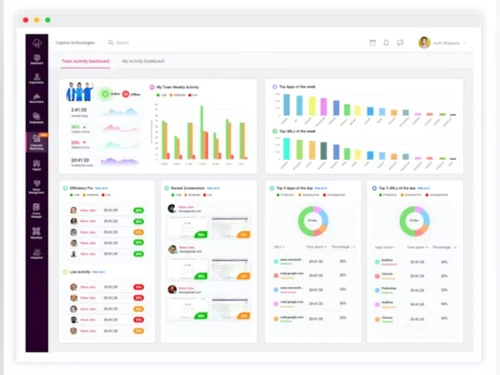
flowtrack dashboard
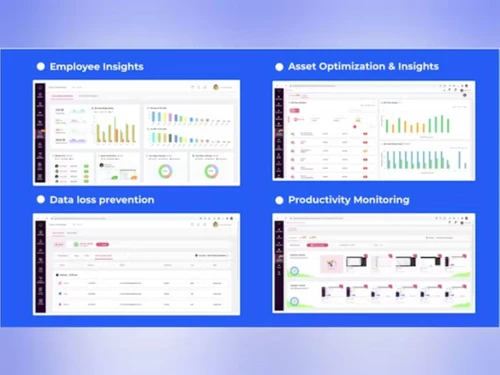
flowtrack insights

FlowTrack

Brand: FlowTrack

  • 4.6

  • 5 Ratings

FlowTrack is an employee performance and productivity analysis software that enhances employee working efficiency and monitors engagement.

See More

Have you used FlowTrack before?

Share your insights for better experience

Add a Review
Starting Price
$3

View plans

100% Genuine
Products
Best Price
Guaranteed
Safe & Secure
Payment
  • Description

  • Pricing

  • Features

  • Specification

  • Review

  • Compare

  • Alternatives

  • FAQ

Starting at $3

FlowTrack Software Overview

What is FlowTrack?

FlowTrack is an employee performance and productivity analysis software. Its main function is to help organizations to track their employee performance, enhance their efficiency by giving feedback and insights into employee activities and create employee engagement. It monitors employee work patterns, tracks project durations, and analyzes employee engagement by using different performance metrics. The user-friendly interface gives real-time data on employee performances, tasks in progress and completed through an intuitive dashboard, helping managers to make better decisions.

FlowTrack provides a feature of productivity monitoring to evaluate employee work efficiency, and employee engagement analysis to address burnout. It gives employees feedback on their performance and helps managers to enhance their productivity. Workforce optimization feature helps in proper employee and asset utilization. The software comes with a time tracking feature that identifies workflow inefficiencies, tracks project times and enhances overall productivity.

Moreover, Employee Engagement & Well-being feature helps in providing insights to understand employee issues and improve job satisfaction. It comes with a data loss prevention feature to protect sensitive information by detecting potential breaches.

Why choose FlowTrack Employee Monitoring Software?

  • Productivity Monitoring: Analyze employee work patterns to identify areas of improvement and optimize overall productivity.
  • Employee Engagement: Monitor engagement levels and address signs of burnout to maintain a healthy work environment.
  • Workforce Optimization: Utilize data to improve resource allocation and maximize asset usage for better operational efficiency.
  • Data Loss Prevention: Detect potential data breaches and safeguard sensitive information to ensure data security.
  • Time Tracking: Track project durations and workflow inefficiencies to enhance time management and project outcomes.

Benefits of FlowTrack Employee Monitoring Software

  • Increases Efficiency : Helps teams work smarter by identifying productivity gaps and optimizing workflows.
  • Enhances Employee Well-being : Tracks workload balance to reduce stress and prevent burnout.
  • Strengthens Data Security : Detects potential breaches and unauthorized access to safeguard sensitive information.
  • Improves Decision-Making : Provides real-time insights for data-driven management strategies.
  • Simplifies Workforce Monitoring : Automates tracking of work patterns, eliminating the need for manual supervision.
  • Supports Remote Work : Ensures productivity and accountability for distributed teams with seamless monitoring.

Pricing of FlowTrack

FlowTrack price in India starts at $3. FlowTrack comes with multiple pricing plans and caters to the diverse customer base.

For subscription-related details and offers on premium packages, please request a call back from our product experts.

Read more

FlowTrack Company Details

Founded Year:  2021

Digital assets present one of the greatest investing opportunities of our generation for both institutions and individuals. Flowtrack provides a solution for investors to prudently diversify their investment portfolio with digital asset exposure.

Director/Founders Chandrakumar Sivasubramaniam
Company Size 1-100 Employees

FlowTrack Pricing & Plans

Lite
Starting at $3
    • Users

      Users
      Users
    • Monthly

      Monthly
      Monthly

Key Features

  • Keystrokes Monitoring

  • Random Screenshots

  • Blurred Screenshots

  • Analytical Reports

  • Offline Tracking

FlowTrack DLP
Starting at $4
    • Users

      Users
      Users
    • Monthly

      Monthly
      Monthly

Key Features

  • All Lite plus Features

  • File Movement Tracking

  • Website Blocking

  • Location Intelligence

  • Key Logging

FlowTrack Features

  • icon_check Employee Productivity Monitoring
    Tracks work hours, task completion, and efficiency to help businesses improve overall workforce performance.
  • icon_check Employee Insights
    Provides data-driven reports on employee engagement, work habits, and efficiency to enhance workplace productivity.
  • icon_check Data Loss Prevention
    Monitors network activity, detects unauthorized access, and prevents potential data breaches to protect sensitive information.
  • icon_check Asset Optimization
    Ensures efficient use of company resources, reducing waste and maximizing return on investment.
  • icon_check Online Offline Tracking
    Tracks employee activity in both online and offline modes to maintain accurate productivity records.
  • icon_check KeyStrokes Monitoring
    Records keystroke patterns to analyze workflow efficiency while maintaining privacy and security compliance.
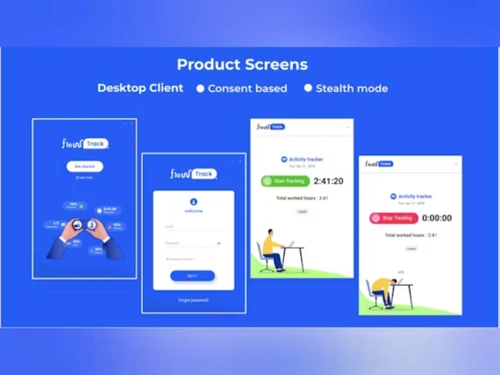
  • icon_check Stealth Mode
    Operates discreetly without interrupting employees’ workflow, ensuring seamless and unobtrusive productivity tracking.
  • icon_check Random Screenshots
    Captures screenshots at unpredictable intervals to provide unbiased insights into employee work activities.
  • icon_check Application Tracking
    Monitors software usage to identify productive and non-productive applications used during work hours.
  • icon_check Analytical Reports
    Generates detailed reports with actionable insights to help businesses optimize employee performance and decision-making.
FlowTrack Demo Video play icon

Get FlowTrack Demo

Watch the demo video to explore key features, real workflows, and how the software fits your business needs.

Understand
Key Features
Personal
Demo Insights
Interactive
Demo Support

FlowTrack Specifications

Supported Platforms
Ubuntu Ubuntu Windows Windows MacOS MacOS
Devices
Desktop Desktop
Deployment
Cloud-Based Cloud-Based
Suitable For
All Industries
Business Specific
All Businesses
Business Size
Small Business Startups Medium Business Enterprises
Customer Support
Email Communities
Language
English
Training Resources
Videos

Explore the Best Alternative Solutions Similar to Your Business Size and Needs

FlowTrack Review

4.6

Out of 5

img

Overall Rating

Based on
5 Verified Ratings

Rating Breakdown

  • Features 4.6
  • Value for Money 4.5
  • Ease of Use 4.6
  • Customer Support 4.8

88% Recommend this Product

Add Review

Techjockey Trusted Reviews from Verified Users

No reviews are currently available for FlowTrack. Discover similar Employee Monitoring Software reviews
  • WorkTime

    4.7

    Whats great - Great piece of kit with support team that’s a lifesaver and their response time is super fast. Major plus for me. read more
  • Mera Work

    5.0

    Whats great - User-friendly interface read more

  • DeskTrack

    5.0

    Whats great - Best DeskTrack Employee Monitoring Software, I am using nearly 1 year. support is good, our employees' activities are tracked... read more

Compare FlowTrack With other Employee Monitoring Software

Products
Ratings
Pricing
Device Supported
Deployment
Supported Platforms
  • img

    FlowTrack

  • 4.6

  • Price On Request

  • Desktop

    Mobile

  • Web based

    On Premises

  • Windows

    Mac OS

  • img

    DeskTrack

  • 4.9

  • Price On Request

  • Desktop

    Mobile

  • Web based

    On Premises

  • Windows

    Mac OS

  • img

    WorkWitness

  • 4.8

  • Price On Request

  • Desktop

    Mobile

  • Web based

    On Premises

  • Windows

    Mac OS

  • img

    We360 ai

  • 5

  • ₹ 399

  • Desktop

    Mobile

  • Web based

    On Premises

  • Windows

    Mac OS

  • img

    Mera Work

  • 4.9

  • ₹ 325

  • Desktop

    Mobile

  • Web based

    On Premises

  • Windows

    Mac OS

  • img

    Time Champ

  • 4.7

  • ₹ 200

  • Desktop

    Mobile

  • Web based

    On Premises

  • Windows

    Mac OS

  • img

    Hoverwatch

  • 4.4

  • Price On Request

  • Desktop

    Mobile

  • Web based

    On Premises

  • Windows

    Mac OS

  • img

    Twib

  • 4.7

  • ₹ 199

  • Desktop

    Mobile

  • Web based

    On Premises

  • Windows

    Mac OS

  • img

    TheOneSpy

  • 4.2

  • Price On Request

  • Desktop

    Mobile

  • Web based

    On Premises

  • Windows

    Mac OS

  • img

    WorkTrack

  • 4.1

  • ₹ 299

  • Desktop

    Mobile

  • Web based

    On Premises

  • Windows

    Mac OS

  • img

    TeamTrace

  • 4.9

  • Price On Request

  • Desktop

    Mobile

  • Web based

    On Premises

  • Windows

    Mac OS

(0) Product(s) selected

FlowTrack Alternatives

See All FlowTrack Alternatives

Starting Price:

$30 /Month

Starting Price:

$29 /Month

Starting Price:

₹299 /Month

Starting Price:

$4 User/Month

Starting Price:

$8 /User/Month

Articles for FlowTrack

See All Related Articles

How can users access FlowTrack reports?

Users can access detailed analytical reports through FlowTrack's web dashboard, which offers real-time data visualization.

Can FlowTrack Employee Monitoring Software detect unauthorized data transfers?

Yes, FlowTrack monitors file transfers, USB usage, and network activity to detect potential data breaches.

How much does FlowTrack Employee Monitoring Software Cost?

FlowTrack price in India starts at $3 at techjockey.com.

Who uses FlowTrack, and what industries benefit from it?

FlowTrack is used by IT firms, remote teams, corporate offices, and industries needing workforce optimization.

How can I get a demo of FlowTrack Employee Monitoring Software?

You can request a free demo on the FlowTrack website to explore its features and functionality.

Can FlowTrack Employee Monitoring Software detect if an employee is using unauthorized applications?

Yes, FlowTrack monitors all applications used and flags unauthorized or restricted software for review.

How does FlowTrack ensure data encryption during monitoring?

FlowTrack uses AES-256 encryption to secure captured data, ensuring protection against unauthorized access and leaks.

Can I track employee login and logout times using FlowTrack?

Yes, FlowTrack Employee Monitoring Software records employee work hours, login/logout times, and idle periods for accurate time tracking.

How can users export FlowTrack reports for external analysis?

Reports can be exported in multiple formats, including CSV, PDF, and Excel, for further analysis.

Can I integrate FlowTrack with Active Directory for user authentication?

Yes, FlowTrack Employee Monitoring Software supports Active Directory integration for seamless authentication and user management.

20,000+ Software Listed

Best Price Guranteed

Free Expert Consultation

2M+ Happy Customers

Terms and Condtions

close

Users with registered businesses can purchase goods from merchants on the platform to satisfy their business needs. Users are not permitted to utilize any products acquired through the platform for resale, advertising, business, or further distribution.

For each purchase made, users will receive a Tax Invoice (or 'GST invoice') that includes specific details such as:

  • the GSTIN of the user associated with their registered business, and

  • the specified Entity Name for their business.

It should be noted that not all products are eligible for GST Invoice. Only the products displayed by participating sellers with the 'GST-based Invoice Available' callout on the product description page would qualify.

Certain goods and services are not eligible to get a GST Invoice, including items with VAS, i.e., Value Added Services (e.g., Total Mobile Protection/Assured Buyback) and those involving an exchange offer at the time of purchase.

Users must ensure the accuracy of the GSTIN, and business entity name provided for the GST Invoice. Requests for corrections into GST Invoice would not be accommodated by Techjockey.com or any Seller, and any issues arising from user-provided information are the sole responsibility of users.

Techjockey.com is not liable for the GST Invoice or any associated input tax credit. To efficiently claim an input tax credit, users should select the registered place of business address as per the GST authority's data and follow the provisions of the GST Act and rules.

To claim an input tax credit, the delivery and billing addresses must match. Furthermore, input tax credits will not be granted if the delivery address and GSTIN on the invoice are from different states. In case of incorrect GST details provided during the order placement, the order will be canceled automatically.