linkedin
Fondo logo
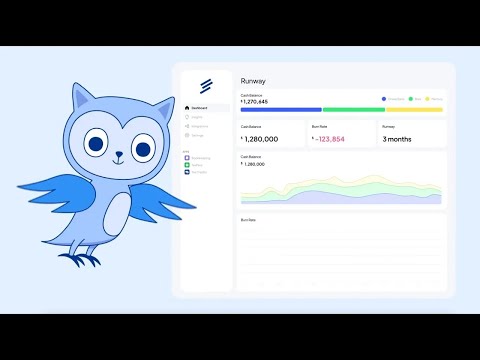
play How does Fondo work?
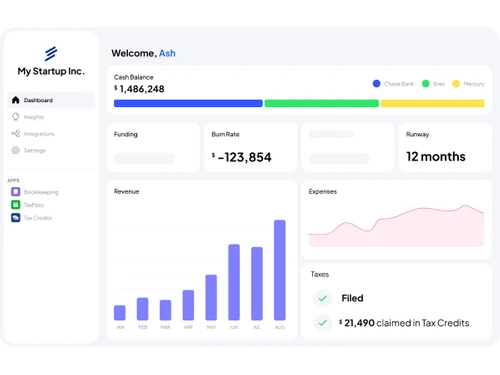
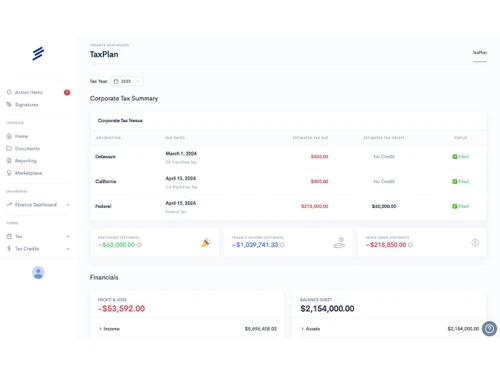
Fondo-dashboard
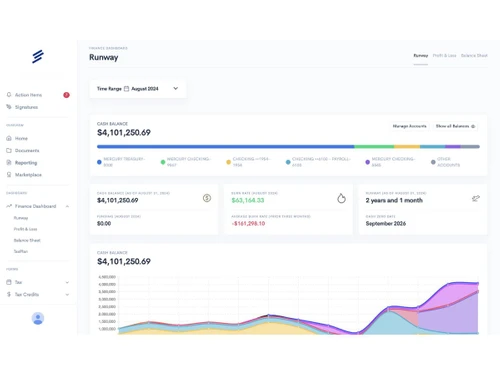
Fondo-runway

Fondo

Brand: BloomJoy

  • 4.1

  • 5 Ratings

Have you used Fondo before?

Share your insights for better experience

Add a Review
Starting Price 50% OFF
$299 $599

View plans

100% Genuine
Products
Best Price
Guaranteed
Safe & Secure
Payment
  • Description

  • Pricing

  • Features

  • Specification

  • Review

Starting at $299

Fondo Software Overview

BloomJoy Company Details

Founded Year:  2020

Fondo helps with bookkeeping and beyond so founders can grow their businesses with more resources.

Director/Founders David J. Phillips
Company Size 1-100 Employees

Fondo Pricing & Plans

Bookkeeping
Starting at $299 $599 SAVE UPTO 50%
    • Licenses

      Licenses
      Licenses
    • Monthly

      Monthly
      Monthly

Key Features

  • Dedicated Accountant

  • Slack Support

  • Monthly financial reporting package

TaxPass
Starting at $1450 $1950 SAVE UPTO 26%
    • Licenses

      Licenses
      Licenses
    • Monthly

      Monthly
      Monthly

Key Features

  • Dedicated Tax Accountant

  • Federal Corporate Income Tax Filing

  • State Corporate Income Tax Filing

  • Delaware Franchise Tax Filing

  • International Add-ons Available

Fondo Features

Core Functionalities

  • icon_check Payroll Management
    Integrates payroll data from providers to accurately record salaries, taxes, and compensation expenses.
  • icon_check Tax Management
    Manages corporate tax prep, filings, and compliance including federal, state, and franchise taxes.
  • icon_check Asset Management
    Tracks capital assets and depreciation for accurate financial reporting and compliance.
  • icon_check Transaction Management
    Automatically tracks, categorizes, and reconciles financial transactions from integrations.
  • icon_check Accounts Payable
    Records vendor bills, expenses, and outgoing payments for accurate payables tracking.
  • icon_check Accounts Receivable
    Tracks invoices and incoming payments for receivables and revenue reporting.
  • icon_check General Ledger
    Maintains a compliant general ledger with categorized accounts and transaction histories.
  • icon_check Statutory Compliances
    Ensures compliance with IRS, state authorities, and statutory startup filing requirements.
  • icon_check Alerts & Notifications
    Provides reminders and alerts related to filings, deadlines, and financial actions.
  • icon_check Bank Reconciliation
    Automatically reconciles bank statements with recorded transactions for accuracy.
  • icon_check Receipt Management
    Stores and links receipts to transactions for audit-ready bookkeeping.
  • icon_check Document Management
    Securely stores tax documents, filings, and financial records in one place.
  • icon_check Credit / Debit Note
    Supports accounting adjustments through credit and debit note entries.
  • icon_check Multi Currency Support
    Supports multi-currency transactions for global startup operations.
  • icon_check Bookkeeping Capabilities
    Core bookkeeping services with automated categorization and reconciliation.
  • icon_check Bank Settlement
    Matches and settles bank transactions against recorded ledger entries.
  • icon_check Fixed Asset Register (FAR) Management
    Maintains fixed asset registers with depreciation tracking.
  • icon_check Trial Balance Preparation
    Automatically prepares trial balances for audits and reporting.
  • icon_check Return Filings
    Handles federal and state business tax return filings.
  • icon_check Time & Expenses Management
    It is a process of recording, tracking, and managing employee working hours and business-related expenses.
  • icon_check Fund Accounting
    It is a method of segregating resources into self-balancing sets of accounts, or funds, according to their intended use or
  • icon_check Cost Centres
    A vital unit where costs are allocated for internal tracking & management purposes.
  • icon_check Gst Report Preparations
    Involves the process of compiling data on Goods and Services Tax (GST) transactions from various financial records within an
  • icon_check Tds Report Generations
    Includes the automated creation of reports detailing Tax Deducted at Source (TDS) from payments made to vendors or contractors.
  • icon_check GST Input Reconciliations
    Involves matching the Input Tax Credit (ITC) claimed on purchases with the GST details provided by suppliers.
  • icon_check Variant Analysis
    Includes comparing & evaluating different versions or scenarios of financial data to identify variations, discrepancies, or
  • icon_check Batch Management
    It enables users to handle multiple transactions collectively, streamlining processes such as invoicing, payments, and updates.
  • icon_check Branch Management
    It allows businesses to manage financial transactions, reports, and data specific to different branches or locations, ensuring
  • icon_check Broker Management
    Involves tracking & managing broker transactions, commissions, & related financial activities to streamline brokerage
  • icon_check Claims Management
    Includes tracking, processing, & settling claims efficiently, ensuring accurate record-keeping and financial reporting.
  • icon_check Collection Management
    A robust field that involves tracking & managing receivables, including invoicing, payment reminders, & follow-ups.
  • icon_check Quotation & Estimates
    Offers detailed price estimates to clients before finalizing sales, while estimates offer preliminary cost projections.
  • icon_check Sales Management
    It consists of tracking sales transactions, managing customer accounts, and generating reports on sales performance.

Billing & Invoicing

  • icon_check Payment Tracking
    Tracks payment inflows and outflows synced from banks and accounting integrations.
  • icon_check Invoice Processing
    Records, categorizes, and reconciles invoices for accurate accounting.
  • icon_check Payment Processing
    Refers to the handling of electronic transactions between buyers & sellers, ensuring the secure transfer of funds.
  • icon_check Automatic Payment Reminders
    Automatic payment reminders are notifications sent to remind customers of upcoming payments.
  • icon_check Bill Of Materials (BOM)
    Refers to a detailed list of raw materials, components, and instructions required to manufacture a product.
  • icon_check E-Way Bill Generation
    E-Way Bill Generation involves creating and managing electronic invoices required for the transportation of goods under GST

Retail and Point of Sale

  • icon_check Point of Sale (POS)
    Integrates sales transactions with financial records, facilitating real-time inventory management and streamlined reporting.
  • icon_check Retail Management
    Consists of features for tracking inventory levels, sales transactions, & customer data along with generating reports for

Project and Workflow Management

  • icon_check Transaction Management
    Automatically tracks, categorizes, and reconciles financial transactions from integrations.
  • icon_check Time & Expenses Management
    It is a process of recording, tracking, and managing employee working hours and business-related expenses.
  • icon_check Project Accounting
    Project accounting tracks & manages financial information & activities specific to individuals or jobs.
  • icon_check Facility Management
    Refers to the tools used to track and manage the operational costs, maintenance, and usage of physical assets or facilities.
  • icon_check Production Management
    It involves tracking & controlling the manufacturing process, including inventory levels, work orders, and production costs.
  • icon_check Workflow Management
    Streamlines tasks automate processes and enhances team collaboration for efficient operations.

Inventory and Supply Chain Management

  • icon_check Vendor & Supplier Management
    Maintains vendor records for expense tracking and payables management.
  • icon_check Inventory Management
    It involves tracking, managing, and optimizing the stock of goods and materials.
  • icon_check Inventory Reconciliation
    Refers to the process of matching the inventory records in an accounting system with physical inventory.
  • icon_check Barcode Scanning
    It streamlines inventory management by automatically tracking & recording product information.
  • icon_check Delivery Management
    It consists of tracking and managing the delivery of goods or services to customers, including scheduling, logistics, & more.
  • icon_check Distribution Management
    Involves tracking & managing the flow of goods from suppliers to customers, including inventory control.
  • icon_check Item Master
    A centralised database where detailed information about each inventory item or product is stored.
  • icon_check Product Management
    It includes overseeing the development and enhancement of features related to tracking, managing, and reporting financial data.
  • icon_check Stock Management
    It includes tracking inventory levels, monitoring stock movements, & managing reorder points.
  • icon_check Store Management
    Helps track inventory, manage stock levels, and streamline purchase and sales processes.
  • icon_check Supply Chain Management
    Streamlines procurement, inventory, and logistics for efficient financial oversight.
  • icon_check Warehouse Management
    Optimizes inventory, controls stock levels, and manages orders and shipments efficiently.

Sales and CRM

  • icon_check CRM Capabilities
    CRM capabilities are integrated to streamline & optimize the business processes associated with customer management.
  • icon_check Customer Management
    It involves tracking & managing customer information, transactions, & interactions to streamline billing, payments, &
  • icon_check Loyalty Program
    Tracks and manages rewards or incentives given to customers for their continued business.
  • icon_check Order Management
    Handles the processing, tracking, & fulfilment of customer orders, thereby integrating them with inventory & financial
  • icon_check Quotation & Estimates
    Offers detailed price estimates to clients before finalizing sales, while estimates offer preliminary cost projections.
  • icon_check Sales Management
    It consists of tracking sales transactions, managing customer accounts, and generating reports on sales performance.

Financial Management

  • icon_check Budgeting & Forecasting
    Provides financial insights and runway visibility using historical and real-time accounting data.
  • icon_check Revenue Management
    Accurately records revenue streams and aligns them with accounting and tax standards.
  • icon_check Cash Flow Management
    Provides visibility into cash inflows, outflows, and runway for startups.
  • icon_check Net Worth Management
    Calculates company net worth using assets and liabilities.
  • icon_check Cash and Bank Management
    Centralized view of cash positions and connected bank accounts.
  • icon_check Financial Planning & Analysis
    Offers FP&A insights using historical financial and cash flow data.
  • icon_check Fund Accounting
    It is a method of segregating resources into self-balancing sets of accounts, or funds, according to their intended use or
  • icon_check Fund Planning
    Defined as a process of forecasting & managing the inflows and the outflows of cash.

Integrations Supported

  • icon_check Import / Export Management
    Refers to the ability to transfer financial data in and out of the system, enabling seamless integration with various apps.

Analytics and Reporting

  • icon_check Financial Accounting and Reporting
    Generates accurate financial statements suitable for audits, investors, and compliance.
  • icon_check Profit & Loss
    Automatically generates profit and loss statements for any reporting period.
  • icon_check Audit Management
    Keeps audit-ready books with documentation and historical transaction clarity.
  • icon_check Gross Profit
    Calculates gross profit based on revenue and direct expense classifications.
  • icon_check Ratio Analysis
    Supports basic financial ratio insights derived from accounting data.
  • icon_check Net Profit Management
    Tracks net profit after expenses, taxes, and adjustments.
  • icon_check Financial Statement Generation & Analysis
    Generates and analyzes balance sheets, P&L, and cash flow statements.
  • icon_check Profit Centers
    Defined as a segment within a business that is responsible for generating profits.

Administrative Features

  • icon_check Admin Controls
    Provides admin-level access controls and permissions for financial data management.
  • icon_check User Access Management
    Controls user roles and access permissions for financial data security.
  • icon_check Ledger Scrutiny
    Provides detailed ledger views for review and compliance checks.
  • icon_check Backup & Restore
    A process of creating a copy of data (backup) to prevent data loss and retrieving that data (restore) to recover the system to
  • icon_check Facility Management
    Refers to the tools used to track and manage the operational costs, maintenance, and usage of physical assets or facilities.
  • icon_check Self Service Portal
    Allows users to access and manage their financial information independently, including viewing reports, submitting invoices, and
Fondo Demo Video play icon

Get Fondo Demo

Watch the demo video to explore key features, real workflows, and how the software fits your business needs.

Understand
Key Features
Personal
Demo Insights
Interactive
Demo Support

Fondo Specifications

Supported Platforms
Windows Windows MacOS MacOS
Devices
Desktop Desktop
Deployment
Cloud-Based Cloud-Based
Suitable For
All Industries
Business Specific
All Businesses
Business Size
Small Business Medium Business Enterprises
Customer Support
Email
Language
English
Training Resources
Videos

Fondo Review

4.1

Out of 5

img

Overall Rating

Based on
5 Verified Ratings

Rating Breakdown

  • Features 4.1
  • Value for Money 4.2
  • Ease of Use 4.2
  • Customer Support 4.4

80% Recommend this Product

Add Review

Techjockey Trusted Reviews from Verified Users

No reviews are currently available for Fondo. Discover similar Accounting Software reviews

  • TallyPrime

    4.4

    Whats great - Along with various inventory and purchase management features, the software supports tax filling as per the latest government... read more

  • Sage Accounting

    4.3

    Whats great - User-Friendly Interface: Clean and intuitive dashboard, easy for beginners and non-accountants. Sage Accounting has been a ga... read more

  • Refrens Accounting Software

    4.7

    Whats great - Refrens brings invoicing, accounting, payment management, and client management into one platform, making financial and opera... read more
Articles for Fondo

See All Related Articles

20,000+ Software Listed

Best Price Guranteed

Free Expert Consultation

2M+ Happy Customers

Terms and Condtions

close

Users with registered businesses can purchase goods from merchants on the platform to satisfy their business needs. Users are not permitted to utilize any products acquired through the platform for resale, advertising, business, or further distribution.

For each purchase made, users will receive a Tax Invoice (or 'GST invoice') that includes specific details such as:

  • the GSTIN of the user associated with their registered business, and

  • the specified Entity Name for their business.

It should be noted that not all products are eligible for GST Invoice. Only the products displayed by participating sellers with the 'GST-based Invoice Available' callout on the product description page would qualify.

Certain goods and services are not eligible to get a GST Invoice, including items with VAS, i.e., Value Added Services (e.g., Total Mobile Protection/Assured Buyback) and those involving an exchange offer at the time of purchase.

Users must ensure the accuracy of the GSTIN, and business entity name provided for the GST Invoice. Requests for corrections into GST Invoice would not be accommodated by Techjockey.com or any Seller, and any issues arising from user-provided information are the sole responsibility of users.

Techjockey.com is not liable for the GST Invoice or any associated input tax credit. To efficiently claim an input tax credit, users should select the registered place of business address as per the GST authority's data and follow the provisions of the GST Act and rules.

To claim an input tax credit, the delivery and billing addresses must match. Furthermore, input tax credits will not be granted if the delivery address and GSTIN on the invoice are from different states. In case of incorrect GST details provided during the order placement, the order will be canceled automatically.