linkedin
Mojo Helpdesk logo
play Mojo Helpdesk Demo Video
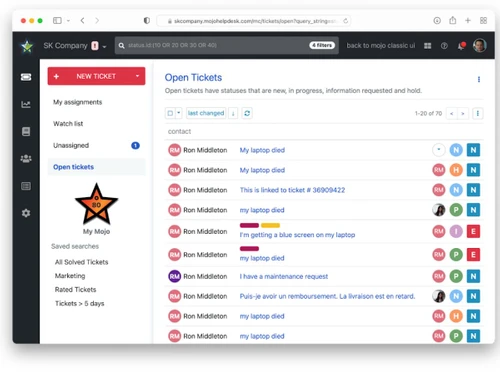
mojo helpdesk-tickets
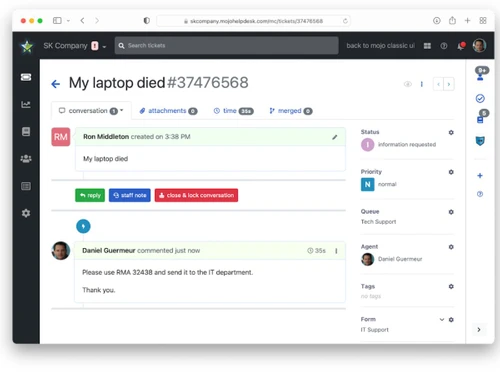
mojo helpdesk-laptop

Mojo Helpdesk

Brand: Metadot

  • 4.3

  • 5 Ratings

A simple and reliable help desk software that manages support requests, improves response time, and keeps everything well organized.

See More

Have you used Mojo Helpdesk before?

Share your insights for better experience

Add a Review
Starting Price
$14

View plans

100% Genuine
Products
Best Price
Guaranteed
Safe & Secure
Payment
  • Description

  • Pricing

  • Features

  • Specification

  • Review

  • Compare

  • Alternatives

  • FAQ

Starting at $14

Mojo Helpdesk Software Overview

What is Mojo Helpdesk?

Mojo Helpdesk is a simple and smart help desk software that allows organisations to view and monitor support requests by employees and customers. It collects all requests in one organized place instead of using emails or spreadsheets. It was initially designed by Metadot who failed to access a help desk that could be personified and effective.

Mojo is currently being used to manage IT problems, maintenance requests and any other internal support requirements by several schools, hospitals and businesses. It aids teams to respond quicker and remain organized without complicating matters.No matter the size of your team, Mojo is designed to quickly get started and can be customized to various departments and targets. It is concerned with maintaining service smooth and communication clear.

Why Choose Mojo Helpdesk?

  • Quick Setup: It takes you a few minutes to install it without requiring any technical knowledge or complex installation procedures.
  • Easy to Use Interface: The interface is created to suit all people. The clean and simple layout makes the Mojo interface easy to use, stress free and quick.
  • Supports Any Department: Mojo supports IT, HR, or maintenance and a variety of internal requests.
  • Scales with Your Team: It functions perfectly with small groups and is scalable as your company grows.
  • Reliable Customer Support: The Mojo support team is friendly, quick, and willing to assist you whenever you need their services.

Key Features of Mojo Helpdesk

  • Round Robin Assignments: Tickets are distributed equally amongst team members. Thus, no team member gets over work.
  • Email Integration: The emails used in sending support requests automatically convert into tickets without using any additional tool or steps.
  • Time Tracking: Monitor the amount of time to complete each request and how to better utilize the time.
  • Staff Notes: Team members will have the opportunity to add the personal notes to tickets without confusing the ticket submitter.
  • Aging Summary: Quickly determine the status of the pending tickets as well as how long the ticket has remained open.
  • Customer Satisfaction Ratings: Customers give you star ratings in order to measure the quality of services and identify areas that less satisfy them.
  • Asset Management: This can track items such as laptops or licenses, and their issues, and when should they be renewed.
  • User Management: Save the information of the customer and organize them in groups to handle and manage the tickets easily.
  • Group Access Rights: Allow managers to see and comment on tickets posted by their department or those posted by a member of their team.
  • Security and Compliance: Secures information through encryption, secure logins and complies with safety regulations such as HIPAA.

Mojo Helpdesk Pricing

Mojo Helpdesk pricing starts at $14 per month per agent at Techjockey.com. The pricing model is based on different parameters, including extra features, deployment type, and the total number of users. For further queries related to the product, you can contact our product team and learn more about the pricing and offers.

Read more

Metadot Company Details

Founded Year:  2000

Our mission is to create software and hardware solutions helping teams across multiple industries support and interact with internal and external stakeholders purposefully, effectively, and intentionally.

Director/Founders Daniel Guermeur
Company Size 1-100 Employees

Mojo Helpdesk Pricing & Plans

Team
Starting at $14
    • Agent

      Agent
      Agent
    • Monthly

      Monthly
      Monthly

Key Features

  • Full ticket tracking

  • Email integration

  • Self service knowledge base

  • Canned responses

  • Customer ticket history

  • Satisfaction survey

Business
Starting at $24
    • Agent

      Agent
      Agent
    • Monthly

      Monthly
      Monthly

Key Features

  • All the features of the team plan plus:

  • Agent permissions

  • Escalation rules

  • Ticket merging

  • Round robin assignment

  • Advanced business hours

Enterprise
Starting at $34
    • Agent

      Agent
      Agent
    • Monthly

      Monthly
      Monthly

Key Features

  • All the features of the business plan plus:

  • Advanced reporting

  • Dedicated account manager

  • Priority support

  • Automated exports

  • Increased quotas

Mojo Helpdesk Features

  • icon_check Ticket Management
    Keep tabs on any support request and manage them with ease in any one place.
  • icon_check Automated Routing
    Tickets will be sent to the correct individual depending upon the established guidelines, or according to ticket type.
  • icon_check Self Service Portal
    Customers will be able to post problems and solve them without support.
  • icon_check Custom Forms
    Create forms that have the appropriate field to gather appropriate data.
  • icon_check SLA Management
    Establish and track deadlines on quick or responsive responses to the tickets.
  • icon_check Workflow Automation
    Automate routine through rules and save time.
  • icon_check Reporting & Analytics
    See the reports to monitor the trends of requests and team activity.
  • icon_check Custom Branding
    Create a portal and email to appear like your brand with logos and colors.
Mojo Helpdesk Demo Video play icon

Get Mojo Helpdesk Demo

Watch the demo video to explore key features, real workflows, and how the software fits your business needs.

Understand
Key Features
Personal
Demo Insights
Interactive
Demo Support

Mojo Helpdesk Specifications

Supported Platforms
Ubuntu Ubuntu Windows Windows MacOS MacOS Linux Linux
Devices
Desktop Desktop
Deployment
Cloud-Based Cloud-Based
Suitable For
All Industries
Business Specific
All Businesses
Business Size
Small Business Startups Medium Business Enterprises SMBs SMEs MSMBs MSMEs
Customer Support
Email Communities
Language
English
Integration
API Integration
Training Resources
Webinars Videos

Explore the Best Alternative Solutions Similar to Your Business Size and Needs

Mojo Helpdesk Review

4.3

Out of 5

img

Overall Rating

Based on
5 Verified Ratings

Rating Breakdown

  • Features 4.2
  • Value for Money 4.3
  • Ease of Use 4.5
  • Customer Support 4.4

80% Recommend this Product

Add Review

Techjockey Trusted Reviews from Verified Users

No reviews are currently available for Mojo Helpdesk. Discover similar Help Desk Software reviews

  • Support CRM

    4.9

    Whats great - Features, Ease of use, Simplicity and Comprehensive customer service management tools read more

  • Uvdesk

    4.4

    Whats great - Stable performance, consistent updates, marketplace extensions, and responsive support team. read more

  • iHelpdesk

    4.2

    Whats great - Reliable ticketing system, easy to use. read more

Compare Mojo Helpdesk With other Help Desk Software

Products
Ratings
Pricing
Device Supported
Deployment
Supported Platforms
  • img

    Mojo Helpdesk

  • 4.3

  • Price On Request

  • Desktop

    Mobile

  • Web based

    On Premises

  • Windows

    Mac OS

  • img

    Freshdesk

  • 4.7

  • ₹ 1799

  • Desktop

    Mobile

  • Web based

    On Premises

  • Windows

    Mac OS

  • img

    Nuevadesk

  • 4.2

  • Price On Request

  • Desktop

    Mobile

  • Web based

    On Premises

  • Windows

    Mac OS

  • img

    Support CRM

  • 4.8

  • ₹ 3750

  • Desktop

    Mobile

  • Web based

    On Premises

  • Windows

    Mac OS

  • img

    Spinso ServiceDesk

  • 4.2

  • Price On Request

  • Desktop

    Mobile

  • Web based

    On Premises

  • Windows

    Mac OS

  • img

    Zoho Desk

  • 4.0

  • ₹ 540

  • Desktop

    Mobile

  • Web based

    On Premises

  • Windows

    Mac OS

  • img

    Zendesk

  • 4.5

  • Price On Request

  • Desktop

    Mobile

  • Web based

    On Premises

  • Windows

    Mac OS

  • img

    TxHelpDesk

  • 5

  • ₹ 1250

  • Desktop

    Mobile

  • Web based

    On Premises

  • Windows

    Mac OS

  • img

    Stingo Helpdesk

  • 5

  • ₹ 599

  • Desktop

    Mobile

  • Web based

    On Premises

  • Windows

    Mac OS

  • img

    Vision Helpdesk

  • 4.3

  • Price On Request

  • Desktop

    Mobile

  • Web based

    On Premises

  • Windows

    Mac OS

  • img

    Desku

  • 4.1

  • Price On Request

  • Desktop

    Mobile

  • Web based

    On Premises

  • Windows

    Mac OS

(2) Product(s) selected

Mojo Helpdesk Alternatives

See All Mojo Helpdesk Alternatives

Starting Price:

$25 /Agent/Month

Starting Price:

$19 /Month

Available

Price on Request

Starting Price:

$29 /Month

Available

Price on Request

Starting Price:

₹15,600 /Lifetime

Starting Price:

$89 /Month

Starting Price:

$12 /Month

Articles for Mojo Helpdesk

See All Related Articles

How much does Mojo Helpdesk cost?

Mojo Helpdesk pricing starts at $14 per month per agent at Techjockey.com.

How does Mojo Helpdesk work?

It collects support requests in one place, helps teams track, respond, and resolve them more efficiently.

Who uses Mojo Helpdesk?

Schools, hospitals, businesses, and IT teams use it to manage support, maintenance, and internal service requests.

Does Mojo Helpdesk offer a free trial?

Yes, you can try Mojo Helpdesk for free to see how it fits your support needs.

Is Mojo free to use?

Mojo is not completely free, but it does offer a free trial before any payment is needed.

Can I use Mojo Helpdesk with Google Workspace?

Yes, Mojo integrates with Google Workspace so you can log in and manage support tickets easily.

Does Mojo Helpdesk support automation?

Yes, it automates repetitive tasks like assigning tickets or sending replies to save your team time.

Is Mojo Helpdesk secure for sensitive data?

Yes, Mojo uses encryption and safety standards like HIPAA to keep your data private and protected.

20,000+ Software Listed

Best Price Guranteed

Free Expert Consultation

2M+ Happy Customers

Terms and Condtions

close

Users with registered businesses can purchase goods from merchants on the platform to satisfy their business needs. Users are not permitted to utilize any products acquired through the platform for resale, advertising, business, or further distribution.

For each purchase made, users will receive a Tax Invoice (or 'GST invoice') that includes specific details such as:

  • the GSTIN of the user associated with their registered business, and

  • the specified Entity Name for their business.

It should be noted that not all products are eligible for GST Invoice. Only the products displayed by participating sellers with the 'GST-based Invoice Available' callout on the product description page would qualify.

Certain goods and services are not eligible to get a GST Invoice, including items with VAS, i.e., Value Added Services (e.g., Total Mobile Protection/Assured Buyback) and those involving an exchange offer at the time of purchase.

Users must ensure the accuracy of the GSTIN, and business entity name provided for the GST Invoice. Requests for corrections into GST Invoice would not be accommodated by Techjockey.com or any Seller, and any issues arising from user-provided information are the sole responsibility of users.

Techjockey.com is not liable for the GST Invoice or any associated input tax credit. To efficiently claim an input tax credit, users should select the registered place of business address as per the GST authority's data and follow the provisions of the GST Act and rules.

To claim an input tax credit, the delivery and billing addresses must match. Furthermore, input tax credits will not be granted if the delivery address and GSTIN on the invoice are from different states. In case of incorrect GST details provided during the order placement, the order will be canceled automatically.