 USA
USA UAE
UAESmall Business
Designed for startups and growing businesses

See More




Brand: Onpay
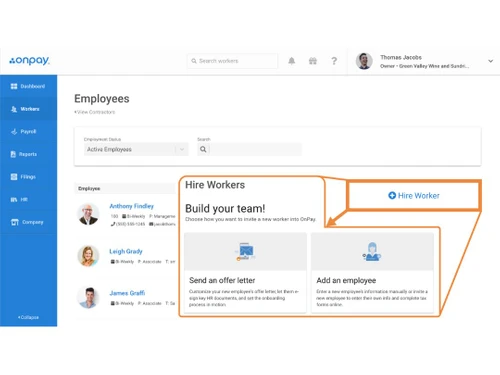
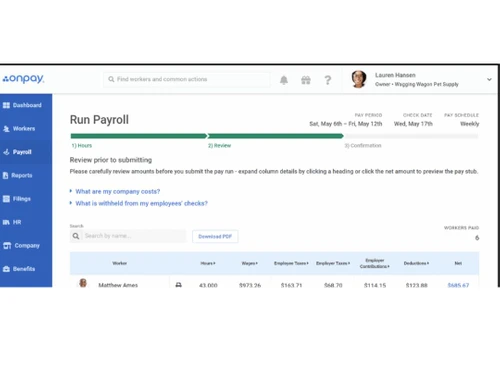
OnPay Payroll Software simplifies payroll, HR, and benefits management with flexible and scalable solutions.
See MoreHave you used Onpay before?
Share your insights for better experience
Brand: Onpay
Founded Year: 2011
OnPay is a fast-growing software company that offers small businesses and accountants the best payroll in the cloud backed up by a team of helpful, friendly experts. And as a payroll service provider with more than 30 years of experience, we know how to get it right. Whether business owners have t
Payroll Management
 Overtime Management Automated Payroll Direct Bank Transfers Off-Cycle Payroll Processing Multiple Pay Rates and Schedules Bonus and Incentive Management Variable Pay & Commission Management Expense Reimbursements Tax Deductions Employee Benefits Management Gratuity Calculation
 Compliance Management
Income Tax (TDS) Management Provident Fund (PF) Compliance Professional Tax (PT) Compliance Labour Welfare Fund (LWF) Management Employee State Insurance (ESI) Compliance Time, Attendance & Leave Management
Leave & Absence Management Leave Policy Customization Holiday & Leave Calendar Sick Leave and Vacation Tracking Attendance Tracking Employee Self-Service (ESS)
Payslip Access Expense Claims Income Tax Planner Employee Lifecycle Management
Employee Database Document Management Employee Shift Scheduling F&F Settlement Banking Integration & Payment Processing
Cheque Processing Direct Deposit Scheduling Bank Transfer Files Multi-Bank Support Automation and Customization
Alerts & Notifications API Access Scheduled Payroll Processing Custom Payroll Rules and Policies Configurable Workflows & Approvals Security and Data Privacy
User Access Management Two-Factor Authentication (2FA) Data Backup and Recovery Encrypted Data Transmission Audit Logs and Monitoring Integrations
API Integration Third Party Integration Accounting Software HRMS Performance Management Payment Gateway Biometric Integration Reporting and Analytics
Payroll Reports Compliance Reports Leave and Attendance Reports Employee Master Report 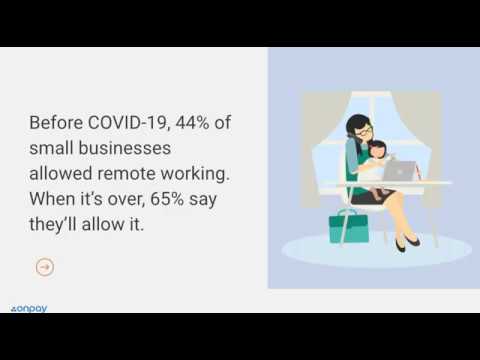

Watch the demo video to explore key features, real workflows, and how the software fits your business needs.
 Ubuntu
  Windows
  MacOS
MacOS  Linux
Linux  Desktop
  Cloud-Based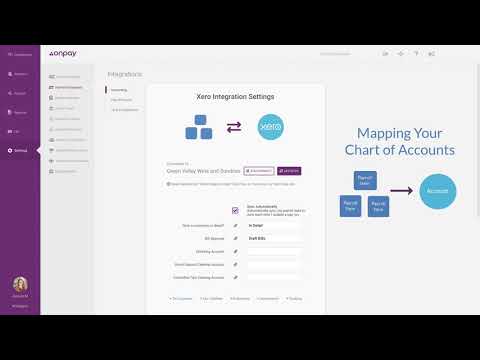
Small Business
Designed for startups and growing businesses
Medium Business
Built for business growth and flexibility
Enterprises
Designed for complex and large-scale business needs
4.0
Out of 5

Overall Rating
Based on
13 Verified Reviews
Rating Breakdown
86% Recommend this Product
Add ReviewOverall, users appreciate OnPay for its ability to simplify payroll management, particularly for small to mid-sized businesses with employees in multiple states. Many reviewers highlight its effectiveness in handling tax calculations, direct deposits, and employee benefits, which streamlines compliance and organization. However, some users express a desire for improved customer service response times and more customization options, especially in reporting and dashboard features. Despite these limitations, the platform remains a reliable choice for payroll processing.



Jun 19, 2024
Techjockey Verified
“OnPay: A Simple Solution for Small Business Payroll”
OnPay has made running payroll for my small business much more straightforward. It calculates taxes, handles direct deposits, and takes care of all the compliance issues. I also use it to manage employee benefits like 401(k) and healthcare, which keeps everything in one place. The platform is easy to access from anywhere, which has been great for my remote team.
Pros
OnPay takes care of payroll processing, tax calculations, and employee payments, making everything much more manageable. It also handles employee benefits like health insurance, which keeps everything organized for me.
Cons
Customer service can sometimes take a little longer to respond, but they’ve always been helpful when I needed assistance.
Reason to switch
Paylocity was too expensive for my small team, and I found OnPay to be a more budget-friendly option with similar features.
Aug 14, 2024
Techjockey Verified
“Payroll Made Easy with OnPay for Multi-State Businesses”
I’ve been using OnPay for my business, and it has made payroll much easier to manage. The system automatically handles tax filings, pays employees, and keeps track of benefits like healthcare and retirement plans. It’s particularly useful for businesses with employees in multiple states, as it calculates taxes accurately for each state.
Pros
OnPay is a great option for businesses that need to manage payroll across different states. It ensures taxes are filed correctly, and the direct deposit feature helps with timely payments. It also simplifies managing employee benefits, which is an added bonus.
Cons
The platform could benefit from more customization options in the dashboard, but it’s still very functional.
Reason to switch
I needed a more affordable option for multi-state payroll and benefits management, and OnPay fit my needs better.
Jul 12, 2024
Techjockey Verified
“OnPay Is a Great Fit for Small Teams with Growing Payroll Needs”
OnPay has been a helpful payroll tool for my small business. It takes care of tax filings, manages employee payments, and handles benefits, all in one platform. I also appreciate how easy it is to onboard new employees and contractors, making it a suitable option as my business expands.
Pros
OnPay automates payroll, including tax filings and direct deposits. It also allows me to manage employee benefits like health insurance and 401(k) plans, which is very convenient for my business.
Cons
The software could have more advanced reporting tools, especially when it comes to tracking time-off and employee hours.
Reason to switch
OnPay provided a more affordable solution with similar features, which was ideal for managing a growing team.

Onpay
Price On Request
Desktop
Mobile
Web based
On Premises
Windows
Mac OS

PagarBook
₹ 499
Desktop
Mobile
Web based
On Premises
Windows
Mac OS

TankhaPay
₹ 40
Desktop
Mobile
Web based
On Premises
Windows
Mac OS
PayWise
₹ 300
Desktop
Mobile
Web based
On Premises
Windows
Mac OS

Zoho Payroll
₹ 1250
Desktop
Mobile
Web based
On Premises
Windows
Mac OS
ADP Vista
Price On Request
Desktop
Mobile
Web based
On Premises
Windows
Mac OS

QuickBooks Payroll
Price On Request
Desktop
Mobile
Web based
On Premises
Windows
Mac OS

RazorpayX Payroll
₹ 29988
Desktop
Mobile
Web based
On Premises
Windows
Mac OS

Papaya Global
Price On Request
Desktop
Mobile
Web based
On Premises
Windows
Mac OS

UnboxPayroll
₹ 2000
Desktop
Mobile
Web based
On Premises
Windows
Mac OS

HivePayroll
₹ 1499
Desktop
Mobile
Web based
On Premises
Windows
Mac OS
(0) Product(s) selected
Available
Price on Request
Starting Price:
$15

Available
Price on Request

Available
Price on Request

Starting Price:
₹10 /Month

Available
Price on Request

Starting Price:
₹25 /Month

Starting Price:
$25 /Employee/Month

Available
Price on Request







Easily, one can seamlessly integrate best time tracking software with OnPay payroll management software.
With a cloud-based software, one gets the flexibility to run payroll on time and save their data securely.
OnPay payroll management software has an automated tax solution and works on it with accuracy.
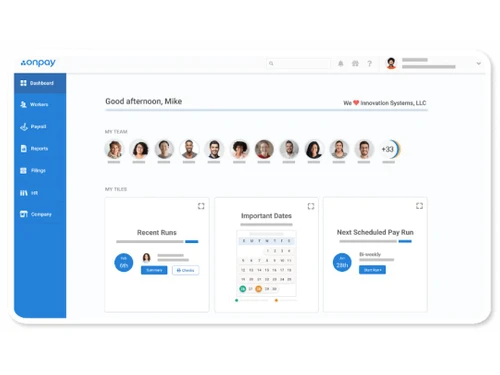
It is an easy to read, real time user interface that shows the graphical representation of historical and current trends.
Yes, salaries can directly be deposited into employee’s bank account.
OnPay automatically calculates, files, and pays federal, state, and local payroll taxes. The platform ensures compliance by staying updated on the latest tax laws and regulations. Additionally, it provides year-end tax forms like W-2s and 1099s for employees and contractors.
Yes, OnPay allows you to manage various employee benefits, including health insurance, retirement plans (401(k)s), and workers' compensation.
Yes, OnPay supports payroll across all 50 states. It ensures compliance with each state’s tax regulations and handles local taxes and filings, making it a great solution for businesses operating in multiple states.
OnPay automates direct deposits for employee payments. You can set up direct deposit for employees, ensuring timely payments directly into their bank accounts. The platform also provides a self-service portal for employees to access their pay stubs.
Yes, OnPay integrates seamlessly with popular accounting software like QuickBooks, Xero, and others. This allows you to sync payroll data with your accounting platform, streamlining your financial management processes.
Yes, OnPay allows you to run payroll for both employees and independent contractors. It handles 1099 tax forms and ensures that contractors are paid accurately and on time, keeping your business operations smooth.
Yes, you can get a free demo of OnPay payroll software at techjockey.com.
OnPay payroll software price starts at $55 at Techjockey.com.
OnPay payroll software supports cloud-based deployment.
To contact the support team of OnPay, you can simply navigate to the official website of OnPay and find the email or contact information of the support team.
0 0
To find my payroll invoice in OnPay, follow the steps given below:
0 0
To sign up and create your OnPay account, follow the steps given below:
0 0
To split my direct deposit into multiple bank accounts in OnPay, follow the steps given below:
0 0
To request access to the Employee Portal, you must contact your company’s payroll or HR administrator. They will send out an invitation with access details or a link.
0 0
20,000+ Software Listed
Best Price Guranteed
Free Expert Consultation
2M+ Happy Customers
Terms and Condtions

Users with registered businesses can purchase goods from merchants on the platform to satisfy their business needs. Users are not permitted to utilize any products acquired through the platform for resale, advertising, business, or further distribution.
For each purchase made, users will receive a Tax Invoice (or 'GST invoice') that includes specific details such as:
the GSTIN of the user associated with their registered business, and
the specified Entity Name for their business.
It should be noted that not all products are eligible for GST Invoice. Only the products displayed by participating sellers with the 'GST-based Invoice Available' callout on the product description page would qualify.
Certain goods and services are not eligible to get a GST Invoice, including items with VAS, i.e., Value Added Services (e.g., Total Mobile Protection/Assured Buyback) and those involving an exchange offer at the time of purchase.
Users must ensure the accuracy of the GSTIN, and business entity name provided for the GST Invoice. Requests for corrections into GST Invoice would not be accommodated by Techjockey.com or any Seller, and any issues arising from user-provided information are the sole responsibility of users.
Techjockey.com is not liable for the GST Invoice or any associated input tax credit. To efficiently claim an input tax credit, users should select the registered place of business address as per the GST authority's data and follow the provisions of the GST Act and rules.
To claim an input tax credit, the delivery and billing addresses must match. Furthermore, input tax credits will not be granted if the delivery address and GSTIN on the invoice are from different states. In case of incorrect GST details provided during the order placement, the order will be canceled automatically.



