linkedin
PagarGuru logo
play PagarGuru Live Demo
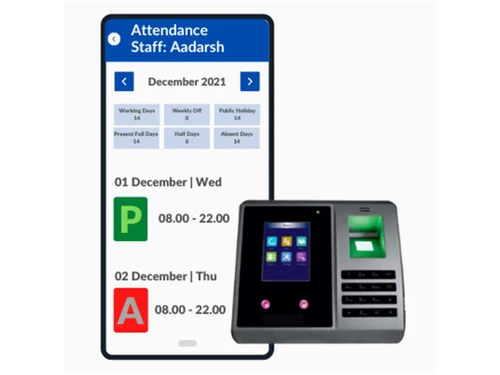
pagarguru attendance
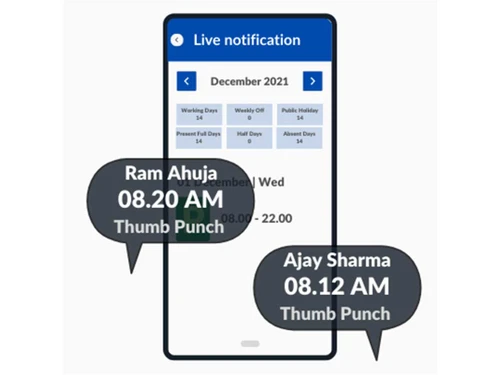
pagarguru live notification

PagarGuru

Brand: PagarGuru

  • 4.3

  • 6 Ratings & 1 Review

Automate payroll and attendance with biometric tracking for seamless salary calculations and compliance management.

See More

Have you used PagarGuru before?

Share your insights for better experience

Add a Review
Starting Price
₹500 excl.GST
₹ 590 incl. GST

View plans

offer Save upto 18%, Get GST Invoice on your business purchase T&C
offer Buy Now & Pay Later, Check offer on payment page.
Buy Now
100% Genuine
Products
Best Price
Guaranteed
Safe & Secure
Payment
  • Description

  • Pricing

  • Features

  • Specification

  • Review

  • Compare

  • Alternatives

  • FAQ

  • Questions

Starting at ₹500
Buy Now

PagarGuruSoftware Overview

What is PagarGuru Software?

PagarGuru is an easy-to-use payroll and attendance management software designed for businesses. It helps track employee attendance using methods like GeoSelfie, FaceScan, and biometric devices. The software automates salary calculations, manages leaves, and ensures compliance with regulations. Whether traditional punch cards or modern biometric devices, it integrates with various attendance tracking methods.

The attendance management software produces more specific pay stubs for every worker to minimize cases of unfair dismissal as will observed upon conformity to legal requirements on wages.

The platform also presents a directory of the employees that can provide all the relevant information about the employees such as personal data, contact data, and others, employment history. Furthermore, it is equipped with basic analysis and reporting facilities. HR managers can generate reports and insights on employee attendance, payroll, and performance.

Key Features of PagarGuru

  • Multiple Attendance Options: Employees can mark their attendance in ways such as GeoSelfie, FaceScan, Biometric Devices, and Manual Attendance.
  • Support for Multiple Locations: If you operate several branches of your business and want to manage attendance across all company branches on a single platform, it provides tools for getting data combined or separated.
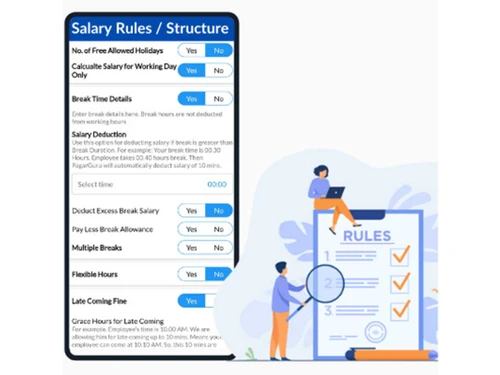
  • 100% Automated Salary Calculation: This attendance management software can solve all the salary problems and do it all on its own based on the attendance record and other drives such as the overtime one.
  • Employee Self-Service App: They can report to work, apply for leave, request for payments, and access updates on job performance and other related information through the app.
  • Shift Management: Rotational shifts and shift rosters for the employees are very easily handled by the attendance management system available.
  • Compliance Management: Tools that help cut through operational processes – one-click solutions for PF, ESI, and more – keeping your business legally sound.
  • Leave Management: PagarGuru’s attendance management software can be used to apply for leave and for managers to easily approve them via the app.
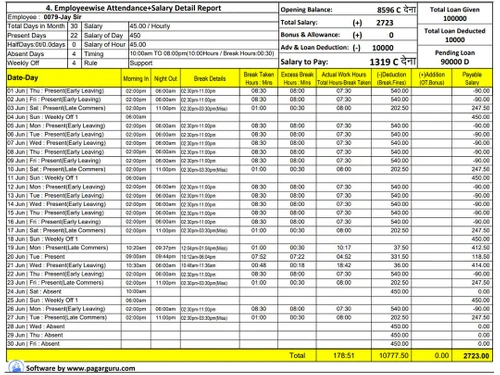
  • Advanced Reporting: It also allows for the creation of attendance reports, and payroll reports among others. This encompasses; pay stubs, attendance forms, and payment statements in simple formats.
  • Employee Loan and Advance Payment Management: Record or track any form of grant or loan that you make to employees and ensure that repayments are made through the system.

Why Choose PagarGuru?

PagarGuru attendance management system offers tools for managing the entire recruitment process, from posting job openings to candidate selection. It allows users to maintain a centralized employee directory with essential contact and organizational information. It includes features for recognizing and rewarding outstanding employee contributions and achievements. The software offers a shared calendar feature to efficiently manage events, meetings, and employee schedules.

It supports an employee portal to access relevant information, updates, and announcements. It allows employees to request and manage shift swaps with colleagues. The software allows employees to enroll in or modify their benefit plans through the platform. The system facilitates smooth employee separation processes, including exit interviews and clearance management.

Benefits of PagarGuru Attendance Management Software

  • It automates the calculation and management of employee overtime to ensure accurate compensation for extra hours worked.
  • It allows HR managers to set performance goals, conduct appraisals, and track employee performance effectively.
  • The platform integrates with various biometric devices, enabling real-time data capture and tracking attendance.
  • The payroll software helps manage employee benefits, such as health insurance, retirement plans, and other perks.
  • PagarGuru attendance management software provides a centralized repository for storing and managing employee-related documents and files.

PagarGuru Pricing

The pricing of PagarGuru starts at 500 per year at techjocmkey.com.

Additionally, you can add WhatsApp integration for live attendance and alerts for ₹150 per employee per year. All plans come with a risk-free 7-day trial.

Read more

PagarGuru Company Details

Founded Year:  2021

PagarGuru is an Attendance, Salary & Payments management application that seamlessly connects with any biometric machines available in the market.

Director/Founders Jay Raotole
Company Size 1-100 Employees

PagarGuru Pricing & Plans

Basic
Key Features
  • Web Access
  • Mobile Access (Android/ios)
  • Attendance Management
  • Payroll/Salary Management

Calculated Price

500 Exclusive of all taxes
    • Employees

      Employees
      Employees
    • Yearly

      Yearly
      Yearly

Key Features

  • Web Access

  • Mobile Access (Android/ios)

  • Attendance Management

  • Payroll/Salary Management

PagarGuru Features

  • icon_check Attendance Management
    Enables accurate tracking and management of employee attendance, including leave, time-offs, and late arrivals.
  • icon_check Payroll / Salary Management
    Automates payroll processing, calculating salaries, taxes, and deductions.
  • icon_check Location / Geofence
    Incorporates geofencing technology to monitor and manage employee locations.
  • icon_check Leave Management
    Allows employees to apply for leave and for managers to manage leave balances.
  • icon_check Loan Management
    Enables employees to request loans and HR to track and manage loan disbursements and repayments.
  • icon_check Staff Management
    Streamlines staff management and provides access to relevant information easily.
  • icon_check Employee Self service
    Empowers employees to access their personal information and apply for leave and reimbursements.
  • icon_check Reports
    Generates comprehensive reports and analytics on attendance, payroll, and leave.
  • icon_check User Roles & Permissions
    Allows administrators to assign specific roles and permissions to users.
  • icon_check Calendar Management
    Includes a calendar feature to schedule and track important events, meetings, and deadlines.
  • icon_check Shift Management
    Streamlines shift scheduling and management for efficient workforce planning and allocation.
  • icon_check Role-Based User Access
    Enables owners to create sub-users like Managers or Accountants with specific permissions to protect sensitive financial data.
  • icon_check Live Dashboard Insights
    Offers a real-time visual summary of present, absent, and late employees to help managers make immediate operational decisions.
  • icon_check Field Work Reporting
    Enables remote or field staff to submit work reports and location updates through the mobile app for better team coordination.
PagarGuru Demo Video play icon

Get PagarGuru Demo

Watch the demo video to explore key features, real workflows, and how the software fits your business needs.

Understand
Key Features
Personal
Demo Insights
Interactive
Demo Support

PagarGuru Specification

Supported Platforms
Windows Windows iOS iOS Android Android MacOS MacOS
Devices
Desktop Desktop Mobile Mobile Tablet Tablet iPad iPad
Deployment
Web-Based Web-Based
Suitable For
All Industries
Business Specific
All Businesses
Business Size
Small Business Startups Medium Business SMBs SMEs MSMBs MSMEs
Customer Support
Phone Email Live Chat Communities
Language
English
Integration
API Integration
Training Resources
Documentation Videos

Explore the Best Alternative Solutions Similar to Your Business Size and Needs

PagarGuru Review

4.3

Out of 5

img

Overall Rating

Based on
1 Verified Review

Rating Breakdown

  • Features 4.2
  • Value for Money 4.2
  • Ease of Use 4.5
  • Customer Support 4.5

91% Recommend this Product

Add Review

PagarGuru Video Review

youtubeVideoId

4.3

“Harshit Agarwal | PagarGuru Success Story | PagarGuru”

Review by: Harshit Agarwal

Compare PagarGuru With other Attendance Management Software

Products
Ratings
Pricing
Device Supported
Deployment
Supported Platforms
  • img

    PagarGuru

  • 4.3

  • ₹ 500.00 excl. GST

  • Desktop

    Mobile

  • Web based

    On Premises

  • Windows

    Mac OS

  • img

    Nialabs

  • 5

  • Price On Request

  • Desktop

    Mobile

  • Web based

    On Premises

  • Windows

    Mac OS

  • img

    Spryple

  • 4.2

  • Price On Request

  • Desktop

    Mobile

  • Web based

    On Premises

  • Windows

    Mac OS

  • img

    Hajiri

  • 4.3

  • ₹ 69

  • Desktop

    Mobile

  • Web based

    On Premises

  • Windows

    Mac OS

  • img

    Tempus Central

  • 4.3

  • Price On Request

  • Desktop

    Mobile

  • Web based

    On Premises

  • Windows

    Mac OS

  • img

    NoQu TAM

  • 4.1

  • Price On Request

  • Desktop

    Mobile

  • Web based

    On Premises

  • Windows

    Mac OS

(0) Product(s) selected

PagarGuru Alternatives

See All PagarGuru Alternatives

Available

Price on Request

Starting Price:

₹600 /Month

Starting Price:

₹69 /Month

Available

Price on Request

Available

Price on Request

FRAS

4.0

Available

Price on Request

Starting Price:

$500 /Month
Available

Price on Request

Articles for PagarGuru

See All Related Articles

Which operating system does PagarGuru Software Support?

This software is compatible with Windows and macOS operating systems.

Is there any PagarGuru App?

The app is not available for Android and iOS devices.

What is the deployment type of the PagarGuru System?

PagarGuru system supports web-based deployment.

How much does the PagarGuru Attendance Management Software Cost?

The pricing of PagarGuru starts at 500 per year at techjocmkey.com.

Does PagarGuru Attendance Management offer a free trial?

Yes, all plans come in this Attendance Management software with a risk-free 7-day trial.

How can you download the PagarGuru Attendance Management Software?

It is a web-based platform. So, you need not download any software or app to use it.

How Does PagarGuru Attendance Management Software Work?

It is an all-in-one employee attendance software that efficiently handles attendance tracking, salary management, and payment processing.

PagarGuru Questions

Q:

How do I add a job work item in Pagarguru?

Nowshath khan Dec 3, 2024
A:

To add a job work item in Pagarguru, follow the steps given below:

  • Open Pagarguru
  • Navigate to the Job Management section
  • Click on 'Add New Job'
  • Input the required details
  • Assign it to an employee.
  • Hit Confirm
kk meena Dec 5, 2024
Q:

How do I create an announcement for staff in PagarGuru?

Pradeep Pattanaik Dec 2, 2024
A:

To create an announcement for staff in PagarGuru, follow the steps given below:

  • Open Pagarguru
  • Navigate to the 'Announcements' section.
  • Click 'Create New Announcement'
  • Input your message
  • Select the target recipients
  • Publish the announcement
Ranjan Dec 3, 2024
Q:

How do I add an employee in Pagarguru?

Nowshath khan Nov 30, 2024
A:

To add an employee in Pagarguru, follow the steps given below:

  • Open Pagarguru
  • Go to the Employee Management module
  • Hit 'Add Employee'
  • Input the required details
  • Hit Save to add them
rohit gupta Dec 2, 2024
Q:

How do I link a biometric device with Pagarguru?

Press Sharma Nov 30, 2024
A:

To link a biometric device with Pagarguru, follow the steps given below:

  • Open Pagarguru
  • Navigate to the Device Integration settings
  • Select your biometric device model
  • Follow the steps to connect it via USB or Wi-Fi
  • Test the connection to complete the process
Ashutosh sharma Dec 1, 2024
A:

To create a new department for employees in Pagarguru, follow the steps given below:

  • Open Pagarguru
  • Navigate to the Admin Panel
  • Go to Departments
  • Hit 'Add New'
  • Input the department name and description
  • Hit Save
Saji Thomas Dec 2, 2024
See All PagarGuru Questions

20,000+ Software Listed

Best Price Guranteed

Free Expert Consultation

2M+ Happy Customers

Terms and Condtions

close

Users with registered businesses can purchase goods from merchants on the platform to satisfy their business needs. Users are not permitted to utilize any products acquired through the platform for resale, advertising, business, or further distribution.

For each purchase made, users will receive a Tax Invoice (or 'GST invoice') that includes specific details such as:

  • the GSTIN of the user associated with their registered business, and

  • the specified Entity Name for their business.

It should be noted that not all products are eligible for GST Invoice. Only the products displayed by participating sellers with the 'GST-based Invoice Available' callout on the product description page would qualify.

Certain goods and services are not eligible to get a GST Invoice, including items with VAS, i.e., Value Added Services (e.g., Total Mobile Protection/Assured Buyback) and those involving an exchange offer at the time of purchase.

Users must ensure the accuracy of the GSTIN, and business entity name provided for the GST Invoice. Requests for corrections into GST Invoice would not be accommodated by Techjockey.com or any Seller, and any issues arising from user-provided information are the sole responsibility of users.

Techjockey.com is not liable for the GST Invoice or any associated input tax credit. To efficiently claim an input tax credit, users should select the registered place of business address as per the GST authority's data and follow the provisions of the GST Act and rules.

To claim an input tax credit, the delivery and billing addresses must match. Furthermore, input tax credits will not be granted if the delivery address and GSTIN on the invoice are from different states. In case of incorrect GST details provided during the order placement, the order will be canceled automatically.